Welcome to our community

Be a part of something great, join today!

  • Hey all, just changed over the backend after 15 years I figured time to give it a bit of an update, its probably gonna be a bit weird for most of you and i am sure there is a few bugs to work out but it should kinda work the same as before... hopefully :)

RED Source settings in Premiere - using multiple RAW settings on the same clip

Brett_M

Well-known member
Joined
Apr 20, 2015
Messages
143
Reaction score
0
Points
16
Location
NYC
Hello,

I'm a big fan of ONLY using RED source settings and no extraneous LUTs or LUMETRI or any other color correcting. I really like the simplicity and neutrality of just trusting the RED pipeline and getting the color right there, I edit the raw footage directly in Premiere without additional proxies or pipeline or LUT creation. Very often peers ask who did my color and they're surprised when I tell them it's just the RED workflow.

However, I'm not so familiar with RMDs and making use of REDCINE etc.

My issue is that I'd like to have two different RED settings on the same clip- for example in one single clip the camera goes from outdoor color temp into a building with different color temp, and I need two white balance settings. What is the SIMPLEST way to do this within the RAW workflow.

How can I make duplicate RMDs for the same clip? Or duplicate the clip without creating another multiple gigabyte file and layering on LUTS etc.

Thanks for your help!
 
Bret,


The Only RED Source settings are either in the Legacy (DragonColor/Redgamma type workflow) or IPP2( REDWideGamutRGB/LOG3G10 with an IPP2 Outtput Transform either applied in-Camera or applied in Post by Lut), which one are you using and can you display a screengrab? Or are you grading a Transformed REC709 image?


The default for 3rd NLE's as of recently from the latest RED SDK is IPP2 REDWideGamutRGB/LOG3G10


Ok, got it working.
It turns out I can just Duplicate the clip within Premiere's Project window, and it somehow is allowing me to edit the RED RAW settings for that separately. I don't see in the finder thought where its creating that duplicate information
 
Hi Brett,

In REDCINE-X Pro select a clip that has the RMD settings you like, then go to Edit>Copy Look. Then select all the clips you'd like to apply those settings to and Edit>Paste Look. Take note there are several shortcut keys to use to store multiple looks once you get familiar with that.

To be thorough, you can right click/option click on your clips and "Save RMD". Then when you load those clips into Premiere the metadata should follow along with them.
 
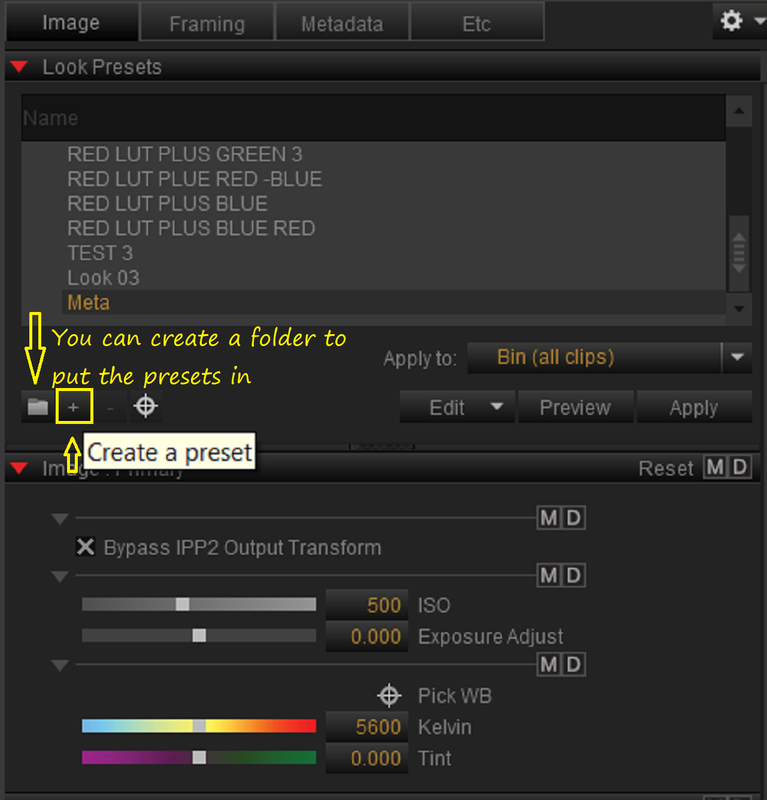
To Add to what Phil said, You can create different "PRESETS" in REDCINE-X with different Color Temperatures. You can put these Presets in their own folder if you wanted.


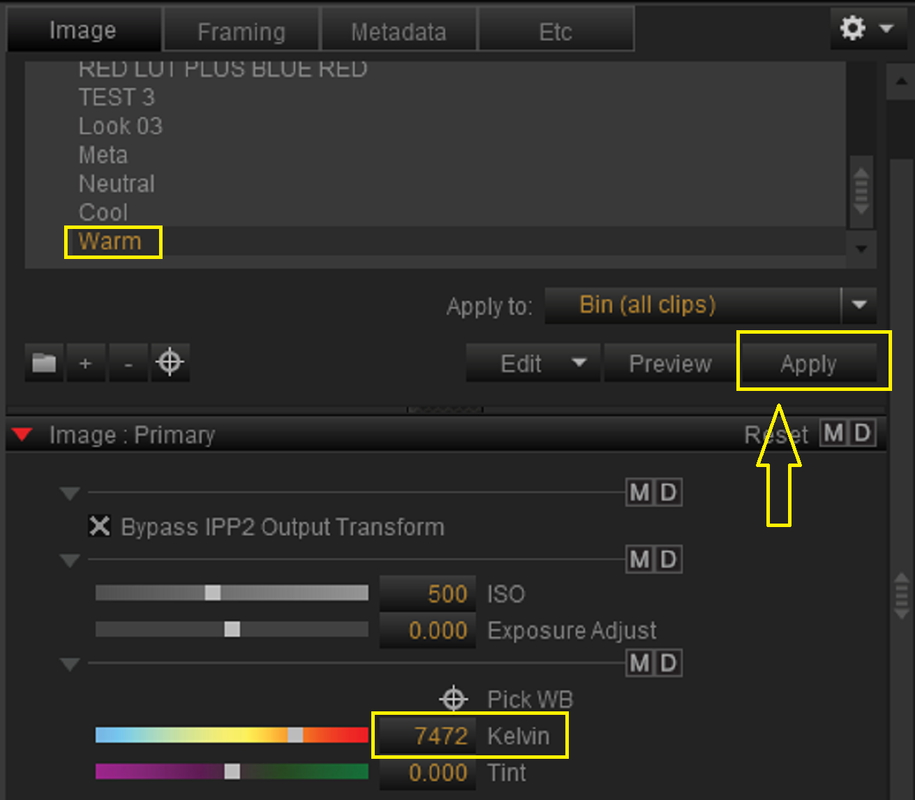
1) Under the "IMAGE" tab then "LOOK PRESETS" click on the "+" icon to save a Preset.

Screenshot-10696.png


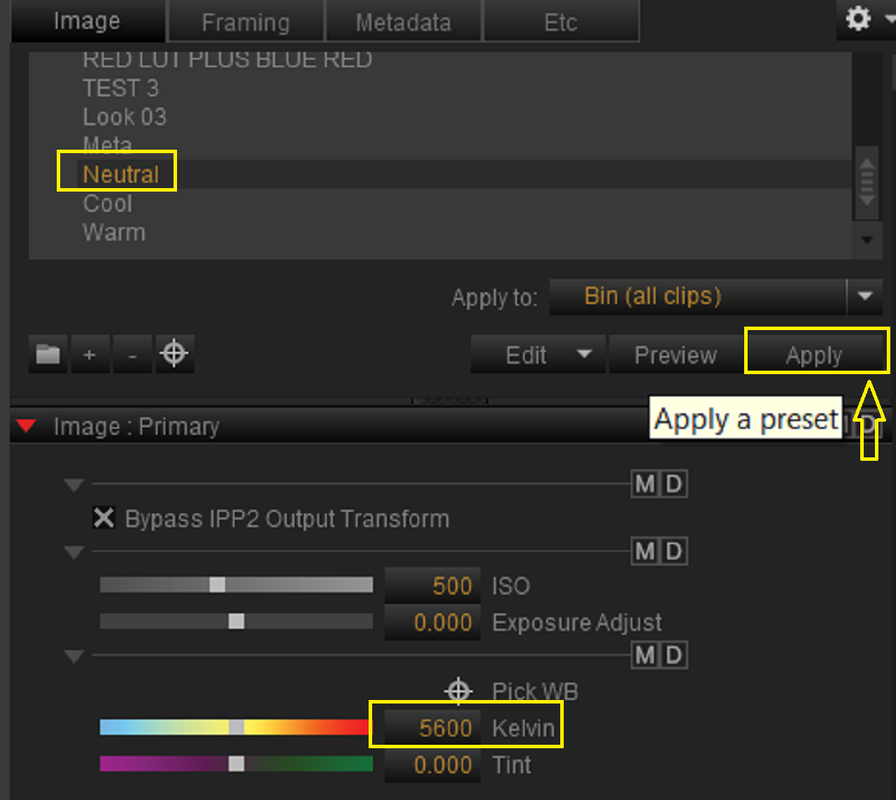
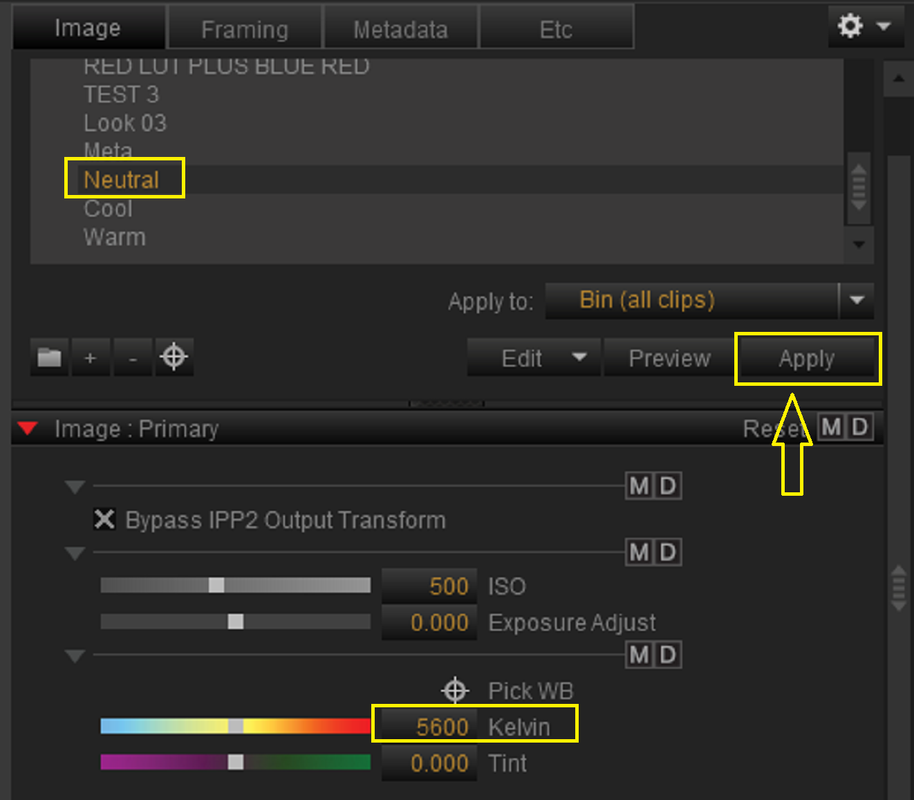
Then Press the "APPLY" button to apply the Preset you want.

Screenshot-10699.png


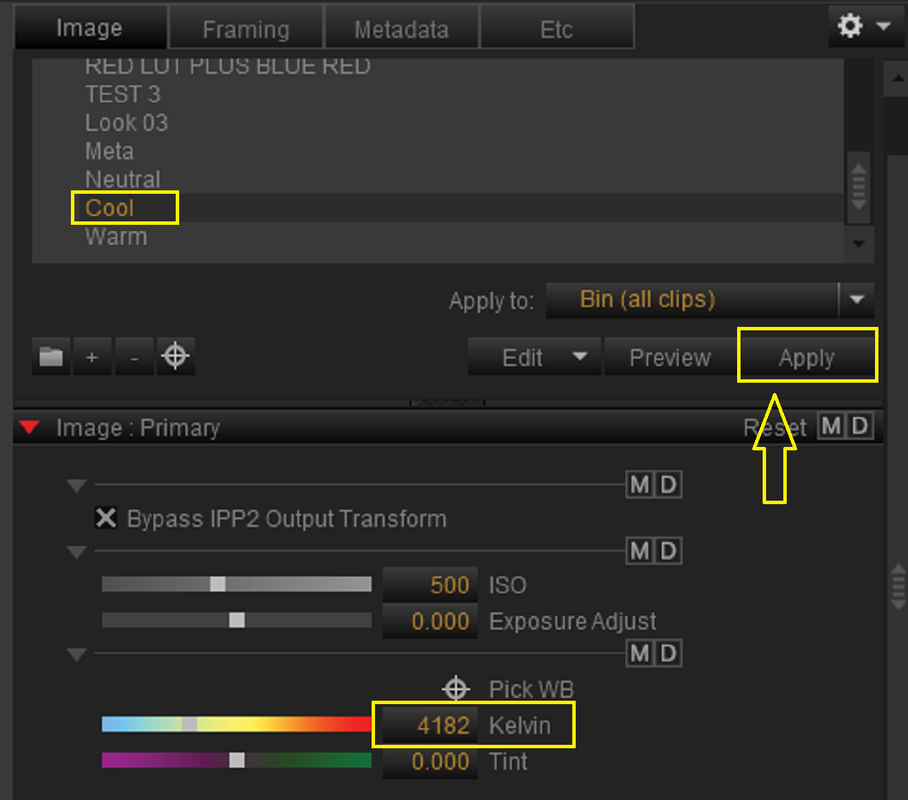
2) I made three different PRESETS :1) NEUTRAL, 2) COOL and 3) WARM each with different "KELVIN" settings.


1) NEUTRAL

Screenshot-10701.png


R036-W007-0628-WV-0000449.jpg


2) COOL

Screenshot-10703.png


R036-W007-0628-WV-S000-0000449.jpg


3) WARM

Screenshot-10704.png


R036-W007-0628-WV-0000450.jpg


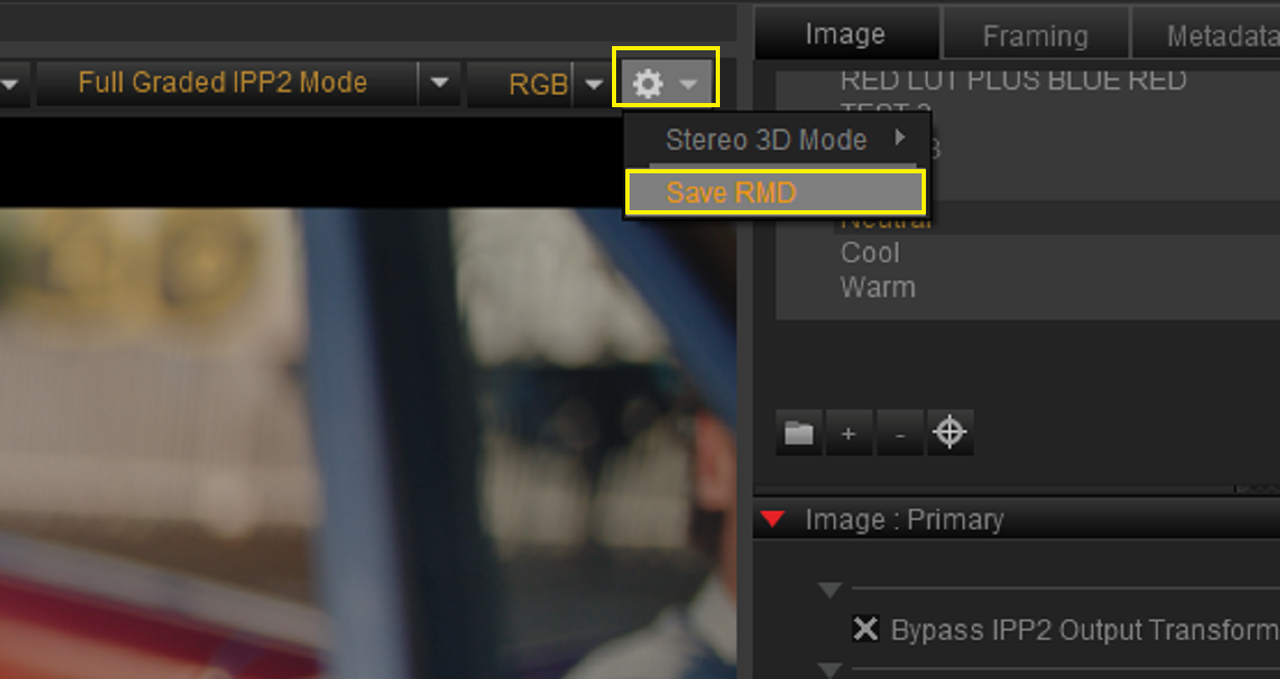
3) You can save whichever Preset's Color Temperature look you wanted to the .RMD file of your .R3D image by going under the "COG WHEEL" Icon in the Top Right-Hand corner of the Viewer Window and selecting "SAVE RMD".


Screenshot-10700.png


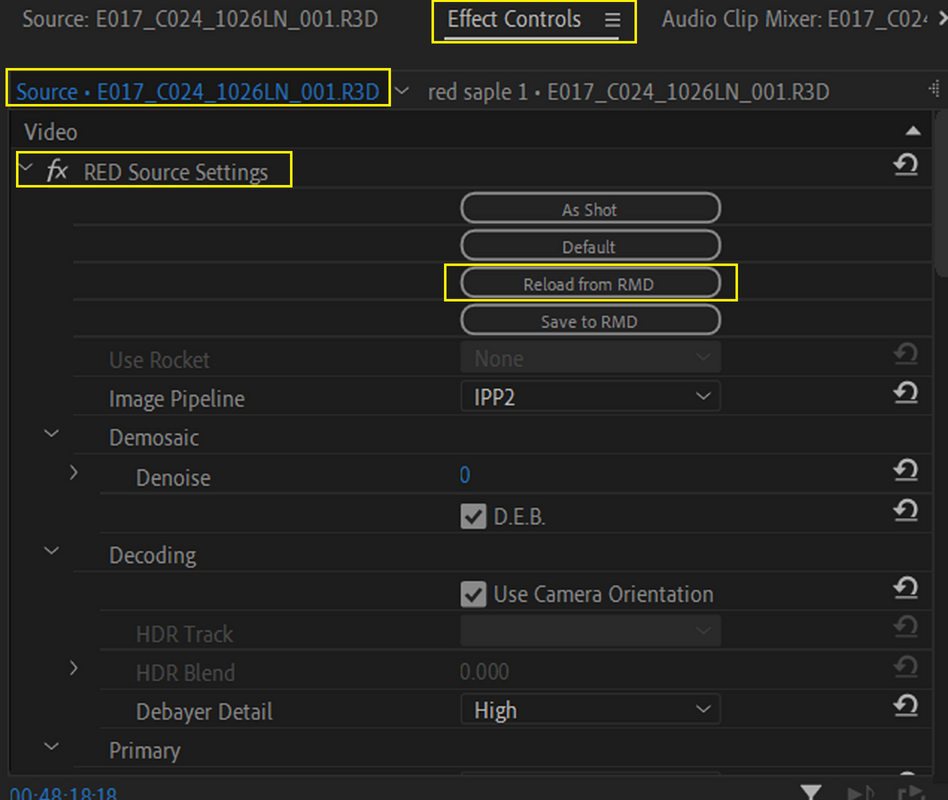
I remember there being some button in Adobe Premiere that allowed you to somehow "Refresh the RMD info "if I'm not mistaken. You could choose a Different Color Temp. Preset and apply it in REDCINE-X then "Refresh the RMD info " in Premiere.


Here's a screengrab from when I still had Adobe Premiere Pro on my computer of a Clip not related to Red .R3D file above showing the
"RELOAD FROM RMD" button

Screenshot-6921.png
 
Last edited:
Back
Top