Welcome to our community

Be a part of something great, join today!

  • Hey all, just changed over the backend after 15 years I figured time to give it a bit of an update, its probably gonna be a bit weird for most of you and i am sure there is a few bugs to work out but it should kinda work the same as before... hopefully :)

RED Rocket update...

Frank. We finally got oit to work by
The 2nd issue was replacing the DELL 30", sadly does not support squat.
So it's not an option for the RR. :mad2:

But RED Rocket™ now streaming beautifully to a DELL 24" via DVI. :thumbup1:

The first 30 inch monitors by Dell and Apple don't support 1920x1080 or 2048x anything for that matter. They support 1280x800 and 2560x1600. Monitors with HDMI in usually work better for this kind of thing because if it has HDMI built in, then you know it can take an HD signal and scale it to the right resolution (such as 720 to 1080). The other thing it helps is ensure that a 24 or 23.976 signal can be displayed at 60hz. That's why if you plug in some monitors without hdmi, you can only get it working at 1280x720 @60, because most cheaper monitors (without hdmi) can only display @ 60hz.
 
The first 30 inch monitors by Dell and Apple don't support 1920x1080 or 2048x anything for that matter. They support 1280x800 and 2560x1600. Monitors with HDMI in usually work better for this kind of thing because if it has HDMI built in, then you know it can take an HD signal and scale it to the right resolution (such as 720 to 1080). The other thing it helps is ensure that a 24 or 23.976 signal can be displayed at 60hz. That's why if you plug in some monitors without hdmi, you can only get it working at 1280x720 @60, because most cheaper monitors (without hdmi) can only display @ 60hz.

Thanks Steve. We have a Panny Pro Series 11 on the way, were just eager to play with the RR in the interim. But you are correct. Dell 30", No go with RR.
 
Torrey - is there a target price on the 320 ? Still thinking about snatching up that 256 Corsair for my MBP ....

Mark,

I got NDA'd with the info I received. FWIW--I wouldn't wait. The 256 GB Crucial is a safe investment for now.

Torrey
-----------------------------------------------
Torrey Loomis
President & CEO - Silverado Systems, Inc.
(916) 760-0032 •*FAX (916) 404-5258
torrey@silverado.cc
http://www.Silverado.cc

Silverado Twitter at*http://www.twitter.com/silveradosys
StudioBuilder blog at*http://silveradosys.blogspot.com
 
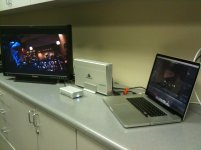
There was only so much bugging of Peter I could do before I ran out and got my own rig to test.

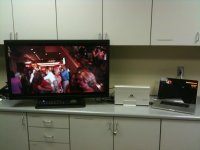
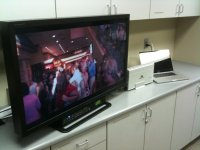
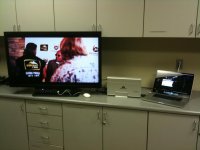
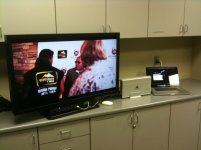
Magma ExpressBox Pro works. Kinda...

Unlike on a Mac Pro where playback to Cinema Display is great, there is some stuttering on playback to the MacBook Pro LCD.

I am testing on MBP with 10.6.1 and Intel SSD. RocketCine-X 661.

BUT...

Playback to external SDI monitor (using a Panasonic 26" LCD here) is flawless. No drop frames.

Further, I tested playback from both the internal SSD and an external G-Tech G-RAID mini (the little guy) via FW 400 and both play fine. No drops.

I am satisfied that for on-set playback using Peter's or Magma's box will work fine. I haven't tried dual SDI for 2K nor have I tried 4K, but 1080 works great.

Pic will be on the next post...

Torrey
-----------------------------------------------
Torrey Loomis
President & CEO - Silverado Systems, Inc.
(916) 760-0032 •*FAX (916) 404-5258
torrey@silverado.cc
http://www.Silverado.cc

Silverado Twitter at*http://www.twitter.com/silveradosys
StudioBuilder blog at*http://silveradosys.blogspot.com
 

Attachments

  • IMG_0397.jpg
    IMG_0397.jpg
    91.3 KB · Views: 0
Cool stuff Torrey... We gotta change your username :)
 
Is that G-Raid Mini bus powered? I always thought all G-Raids had to be plugged into power...at least that was what I was told...
 
Hi guys,

I went to Akihabara yesterday and found a adapter to install 2.5" hard disk to replace the optical drive in the Mac Book Pro. I was thinking I can install another drive this way and stripe to RAID0 with the internal drive will give me over 150MB/Sec. transferring rate and 1TB capacity. I don't mind getting the optical drive out and I can get an external firewire optical drive or something similar because wouldn't use that for the R3D jobs too much. I will post pics later.
 
Is that G-Raid Mini bus powered? I always thought all G-Raids had to be plugged into power...at least that was what I was told...

Imran, drives like Caldigit VRmini and LaCie Little Big Disk can be used with firewire bus power.
 
Is that G-Raid Mini bus powered? I always thought all G-Raids had to be plugged into power...at least that was what I was told...

Imran,

Yep! Bus powered...

Also--using the FW 400 port on the drive since that is the only cable I had laying around...

Torrey
-----------------------------------------------
Torrey Loomis
President & CEO - Silverado Systems, Inc.
(916) 760-0032 •*FAX (916) 404-5258
torrey@silverado.cc
http://www.Silverado.cc

Silverado Twitter at*http://www.twitter.com/silveradosys
StudioBuilder blog at*http://silveradosys.blogspot.com
 
I was thinking I can install another drive this way and stripe to RAID0 with the internal drive will give me over 150MB/Sec. transferring rate and 1TB capacity.

Kaku,

While the capacity isn't there quite yet, you can use a single SSD to get that now.

Otherwise, I'd use an external drive instead of totally gutting your MBP.

Torrey
-----------------------------------------------
Torrey Loomis
President & CEO - Silverado Systems, Inc.
(916) 760-0032 •*FAX (916) 404-5258
torrey@silverado.cc
http://www.Silverado.cc

Silverado Twitter at*http://www.twitter.com/silveradosys
StudioBuilder blog at*http://silveradosys.blogspot.com
 
Right, but you can see how convenient it would be to have less pieces.
 
Any news about Red coming out with a Lappy version Redrocket or a Red express card slot expansion device for Redrocket + MBP work?

I really want to buy a Redrocket but own and work with 2XMBP. I am hesitant putting down the money though for a Redrocket and a separate expansion device because of the chance that Red will announce something a day later.
 
I really want to buy a Redrocket but own and work with 2XMBP. I am hesitant putting down the money though for a Redrocket and a separate expansion device because of the chance that Red will announce something a day later.

Nir,

Isn't that always the case with RED, though? There will ALWAYS be something announced a day or month later.

:-)

If you have clients that are willing to pay for the capabilities that the Rocket brings, then it isn't worth waiting. Use it now and then sell it later if something new comes out.

Its like a Kona 3 card. The card's price is the same now as it was years ago when it was introduced. However, the card has a lot more value now--there are new capabilities in the card because of firmware and software revisions by AJA.

The value of a RED Rocket card will likewise remain as RED continues to support the card and build in new features with software releases that unlock new capabilities.

Torrey
-----------------------------------------------
Torrey Loomis
President & CEO - Silverado Systems, Inc.
(916) 760-0032 •*FAX (916) 404-5258
torrey@silverado.cc
http://www.Silverado.cc

Silverado Twitter at*http://www.twitter.com/silveradosys
StudioBuilder blog at*http://silveradosys.blogspot.com
 
Any news about Red coming out with a Lappy version Redrocket or a Red express card slot expansion device for Redrocket + MBP work?

Hey, Nir... How did you get to the end of this thread without seeing this? There is a mobile solution coming soon. You can see a picture of the prototype in post #1066 of this thread. And some pictures that come before it show a larger 2-slot production unit that may be useful for some as well.

The real drawback to the mobile solution will be overall bandwidth to and from the RED Rocket, as an ExpressCard adapter on the MBP or other notebook will only allow for about 1/8th of the Rocket's maximum bandwidth. But it should still prove useful for certain things, especially real-time onset playback from a full 4K debayer.
 

Attachments

  • IMG_0399.jpg
    IMG_0399.jpg
    88.7 KB · Views: 0
  • IMG_0400.jpg
    IMG_0400.jpg
    88.4 KB · Views: 0
  • IMG_0401.jpg
    IMG_0401.jpg
    89 KB · Views: 0
  • IMG_0402.jpg
    IMG_0402.jpg
    86.7 KB · Views: 0
  • IMG_0403.jpg
    IMG_0403.jpg
    83.4 KB · Views: 0
Hey Torrey,

How is the heat inside the Magma box? Perhaps that could account for some of the stuttering playback issues. Then again, it could also just be a bottleneck issue with the Magma box and its interface.
 
How is the heat inside the Magma box? Perhaps that could account for some of the stuttering playback issues. Then again, it could also just be a bottleneck issue with the Magma box and its interface.

JK,

I am pretty sure its the bottleneck, not the heat. I can get the card to stutter quickly with playback to the MBP LCD, whereas long playback to external SDI is flawless.

Torrey
-----------------------------------------------
Torrey Loomis
President & CEO - Silverado Systems, Inc.
(916) 760-0032 •*FAX (916) 404-5258
torrey@silverado.cc
http://www.Silverado.cc

Silverado Twitter at*http://www.twitter.com/silveradosys
StudioBuilder blog at*http://silveradosys.blogspot.com
 
I am pretty sure its the bottleneck, not the heat. I can get the card to stutter quickly with playback to the MBP LCD, whereas long playback to external SDI is flawless.

The data flow on the PCIe x1 express card for HD-SDI playback, is from the disk to the card only... for the LCD playback it reads from the disk while it has to maintain a full uncompressed flow to the graphics controller so the 1x lane has to read the 36Mb/sec from disk and it also has to send, depending on the selected size, for 1080p a 180Mb/sec to the LCD...! so the 250Mb/sec ceiling that the express card expansion box has, is exhausted immediately...

This is a clear sing that the extremely fast proxy rendering will be severely crippled with the 1x lane limitation...
 
Back
Top