Welcome to our community

Be a part of something great, join today!

  • Hey all, just changed over the backend after 15 years I figured time to give it a bit of an update, its probably gonna be a bit weird for most of you and i am sure there is a few bugs to work out but it should kinda work the same as before... hopefully :)

Red Dragon fps range

Marc Rochon

Active member
Joined
Dec 25, 2014
Messages
36
Reaction score
0
Points
0
Hi all,

I just got my new Dragon up and running this weekend. I'm testing the hi fps and it is only letting me go 1/2 of the max frame rate. Example: at 2.5K 8:1 I can only go to 200fps instead of 400 fps. It's like that for all the formats. I can only get 1/2 the max frame rate. I'm new to RED so any help would be appreciated. I'm sure it's "operator error"

Thanks,

-Marc
 
I see the issue... you are talking about much wider aspect ratio. As always, Phil nails it.
 
Last edited:
Hi all,

I just got my new Dragon up and running this weekend. I'm testing the hi fps and it is only letting me go 1/2 of the max frame rate. Example: at 2.5K 8:1 I can only go to 200fps instead of 400 fps. It's like that for all the formats. I can only get 1/2 the max frame rate. I'm new to RED so any help would be appreciated. I'm sure it's "operator error"

Thanks,

-Marc

First, congratulations on the new Dragon.

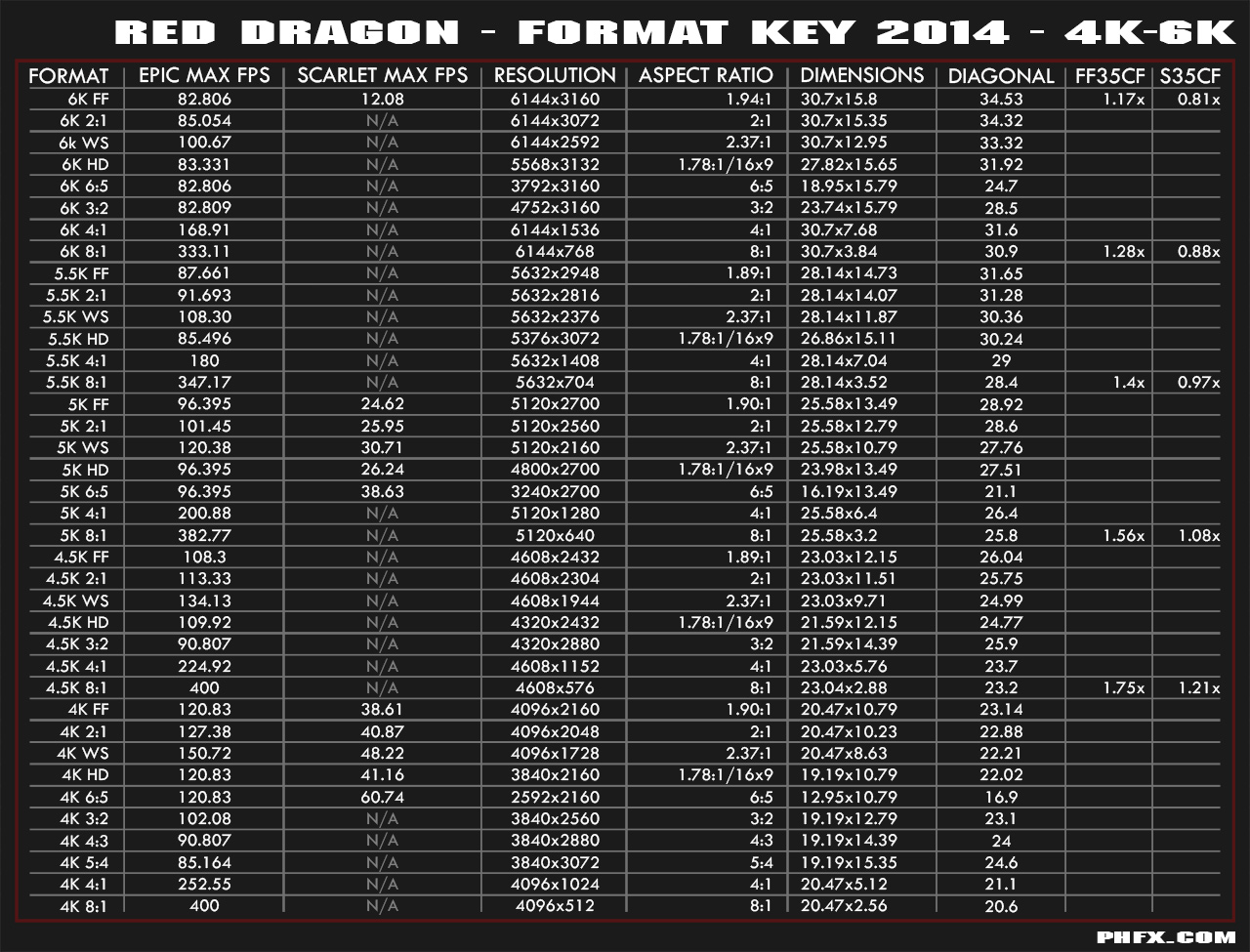
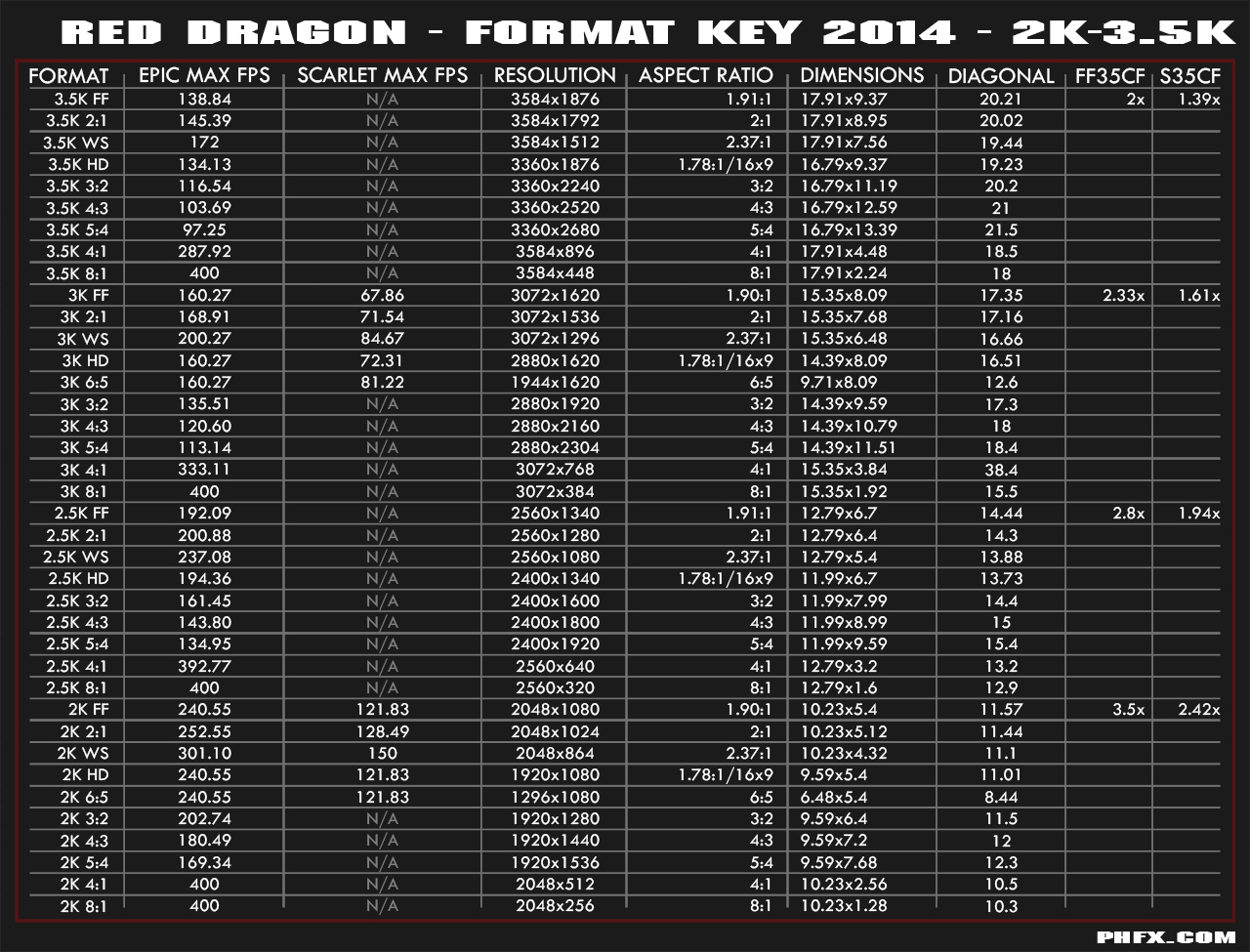
Red Dragon has frame rate abilities only restricted by the vertical resolution of each format. So the more pixels vertically you have the lower the available max FPS would be.

Here's a very quick and handy guide referencing all of the formats and frame rate capabilities:

phfx_redDragon_FormatKey_01_4k6K.jpg


phfx_redDragon_FormatKey_02_2k3p5K.jpg
 
Epic....son of a gun. Your right. I was messing with the HDR settings and left that on. Doh!! Thanks guys. Got 400fps now.

Any way to just reset everything back to factory default?
 
Without my Epic ATM (gone in for Dragon upgrade) but look in the maintenance settings and there should be a restore/factory default in there.
 
The other item I've found that can impact FPS is if you leave the 'Look Around' on in the display settings. It won't cut it to half, like HDR does, but it will cut it down depending (I believe) on the size of the frame w/ the look around. FYI.
 
400FPS Red Dragon?

400FPS Red Dragon?

How are you guys getting 400FPS? I can only get to 300FPS at 2.5K.
 
PS enabling look-around enables you to capture a wider FoV on Scarlet MX & Scarlet Dragon too when recording the hdsdi out to an external HD recorder (and is a cleaner signal than 4k mx / 5k Dragon), though of course you lose the r3d yumminess and 4k but supersampled HD looks really nice.

Craig Lees
ED & SMX UK
FD SSC & Lomo Anamorphic Sets
 
So you set a custom image hight of 640 px? Could you please explain how?!
Thanks a lot
 
That's defiantly not normal! Should be 75...
But guys this 400fps thing is amazing, please can someone explain? It'll literally save me renting a phantom!
 
For 400fps on Dragon = 8(width):1 (height) custom aspect ratio (click aspect ratio in resolution menu. Red's frame rates are based on sensor height. The wider you go, the higher the fps, hence 100fps at 6Kws as opposed to less at 6kFF.

Look at Phil Holland's data charts in the Stickies sections for exact fps per resolution.


Craig Lees
ED & S-MX UK
FD SSC & Lomo Anamorphics for rent in London UK
 
Epic....son of a gun. Your right. I was messing with the HDR settings and left that on. Doh!! Thanks guys. Got 400fps now.

Any way to just reset everything back to factory default?

You could also reset by holding down the power button for 30 seconds when rebooting.
 
Back
Top