Welcome to our community

Be a part of something great, join today!

  • Hey all, just changed over the backend after 15 years I figured time to give it a bit of an update, its probably gonna be a bit weird for most of you and i am sure there is a few bugs to work out but it should kinda work the same as before... hopefully :)

RED Cine X - All of my QT exports fail now

Aaron Shirley

Well-known member
Joined
Aug 14, 2010
Messages
94
Reaction score
0
Points
0
Location
Washington, DC
Win7-64 system

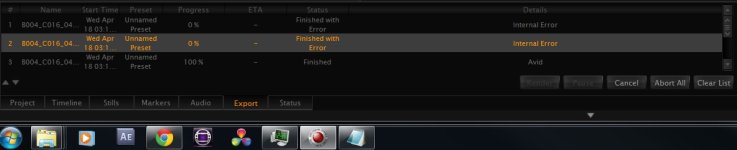
I was exporting a few different QT versions of a clip for tech support (dealing with a separate problem) and then after 2 or 3 of them, they all just started failing. At first I thought I was just using some incompatible settings, but after about a dozen failures, I started getting worried and tried some that originally worked and those fail too now. I tried exporting other codec types such as Avid HDxND, etc and they all work, but nothing in QT's codec list.

I tried rolling back from RCX 13 beta to 12 and 12 beta, but they can't export QT either. So I tried re-installing QT and still nothing (I've got the latest version)

The failure does not produce any kind of media file and the message and log look like this:
redexport Apr 13 2012 08:48:49 Windows 32bit Public Release
redexport: The Winsock 2.2 dll was found okay

redexport: init msg received.

Avail Cam: 0x00000000 Avail Ext: 0x00000000 Requested Cam: 0x00000003 Requested Ext: 0x00000000 Final Cam: 0x00000000 Final Ext: 0x00000000 mTotalAudioChannels: 0
redexport: total setup time = 800 ms
Quicktime Output Filename: F:/REDfootage/Tests/B004_C016_0411PZ.mov, Codec: 0
codecType: 1919706400 rle

ICMCompressionSessionCreate() failed (-50 0xFFFFFFCE) width: 1920 height: 1080 codecType: 1919706400 rle

createCompressionSession failed (-50)

redexport: frame: 0
redexport: abort msg received.
redexport: total elapsed export time: 00:00:02.145
redexport: maximum frame processing time: 1345 ms
redexport: minimum frame processing time: 1345 ms
 

Attachments

  • RCX_QTrederproblem.jpg
    RCX_QTrederproblem.jpg
    60.6 KB · Views: 0
My five cents,

Try to turn the red rocket off in the player to see if you can locate the problem to rocket renders..
 
My five cents,

Try to turn the red rocket off in the player to see if you can locate the problem to rocket renders..

...well I don't have one so that should narrow it down a little :)
 
Hi Aaron, I have the same issue. I'm also on Win7 64Bit. I've sent the log files to RED a couple months ago and hoped that they get it fixed. But none of the new releases worked for me regarding qt export. I help myself using the Adobe Media Encoder for transcode. But I wish that someone finds a solution!
 
Last edited:
The error code you are seeing has always been what gets reported from the Quicktime API when Quicktime is not installed on a machine.

I recommend re-installing Quicktime.
 
The error code you are seeing has always been what gets reported from the Quicktime API when Quicktime is not installed on a machine.

I recommend re-installing Quicktime.

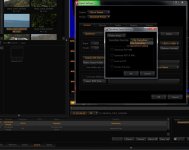
Well, I decided to try uninstalling and re-installing QT again, this time making sure I was using just default QT settings when I did a test render (the only thing I changed was the "render project" default to "render clip" which I know is mandatory for getting a media file to result...

...and IT WORKED! ...but why this time and not before, and why did it just stop working while I played with settings? I found the answer with the next setting change I tried: next to 'FrameRate Override:', "Clip FrameRate" had defaulted back into place, so I changed it to "QuickTime Setting" like I had before, the day it broke. And sure enough, it failed to render. So I switched it back to "Clip FrameRate", and my QT render worked again!

Thanks for the help Matthew! Daniel, try this setting and post if if helped:
 

Attachments

  • RCX_QTredersolution-003.jpg
    RCX_QTredersolution-003.jpg
    65.7 KB · Views: 0
Hi Aaron,

What is the framerate of the clip you are attempting to transcode? Also what frame rate are you selecting in the QuickTime dialog?

EDIT: I'm guessing you are setting Override but not changing the value in the QuickTime settings dialog, but leaving the setting on "Current". Can you confirm?

Thanks,
David
 
Last edited:
Thanx Aaron, but no, that didn't work for me. I use the same settings on my MacBook Pro under Win7 and it works. It used to work on my Mac Pro before I made the upgrade to Win7. I've deinstalled and reinstalled QT and RCX a zillion times with no success. Looks like I have to live with the AME workaround until I got me a new workstation.
 
What is the framerate of the clip you are attempting to transcode?
The original R3D framerate was 23.976, and I was attempting to transcode the same.

Also what frame rate are you selecting in the QuickTime dialog?
I am and was in each try, selecting "use current frame rate" or "use original" or whatever the default for that is.

EDIT: I'm guessing you are setting Override but not changing the value in the QuickTime settings dialog, but leaving the setting on "Current". Can you confirm?
David
Yes that's right; now that you put it that way, it makes sense that that combination of settings wouldn't work. I guess it just hadn't occurred to me what that override setting was for, and now, I can't even remember what I was hoping it would do when I originally switched it.
 
Thanks Aaron,

I've fixed this issue for Build 14. Now if that setting is detected it will default to the clip frame rate.

Cheers,
David
 
Back
Top