Welcome to our community

Be a part of something great, join today!

  • Hey all, just changed over the backend after 15 years I figured time to give it a bit of an update, its probably gonna be a bit weird for most of you and i am sure there is a few bugs to work out but it should kinda work the same as before... hopefully :)

RCX v51 Beta 3 Release

Is this something that can at all be implemented on opencl for AMD cards like the Vega 64 or is it totally out of the realm of possibility?

I seem to recall Jarred mentioning they're gonna do it after CUDA, but it sounded like at least another half-year... And the CUDA one hasn't even really rolled out yet (it's still beta... and windows only).
 
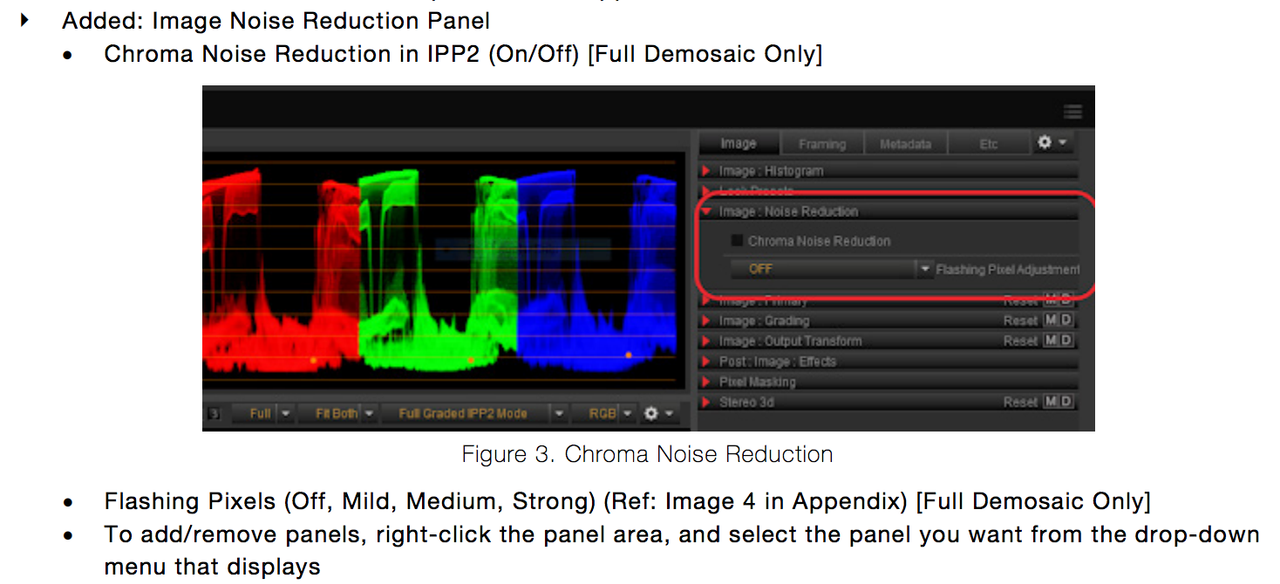
Am I dumb or am I missing the chroma noise reduction or flashing pixels settings? Is it supposed to be in the right hand panel under the image tab?

You'll need to right click and enable the Panel. It's in the Release Notes.


Screen-Shot-2019-02-07-at-3-38-11-PM.png
 
Anyone do any comparisons between the old Denoise+DEB vs the new Chroma NR? Would love some Dragon split screens.
 
I can't wait to try this... especially since I have a new machine with an 8GB GPU now. :)

I am however mired in a small quandary regarding the external GPU I'm planning to get when bux allow... debating between a 2080Ti and a Radeon VII... if the performance improvements are going to get ported to the Radeon line then it might be worth the wait in exchange for both saving money and having more memory. And then there's ProRender... tough choice, either way.
 
Loving the Chroma noise reduction. D.E.B. for the other sensors! It makes Helium noise look very filmic, and can push ISO just a little bit more. I can't wait until this is part of the SDK to use it in Resolve!
 
Having some serious issues where it wont even bring up previews with my RTX2080. Seems like it goes between running out of gpu memory and then something about parcing. Also am running latest drivers. Any ideas? Thanks!
 
Having some serious issues where it wont even bring up previews with my RTX2080. Seems like it goes between running out of gpu memory and then something about parcing. Also am running latest drivers. Any ideas? Thanks!

RTX Titan X with 24 GB for 8k
RTX 2080ti with 11 GB for 5/6k (without heavy noise reduction).
RTX 2080 with 8GB for 4k (without heavy noise reduction).
 
Having some serious issues where it wont even bring up previews with my RTX2080. Seems like it goes between running out of gpu memory and then something about parcing. Also am running latest drivers. Any ideas? Thanks!

Send feedback to the Beta Team.

Providing Feedback:
Post your feedback and input on the RED Public BETA Forum: https://support.red.com/hc/en-us/community/topics/360000709953-RED-BETA-REDCINE-X-PRO-v51-Forum ( requires log-in )

E-mail us your user reports, system logs and summary of your experience: redbetasw@red.com
• NOTE: Go to: HELP >> Save Report
• NOTE: Go to: HELP >> Save System Information
 
Changed my graphicscard from GTX970 to a RTX2070 and now i can watch my Gemini 5k Footage in Full Res and Full Screen in Realtime. Awesome!
Can't wait for the implementation in Premiere and Resolve.
 
For us playback is not very stable but export is super fast.
This is on a laptop with a full 1080 GTX card and 6Core running at around 3.4GHz in the test. Windows.

19:19-28:26=9min07sec=547. 2.4x slower so more than twice as long Full Debayer
31:03-40:16=9min15 so 2.5x slower Half Debayer
07:21-11:20= 4min. Approx 1x so realtime ish Quarter Debayer

beta3
FullDebayer does not seem to work to export when I tried.
46:21 - 49:54 so 3min33sec=213s so less than realtime. HalfDebayer
42.37-43:56 1min19s=79s so 0.35 so 3 times faster than realtime. HD QuarterDebayer

8k Half debayer is 3x faster with the new Beta for exporting.

I think for bigger laptops it may be worth getting to GPUs. They do not add that much weight and that means you should be able to export in 8k realtime. Currently the 2080 cards in laptops seem to be Max-Q, so will see if they will also release full 2080 GTX cards since they should be quite a bit faster.

Best,
Andreas
 
I know this is apples issue but I am certain that the same can be accomplished with amd on apples METAL
 
I know this is apples issue but I am certain that the same can be accomplished with amd on apples METAL
Yes, in theory there is no reason this cannot be done. It is just that Nvidia teamed up with Red to program this software, but Nvidia Cuda is not supported on Apple anymore (decided by Apple). Jarred said that they offered both AMD and Nvidia to help but only Nvidia picked up the ball as far as I understand. Basically Red is doing everything they can on their side.

Best,
Andreas
 
Back
Top