Welcome to our community

Be a part of something great, join today!

  • Hey all, just changed over the backend after 15 years I figured time to give it a bit of an update, its probably gonna be a bit weird for most of you and i am sure there is a few bugs to work out but it should kinda work the same as before... hopefully :)

Raptor specific AKS

so how do you hold a handle with the right hand , supporting body or lens with left hand and hit buttons on the right side of camera? Seems to me the more I think about this, I feel like the UI and buttons should be on cam left. Or at least have a couple user buttons on cam left.

The controls need to be on the smart side, the right, for the ac to control camera settings.
 
your kidding right? What AC do you have that isn’t working wireless with cam settings? Also those times YOU want to adjust things.

Brody is correct in referring to why the controls are on the smart side. Once the new touch monitor ships you'll have the ability to get at those settings yourself. This really isn't reinventing the wheel here. DSMC2 works essentially the same way. We just have a new Side Menu Panel rather than the Sidekick.

The new monitor has 4 assignable keys dumb side near the side/top.

Right now there's an extra couple buttons on the XL on the dumb side, which I like. There's a lot of room for a clever handle with some integrated keys or something. If nobody makes one in 60 days or so, I'll make my own I think
 
Brody is correct in referring to why the controls are on the smart side. Once the new touch monitor ships you'll have the ability to get at those settings yourself. This really isn't reinventing the wheel here. DSMC2 works essentially the same way. We just have a new Side Menu Panel rather than the Sidekick.

The new monitor has 4 assignable keys dumb side near the side/top.

Right now there's an extra couple buttons on the XL on the dumb side, which I like. There's a lot of room for a clever handle with some integrated keys or something. If nobody makes one in 60 days or so, I'll make my own I think

Just because previous models had it on that side doesn't mean times haven't changed. You probably couldn't put it there on DMSC2 because of the redmag interface. Are you really saying you wouldn't like it on the operator side? I think it would be super convenient.
 
your kidding right? those times YOU want to adjust things.

No definitely not kidding. It’s been done this way for a long time because it works well with crew and each persons roles. Including an AC with wireless control beyond basic fiz r/s iso, or not that day. You have all camera controls on operator side already with the touch display, actually faster and easier to use than the side camera buttons.

And if your mostly a 1 man crew only wanting an evf let’s say, then I see how that can be a little annoying to you, but if that’s the case just mount your phone with red control somewhere close on the body, on the dumb side.

I have already posted elsewhere that I am disappointed that the dsmc2 type side handle is not an announced option. I am also hoping there is a side handle option with additional buttons/controls, for quick toggle features and more, made by 3rd party or not. Although, like Phil said, there is still the 4 on the display already which will cover a handful of those quick toggles.
 
No definitely not kidding. It’s been done this way for a long time because it works well with crew and each persons roles. Including an AC with wireless control beyond basic fiz r/s iso, or not that day. You have all camera controls on operator side already with the touch display, actually faster and easier to use than the side camera buttons.

And if your mostly a 1 man crew only wanting an evf let’s say, then I see how that can be a little annoying to you, but if that’s the case just mount your phone with red control somewhere close on the body, on the dumb side.

I have already posted elsewhere that I am disappointed that the dsmc2 type side handle is not an announced option. I am also hoping there is a side handle option with additional buttons/controls, for quick toggle features and more, made by 3rd party or not. Although, like Phil said, there is still the 4 on the display already which will cover a handful of those quick toggles.

i think a smart handle would be great as well but as other users have commented with the Komodo handle being used on raptor, it is imposing on the screen area unless pushed unnaturally forward. I guess we’ll agree to disagree on screen placement, but I think this camera should have it on the left side. The XL, that’s another story.
 
I can verify the Tilta focus handle for Komodo works for R/S with the optional Komodo cable. No software updates needed. I cant speak to other control handles they make. Unfortunately they require an NPF battery... So another damn charger
.
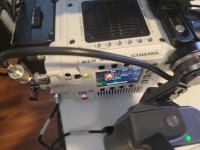
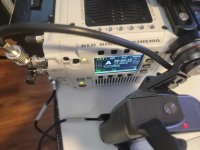
20211002_224304.jpg 20211002_224259.jpg
 

Attachments

  • 20211002_224304.jpg
    20211002_224304.jpg
    69 KB · Views: 0
  • 20211002_224259.jpg
    20211002_224259.jpg
    68.8 KB · Views: 0
I haven't gotten my ST yet and am new to video. I am a published professional naturalist/artist/ornithologistI work out-of-doors in intimate contact with my subject matter. I am currently working on a series of ground-level miniature landscapes in photo. I gave up on using my Sony A7RII in favor of getting this Raptor for stills and video, I want to keep it light, portable and effective for my work. Autofocus and exposure is ok; but many times I want to manipulate the image by using manual focus and Iris adjustment. I would like to be able to have a control handle that would serve my needs: focus, iris and speed control in a control handle. I'm laying on my belly in the brush or weeds and I don't want to be mussing with twisting and flopping around on the ground adjusting the camera, I want to be in the place I am with control over the camera, a couple of buttons, wheels or toggles on a handle. I would want to be using a small monitor to view the status of the image, with peaking and that's about it...and probably a small hood around the small monitor that would not keep popping off. Then be able to use lens control too with non auto lenses at times, lens control linking to the handle. Spartan setup. no loosely fitting flimsy hdmi cables or those c plugs that can pull out. no cables anywhere. if there are cables they should be securely attachable, not anything that will pull out.
 
Is it me or it is really quiet in terms of Raptor accessories?
When the ST Komodo started shipping I have the feeling they were new accessories popping out every day from all kind of manufacturers.
There was also a lot of activity in terms of testing, announcements from Red, etc…
It is the quietest camera release from Red I’ve witnessed but maybe I’m tripping…
 
Is it me or it is really quiet in terms of Raptor accessories?
When the ST Komodo started shipping I have the feeling they were new accessories popping out every day from all kind of manufacturers.
There was also a lot of activity in terms of testing, announcements from Red, etc…
It is the quietest camera release from Red I’ve witnessed but maybe I’m tripping…

There are some Komodo cages that came out 2 months ago, over a year after it's release. Took about 3-6 months for accessories to really fly in IMO.

Doesn't exactly feel quiet to me. The weirdest and wildest aspect of Raptor's release was it was 0-60 in like 2 seconds. There wasn't much of a tease or anything. Literally tease to release happened in a week or two max. If anything I think it's slapped people across the face regarding how quick it hit the market from time of announcement. Myself included. I've had multiple accessory manufacturers reach out since it's launch and announcement. Imagine it's a matter of time.

At the moment, I don't think DSMC3 monitors have shipped. 1.3TB cards I ordered too. Was told that late October was when we'd see some of the accessories shown on the initial livestream., not near that yet

What I can say is I have since seen the top plate/battery plate/top handle/base plate/I/O cage thing extremely briefly. First time I got to actually touch the touch too. New menu, doesn't exactly look like DSMC2. Cleaner, modern design. The top plate to battery plate thing is pretty wild. Has power pogos to deliver AUX ports up top, which is a nice touch. Haven't seen the XLR breakout box yet, but have been told it bolts anywhere. Haven't seen the dovetail system in person yet, but that is something I'm real keen to see.

On a personal, more operator driven note. Komodo has the top touch screen, which hasn't really made me feel the need for a touch LCD most of the time. Raptor is much more like DSMC2. You really want that touch screen interface. When I currently use it, I toggle to my User Keys panel and I've gotten used to blind touching focus and exposure check stuff via reaching around. Somewhat need the custom keys on that monitor as well to put some power back into the operator side of the cam. There's room for a couple handle-type accessories to do exactly that.
 
Hi Phil

I have a Raptor and am very impressed. Still waiting for the Top Monitor (like most of us) but wondering has there been any mention of splitting the Pogo part and monitor and having the monitor a little further way from the body? on the end of a small arm or at least allowing a top handle?

I am excited to see BT's Raptor cage stuff materials as this is what I will prob be getting (as they have been getting better and better of late in dressing cameras.).. but is anyone talking to Ignitedigi? I like what they do and I am wondering if it is possible to fully create a camera with their approach.. (All the way down to a BP? and up to a handle n VF )BUT with stability to run long lenses when not on a gimbal??

thanks

Michael
 
The weirdest and wildest aspect of Raptor's release was it was 0-60 in like 2 seconds. There wasn't much of a tease or anything. Literally tease to release happened in a week or two max. If anything I think it's slapped people across the face regarding how quick it hit the market from time of announcement. Myself included. I've had multiple accessory manufacturers reach out since it's launch and announcement. Imagine it's a matter of time.

You're more than right on that, there was 2 or 3 posts on Jarred's Instagram a couple days before the livestream then all specs were announced and the ST was available for purchase.
It was pretty fast and intense and did not let me a minute to think about the ecosystem around... Now that it's more calm if I may say, I have time to think about it and the options I need are not available yet, that's probably why I feel it's too calm...

At the moment, I don't think DSMC3 monitors have shipped. 1.3TB cards I ordered too. Was told that late October was when we'd see some of the accessories shown on the initial livestream., not near that yet

Sorry I missed that point during the livestream... Or I did not want to hear it.
Lots of gears and accessories availability are still affected by the pandemic and its consequences so hopefully we still see some stuff popping up around late October.

What I can say is I have since seen the top plate/battery plate/top handle/base plate/I/O cage thing extremely briefly. First time I got to actually touch the touch too. New menu, doesn't exactly look like DSMC2. Cleaner, modern design. The top plate to battery plate thing is pretty wild. Has power pogos to deliver AUX ports up top, which is a nice touch. Haven't seen the XLR breakout box yet, but have been told it bolts anywhere. Haven't seen the dovetail system in person yet, but that is something I'm real keen to see.

This is the kind of tease I need Phil ;) Like this it feels less quiet.

Raptor is much more like DSMC2. You really want that touch screen interface. When I currently use it, I toggle to my User Keys panel and I've gotten used to blind touching focus and exposure check stuff via reaching around. Somewhat need the custom keys on that monitor as well to put some power back into the operator side of the cam. There's room for a couple handle-type accessories to do exactly that.

The Komodo side handle is OK but I really hope Red will release one with more assignable keys à la DSMC2 Side Handle.
Having a touch screen will be great but I feel like I will need controls next to my right thumb when shooting handheld or so.
 
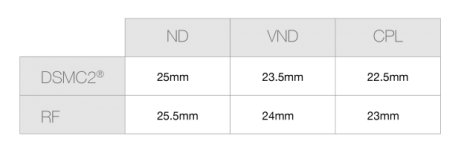
On the topic of ND lens mounts...it's important to mention that not all PL lenses work with all of the mounts because of flange depth. With DSMC2 and Komodo I haven't run into an EF lens that didn't work with an EF Revolva. But Zeiss Super Speeds are too deep to work with Revolva. That's a pain in the ass. Modern PL lenses with shallower flange depth work fine. Some vintage lenses...not so much. Speed Panchros don't work, I don't think.
I emailed Breakthrough and asked them specifically about compatibility with their VND mount and Speeds and they said it would work. Though I'd love a test.

FYI!
 
On the topic of ND lens mounts...it's important to mention that not all PL lenses work with all of the mounts because of flange depth. With DSMC2 and Komodo I haven't run into an EF lens that didn't work with an EF Revolva. But Zeiss Super Speeds are too deep to work with Revolva. That's a pain in the ass. Modern PL lenses with shallower flange depth work fine. Some vintage lenses...not so much. Speed Panchros don't work, I don't think.
I emailed Breakthrough and asked them specifically about compatibility with their VND mount and Speeds and they said it would work. Though I'd love a test.

FYI!

Breakthrough actually provides the specs on their forthcoming DFM. And, most higher-end lens manufactures do provide MAX flange depth. But I do notice this spec along with Image circle is not always easy to find with the newer generation of lens manufacturers. I'm sure Kippertie provides this info as well


Breakthrough DFM MAX Flange Distance
lighter.png
 
I guess now we just need some generous soul to make a chart of all the flange depths of the common vintage PL lenses and we're in bizness.
 
Back
Top