Welcome to our community

Be a part of something great, join today!

  • Hey all, just changed over the backend after 15 years I figured time to give it a bit of an update, its probably gonna be a bit weird for most of you and i am sure there is a few bugs to work out but it should kinda work the same as before... hopefully :)

R3D´s RMD update from RCX to Resolve

Erik Lundby

Active member
Joined
Apr 22, 2009
Messages
28
Reaction score
1
Points
3
Location
Oslo, Norway
Hi,

I like to start of my grade in RCX. Can someone please help me with "how to update the R3D´s RMD in Resolve" after first linking clips in Media Pool?
(R3D´s are first linked in Media Pool in Resolve, then edited. After doing color adjustments in RCX, I want to "update" the R3D´s in Resolve, before continuing grading in Resolve)

Thank you for any help in advance!

All the best!

Erik
 
Erik,


All you have to do is first make sure you have the proper settings in REDCINE-X and in RESOLVE.


IN REDCINE-X

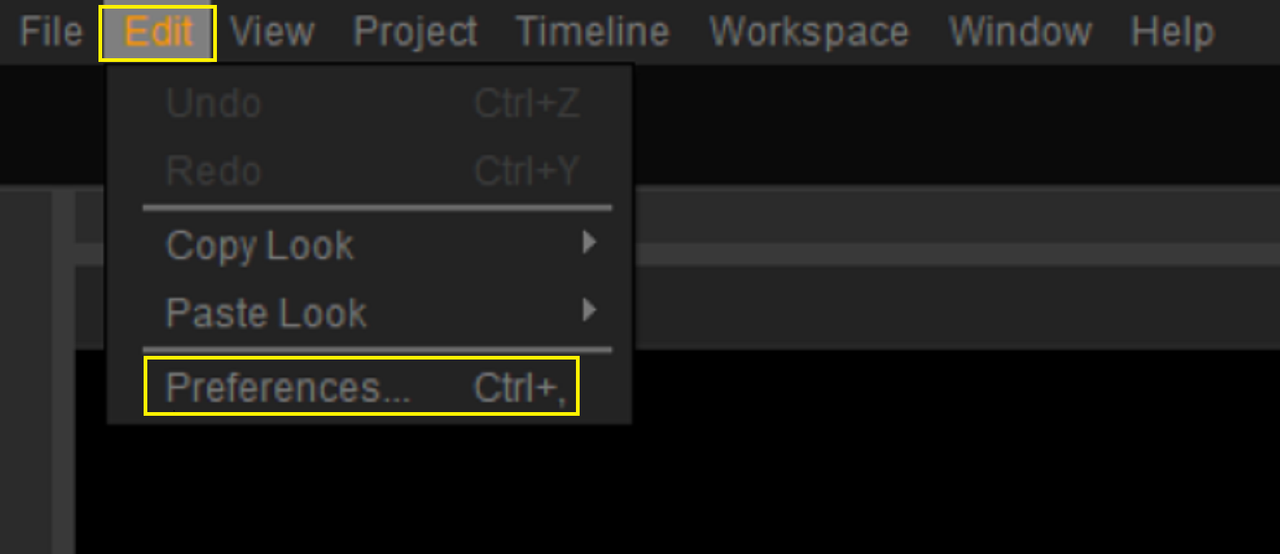
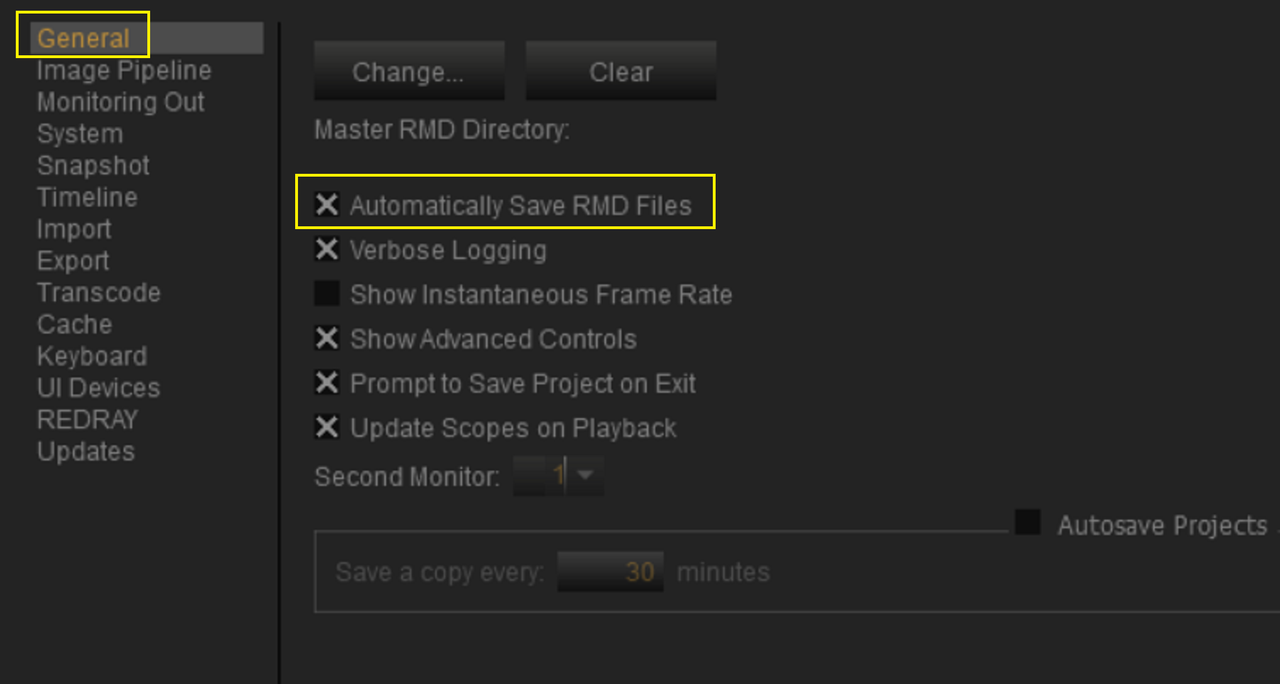
in "PREFERENCES", make sure " AUTOMATICALLY SAVE RMD FILES" is selected. This will make sure any adjustments you make to a RED.R3D file in REDCINE-X will be included in any NLE you import them into.

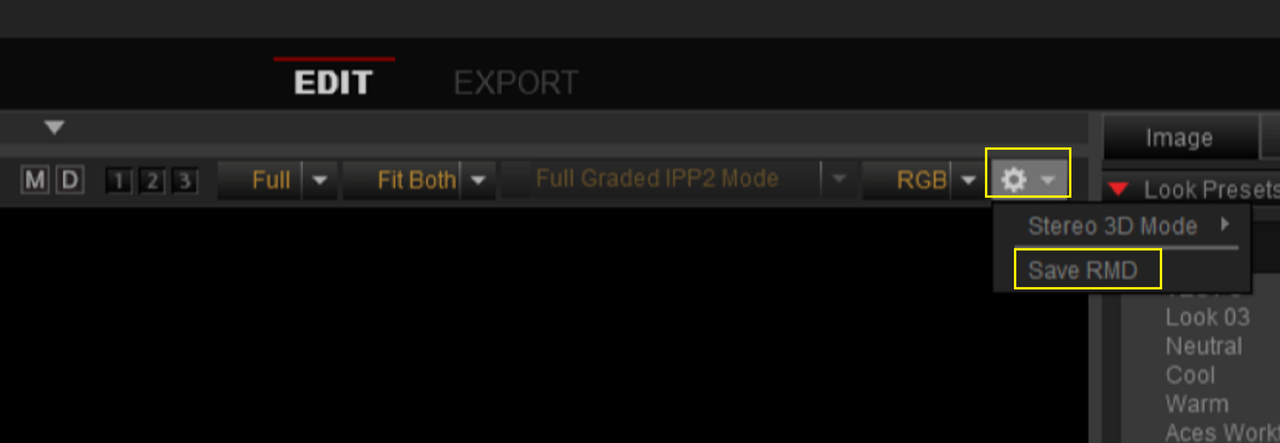
If you don't want the changes you make in REDCINE-X to carry over to NLEs, De-select it, and when you do want a grade in REDCINE-X to be part of .RMD file you can go above the "VIEWER" window and under the "COG WHEEL" select "SAVE RMD"

1.png


2.png


3.png


IN RESOLVE


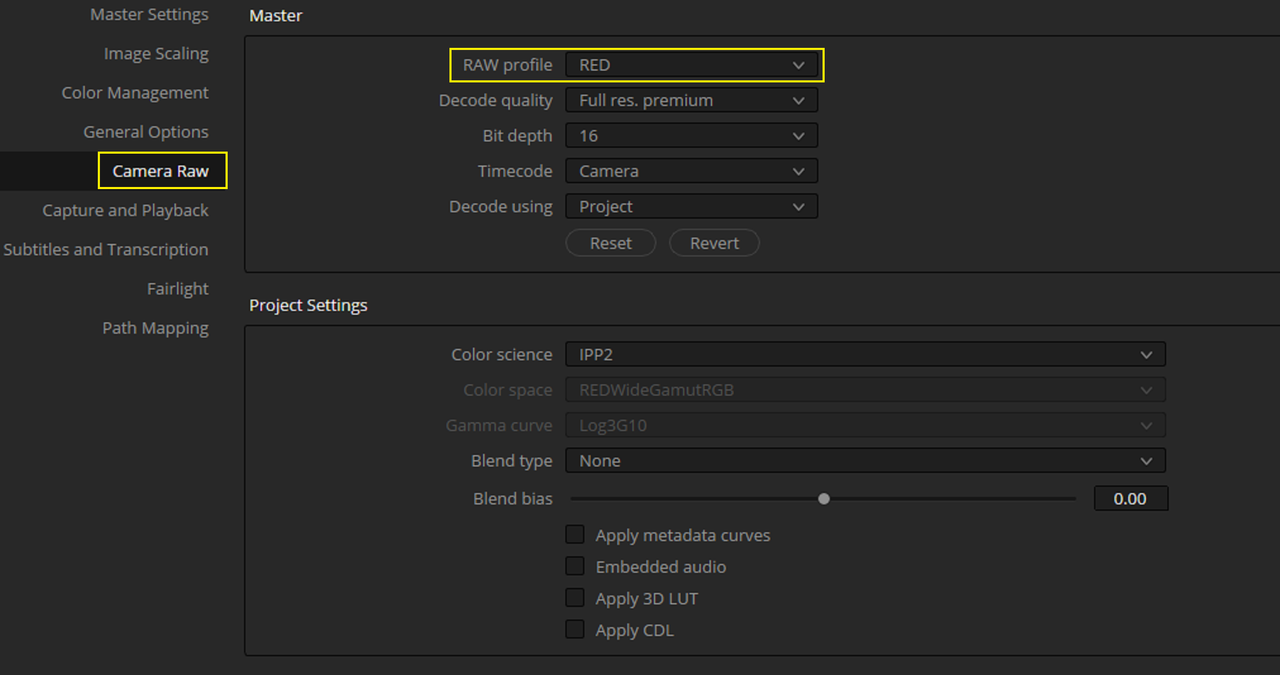
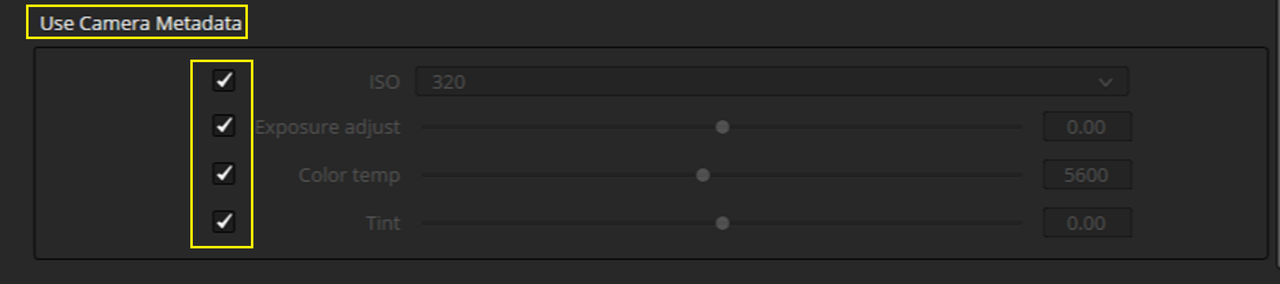
In Resolve, Press "SHIFT+9" to go to the "PROJECT SETTING". Next, go under the "CAMERA RAW" header in the Left-hand column and select "RED" from the "RAW PROFILE" drop-down. At the bottom of the "RED" " Camera RAW" setting, under "USE CAMERA METADATA" , Select all of the settings in the .RMD file that you want to carry over into RESOLVE. If you want all of the corrections you made, barring the CDL" corrections you made, just check all of them.
4.png


5.png


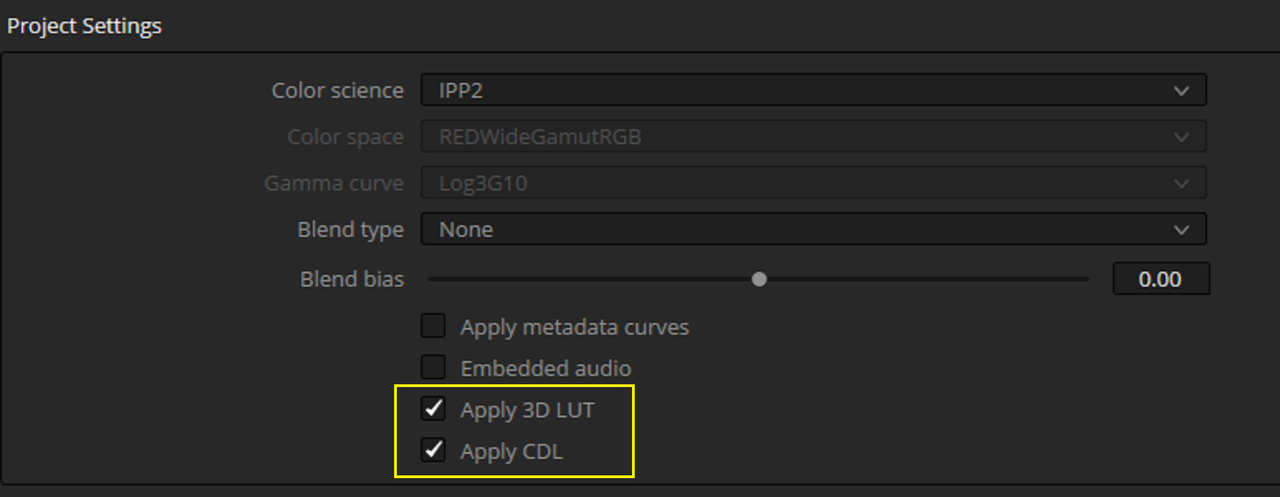
If you want any LUT and or CDL corrections you made in REDCINE-X to carry over into RESOLVE you would select the revelant boxes below.


Screenshot-13545.png


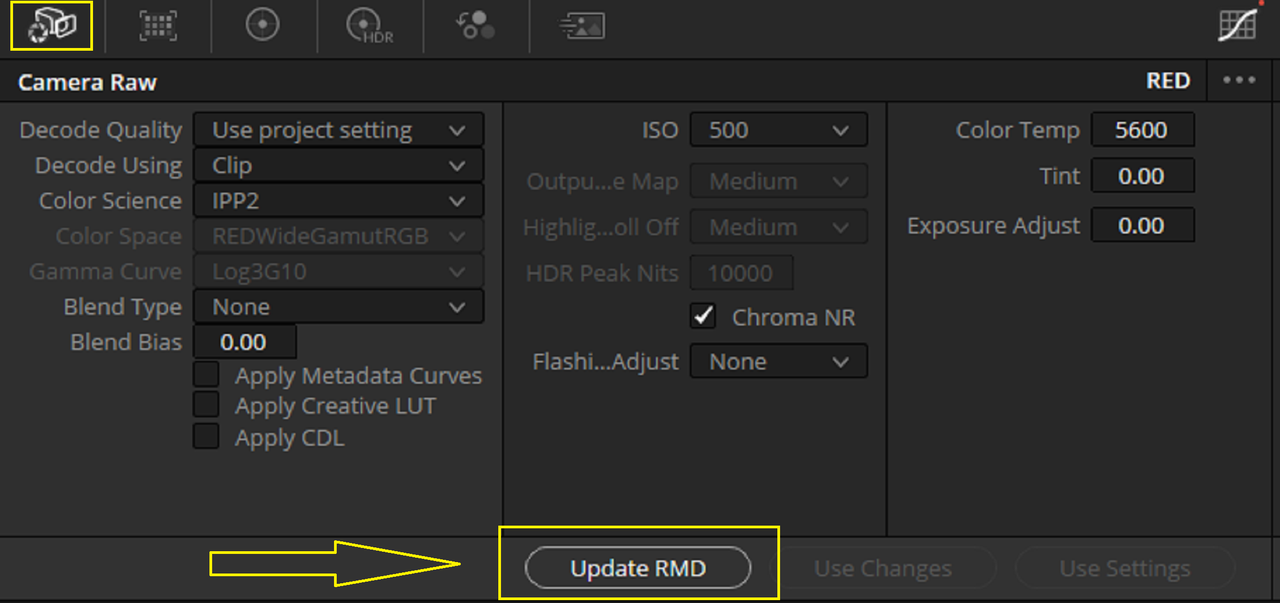
If you want to update a RED.R3d file's camera RAW settings in RESOLVE and wanted to update that info in the .RMD file so that it also shows up in REDCINE-X. Go to the "CAMERA RAW" icon on the "COLOR PAGE" and press the "UPDATE RMD" button.


6.png


Pretty much what Rand said.

I'd also add that in RCX you can also save the new RMD by right clicking on the clip in the timeline and selecting 'SAVE RMD' from the drop down list, as well as selecting it via the cog wheel at the top right of the RCX viewer.

Would just mention too that while in the Camera RAW section of the Resolve Color Page, choosing 'Decode Using:Clip' will give you greatest access to the RAW parameters there.

The most important thing I've found though, is that in order to get the R3D clip, that's already in Resolve, to be updated with the colour changes made in RCX and saved in the newly updated RMD file, I have to find the clip in the Resolve Media Pool, right click on it and choose 'Replace Selected Clip...', then navigate to the same R3D file at it's source and open it in order for the clip to be updated in Resolve. The Clip doesn't get updated automatically, or automatically when restarting Resolve, or by unlinking/relinking the clip, or by changing the Project settings, or by changing the parameters in the Camera RAW section of the Resolve Color Page.

Can anyone confirm that's the only way (via 'Replace Selected Clip...') to get the changes made in RCX to apply to an R3D clip that's already in Resolve, or am I missing something here?
 
Unlike ADOBE PREMIERE which allows you to "RELOAD RMD FILE" in the Raw settings, Resolve only reads the .RMD files associated with the RED.R3d clips once at import, and can't be re-read again unless the clip is Re-imported. Although you can RE-write to the RED .RMD with "UPDATE RMD" in the "CAMERA RAW" area of the "COLOR PAGE" you can't RE-READ the .RMD file at least not currently in Resolve. This is why you should use REDCINE-X for a "FIRST PASS" Color Correction for Resolve only.
 
Erik,


All you have to do is first make sure you have the proper settings in REDCINE-X and in RESOLVE.


IN REDCINE-X

in "PREFERENCES", make sure " AUTOMATICALLY SAVE RMD FILES" is selected. This will make sure any adjustments you make to a RED.R3D file in REDCINE-X will be included in any NLE you import them into.

If you don't want the changes you make in REDCINE-X to carry over to NLEs, De-select it, and when you do want a grade in REDCINE-X to be part of .RMD file you can go above the "VIEWER" window and under the "COG WHEEL" select "SAVE RMD"

1.png


2.png


3.png


IN RESOLVE

In Resolve, Press "SHIFT+9" to go to the "PROJECT SETTING". Next, go under the "CAMERA RAW" header in the Left-hand column and select "RED" from the "RAW PROFILE" drop-down. At the bottom of the "RED" " Camera RAW" setting, under "USE CAMERA METADATA" , Select all of the settings in the .RMD file that you want to carry over into RESOLVE. If you want all of the corrections you made, barring the CDL" corrections you made, just check all of them.
4.png


5.png


If you want any LUT and or CDL corrections you made in REDCINE-X to carry over into RESOLVE you would select the revelant boxes below.


Screenshot-13545.png


If you want to update a RED.R3d file's camera RAW settings in RESOLVE and wanted to update that info in the .RMD file so that it also shows up in REDCINE-X. Go to the "CAMERA RAW" icon on the "COLOR PAGE" and press the "UPDATE RMD" button.


6.png
THANK YOU SO MUCH!!!

You've just helped me crack an issue that has been bugging me for the past couple of weeks.

Ten points to Gryffindor!
 
Back
Top