Welcome to our community

Be a part of something great, join today!

  • Hey all, just changed over the backend after 15 years I figured time to give it a bit of an update, its probably gonna be a bit weird for most of you and i am sure there is a few bugs to work out but it should kinda work the same as before... hopefully :)

Quick Look - LG 31" DCI 4K Monitor

Pls get back to us how you manage with it Frank. Thanks.
 
The vendor that promised a December date has been informed that if we don't get a solid date of delivery we will have to cancel.

On that note, does anyone know where to pick this up with no delays?

I'm in Canada but we can order from the US.

Now of course this would all be moot if we find out that it doesn't work with the UltraStudio 4K.
 
Great reviews in here. Thanks guys for contributing. I'm on the fence in a few directions. What would be your 2nd pick outside of this LG assuming similar price points? The Eizo looks nice but it's months out and will likely release at 2-3X the price of the current desktop crop
 
The BMD UltraStudio 4K arrived today and after about an hour I had it working as the program monitor in full 4k (4096x2160).
TB from computer (nMP) to TB on BMD UltraStudio 4K. HDMI from BMD UltraStudio 4K to LG 31mu97 HDMI. Not Display port.

It's working as I'd hoped so far. Nice feeling. It doesn't come with a TB cable or power cable. I am temporarily using the TB cable from my external enclosure. That means my RR is off line but it is still getting the job done in real time. There was some concern that the HDMI output on the BMD (not 1.2) would not be able to handle it. It seems to be doing fine.
I need more time to test it. Tomorrow hopefully.
 
The BMD UltraStudio 4K arrived today and after about an hour I had it working as the program monitor in full 4k (4096x2160).
TB from computer (nMP) to TB on BMD UltraStudio 4K. HDMI from BMD UltraStudio 4K to LG 31mu97 HDMI. Not Display port.

Thanks for posting your results, Frank! Is this in 10 bit?

Does anyone know if there is enough bandwidth to daisy chain this with a Pegasus 8 disk Thunderbolt II RAID array?
 
Thanks Frank. Looking good then. I guess there will be no problem doing this with pc right?
 
...
I was having problems like yours when I first had the LG plugged in using the HDMI out on the nMP. Switching to the supplied DP cable solved it for me. Best of luck.

Thanks Frank! Sad thing is, I'm using the DP (mini Display-Display1.2) cable that came with it and I'm getting black outs and black flashes anyway.
(I'm also using the AUDIO and USB ports of the monitor - during the flashing moments the keyboard seems to freeze for a short moment as well)

Through the HDMI it seems to not deliver full 4k!?
 
Just to double check - nMP > BMD Ultra4K then HDMI Out > LG equals Full 4K 10Bit? Any hit on Playback at 24?

And the Studio4K supports 4K @ 60hz but only 4:2:0 right? I think BMD confirmed that but can't remember.

Seems like a good combo for program monitoring in 4K assuming you get calibrating and color space under control.

I wonder if it's best to get a 2nd one and use that as the Desktop while sharing the same TB Bus.

AKA this breakdown:

Bus 1 - RR
Bus 2 - Raid Storage
Bus 3 - Monitors (BMD 4K and a Desktop via TB > DisplayPort)
 
Frank which NLE are you testing the BMD to LG with?

And how are the tests going so far?
 
Just to double check - nMP > BMD Ultra4K then HDMI Out > LG equals Full 4K 10Bit?
I'm not sure if it's 10bit. I know we're running full 4k R3d's and 4k HD (3840x2160) from FCPX and Davinci. I have only had a couple hours working with the new setup.
I talked with Jeff Kilgroe last week and he questioned its ability to do full 4k 10bit. The UltraStudio 4K does not have HDMI 1.2 capabilities which he thought would be necessary.

I will investigate again tomorrow. Don't see anything in the UltraStudio preferences that indicates an 8-bit or 10-bit option. I just know it looks great.

I guess there will be no problem doing this with pc right?

Don't have a PC myself. I only know that it seems to be working well on a nMP 8-core w/d700's and 64gb ram. The PC question would be best reserved for Jeff or another PC guru.

If anyone know's what I should look for to determine 8-bit vs 10-bit or any other relevant information, please let me know.
 
I wonder if you banding on a dark image would probe the 8Bit or 10Bit question.
 
Just to double check - nMP > BMD Ultra4K then HDMI Out > LG equals Full 4K 10Bit? Any hit on Playback at 24?

And the Studio4K supports 4K @ 60hz but only 4:2:0 right? I think BMD confirmed that but can't remember.

I believe the Studio4K does 10bit at 4K 24Hz, but is limited to 8bit 4:2:0 at 60Hz. Actually I know that's the case for 60Hz, just not 100% sure on 10bit at lower frame rates. This is via HDMI, you can get 4K 10bit 60Hz over the various SDI connections.

Now as for the LG monitor, I don't think it accepts any better than 30Hz via HDMI. Once again, I don't know about 10bit support... I think a lot of us are looking to Frank to provide answers. :)
 
We're about to accept delivery on a demo Sony PVM X300.

Crossing fingers that sucker works with REDRAY and UltraStudio4K.
 
I think a lot of us are looking to Frank to provide answers. :)
That's like waiting for a turnip to provide blood lol. You're the answer man Jeff:)

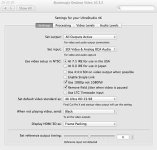
Seriously.... I'm not sure where to look to find out if it's putting out 8 or 10-bit.
Here's what the BMD tab in system preferences looks like.
 

Attachments

  • BMD desktop video 01.jpg
    BMD desktop video 01.jpg
    49.5 KB · Views: 0
If you're having issues like I did, read this!

Apple says to use a different BUS for each display. BUT! I was doing that already ;)
I talked to my tech support, and they said that for the MacPro (late 2013) to not only use a different BUS per display,
but to also fill the ports clockwise, with the 4K display starting at position 1 and always attach lower res displays after the 4K.
(clockwise the true BUS port numbers are 2, 0, 1 - not 1,2,3. But for 4K display hierarchy, stick to the order I posted below)

Like this:

ThunderboltBUS_MacProlate2013.png


It doesn't really make any logical sense, but they said it did help in the past.
My 4K LG was at position 3 and the HD display in position 2. Since I changed it to 1 and 2
I didn't get any more hiccups in the past few hours. If that changes, I'll let you guys know.

For more inside information check out these support pages from Apple

Mac Pro (Late 2013): Using multiple displays
http://support.apple.com/en-us/HT202801

Using 4K displays and Ultra HD TVs with Mac computers
http://support.apple.com/en-us/HT202856
 
Patrick yep that was the BUS grouping I had to comply with to get a few Sonnet Express III--R loaded with ROCKET and Digidesign HDX, Dual Apple Cinema 30s and a Pegasus RAID.
 
Back
Top