Welcome to our community

Be a part of something great, join today!

  • Hey all, just changed over the backend after 15 years I figured time to give it a bit of an update, its probably gonna be a bit weird for most of you and i am sure there is a few bugs to work out but it should kinda work the same as before... hopefully :)

Quick HDR test Alexa vs Epic

Jesper Holmström

Active member
Joined
Dec 28, 2006
Messages
26
Reaction score
0
Points
0
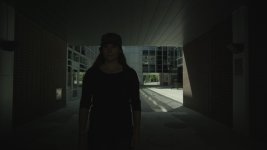
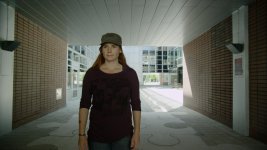
I have been testing the HDR funcion in Epic and in my opinion it is best used for highlight protection with a highlight key. 3 stops of HDR seems to be a sweetspot, if you use more it's harder to blend.
Here is a quick test rendered in Resolve.
Thanks Red for a very powerful tool.

Jesper Holmström
Dagsljus Filmequipment
 

Attachments

  • Epic_A_track_1.65.1.jpg
    Epic_A_track_1.65.1.jpg
    89 KB · Views: 0
  • Epic_X_track_1.65.3.jpg
    Epic_X_track_1.65.3.jpg
    49.2 KB · Views: 0
  • Epic_HDRBlend_3stop_1.65.2.jpg
    Epic_HDRBlend_3stop_1.65.2.jpg
    87.5 KB · Views: 0
  • Alexa_prores_1.8.1.jpg
    Alexa_prores_1.8.1.jpg
    86.2 KB · Views: 0
Good test! I have a question, when you push the record button while using HDRx, does the image in the monitor changes to the X track? And when you push it again it returns to the A track?

The Epic I'm using right now does, and I want to know if there is a way of disabling it.

Thanks!
 
Are you hard-clipping in the A track - hard for me to tell. I'm seeing a bit more detail in the A track than in your Alexa shot.

Graeme
 
Yes I'm hard clipping A track and also in the Alexa. But I have other shots wich show that Alexa has a little more detail in the highlight by default. 1-1,5 stop
This test shows that whatever the number is for Alexa:s better dynamic range it is definitely less than 3 stops HDRx.

And no, my Epic does not show the X-track during record.
Jesper
 
You are right Graeme. But it is the Log C to 709 lut in resolve that makes the Alexa clip hard. There is more detail in the Alexa. But what if I stopped down one stop on Epic. Would the noise be more tolerable due to Epic superior resolution?
This test shouldn't be considered as a dynamic range test. If one wants to check dynamic range one has to look at both ends and with a target resolution (4K?) to see if the noise is acceptable.
This was just to show that the HDRx function is not a gimmick.
Regards,
jesper
 
Noise is generally less visible if you downsample, or project at full rez than compared to a natively lower resolution image.

Also, you can use REDLogFilm on the RED side too and then you'd not have to LogC to 709 on the Arri. But either way, eventually you'll have to get the image to a reasonable contrast to view, and that's really the challenge in today's grading.

Thanks on your "the HDRx function is not a gimmick." comment. No I don't think it's a gimmick either, but a useful tool that works well. Keep testing and reporting - always good to get feedback and dialogue with our users.

Graeme
 
Wow, I could not be more impressed with these HRDx images that are coming in - thank you Jesper for these.

Graeme, is there someplace we can read about how you're handling the blur in the x track?
 
Jesper - thanks for your test. It definitely shows how HDRx™ can be useful.

Were both Alexa and Epic tests shot with the same lens? Alexa a stop or so more open?
 
They are both shot with Ultra Primes same focal lenght, different lens, same aparture. I could however get more info from Alexa but it is hard to grade without doing a highlight key. Alexa wasn't totally gone, Epic was.
Both rated at ISO 800.

Motion blur is of course the biggest issue. There is a new blending mode called "magic motion" wich is better than "simple blend". But I still prefer doing a high light key.
These examples was overexposed for HDR testing puposes. This scene does not require HDR. That's why the "noHDR" shot looks terrible when brought down to the same level as the others.
Jesper
 

Attachments

  • Simpleblend_1.1.jpg
    Simpleblend_1.1.jpg
    42.7 KB · Views: 0
  • Magicmotion_1.2.jpg
    Magicmotion_1.2.jpg
    43.1 KB · Views: 0
  • Highlightkey_1.3.jpg
    Highlightkey_1.3.jpg
    42 KB · Views: 0
  • NoHDR_1.3.jpg
    NoHDR_1.3.jpg
    45.3 KB · Views: 0
Epic A-track looks better then Alexa ProRes Track, although it seems overexposed for use in a HDR-Test
 
A highlight key can work in the situation where you have two distinct image regions, but where you have gradients crossing across the tonal range, the RED Blends will work better for you.

Graeme
 
They are both shot with Ultra Primes same focal lenght, different lens, same aparture. I could however get more info from Alexa but it is hard to grade without doing a highlight key. Alexa wasn't totally gone, Epic was.
Both rated at ISO 800.

Very good...I was wondering because the Alexa looked much softer. I wasn't expecting that much difference with compressed images etc. over the web.
 
No. Epic with HDRx 3 stops is the winner. You can never squeeze that much dynamic range out of Alexa.
Alexa traded resolution for dynamic range (bigger pixels) the problem is that you can not trade back.
Epic 5 K downconverted to 2K will trade back some resolution for dynamic range (less noticeable noise).

The test is not overexposed, the object was to get a good exposure on the face and see how much highlight that could be recovered.
It might have been poorly graded but I'm not a colorist.
If the Alexa looks soft then it's because of less resolution and the fact that the focus-puller for this test is the talent...

Regards
Jesper
 
Back
Top