Welcome to our community

Be a part of something great, join today!

  • Hey all, just changed over the backend after 15 years I figured time to give it a bit of an update, its probably gonna be a bit weird for most of you and i am sure there is a few bugs to work out but it should kinda work the same as before... hopefully :)

Question for LTO owners

Bruce Ingram

Well-known member
Joined
Sep 19, 2007
Messages
110
Reaction score
0
Points
0
Age
52
Location
Houston
Website
www.ingramworks.com
Hey, question to the LTO owners around here. I have an LTO-3 Quantum drive that has been a reliable piece of hardware since I started using it. But, recently, recovering projects off of both current backup tapes and older (1 to 2 years) tapes has become spotty and irregular. Some things won't recover, others will easily while still others will after several attempts. Cleaning has been regular, including new cleaning tape.

My question is if anyone else may have experienced similar issues and if so, how you resolved them.

Thanks!
 
If you can, I would try the tapes in another tape drive. It's possible you stored the tapes somewhere they were exposed to a magnetic field or EMR over time and they could be corrupted. Even more likely is that the drive is just going out on you and needs to be repaired or replaced. If the latter is true, you will want to also be cautious with recently created tapes as they could be created with errors or mis-aligned magnetic heads in the tape mechanism. Which means that tapes written with a bad tape unit may not be readable in a good unit, only partially or mostly readable in the bad one..
 
Thanks for the ideas, we'll trying both (sending it for service and trying a different drive) hoping one will work. I hadn't considered a field near the tapes, I store them away from any equipment but considering our building god only knows what might be floating around. My hope is it's the drive and the tapes are safe for obvious reasons.
 
Another possibility could be a software issue or an issue with your controller card or even the cabling. Best to check it all as best as you can, move the equipment to a different system if you need to or boot from a fresh OS install, etc.. Have you changed software or upgraded recently?
 
I don't think it could be the system itself, as the LTO is completely external and accessed through the network. I have attempted recovering from another workstation on the network with the same results, but I haven't tried accessing it directly from my workstation. It's doubtful it could be a network issue, but I can't rule that out. Thanks again for the ideas!
 
Yeah I'd check with the manufacturer- most likely a firmware, error correction issue. Though of course if you keep your tapes on top of a giant magnet or under the stove, that would do it too...

Noah
 
Could definitely be a network issue. Didn't realize there was network access involved as well. What happens if you try to access the LTO unit locally?

There are a lot of things that could be wrong. I would start with the LTO unit itself and a clean workstation to run it from. No network or anything else that could convolute the process. Then if it works, you know to look elsewhere. It could be a routing issue on the network or a software issue at the system the LTO is connected to, etc.. Is it a self-contained LTO unit that is connected via fiber and accessed from multiple systems via a fiber channel switch? Infiniband? Is it connected to a server via SCSI or FC and accessed through that server?

I don't really like the Cache-A systems myself. I know a couple people that have them and have played with them on several occasions. I don't recommend them and I'll just leave it at that.

I would recommend the new HP LTO-5 3000 series models. External unit, host adapter, cable and software will be about $4500 ($2000 cheaper than a Cache-A LTO-4). Or you can go with the HP LTO-4 units as they are cheaper, but not the latest and greatest. HP 1760 desktop LTO plus a good controller, cable and software will cost about $3200. Prices in US $... Markets vary, etc.. ATTO controllers are the best and really only option for the Mac Pro. If you're attaching to a windows system, LSI, ATTO, Areca, etc.. will all work since there's more complete driver support for tape systems.
 
After discussing it today with a local vendor super-nerd, some new info. Found out we basically have a Cache-A LTO, when they were part of Quantum, one that uses FTP to access the tapes. He was kind of the same opinion on it as Jeff. Apparently, Quantum has washed their hands of these models once the developers left and setup Cache-A, they have been no help at all so far. We are planning to contact Cache-A to see if they can offer any options. Luckily the reseller we purchased it from is going out of there way to try and help us.

I've done all firmware/software updates so no help there. If we end up replacing it we'll be working with the aforementioned super-nerd to make sure we get it right, they have yet to steer us wrong.
 
Jeff to the rescue as usual. Thanks for the posts guys.
LTO is going to become a part of our workflows in a big way if they haven't already.
 
Quantum A-Series. Yeah, Quantum didn't do so hot with that product and those units had lots of problems. Always felt as if they were in beta and never finished. Then Quantum dumped the project and washed their hands of it (and their customers). The guys who worked on it there left and formed Cache-A, but they're still trying to proceed down the same path. I don't think they are offering any type of support for the older Quantum A-Series units. Cache-A has said they would open up their tape format, but that has not happened yet that I'm aware of. To me, the Cache-A units seem like nothing more than a small net-managed PC built from commodity parts, running an embedded OS layer with generic web server and HTTP/FTP/Java file manager system. Not a whole lot of bells and whistles.

The bad thing about A-Series LTO drives, and Cache-A drives is you can only use their systems to read A-Series formatted tapes. Which is any tapes you have created in a Quantum A-Series or Cache-A unit. I think this is the biggest reason they have not opened up their tape format. Once they do, "poof" and no one buys a Cache-A system ever again.

Cache-A units will supposedly read tapes created with the Quantum LTO-3A units. I don't know if that would help you or not... Depending on if you need to source a replacement LTO-3A or a new Cache-A system -- or rent one or hire someone with one, to help you recover your data.

With LTO systems, we are unfortunately locked into specific software solutions to read and write our tapes as there is no truly universal tape format. Perhaps UNIX tar format dumped to a tape is as close as we can get to that, but that's not ideal in many respects either. Being locked into a software solution is one thing, being locked into hardware via a system like Cache-A is worse. Sure, you don't have to buy backup software to run the tape drive, but you can't read tapes in any drives but theirs. Good backup software, like BRU from Tolis Group, is continuously being developed and you can always download the trial version to access your data. Even though the trial version expires after so many days for creating new archives, it works indefinitely and freely to recover data. So if you ever need to send tapes to someone else for recovery or just to transport data, you can give them the tapes and then give them a CD or just email them the link to download the free software to read them -- works with just about any tape drive supported on the Mac.

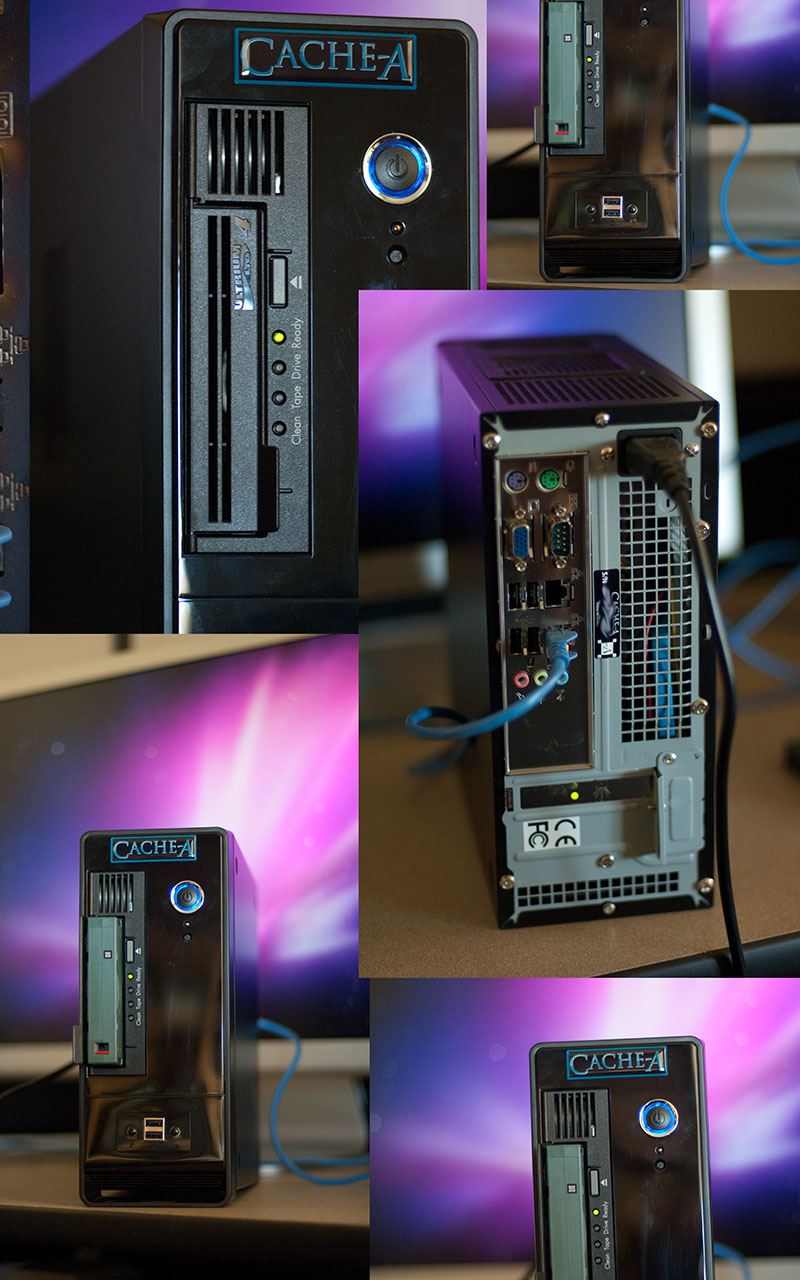
Cache-A LTO-4...
CacheAimgs.jpg
 
Quantum A-Series. Yeah, Quantum didn't do so hot with that product and those units had lots of problems. Always felt as if they were in beta and never finished. Then Quantum dumped the project and washed their hands of it (and their customers). The guys who worked on it there left and formed Cache-A, but they're still trying to proceed down the same path. I don't think they are offering any type of support for the older Quantum A-Series units. Cache-A has said they would open up their tape format, but that has not happened yet that I'm aware of. To me, the Cache-A units seem like nothing more than a small net-managed PC built from commodity parts, running an embedded OS layer with generic web server and HTTP/FTP/Java file manager system. Not a whole lot of bells and whistles.

The bad thing about A-Series LTO drives, and Cache-A drives is you can only use their systems to read A-Series formatted tapes. Which is any tapes you have created in a Quantum A-Series or Cache-A unit. I think this is the biggest reason they have not opened up their tape format. Once they do, "poof" and no one buys a Cache-A system ever again.

Cache-A units will supposedly read tapes created with the Quantum LTO-3A units. I don't know if that would help you or not... Depending on if you need to source a replacement LTO-3A or a new Cache-A system -- or rent one or hire someone with one, to help you recover your data.

With LTO systems, we are unfortunately locked into specific software solutions to read and write our tapes as there is no truly universal tape format. Perhaps UNIX tar format dumped to a tape is as close as we can get to that, but that's not ideal in many respects either. Being locked into a software solution is one thing, being locked into hardware via a system like Cache-A is worse. Sure, you don't have to buy backup software to run the tape drive, but you can't read tapes in any drives but theirs. Good backup software, like BRU from Tolis Group, is continuously being developed and you can always download the trial version to access your data. Even though the trial version expires after so many days for creating new archives, it works indefinitely and freely to recover data. So if you ever need to send tapes to someone else for recovery or just to transport data, you can give them the tapes and then give them a CD or just email them the link to download the free software to read them -- works with just about any tape drive supported on the Mac.

Thats our experience of Bru too. They do have a new tool allowing creation of a separate file of metadata to index the tape and allow restore on another system, or at least thats my reading of it. Its a good step in the right direction to allow easier interchangeability of data.

We have never had any issues with Legacy LTO tapes.
 
Hello,

Sorry to hear about the LTO issues. Another option on the Mac is this bundle from Quantum that has been working very well for me.

http://www.provantage.com/quantum-tc-l42bn-ez~7QUAT08E.htm

They may have a newer model out. What is nice about the bundle is that it includes an LSI SAS PCIe card which OS X has driver support in a standard Snow Leopard install.

Best!

ATF
 
I used to own the Quantum LTO-4 bundle with LSI card. It is a good option and cheaper than the HP drive options. I moved to the HP with ATTO solution since I could use a much more capable ATTO card, which can host other things besides the LTO - external RAIDs and other SAS and eSATA devices. With the LSI card, we're restricted on certain options like specifying data block sizes for archives and the Quantum kit is a noticeably slower than the HP 1760. Not enough slower to be a deal breaker. Both units occupy the same physical space on your desk and they both have annoyingly loud fans. I replaced the fan in my HP unit with a much better quiet one. But the tape mechanism itself is loud when reading/writing and I only turn it on when I need it.

The latest version of BRU PE (2.10) has support for creating archive catalog disks. It can also recover the contents of a tape archive (if you don't have the catalog) from within the GUI, which before had to be done manually from the command line. BRU PE has been treating us very well here for a backup software solution. It works with the Quantum kit as well, but Tolis Group (BRU authors) also recommend the HP with ATTO combination on the Mac.

The older, and very lengthy, Backup and Tape Device Q&A thread details a lot of comparisons between the Quantum and HP LTO kits out there and the experiences that many of us here had with both kits.
 
Thanks Jeff and everyone for your input, it's been a huge help. We are moving forward with switching to another LTO solution and as for the LTO-3A problems we are trying to get a hold of a working unit and will begin the slow process of recovering all of our backups. This has been a hard lesson for me personally but with the advice we have gained here and with the help an extremely helpful local vendor we are in a better place knowledge-wise.
 
Jeff,

Could you advise me what I'd need to set up a complete LTO-5 tape backup system? I'm going with the HP StorageWorks 3000, by the way. I was looking at the 3280 previously, but it was just more $$ for bigger body for some reason unless, of course, I was missing something.

Anyways, I recon I'd need a host card from ATTO, but which one? I've read somewhere that having a card from ATTO will also let me enjoy a DAS or e-SATA connectivity. This sounds too good to be true as I don't know much about these cards.

Do I need a software like offerings from Tolis Group? If having a software control the LTO system helps me sleep better at night, which version would you recommend?

Is there anything else I'm missing?

I appreciate your will to help others on the forums. I've learned more than a truck load from you.
 
Back
Top