Welcome to our community

Be a part of something great, join today!

  • Hey all, just changed over the backend after 15 years I figured time to give it a bit of an update, its probably gonna be a bit weird for most of you and i am sure there is a few bugs to work out but it should kinda work the same as before... hopefully :)

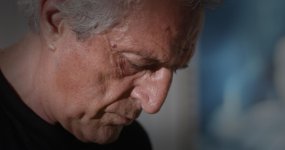
Pulling portraits from motion...

Christopher Barrett

Well-known member
Joined
Sep 30, 2010
Messages
1,518
Reaction score
0
Points
0
Location
Chicago
Website
christopherbarrett.net
A client of mine (whom I usually shoot architecture for) asked me to do head shots of the office. Fortunately Architects are fairly stylish, at least in Chicago. I decided to shoot it all on the Epic and pull stills from the motion. I explained the process to them and they were totally on board. No having to capture the perfect moment, no flash going off, just stand in front of the camera and "work it" for about 60 seconds. We were all really pleased with the results! Here's one of my favorites...

56813_4527153091958_1476555721_o.jpg
 
I plan on doing this also. What shutter were you at? Did you increase the fps also or is that unnecessary of you are at a high shutter?

Well done!
 
I plan on doing this also. What shutter were you at? Did you increase the fps also or is that unnecessary of you are at a high shutter?

Well done!

Better do high shutter than speed since you then can stay at less compression.... even go down on speed and super low shutter angle not to collect stupidly amounts of frames if you only go for the stills.
 
i just shot a lookbook for a client and convinced them to do the same....results are great, the only issue is the editing....i usually send the client a link to an online gallery, they browse though it and give me their picks....putting all the footage in a video stream online and have the client write down the time for each frame does not make a lot of sense...i ended up pulling my fav stills out of the footage....how did you handle this? i guess the way would be to do it on set?
edit: i shot everything in 4K since i am only on a lowly scarlet and wanted motion as well....
 
Last edited:
You can't post such a beautiful portrait shot without a full workflow!

Lens / Supplementary Lighting / FPS / Shutter / Post-workflow

Enquiring minds need to know.

And I don't know about others, but I'd love to see more.
 
Looks great!

Just today I was reviewing footage at 100% in RedCine-X, and the talent said "Wow, and that's video? I could print that!"
And that was at 4k.
 
Thanks! I'll post more as they come down the pipeline.

Epic @ 5k
Cooke Panchro/i 50mm wide open at T2.8
ISO 800
3:1 Compression
RC3 / RG3
24fps @ 1/60 to freeze the action, still had some blurs on moves... maybe do 1/100 next time
1 Diva over Camera, the rest is ambient
RCX: Pulled up the hilights and dropped the shadows to almost clipped/crushed. Added a bit of Alchemy and processed out the 16bit TIFF
Photoshop: retouched, selectively sharpened, desaturated and added a nice fat s-curve

That's the general gist of it...

CB
 
Thanks! I'll post more as they come down the pipeline.

Epic @ 5k
Cooke Panchro/i 50mm wide open at T2.8
ISO 800
3:1 Compression
RC3 / RG3
24fps @ 1/60 to freeze the action, still had some blurs on moves... maybe do 1/100 next time
1 Diva over Camera, the rest is ambient
RCX: Pulled up the hilights and dropped the shadows to almost clipped/crushed. Added a bit of Alchemy and processed out the 16bit TIFF
Photoshop: retouched, selectively sharpened, desaturated and added a nice fat s-curve

That's the general gist of it...

CB
did you choose the frame or did you have the client scrub through the clip right there and then to get the expression they wanted......i am not sure how to deal with that side of the shoot regarding the stills.....
 
Frame grab

Frame grab

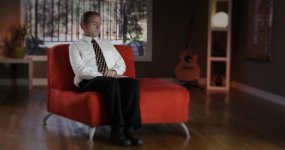
Here are few frame grabs from my Scatlet.
 

Attachments

  • image.jpg
    image.jpg
    70.1 KB · Views: 0
  • image.jpg
    image.jpg
    70.4 KB · Views: 0
  • image.jpg
    image.jpg
    91.7 KB · Views: 0
They all look great, Christopher. Thank you for the setup and proceesing details. From my limited experience, 1/125 to 1/250 sec seems best compromise for limiting motion blur in portraits.
 
Nice work! I can't say I love your grading - not quite natural enough, but I must admit that it does work anyway.

Is the client keeping the images in that aspect ratio? I think that wider/cinematic ratios looks great for photos. But... I was thinking... if your finished images required a more conservative aspect, maybe place the subject right in the middle of the frame so that you can crop from either side or both sides as required - freedom to crop for the photo editor, in one direction at least. Just thinking aloud. Your thoughts?...

Shapour, thanks for posting those. I notice some yellow-ish skin tones in places on two of the frames you posted. Why would that be? Anyway, it's good to see from the images in this thread that you can get very sharp images from the RED sensor. I see a lot of soft frames being posted in other threads and I hope that potential owners aren't seeing those first.
 
Back
Top