Welcome to our community

Be a part of something great, join today!

  • Hey all, just changed over the backend after 15 years I figured time to give it a bit of an update, its probably gonna be a bit weird for most of you and i am sure there is a few bugs to work out but it should kinda work the same as before... hopefully :)

Problems with 4K HD and Red Rocket

Björn Benckert

Well-known member
Joined
Dec 5, 2007
Messages
7,423
Reaction score
74
Points
48
Age
52
Website
www.syndicate.se
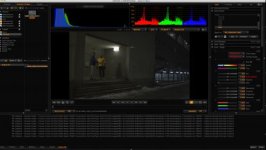
I'm having serious issues trying to convert material shot in 4K HD with the Red Rocket. I get "error decoding frame" errors. In software it works fine (albeit slow) so this is a Rocket issue.

I've tried reinstalling the latest firmware and driver and naturally I'm running the latest version of everything.

See attached screenshot for error messages.

Known problem?

I have a still frame extracted that gives the same error. Available for download from my dropbox: STILL.R3D
 

Attachments

  • Screen Shot 2012-02-21 at 17.29.28.jpg
    Screen Shot 2012-02-21 at 17.29.28.jpg
    18.8 KB · Views: 0
Bjorn cant see your picture its very unclear.

So to be clear
you cannot transcode using REDrocket but when you turn the rocket off it transcodes the entire clip just slow?

Few things
Try older software versions like 506 and also try RCX pro version 4 and 7.
 
Bjorn cant see your picture its very unclear.

So to be clear
you cannot transcode using REDrocket but when you turn the rocket off it transcodes the entire clip just slow?

Few things
Try older software versions like 506 and also try RCX pro version 4 and 7.
ok.. Where do i find those versions?
 
Bjorn,

Can you provide more detail? What format are you transcoding to? What is your output resolution? Do you have a crop set?
If you email verbose logs to redcinex at red dot com I can take a look.

Thanks,
David
 
Thanks Big Lu,
Tried to render in old redcinex (do not know what version) and it's chewing the files with no problem. It was not our camera so I guess or assume that the firmware build on the camera was old or such. Have not tried the 4kHD on ours since last update so I do not know.

Again thanks. It's those little advices that keeps the ball rolling in the right direction. Client is super stoked, he now knows that reduser is a gift from god. :)
 
Bjorn,

Can you provide more detail? What format are you transcoding to? What is your output resolution? Do you have a crop set?
If you email verbose logs to redcinex at red dot com I can take a look.

Thanks,
David


I transfer to proress proxy 1280x720 and ignore my last post... red cine x 501 does not do the work it gets super slow and render black files... now I download redlinex 506 see how that goes.

Does not do any difference black frame in viewer and render super slow with red rocket on for viewing and decoding.
 
It give a first picture in the viewer then when playback it's only sound. The renders does not work. I will now try to reinstall the firmware.
 
Bjorn,

It appears you are having more than just transcode issues. Can you please send verbose log files to redcinex at red dot com? Just zip your log folder if you can.

Thanks,
David
 
Thanx for being on my case. I do not know where to find the log file... here is a link to a screen dup of the status list...

http://www.syndicate.se/Files/~usr/film/PastedGraphic-1.png

You right now it does not look like a file error... since non of my files can be rendered... so I guess it's a rocket thing.


I can reboot everything (red rocket raid and laptop) and then start up redcinexpro and play a clip then when going to export it goes trough and starts to render but it goes slow and slowern and then the status error messages starts adding up...
 
I had a similar issue, seemed to be a conflict with TB raid and the red rocket, had to go back to individual external hard drives, for now.
 
Back
Top