Welcome to our community

Be a part of something great, join today!

  • Hey all, just changed over the backend after 15 years I figured time to give it a bit of an update, its probably gonna be a bit weird for most of you and i am sure there is a few bugs to work out but it should kinda work the same as before... hopefully :)

Peter Jackson's Hobbit blog...

I think that's an incredibly unfair criticism of us trying to bring a real problem to light and find its solution. There is a genuine problem with red sensors and television make-up and we've attempted to be constructive about it. Those make-up teams have been working for years with certain parameters and they're the only make-up artists that specific celebrity talent will allow to be used. Having them change their entire method for one or two days on a camera they rarely ever see isn't the easiest thing for them to do, or to be asked of them. The easiest solution would be to use a different camera.

The Red is great, but it's not perfect and there's always room for improvement. If this is the only camera having this issue, then it's the odd man out and it's easy to have the finger pointed at it and have suggested that something else be used. Don't mistake constructive criticism and genuine offers to help solve the issue as complaining, because that's certainly not the case here.

You state "There is a genuine problem with red sensors..." - could you care to elaborate what makes one come to the conclusion that it is a hardware issue with RED's sensors and not a color science issue, i.e. software?
To my knowledge it would be a world first if it is confirmed that a piece of silicon behavied differently with skin tone color frequencies than other frequencies.

Have Graeme or RED confirmed it to be a sensor issue and not a color interpretation, i.e. color science issue?

This is a know issue in stills photography that a lot of make up mis-behaves under strobe lighting or cheap tungsten lighting from IR heavy sources) which contains a very skewed balance of UV/IR/Visible-light, but that professional make up should behave this way under "normal" light including daylight sounds a bit strange - it must be a different phenomen at work.

I know that Hasselblad supposedly spent a lot of effort tweaking their colorprofiles for their MF digital backs, with respect to skin tones, some years ago. The approach was to make sure the very narrow band of skin tones was firstly mapped 100% correctly to avoid any artifacts caused by small hue shifts in that band of hues and secondly to "enhance" skin tones by deliberatly manipulating the response in the skin tone area to make them "nicer" to th eviewer. If it really is a color science issue it should be reproducable regardless of using make-up or a color pigment. If it does matter if make-up or pigments are used, it indicates an non-natural response to the light source beeing used. Hence it should be a issue with the light source, filtration in front of the sensor or a combination - the silicon itself cannot have such a behaviour regardless of what one might think.

It will be interesting to hear what you find though, I only hope that you check really good the actual make up and its respons to IR and UV light as well. The argument that other cameras doesn't show it could also mean that these cameras have adressed the skin tone issue in software. It doesn't have to be a physical sensor issue.
 
Here are some brands that have proven problematic and some that are ok. It's been difficult to pinpoint if an entire brand is no good or just certain tones, mostly because the tests I have done happen on a prelight day where we have a rig to put in and the artists time is limited or on a shoot day where we are just trying to fix it and save our asses.

If I've had a problem with it, the brand goes on the list. If there was a way at the time to easily get the exact product number I did. But some brands don't seem to have them - in which case I just wrote down the brand. The brands on the GOOD list have never given problems, but that's not to say there don't exist tones within those brands that won't in the future. I just started creating this list recently- definitely should have started much sooner but there are so many brands and hundreds of tones it seems a daunting task to catalog all of them. If anyone can add to this list please do.

NO GOOD
Visiora (PL 006) and maybe all Visiora
Bobby Brown
"HD makeup"


GOOD

Gerda Spillman (CH-8134)
La Mer Tan
Armani
Loreal Tru Match Cool

Apparently the other thread you linked to (on page 4 of this thread) has been deleted... In it some people listed a few products that caused the issue... I didn't get to write it down... Would love to add them into your list.

Redteam... Is there a way to retrieve that info?
 
You state "There is a genuine problem with red sensors..." - could you care to elaborate what makes one come to the conclusion that it is a hardware issue with RED's sensors and not a color science issue, i.e. software?

I should clarify to say, "There is a genuine problem with Red cameras." Whether it's the sensor, or the color science. We're obviously hoping it's the color science and a tweak can be done.

I reached the conclusion because the issue doesn't seem to happen on Alexa, F35, F950, HVX200, 7D, 5DII, D7000, F3, etc.
 
That Peter jackson blog showing technicians over colorising all there sets and actors makup really had me scratching my head... I get what ever skins tones I want from any subject i shoot.., I can key anything in Resolve or flame and exaggerate, pull up or pull down with such ease any colour I want....

Mark, the impression that I got from the video - and I could be dead wrong here - was that they were planning on desaturating the entire frame to bring the psychedellic forest colors to a more subtle level. If they pump up the skintones on set, they will have to do less work to get normal skin relative to the processed forest. I would venture a guess that they did this so they are recoding more dynamic range in the color channels, which could give them more ability in post to make the colors selectively pop or shimmer or key them for other VFX funny business. Or, it could ensure that there is a visible effect that wouldn't risk getting lost if it was too subtle on-set. Seems they are shooting to maintain options, achieve a specific goal, and reduce effort to spot-correct skin in all the shots. Again, this is just a guess on my part; we'll find out when we watch the film. I'll be they did plenty of tests beforehand like anyone would, and as we know that Red can capture pretty darn good skin in the first place, there must be some specific clever reason they did this. For my part, I'm very curious about the details now!
 
...so, picked out a name for your Scarlet yet?
 
Last edited:
CJ, I am with you on this. I shoot a LOT of skincare/beauty commercials, there are probably 10 or so on the air right now that I have shot with Red or Epic.

I have found the issue to exist under tungsten light usually very diffuse tungsten light (I do not think I have ever seen it under daylight balance). Yes, some make-up will look totally fine to the eye and look super splotchy to the Reds! They appear as yellow patches on the face. It can be troubling on a skin care spot because it can send everyone into a major tailspin on set. I have also seen purple-ish lips under these conditions. To me it always seems worse on the on set monitors and not as bad when looking at the RAW files later and it has always been corrected/graded fairly easily.

A big part of me thinks it could be some kind of IR or related to the OLPF under tungsten with yellow based make-ups. These conditions push a daylight sensor way into the reds and yellows, there is not much blue to be had. Perhaps Grahme can narrow down the very finite frequency differences and address it with the color science. I am going into another big 5 day skin care shoot next week, I will see if I can snap some pics and pull some stills if I see any issues.

I don't mean to diss my cameras here I love them and I love the way they work and allow me to work! But, I do have to call a spade a spade, the tungsten skin thing needs a tune-up.

Thank you Red for listening!
Rich
 
CJ, I am with you on this. I shoot a LOT of skincare/beauty commercials, there are probably 10 or so on the air right now that I have shot with Red or Epic.

I have found the issue to exist under tungsten light usually very diffuse tungsten light (I do not think I have ever seen it under daylight balance). Yes, some make-up will look totally fine to the eye and look super splotchy to the Reds! They appear as yellow patches on the face. It can be troubling on a skin care spot because it can send everyone into a major tailspin on set. I have also seen purple-ish lips under these conditions. To me it always seems worse on the on set monitors and not as bad when looking at the RAW files later and it has always been corrected/graded fairly easily.

A big part of me thinks it could be some kind of IR or related to the OLPF under tungsten with yellow based make-ups. These conditions push a daylight sensor way into the reds and yellows, there is not much blue to be had. Perhaps Grahme can narrow down the very finite frequency differences and address it with the color science. I am going into another big 5 day skin care shoot next week, I will see if I can snap some pics and pull some stills if I see any issues.

I don't mean to diss my cameras here I love them and I love the way they work and allow me to work! But, I do have to call a spade a spade, the tungsten skin thing needs a tune-up.

Thank you Red for listening!
Rich

This sounds like what I encounter. When I was shooting red MX the issue was more pronounced on the monitor as we could only view Redcolor/Redgamma. Grading with rg2/rc2 helped a bit but didn't fully solve the problem. Now with epic, shooting with saturation 1.3 and contrast .4 as an on set viewing LUT the issue is a bit less pronounced but still very present.

I believe it's a color science thing. I almost always shoot with an 82c or 80d filter in front of the lens which can bring the tungsten light to 4400 or so. The problem is still pronounced even with this filtration but I believe it to be much worse without the filter. I have seen it occur under daylight balance as well - although the time I am thinking about was shooting a Kohl's commercial which was likely under cool white fluorescents. I do think you are on to something about the blue channel. Im looking forward to the opportunity to shoot some tests and get Graeme some footage.
 
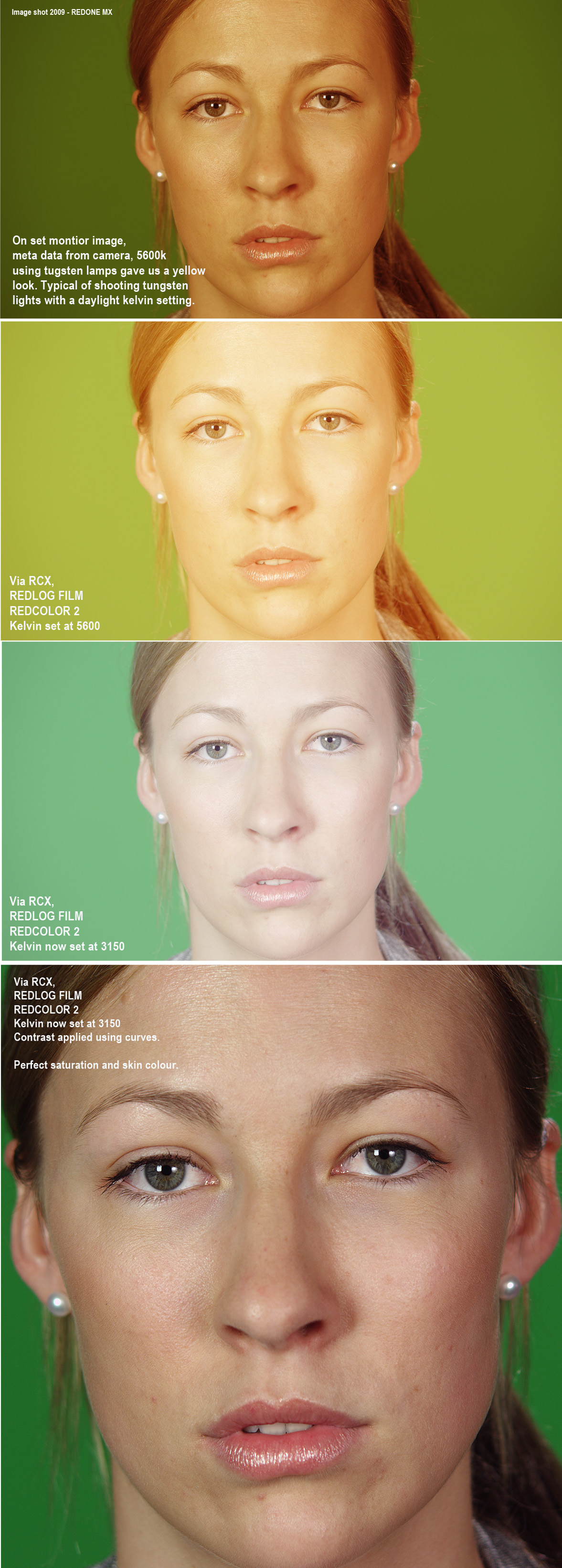
I'm still not sure about this skin colour / make up issue thing... that people are talking about.
I have just climbed out of resolve and RCX doing some simple tests with a subject lit with HMI, Tungsten, a cheap flouro tube and day light.

I could skin tone match them all perfectly indentical even in RCX, Resolve even quicker and easier.. (other than the different shadows the lights gave).
Working from a RAW file you can do anything you want... seriously.
Its the guys with RGB baked colour files like from the ALEXA shooting in PRORES thst has the issue your talking about...
but when working from RAW and grading from a kelvin correct white point from any different light source. I seriously make look skin look natural and perfect every single time.

Grading in camera using an onset monitor is a joke right?... Using your cameras colour settings and transcoding from that point is also a joke right?..
not unless you have a perfect colour corrected monitor onset in a suitable viewing environment.... then you have know hope of success.!

The only start point to grade from is FLAT REDLOG or REDLOGFILM, (REDCOLOR 2). Then set a perfect kelvin and tint balanced base so you get the most neutral whites possible, and grade directly from the R3D's. Not some transcoded DPX with backed in colour information... specially from a backed in colour PRO RES FILE... sheeesh! Your mad if you start from any other point other than pure white!

I see this mistake time and time again... I always here people saying RED looks like video or red skins looks bad... then I get there files and show them in there own laptops what they are doing wrong.. all of a sudden, there ugly coloured images with incorrect kelvins and tints are beautiful again... then they look at me like with those. HOW THE FUCK did you do that face!!!!

Your not shooting a video camera guys, your shoot a RAW DATA capture camera! use the RAW files properly... don't waste what they give you.

Also you don't need to put filters on it.. thats like crazy!!!!! you can shoot the 3200k scene and set the camera to 8000k.... giving you the ugliest image out there! and it can still come back to normal!.
On set colour settings can be deleted and new ones applied years later... its RAW everyone, RAW!!!!! You can completely screw up on set (not the exposure) but completely screw up your color settings and it does not matter... thats the power of RAW!!!!

Look...

RAW_change.jpg
 
I'm still not sure about this skin colour / Make up issue.
I climbed out of resolve to do a simple test with a subject lit with HMI, Tungsten, a cheap flouro tube and day light.

I could skin tone match them all perfectly indentical even in RCX, Resolve even quicker and easier.. (other than the different shadows the lights gave).
Working from a RAW file you can do anything you want... seriously.
Its the guys with RGB baked colour like the from the ALEXA shooting PRORES thst has the issue your talking about... but when in RAW and grading from a kelvin correct white point from any different light source. I seriously can look natural and perfect every time.

Grading in camera using an onset monitor is a joke right?... Using your cameras colour settings and transcoding from that point is also a joke right?

The only start point to grade from is FLAT REDLOG or REDLOGFILM, kelvin and tint corrected base so you get the most neutral whites possible, and grade directly from the R3D's. Not some transcode DPX with backed in colour information... specially from a backed in colour PRO RES FILE... Your mad if you start from any other point.

I see this mistake time and time again.. Your not shooting a video camera guys, your shoot a RAW DATA capture camera! use the RAW files properly... don't waste what they give you.

Nobody has been talking about grading from a monitor on set. I was referring to using contrast and saturation settings as a viewing LUT on set to observe the problem during shooting. Yes, you can grade images any which way you like from the raw and get to the same place. This is not what we are discussing. If you read the whole thread we are discussing an issue where certain makeup causes splotchy, patchy green/orange tones. Because the makeup appears as a different tone than the skin as represented by the color science used during RED RAW development, it is more difficult to grade out. It requires tracking power windows and secondaries. Sometimes it is not practical to do this- like when you are delivering hours of graded footage to a client for a toolkit. This is one of the reasons I am interested in troubleshooting this issue.
 
Nobody has been talking about grading from a monitor on set. I was referring to using contrast and saturation settings as a viewing LUT on set to observe the problem during shooting. Yes, you can grade images any which way you like from the raw and get to the same place. This is not what we are discussing. If you read the whole thread we are discussing an issue where certain makeup causes splotchy, patchy green/orange tones. Because the makeup appears as a different tone than the skin as represented by the color science used during RED RAW development, it is more difficult to grade out. It requires tracking power windows and secondaries. Sometimes it is not practical to do this- like when you are delivering hours of graded footage to a client for a toolkit. This is one of the reasons I am interested in troubleshooting this issue.

ok...

does max factor have a camera forum to go to then. :))) kidding.
 
Back
Top