Welcome to our community

Be a part of something great, join today!

  • Hey all, just changed over the backend after 15 years I figured time to give it a bit of an update, its probably gonna be a bit weird for most of you and i am sure there is a few bugs to work out but it should kinda work the same as before... hopefully :)

PARALINX ARROW - Wireless Uncompressed HD Transmitter System. Ships June 15th 2012

Status
Not open for further replies.
Existing Paralinx p-tap cable is a good, robust solution. Bought an extra from Abel Cine to build into a directors monitor. If you have DIY chops, and time to wait for a shipment from China, you can buy a regulator on ebay, buy a p-tap plug from B&H, and solder a usb port or 12V pin onto the other end. You might save a few bucks, but frankly the Paralinx cable is worth it when you factor in the value of your time.

I've zip-tied my TX to a short noga arm fashioned as a "mast."

For handles for the directors monitor, I bought the DSLR rig from Alzo VIdeo. RIgid, inexpensive, and fits the Marshall 7" monitor like a champ.
 
Hi All,

In the effort to fully educate myself with Paralinx Arrow and anything I might need to know - I read through the 300+ posts in this thread. About halfway through, I started to compile a bunch of relevant info for fellow RED Users that might not have the time to read everything. The following is a lot of the info I found. There's a bunch that I didn't grab but I think this still might help a lot of people by having a ton of the information all in one place. All of the info below is from Dan Kane's posts on this thread... Here it is:

===========================

It requires 5V Power on either side to run. We include One D-Tap Power supply which also could charge your Cell Phone or iPad from a D-Tap (aka P-Tap port)
The receiver side also requires 5V power and we have a bunch of recommended 5V USB batteries that are not expensive, or you can purchase an additional D-Tap to USB power cable with an appropriate receiver lead.

Please note that range is UP TO 320' Line of sight. Results vary depending on conditions. Generally we've never had a shorter range than 150' even in heavy interference.
======================================
We have tested up to 6 systems concurrently in the same space and they work great together (one to one) – no interference with each other
======================================

Regarding HD-SDI - it's very easy and affordable to implement HD-SDI externally using a Decimator 2 or Blackmagic Battery HDMI/SDI converter, and the upcoming bi-directional Decimator SDI/HDMI product will be an excellent accomplice. I know that a lot of people are saying "I don't want to hang any more stuff off my rig" - it's still smaller than many competitor rigs, draws less power, and is still way cheaper. And the range is not half bad.

Oh and latency - ultra low latency is important for showing picture to directors and producers.

About One to Many Transmission:

It is something we would really like to do, and we are evaluating whether it is something achievable by a user serviceable firmware update, or whether it has to be introduced in a special upgrade kit.

It's "Possible" - but we are using 128 bit encryption in order to guarantee that actors won't be the subject of "wireless Paparazzi" rips done over the air outside the studio lot or on location.

Our goal is to maintain security, while also giving our users the most capability (including one to many broadcast transmission) without compromising cost, or effectiveness and range.

The best way we can please our customers is by giving them maximum achievable quality NOW, and doing what we can to offer Broadcast in the future.

One possible solution for a situation like this is to send from the Camera to a Video Village/playback Cart, distribute to monitors on the cart utilizing SDI from a DA, and then if you need a second wireless feed (like a producer/client village) you can redistribute the signal out to a secondary transmitter and blast that to the producer village.

I'm going to do some very informative videos in the coming weeks to show every facet of configuration and how to get the best results from your system.

It's not just about being a good product, but also being an educated User. There are ways to get more range through placement and mounting, and ways that you can achieve optimal results - it just takes knowledge and planning - and PARALINX wants to help you with that.

Here is what is included in the kit:

1xTransmitter
1xReceiver
1x IR remote configurator
1x USB a/b mini cable
1x AC/USB power plug
1xD-Tap to USB Power Cable (can charge ipad,iphone, other devices)
1xAC to Receiver Cable
1xManual

we also offer a D-Tap Kit for the receiver side which includes:

D-Tap USB Cable
USB to Receiver Power Cable

You can also power the receiver with a decent USB battery.
My favorite one is this one:
http://www.amazon.com/Lenmar-PPW66-P.../dp/B005DTJI7Y
Lasts 6+ hours. Really a nice battery and not terribly expensive. You can get cheaper, but this is Legit.

We also can custom make Fischer to ARROW power cables as necessary if you request them via our distributor.
=================================


remember to activate your HDMI on your Epic or Scarlet if you are sending straight from the HDMI port
it's in the 5Ghz unlicensed band.

The ARROW transmits in 4 band ranges


1. 5150 - 5250mhz
2. 5250 - 5350 (able to be turned on and off in the on screen display) mhz
3. 5470 - 5725 (able to be turned on and off in the on screen display) mhz
4. 5725 - 5850 mhz

and is capable of utilizing Dynamic Frequency selection in the various bands to avoid interference.

Transmission power is less than 50mw.

==============================

I'd love to allow some users to chime in on the heat - but I can say that we have worked with our chipset fabricator to make sure that thermal dynamics are one of our top priorities.

We have had zero reports of our commercial, professional grade units overheating in the field, and never have had problems in our testing running 12-14 hours a day on shoots.

===========================

Decent source on a USB to Barrel connector that we confirm to be working:
http://www.bixmart.com/USB-DC-Power-...-Z4_p_138.html
Z4 Cable to G5 tip connector combo

==================================

the P-Tap to 5V regulator cable could be tested by applying a DC voltmeter to the USB power output of our included P-Tap cable - all of the 5v dongle cables are designed to regulate down to 5V - perhaps you received a bad one)


As I'm understanding it may be possible that you connected a 12-14v power source directly to your _receiver_ not your transmitter, (5V barrel jack)

We include a P-Tap to 5V USB regulator in the package, and it is specifically made to regulate 12-17vDC down to 5V for the Transmitter side (or the receiver side if you have the appropriate USB to 5V 3.5*1.35mm barrel as I illustrated in the previous post).

Just to clear the air and make sure there is NO confusion about the product:

Our Transmitter and receiver both accept a MAXIMUM of 5v DC input.

our Transmitter powers via 5v usb B mini cable.

our receiver powers via a 5V DC barrel jack 3.5*1.35mm with center pole positive.

If someone applies 12v dc to the barrel jack on the receiver your unit will no longer function.

the Power Tap units that we INCLUDE in our package are designed SPECIFICALLY to regulate 12-17vdc down to 5v DC for your usage - they were all tested carefully before shipping - but sometimes a regulator can fail. We will test Steve's as soon as we receive it in RMA.

I just wanted to make sure there is no misunderstanding that something is not being correctly shipped or explained with the product.

Abel has not yet contacted us with an RMA for this particular unit, or actually any unit from Abel - so, just wanted to let everyone know where that stands
========================================

Something I discovered at Panavision the other day:
At Panavision they don't really offer P-Tap as a connection option - but they did have these old Funky ENG P-Tap passthrough boxes that have an AUTOMATIC LIGHT CONTROL for P-Tap.
This is something you should be EXTREMELY WARY OF WITH ANY ACCESSORY OTHER THAN A TUNGSTEN LIGHT.
This device is a secondary regulator which when fed into oure regulator will cause a harmonic imbalance and destroy your unit.
_DO NOT_ under any circumstance plug your ARROW power supply into an AUTOMATIQUE unit (or be sure that AUTOMATIQUE IS SWITCHED OFF AND CANNOT I REPEAT CANNOT BE TURNED ON)
http://antonbauer.com/Products/Categories/GoldMounts

============================

our device transmits audio that is in sync to the picture (assuming the audio you feed it is in sync to the picture ;)
There is no compression, and the whole system has less than 2ms delay from tx to rx.

============================

My workflow for setup would be:
Use a voltmeter to check that the polarity of your D-tap/P-Tap is wired correctly. People sometimes wire them creatively (aka wrong).
Measure the power coming from your D-Tap. Make sure there is not more than 24v coming from it for some reason.
Make sure there is not another regulator between the D-Tap and the battery. The D-tap should be "line voltage" for your battery. Double regulators=strangulators.
I'd recommend anyone buying one of these to plug it into your mains power and make sure that the blue lights come on all around. We test each one very carefully at the factory and they go through several layers of quality control.
Don't get creative with your power solution without checking with us first - a lot of people have decided to modify their power source or use their own power source, and some have even plugged 12v into the units. Whoops There goes your device.
 
There's a limit on the amount of characters per post - here is Part Two of compiled information:

=========================

Another note - We believe that Non-US users MAY experience voltage issues using the included US AC power supplies with their units IF THE POWER IS FLUCTUATING OVER 220VAC. If you are overseas or uncertain about power stability - please use a voltmeter to check that the voltage on your 5V supply does not exceed 5.15V. Best to use the DC/DC cables - OR if you have the need to power it with AC - please find a localized power supply that does not put out more than 5.15v dc.

Standard Ipad Chargers that output 5V at 2.1A are capable of running your transmitter and receiver, so if you have power that fluctuates or is over 220VAC, then we recommend finding a

Sorry for the hassle, but if you are a non US customer please test your AC power supply in advance as this was a US Region product (where we are based). Please feel free to request Regionalized power cables from your distributor - they may or may not be able to provide them (we don't make power cables for every region yet.)

======================================

For aerial work please email me and I can help you make a custom cable.
Dan at Paralinx dot net

======================================

We include one Female/female HDMI connector and one HDMI cable with our current configuration; both normal. transmitter is male hdmi, and receiver is female port

======================================

For a good battery solution I recommend the lenmar power port 6600 from amazon.com - around $50
Also some great 2.1 amp USB batteries on www.bhphotovideo.com

=======================================
We will be _announcing_ the one transmitter to 4 ultra secure receiver solution in November along with details of how it works and accurate time frame.

All Current and future owners will be given the opportunity to Go Multicast (one transmitter to multi-receiver) when it is ready.
There should also be some other exciting new stuff to showcase in November
========================================

you could use something like this to split your P-Tap ports - Anton Bauer Power Tap Multi from Abel Cine:
http://www.abelcine.com/store/Anton-...male-Powertap/

Or you could get an Anton bauer or V mount battery plate with multiple ports - depends on what you want to spend and whether you would rather change your battery plate or add a little dongle piece.
======================================
The receiver draws 2 amps. 7ah should do around 3-3.5hours.
A 1amp battery will run the receiver but range might be mildly restricted.
=======================================

http://www.youtube.com/watch?v=dUq1t9WWRNk
Paralinx Shield – video

http://www.youtube.com/watch?v=xAkfHCyNcHg&feature=player_embedded
Paralinx ARROW + SHIELD on set of a Commercial

================================

Rest assured we are taking care of All of our customers, and we are going to be making improvements to our product line over time. We incorporate your feedback into what we are making, and we have a No User Left Behind policy - we guarantee you won't be Penalized for being an early adopter. I can't say that we can afford to be as amazingly generous as Red Digital Cinema has to its Red One customers - but we will do our darndest to make features, and improvements available to you in a way that is fair to everyone.
 
Amazing Mitch. I missed your PM because my iinbox was full thanks a ton. Let's talk by email when I get off the commercial iI'm working on.

Best,

Dan

Sounds good. I sent you a regular e-mail. Would like to order "Shield" asap... Take my money!! :smiley:
 
Anyone success to get the audio out from Epic and Scarlet ? I still can't get the audio out from Epic and Scarlet.

Firmware v3.2.2.1
 
Anyone success to get the audio out from Epic and Scarlet ? I still can't get the audio out from Epic and Scarlet.

Firmware v3.2.2.1

Yes, I've shot with recent beta firmware, one or two releases back and it fed the audio through HDMI into a monitor no problem. Was very convenient for Client Playback.
 
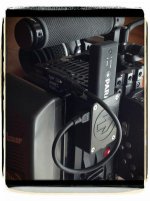
Thought i'd post a quick pic of my Arrow mounted on Epic #22 using the new Shield. Makes the HDMI port on the Arrow somewhat disposable now :-)Power is via Viewfactor's Anton Bauer battery plate with VF's little P-Tap to USB adapter.Cable is a real short Micro to Mini USB cable via Ebay. Neat & simple. just how i like it


8328927076_cb8090aeef_z.jpg
 

Attachments

  • sheild.jpg
    sheild.jpg
    57.2 KB · Views: 0
That's a great setup Jason. i imagine it works very well. Almost like its not even there.
 
I have three paralinx units on the television show Justified. When they are set up correctly they work like a charm. They are tiny. Video as clear as being hard wired. A pure luxury to not have to cable everything. It allows for freedom for the three cameras in use at all times on Justified. This is what all of us have been waiting for. It works, the range is amazing, no noticeable delay like some units, and the price is ridicules. A unit like this should cost three times the amount charged. Go buy one now. I'm telling you it works with an amazing range. Francis
 
Hi Danu,

I think the new beta build from Red includes audio out of the HDMI port - I have not checked it out personally yet.

Best,

Dan


Errgghhh...it's a very annoying...build v3.3.3 can use both HDMI and SDI at same time...Need the release version since I'm on commercial shoot right now..
 
I have three paralinx units on the television show Justified. When they are set up correctly they work like a charm. They are tiny. Video as clear as being hard wired. A pure luxury to not have to cable everything. It allows for freedom for the three cameras in use at all times on Justified. This is what all of us have been waiting for. It works, the range is amazing, no noticeable delay like some units, and the price is ridicules. A unit like this should cost three times the amount charged. Go buy one now. I'm telling you it works with an amazing range. Francis
Hi Francis,
would you please tell us a bit more about the "when they are set up correctly" part ? Any advice on that ?

thanks :)
 
That wireless system looks pretty cool on paper at a rather decent price. Has anyone got to use it yet?
 
I have been using this system since the end of June. It is rock solid. So far, I haven't needed to place the director's monitor over 150 ft from the camera, but the signal has always reached. The other day, the monitor was in one room and the camera was 3 rooms and 60 ft away and the signal passed through all 3 walls and generated a clear signal. I have been very happy with its performance.

Also check out what Francis Kenny had to say in post 332 above.
 
The Arrow is really great. I was delaying the purchase of it for budget reasons, and then I spent three long shoot days with a 35 foot, thick gauge HDMI cable hanging out of the back of my my baby. After the fourth person tripped over my video tether, I decided that it was time to get the Arrow and I haven't looked back since.

It's tiny, no delay, huge range. And being wireless increases the value of my kit, as well.
 
Thank You Francis, Steven, and Larry - we appreciate your business and your feedback.

One of our big objectives right now is to have some informational videos ready for you by next week - I think a video demonstration is worth 100^10 words.

Part of what I think Francis is talking about is regarding configuration.

The Antennas inside the units are on the opposite end of the signal input port - so if you point your receiver and transmitter relatively in the same direction as each other you will have better range. It is also beneficial to elevate both sides anywhere from 4 feet from the ground to 10 feet from the ground (obviously easier on the receiver side if you are using a C-Stand to have a receiver station.

Additionally wrapping three receivers together with tape does not constitute a good way of bundling them - both from a thermal and an RF standpoint.

If you are using 3 receivers - they should ideally be 24 inches apart or more - so like a tree of two or three setup on a C-Stand with some grip heads is a nice way to do it on a big show.

A lot of this will be covered in the video which we are hoping to share all the normal basics, as well as a set of best practices for best results.

Thanks All!

Dan Kanes
PARALINX TEAM
 
Status
Not open for further replies.
Back
Top