Welcome to our community

Be a part of something great, join today!

  • Hey all, just changed over the backend after 15 years I figured time to give it a bit of an update, its probably gonna be a bit weird for most of you and i am sure there is a few bugs to work out but it should kinda work the same as before... hopefully :)

Paradigm shifts in fashion photography - the pictures need to move...

Joined
Jul 26, 2011
Messages
53
Reaction score
0
Points
0
Location
Heading back to the US
Website
www.iris32.com
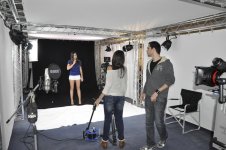
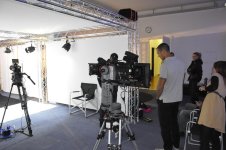
Stills and motion, both are needed for the new e-magazines - less resolution and better optimized for digital distribution. Just to share some information about our experience shooting stills with RED. To make it short this is our conclusion:A LOT OF LIGHT (5600 K) and good skills with REDCINE and the picture quality gets amazing. I am posting some shots from our new fashion studio facility in Zurich. We have been experimenting with low cost LED COB lights combining 4 x 100 Watt 5600K and 2 tuneable 100 Watt 16M colours RGB COB lights. After a series of some hundred test we are now getting amazing results after grading in REDCINE X, specifically using the Alchemy function. We will upgrade the lights now to 12 COB units.These are the first test shots. I will post much better results in the next weeks, meanwhile a glimpse about the future of fashion casting, SEDCARD's will soon retire, thanks to RED http://www.cast32.com/book/display/talent/B001-B001-B059.html. Anyhow who needs thats useless paper in the era of IPADS and electronic displays. :)
 

Attachments

  • COB LED LIGHT.jpg
    COB LED LIGHT.jpg
    93.2 KB · Views: 0
  • COB RED SETUP.jpg
    COB RED SETUP.jpg
    91.7 KB · Views: 0
Last edited:
agreed, I do very similar work in Australia. can I ask what you mean by the Alchemy function in redcine ?

Hi Dominik, Alchemy can be found in REDCINE-X Pro under your look controls in Look:Effect:Alchemy Group. Make sure you check the box under Post:Look:Effects to enable it. It will add to your encoding times and it is not supported by hardware acceleration. But, it provides a very powerful and unique control of the look of your material. Similar effect to a local contrast adjustment.

It's been around for a while, give it a try!
 
  • Thread starter
  • Banned
  • #4
If you open REDCINE X PRO on the right side in the LOOK bar scroll down and you will see a group of sliders called the ALCHEMY GROUP. There you can change the values for SKIN, CLARITY and ALCHEMY. These settings are amazing to use when you have skin. I have attached 2 examples, one without ALCHEMY and one with.
 

Attachments

  • WITH ALCHEMY.jpg
    WITH ALCHEMY.jpg
    50.2 KB · Views: 0
  • WITHOUT.jpg
    WITHOUT.jpg
    53.4 KB · Views: 0
For skin smoothing there's the "skin" function in Alchemy Group... but it tends to bloom pretty quickly. Using Clarity (or negative clarity) blurs/smooths pretty good too...

Render times go through the roof though... That said, after using them it's hard not using them.
 
I have been shooting fashion stills including covers and videos for various magazines for the last year.. and all the mags are large format publications.. ( check out my other posts). WE have always had great results... Just like analogue pics, if you expose correctly all is good.. but the real key to technologically quality stills and motion is to black shade properly and that is not just turning on and shading.. we always heat the epic up to around 60, let it then cool to normal op temp around 39 and then black shade...It makes a huge difference if you do it this way.
The magazines love the results...None have ever complained because the quality is excellent I just wish the sensor was wider for when we shoot verticals as we usually have only 2/3rds of the sensor to use for a vertical full page bleed

http://spiritandfleshmag.com/new/fashion/fashion/vs/

http://spiritandfleshmag.com/new/fashion/fashion/envy/
 
Back
Top