Welcome to our community

Be a part of something great, join today!

  • Hey all, just changed over the backend after 15 years I figured time to give it a bit of an update, its probably gonna be a bit weird for most of you and i am sure there is a few bugs to work out but it should kinda work the same as before... hopefully :)

Outrigger handle with 5.0 LCD Touchscreen

Damian Grady

Well-known member
Joined
Sep 26, 2009
Messages
247
Reaction score
0
Points
16
Location
Preston, UK
Website
www.redolution.co.uk
Is anyone using the Outrigger Handle with the 5.0 LCD Touchscreen sat on top of it?

I am eagerly awaiting my EPIC X and some of the accessories have already arrived. I was taking a look at the screws that come with with the LCD (and outrigger handle) and neither set is long enough to reach the screw holes on the body of the EPIC when the LCD is mounted on top of the Outrigger like this ...
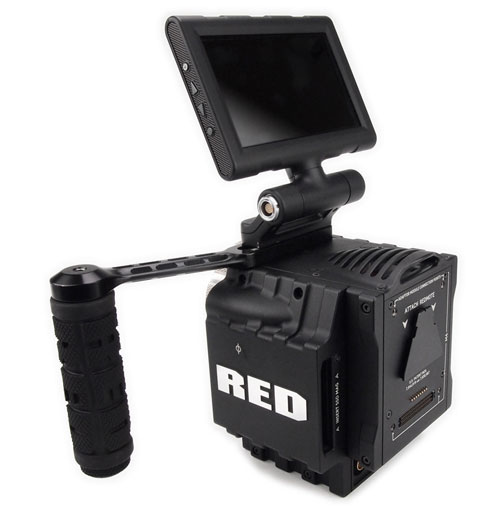
Epic-with-Outrigger-and-LCD.png


Am I doing something wrong here?
 
Hey Loic,

In the pic it just looks like the LCD on top of the Outrigger - I can't see any other accessory involved. There is also no sign of any longer screws available from RED in the store. How strange.
 
You will need longer screws.
Contact your Bomb Rep. and ask him/her if they have some available or you can ask the length you will need and get it from another supplier.
 
Since there are so many configurations, we cannot possibly have a screw length for every iteration. So, we ship with screws with accessories that would connect that accessory to the brain. If it was "use X screw when you use A + B, but not when you use A + C", we only confuse you and us. So, yes, you will need to determine the ideal screw length for you own particular configuration.

BC
 
Since there are so many configurations, we cannot possibly have a screw length for every iteration. So, we ship with screws with accessories that would connect that accessory to the brain. If it was "use X screw when you use A + B, but not when you use A + C", we only confuse you and us. So, yes, you will need to determine the ideal screw length for you own particular configuration.

BC

Cheers Brent for the heads up! I don't suppose you could advise me on the length of screw I would need for this configuration? Particularly as Loic said earlier that if the screws are too long the brain could be damaged.
 
I put this on another thread but i figured out a quicker way to do this without longer bolts.

I made a plate out of brass, with four holes in it to mount the outrigger and the LCD - marked and drilled them out in the correct spacing, that was the most difficult bit. This is good and strong.

I've attached a photo so you can see it. Pretty simple, no need for longer bolts this served me well till i milled something a little more permanent for the job when i got my VF top plate.

attachment.php


Andi
 
Here's my current rig. I called RED and they said I needed 1-inch exact 1/4-20 screws to mount the outrigger handle and the 5" touch at the same time. Super easy, and I didn't damage my Epic-X brain in any way. I got the screws from home depot. Cost me 50¢.
IMG_7660.jpg
 
You guys can get these screws at McMaster Carr for literally pennies per screw. A couple bucks for a $100 pack.
 
For the next generation of outrigger handle it would be great if the "outrigger arm" was nato rail...
Im considering to "sand down" the arm on the outrigger handle so the nato clamp for the touchscreen can grab onto it.

Next version could also have not rail where it's fixated to the camera... or better the whole arm being nato. with a nato clam to grab onto the nato on the camera...
 
This makes no sense whatsoever, RED advertises the outrigger handle with the LCD but if you buy into it doesn't work as advertised the proper screws?? Include the screw for the advertised configuration. (period) Why? because it makes sense. They are including screw that don't work as advertised. The only other thing that make sense other than including the proper screws for the advertised configurator is a WARNING! A sentence that says "You will need longer screws with the LCD". "Click screws with LCD or Without". Longer screws should be the FIRST option.

I consider RED to be the new Apple, but you really don't need a genius to figure this one out.
 
Last edited:
Here's my point. It's just customer service. This is one reason why Apple is so big. I went to add in 3rd party BluRay burner on my 12core MacPro. I open the macpro bay, and ready to put in the drive, guess what? No screws with the burner. I look on the side of the Apple MacPro DVD chasis bay and guess what I see? 4 screw in a row, connected to the side of the bay "Just incase". That's Apple Magic!! Small and simple.

Anyway, walk to the corner hardware store in the rain and the best they have is flat head screw which not only make my 20K system (w/RR) look shabby but don't fit because the heads are too big to be seated properly. Can't trust it. I have to make another trip to a different store. Guess how much the screws cost? 25¢ each. I think it would be CHEAP to include extra screw with a $350 handle. But, I decide to name each screw, one is name GAUDY and the other name is UGLY.

LooseScrew.jpg
 
Here's my point. It's just customer service. This is one reason why Apple is so big. I went to add in 3rd party BluRay burner on my 12core MacPro. I open the macpro bay, and ready to put in the drive, guess what? No screws with the burner. I look on the side of the Apple MacPro DVD chasis bay and guess what I see? 4 screw in a row, connected to the side of the bay "Just incase". That's Apple Magic!! Small and simple.

Anyway, walk to the corner hardware store in the rain and the best they have is flat head screw which not only make my 20K system (w/RR) look shabby but don't fit because the heads are too big to be seated properly. Can't trust it. I have to make another trip to a different store. Guess how much the screws cost? 25¢ each. I think it would be CHEAP to include extra screw with a $350 handle. But, I decide to name each screw, one is name GAUDY and the other name is UGLY.

Alonzo, You are right, those bolts have no business on your Scarlet. You need some 1 inch 1/4-20 Socket Head Cap Bolts in Stainless. And when you're done installing those, you'll find that 2 of the original bolts will go right next to them in the empty threaded holes. Now you've got your "onboard" bolts when you want to use only the LCD or Outrigger Handle. However, I'm with RED on not including the longer bolts. Consider how upset a customer would be if they mistakenly installed the 1 inch bolts RED included with the handle, but were only using the handle itself, and tightened them right into the camera brain. I don't agree that RED cares about a 25 cent bolt. I think they are doing the right thing by letting us decide what we need and getting it for ourselves rather than providing bolts that could wreck our cameras.
P3080008.jpg
 
This is how we ride...

This is how we ride...

No tools needed....Hate to fiddle around with allen keys. Also note the little nato out on the handle where our viewfinder can sit that has a natoclamp underneath.
 

Attachments

  • IMG_0296.jpg
    IMG_0296.jpg
    89.9 KB · Views: 0
  • IMG_0298.jpg
    IMG_0298.jpg
    95.8 KB · Views: 0
Back
Top