Welcome to our community

Be a part of something great, join today!

  • Hey all, just changed over the backend after 15 years I figured time to give it a bit of an update, its probably gonna be a bit weird for most of you and i am sure there is a few bugs to work out but it should kinda work the same as before... hopefully :)

Optimator vs. Null Lens and Target

I'm with you guys.

I have a little trouble visualizing the ZR axis tilt of a sensor, but don't wait on my account. :huh:

P.S. Jim at Band Pro NYC and I made a tentative appointment to test out the Optimator Pro and Deluxe with my Red One this Friday.

From Jacek's description, it means the sensor is rotated about the z-axis (the axis along the length of the camera). Ie. if the camera body is exactly level horizontally on it's mount, the sensor will be slightly off horizontal, down on the left or right of centre. But I imagine that tolerance slop in camera mounts and/or a tripod levelling bubble would likely be of a much larger magnitude than a typical ZR axis tilt?

[EDIT] Oops - didn't see Jacek already answered before I posted :-)
 
That was a perfect explanation.

I'm with you 100% now.

Please let me know of any doubts, or trouble visualizing- I can't explain to you further...
Peter, when you put a camera on a tripod, get your bubble perfectly centered/level and point the camera at the flat horizon(best at the ocean- not mountains or hills) your horizon should be parallel to the top edge of the monitor frame. If it's crooked and you have to tilt the (tripod) head sideways to make it parallel your ZR axis is off.
let me know...
 
Optimator tests- part two

Optimator tests- part two

Now that we got the ground rules out of the way we can test:
The center dot is the reference target for x/y shift. The right upper corner of it is the very optical axis of the lens port. The rulers left and bottom measure the shift. You have to turn on the crosshair display and note the distance from the center dot. Each division on the rulers is marked with a number. These numbers are lines per height. You have to multiply the number by 10. Each line is 7 microns(.007mm). consequently- if your crosshair is near the bar with the number 4 next to it the shift is 40x.007mm=.28mm
Remember- the Optimator is a multi purpose instrument and the optics are optimized for that- the center has a maxed out performance and speed so even minor z axis variations are easily visible. The focus falloff is very quick. The corners had to give a little. They are softer. I feel this is the best setup despite the bit softer corners. We are not testing the Optimator optics after all....
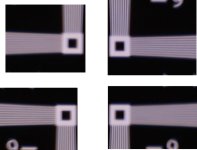
As we know that the sensor response is uniform and the sensor is flat so all we are looking for in the corners is how uniformly (evenly) the corner targets focus. If they are all the same it means that they all focus on the same plain i.e. the xr/yr axis shift is minimal. Usually it's most visible on the diagonally opposite corners because they are furthest apart so the difference is greatest The corner crop I attached illustrates the tilt: I only show the area of interest so it's easier to see. The horizontal lines(trumpets) on the upper left and lower right corners are blurred together while the (eqiuvalent) upper right and lower left areas have visible separation all the way to the end(white square)
With the DeLuxe you can refocus these areas and note the amount of shift needed to achieve separation. This is the amount of tilt. In this case it was about .0015"(.037mm) corner to corner- a very minor tilt yet easily detectable with some experience and the Optimator. If the tilt is significant both the horizontal and vertical trumpets are blurry.
This amount of tilt is only visible on a full res capture. You'd never see that on a scaled down frame like the 720p Redone output. Which is a good thing because you don't need to be alarmed. No other instrument at this time gives you this information.
I know this got a bit complex so please don't hesitate to ask questions here - I need the feedback for the manual and we all learn.:yesnod:
 

Attachments

  • corners crop copy.jpg
    corners crop copy.jpg
    68.4 KB · Views: 0
Jacek,

Looking at the reticle corners, I can see what you mean by the difference in trumpet line clarity. I can imagine how an ever-so-slight tilt in the sensor could, or would, cause this.

I also understand what you mean by needing to judge the corners in relation to one another ... rather than comparing the corner clarity to the dead center of the reticle's chart pattern. Based on what little I do know about lens/optic limitations, this certainly makes sense to me.

Above all, I really appreciate the pride and conscientiousness that you take in your product. :yesnod:

On Wednesday, at Jim's invitation, I will be at Band Pro NYC playing with both the Pro and Deluxe models. I will bring with me your specific operating instructions, and I look forward to seeing all that the Optimator has to offer.

On a separate note, Jacek, do you have a 19mm lens support for the Red Pro 300mm lens in the works? I know that the official word from Red is that it is essentially unneeded, but it certainly seems like a cautiously wise idea.
 
right place

right place

This was much easier than I thought- thank you guys!!!
It must be the right place to explain the Optimator here.
sometimes highly skilled techs are having difficulties understanding in face to face demos I'm doing....
 
Optimator vs.... review

Optimator vs.... review

Thanks Greg,
For the record I agree 100%:yesnod:
 
Gregg,
Finally someone gives a review after using both in the field...(Kind of got the hint when I saw the equiptment for sale page).
I still would like a REDUSER review on all the collimator brands but have yet to see the manufacturer's step up to the plate?
Best Regards,
Woody
 
I'd be happy to review the other options if they would send them on.
The two that I tested (NULL and Optimator) are both great products, the NULL works great, just inconvenient with out the target. IMO the Optimator is the best option, its priced right and works perfectly in all conditions.
 
different tools

different tools

Every tool has its virtues. I tried to make the Optimator as accurate and universal as possible. For some like the 3d productions it's the centering, some owner/operators change mounts on camera so they appreciate the universal mounting system and others just need a robust, easy to use back focus tester. Whatever the main reason the Optimator delivers.....:yesnod:
 
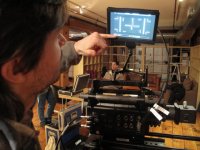
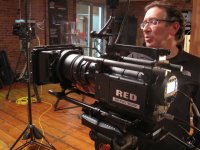
Earlier this week a couple of us had the pleasure of testing the Optimator Pro and Deluxe models at Band Pro East. I have had a lot of work drama in the interim. As a result, I have been unable to comment on our experience until now.

First and foremost, Jim Hegadorn at Band Pro NYC could not have been more generous with his time. He made us feel right at home and helped us to make the most out of our visit. He was kind enough to let us spend the lion's share of the afternoon testing and talking about these two intriguing products.

If you are in the market for a flange depth tool, I certainly encourage you to take a look at the Optimator line and compare it to the Null Lens. There is only way to definitively establish if either product is right for you. You need to get them in your hands and try them out for yourself.

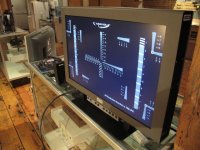
After setting our backfocus with the Optimator Pro, we tested its accuracy using the Red Pro Primes and a backfocus chart (Photo 3). As it turns out, the results were spot on.

One question that I have for Jacek relates to some differences that we saw in the Pro and Deluxe models (beside the obvious micrometer).

(Keep in mind ... these were sample prototypes)

1) This paticular Pro Model had a target that seemed crisper than its bigger Deluxe brother. We were all in agreement that it was easier to find proper focus using the Pro model.

2) The reticle of the Pro Model also had a noticeably different scale on its cross hairs.

(See PDF files below)

As you can see, the numbers of the Pro model were listed in smaller increments. I remember Jacek mentioning that each single digit left and down represents 10 microns distance from the center dot. Since the scale was the same, but the numbers different, does that mean that this Pro target had a finer resolution?
 

Attachments

  • Opt Day0001.JPG
    Opt Day0001.JPG
    74.7 KB · Views: 0
  • Opt Day0002.JPG
    Opt Day0002.JPG
    73.4 KB · Views: 0
  • Opt Day0003.JPG
    Opt Day0003.JPG
    79.2 KB · Views: 0
  • OPT PRO .pdf
    OPT PRO .pdf
    13.3 KB · Views: 0
  • OPT DEL.pdf
    OPT DEL.pdf
    16.6 KB · Views: 0
Optimator demos

Optimator demos

I'm glad you finally made it there Peter. Yeah from your pics it looks like they have some very early units. I was convinced that they all have been swapped for production ones and sent back here for update.
Jim will bring them to burbank this week.
When I get them I'll report back here.
It looks like these are the early units that made the World Tour at the end of last year.
Having been carried, shipped all over the world they may need servicing.
On top of them being one of the first few units out......
 
Back
Top