Welcome to our community

Be a part of something great, join today!

  • Hey all, just changed over the backend after 15 years I figured time to give it a bit of an update, its probably gonna be a bit weird for most of you and i am sure there is a few bugs to work out but it should kinda work the same as before... hopefully :)

Ongoing Gamma mismatch issue

Guys where do I find this gamma export options setting?

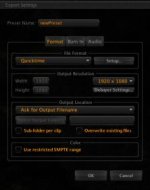
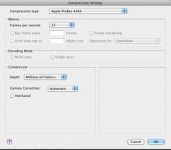
I believe that they are referring to (on build 261 & 262) the export tab at the far left. Open that, then you have a variety of export options. Basically you can go to the "+" button and create your own....for example: click the "+" button, then an export setting box comes up. Then you can create your own export settings from DPX to MXF and anything between. So when you choose QT, go to Setup the next button to the right you'll choose compression type, then apple prores (the one you want) 422 or 4444 or ? below this you choose compressor and under gamma correction your choices are automatic or none. I use none. I'm assuming this is what they are talking about.

Screenshots to assist
 

Attachments

  • Screen shot 2010-09-03 at 7.16.41 AM.jpg
    Screen shot 2010-09-03 at 7.16.41 AM.jpg
    5.9 KB · Views: 0
  • Screen shot 2010-09-03 at 7.16.30 AM.jpg
    Screen shot 2010-09-03 at 7.16.30 AM.jpg
    9.9 KB · Views: 0
  • Screen shot 2010-09-03 at 7.16.20 AM.jpg
    Screen shot 2010-09-03 at 7.16.20 AM.jpg
    10 KB · Views: 0
Thanks Mike - my settings in Quicktime are to enable FCP gamma BTW.

Graeme

Graeme, are you selecting "automatic" then for Gamma settings? i read you selected none. BUT, where are you enabling FCP gamma in the export settings? I have not found this either.
 
Or are you referring to enabling Gamma within the Quicktime preferences and NOT RCX.

and, are you in QT 7 or Quicktime Player? I know of the settings in QT 7 to choose for FCP gamma, but in Quicktime Player, i don't see where you can find this option.
 
You've got to have QT7 installed to get at that "FCP gamma" option.

Graeme
 
You've got to have QT7 installed to get at that "FCP gamma" option.

Graeme

I think that was confusing for some....I know of it and have QT 7 as well as QT player.....and yes, have FCP option (with in preferences of QT 7) checked. But isn't that now just standard on QT Player? Of course there are no preferences, but do you see that QT player handles Gamma same as QT 7 when FCP Gamma option is checked or do you see a difference?
Thanks Graeme.
 
I'll have to do some digging.

Graeme
 
Ok - this is where it gets frustrating......

In RC-X my little bit of grey is 23.1%
In QT7 (FCP on) it's 23.1%
in QT7 (FCP off) it's 26.7%
In QTX (FCP on or off) it's 26.7%
in FCP it's 23.1%

Graeme
 
Ok - this is where it gets frustrating......

In RC-X my little bit of grey is 23.1%
In QT7 (FCP on) it's 23.1%
in QT7 (FCP off) it's 26.7%
In QTX (FCP on or off) it's 26.7%
in FCP it's 23.1%

Graeme

The variations in QT players and apps is something we can't fix on our end.
There's also a difference sometimes depending on how an app is requestiing files from quicktime for output via monitor or through hdsdi.
 
And hardly limited to files from RED apps either - opening up a camera movie from a 5D2 it's grey reference reads as:

QT7 = 64%
QTX = 68%

As Deanan says, "The variations in QT players and apps is something we can't fix on our end."

Graeme
 
a well known quicktime problem....long live QT !
 
Well heck

Well heck

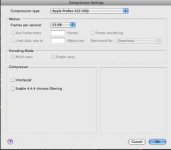
Well thats funny. I don't even have that gamma option! The only options I have for prores interlace chroma and enable 4:4:4:

Is this because i only have fcp 6?

I did figure out that i had "limit to smpt colors" which was a big part of the gamma problem. What the heck is that nightmarish setting for?
 
QT Gamma

QT Gamma

Here's what my compression settings looks like: QT 7.6.6
 

Attachments

  • Screen shot 2010-09-03 at 5.04.37 PM.jpg
    Screen shot 2010-09-03 at 5.04.37 PM.jpg
    10 KB · Views: 0
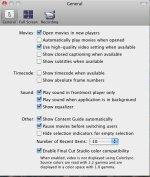
this is what it looks like in QT 7 under preferences....notice the checkbox at the bottom for FCP.


Yep, I've got that part. But I don't have the gamma settin in the ProRes export tab. Hmmm? Anythoughts?
 
What version of FCP are you running, Bobby? Might that be what installs ProRes codec writing, and hence it's version?

Graeme
 
What version of FCP are you running, Bobby? Might that be what installs ProRes codec writing, and hence it's version?

Graeme

I'm still on FCP 6 But the ProRes codecs are relatively new, and even then, you'd think updates would make them consistant on such a basic element. Does anyone with FCP 6 have the gamma option on prores export?
 
Mixing different versions of FCP, Codecs and QuickTime is never a good idea.
 
Back
Top