Welcome to our community

Be a part of something great, join today!

  • Hey all, just changed over the backend after 15 years I figured time to give it a bit of an update, its probably gonna be a bit weird for most of you and i am sure there is a few bugs to work out but it should kinda work the same as before... hopefully :)

NVME or SATA SSD for editing Raptor 8K in Adobe Premiere ?

Emilian Dechev

Well-known member
Joined
Sep 2, 2015
Messages
125
Reaction score
2
Points
18
Age
39
NVME SSD or SATA SSD for editing Raptor 8K in Adobe Premiere ?

Would there be any noticeable difference at all?
 
Just found this info on google, but can anyone confirm, that 8K timeline moves more smooth on NVME vs SATA ?

"NVMe drives can usually deliver a sustained read-write speed of 3.5 GB/s in contrast with SATA SSDs that limit at 600 MB/s. Since NVMe SSDs can reach higher speeds than SATA SSDs such as M. 2 drives, it makes them ideal for gaming or high-resolution video editing."
 
Ah well he said "yes" like yes, there is actual difference scrubbing on the timeline? So I should get the NVME M.2 ?
 
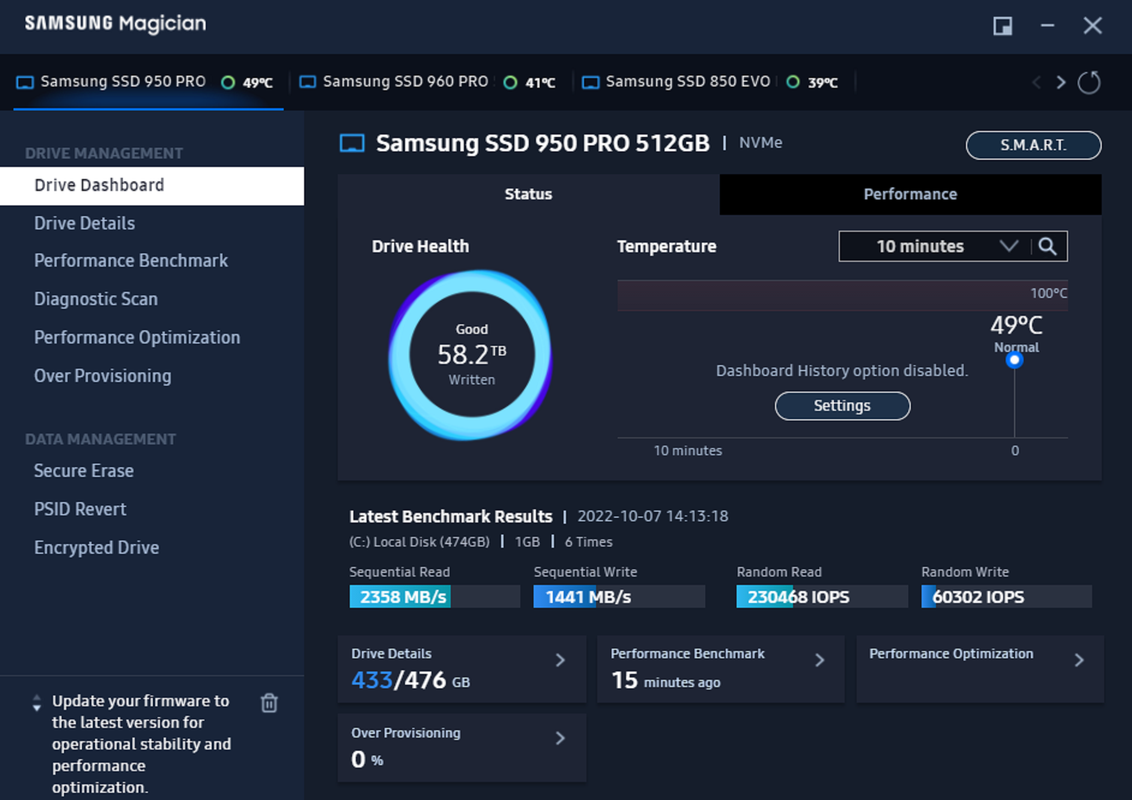
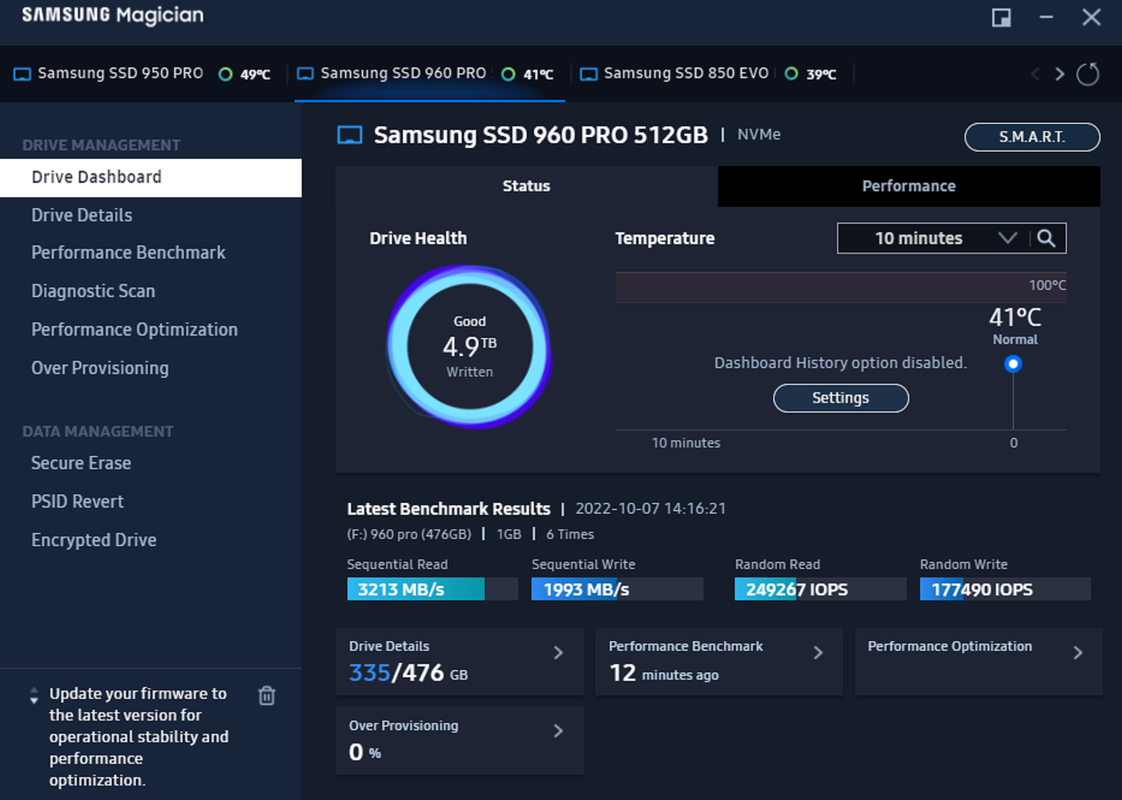
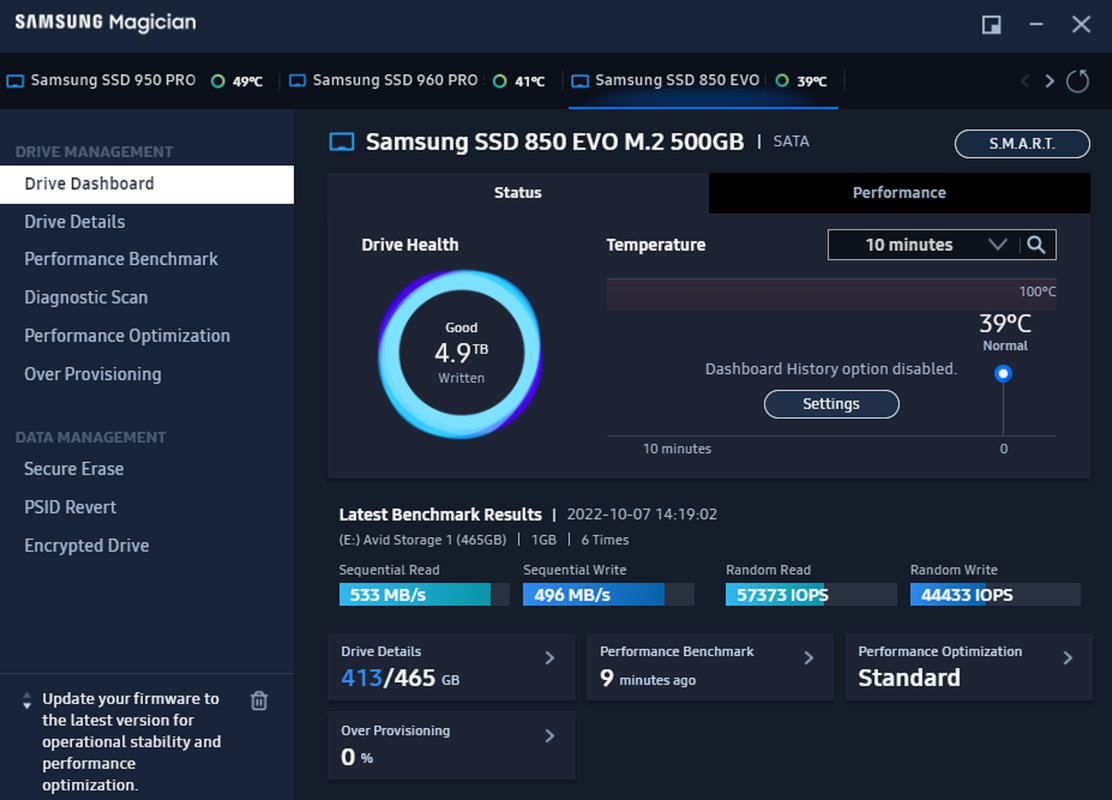
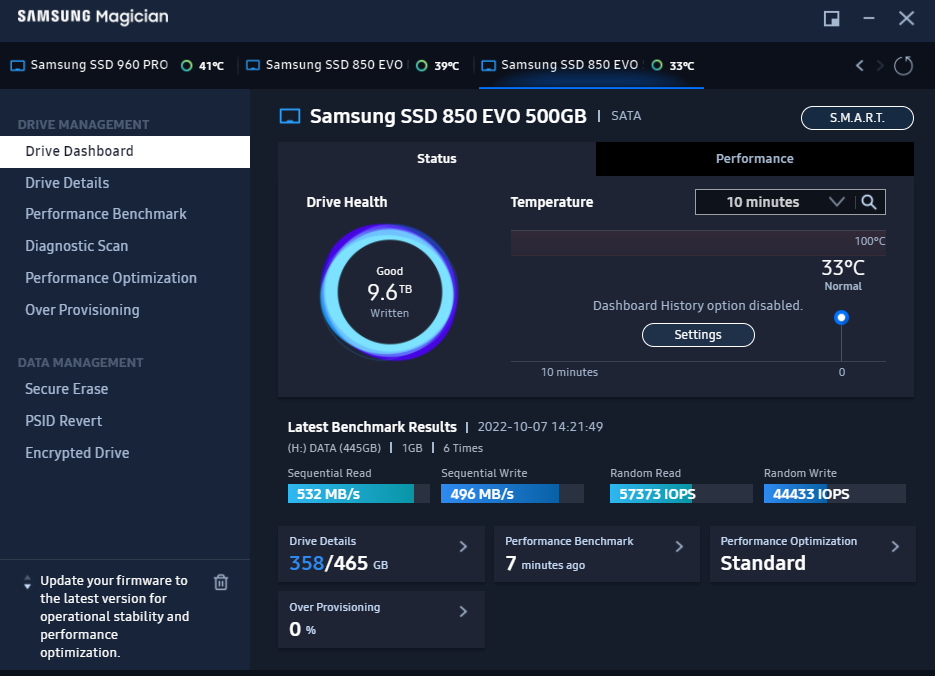
I have 4 Solid State drives in My Older MSI GT75 Dominator Pro Laptop. My Boot Drive ( Drive with Windows 10 Pro Operating System on it ) is the Samsung 950 Pro NVME drive. Most of the Media that I use including RED.R3D files that I use in Davinci Resolve are stored on the Samsung 960 Pro NVME drive. I think this setup is the only way I could really be using 8K and ARRIRAW files on this Laptop since I only have a Nvidia 980M graphics card in this Laptop.


1) Samsung 950 Pro NVME M.2

Screenshot-6940.png


2) Samsung 960 Pro NVME M.2

Screenshot-6941.png


3) Samsung 850 EVO Sata M.2

Screenshot-6942.png


4) Samsung 850 EVO Sata

Screenshot-6943.png
 
Last edited:
Look great, thanks for sharing!

I have tried to work with 8K Red Raptor footage, on a regular SSD in Premiere - almost ok, but not really. It stutters. So I wanted to know, if a NVME kind will give me smoother playback... I guess it will.
 
Look great, thanks for sharing!

I have tried to work with 8K Red Raptor footage, on a regular SSD in Premiere - almost ok, but not really. It stutters. So I wanted to know, if a NVME kind will give me smoother playback... I guess it will.

I believe it will. I the think the reason why no one can give you a definitive statement on the subject is because so many things will determine smooth playback. Things like CPU vs GPU usage, Project Resolution and Framerates, Number of Video and Audio tracks, Effects, resizing...ect. But with much Higher Read and Write Speeds there should be a difference. have you tried using any proxy file capability available with Premiere?


Newer Video on Proxy files

 
Last edited:
Solid info, thanks! I want to edit with RAW, but proxies may come in handy.
 
Solid info, thanks! I want to edit with RAW, but proxies may come in handy.

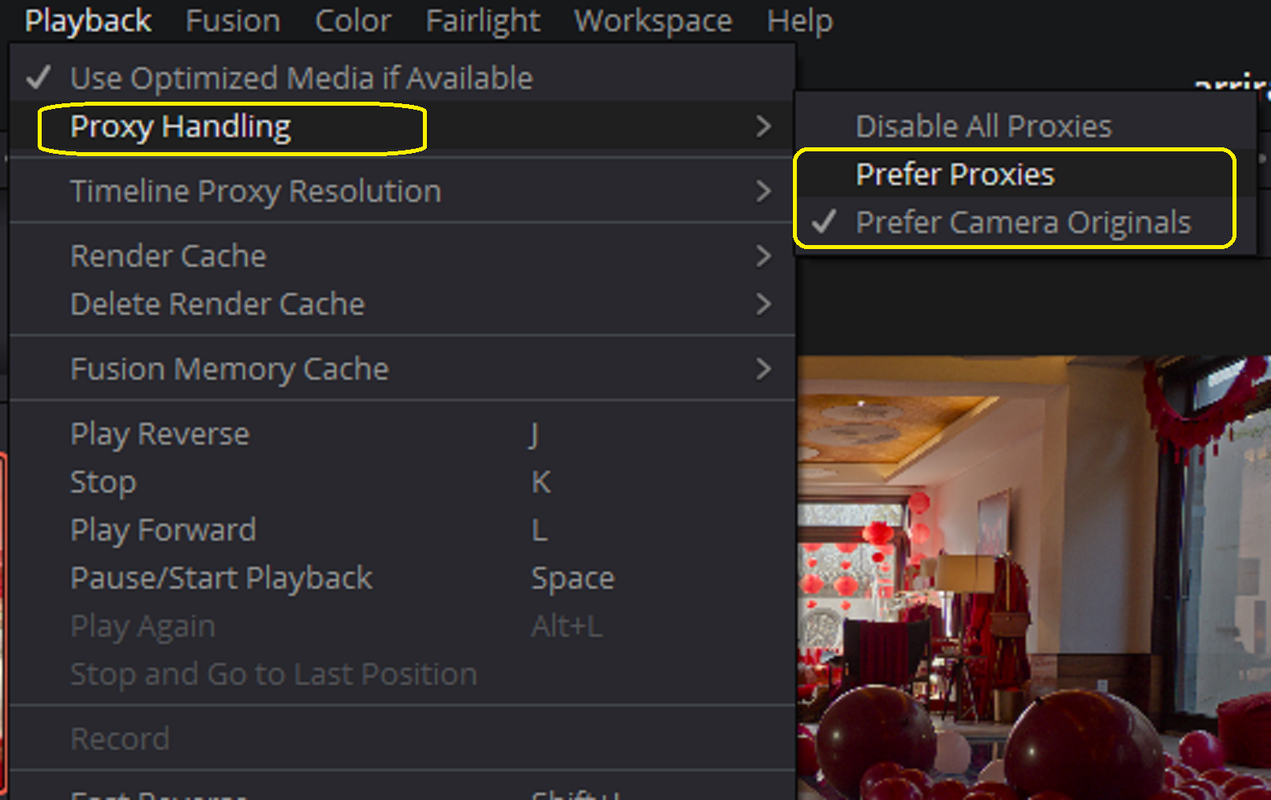
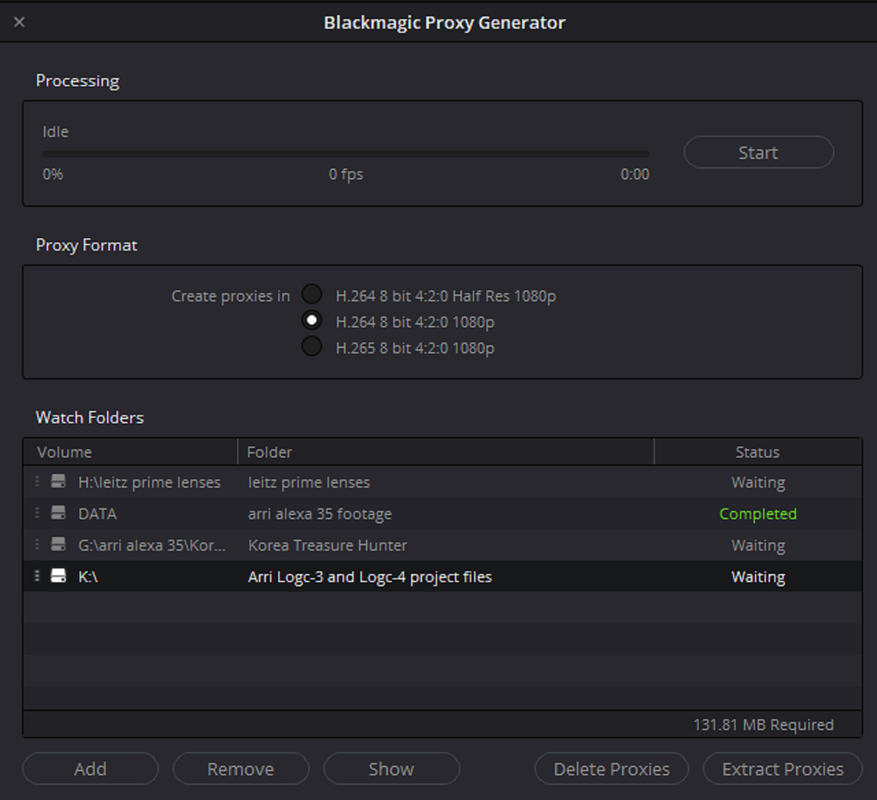
Your welcome! as you saw in the video, if you place that "Proxy" Icon in the Viewer you can Edit with the Proxies then once you done editing revert back to Raw for export. Davinci Resolve also has the ability to create low res. proxy files and it also like Premiere places them next to your Raw Files. You can turn the Proxy files on and Off by selecting "Prefer Proxies" or "Prefer Camera Originals". However the Proxies that are available to be used with Resolve are limited to a Selection of three.

Screenshot-6944.png


Screenshot-6945.png
 
There are too many factors to quantify more precisely what effect for smooth editing an NVMe will have compared to SATA. The disk throughput itself is obviously a factor, but the next question is whether any other component would hit a bottleneck next when after the disk can deliver fast enough. For example, you can identify the disk as the current bottleneck, replace it with a faster one, only to find that it didn’t do much good because the next bottleneck is the graphics card, which eats up all the benefits of the faster disk with a slow debayer/decode part in the process.

What you can say for sure is that if you replace a slow SATA drive with a fast NVMe drive, your chances of smooth playback are much higher, but it’s not a guarantee.

You should try to benchmark and profile all the real-world scenarios that you are interested in, like from a single clip to two overlapping clips in the timeline to multi cam timelines, etc. Use Task Manager or other more sophisticated tools in Windows, Resource Monitor, Process Monitor and so on to identify the main and secondary bottleneck in each scenario. You might find different bottlenecks for different scenarios. Two overlapping clips may represent a different bottleneck than when they are appended, 6k LQ might expose a different behavior than 8k HQ, etc.

And then find the right balance between replacing hardware, tweaking software settings, and other means such as proxies.
 
Last edited:
Alright thanks for all suggestions Alex!
 
On another note, I am currently using a RTX 3080. Is there any official GPU recommendation by RED for editing the Raptor 8K footage ?
 
No. Faster is better, but apart from that, it's hard to specify a "minimum requirement" for fluent editing because it again depends on too many other hardware components and usage factors.
 
I want to edit with RAW, but proxies may come in handy.

The beauty of R3D (last time i checked) is that it's never more than 300MB/s. So, use that as your base calculation to build from. How many concurrent streams do you need etc.
 
Back
Top