Welcome to our community

Be a part of something great, join today!

  • Hey all, just changed over the backend after 15 years I figured time to give it a bit of an update, its probably gonna be a bit weird for most of you and i am sure there is a few bugs to work out but it should kinda work the same as before... hopefully :)

Not happy with my Dragon

Dane Maxwell

Member
Joined
Aug 15, 2014
Messages
19
Reaction score
0
Points
0
Location
Durban
Hey there Red experts/colorists

So I have owned a RED Dragon for a few years now, unfortunately I have never produced the images I'd expect the camera to produce. I have spent hours and hours trying to configure the picture to look like it should, AMAZING!
Eventually I decided to try pick up a basic understanding of Resolve so I could better manipulate colors and get the result I want.
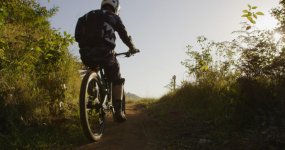
Ive attached an R3D snapshot and tiff file file for anyone who has time to check it out and let me know your thoughts? To me it seems the sensor is noise than ever and Magenta seems to creep into every tone.

I have linked to my google drive where you will find the 2 files

https://drive.google.com/file/d/0B24Yi_84QtgFcllpdWlydHVuSzg/view?usp=sharing
https://drive.google.com/file/d/0B24Yi_84QtgFeVdmM3ZUVmJwVFE/view?usp=sharing


Super amped to hear back from the PROS :)
Cheers
Dane
 
Looking at the R3D, here are the reasons:

1) Doesn't look like the subject is in focus

2) Canon lens at F /10.8
- not ideal for detailed image

3) Exposed for ISO 800 w/ STH OLPF
- that will cause noise. For a clean image on Epic Dragon, I expose STH at 320 and LLO at 500 and expect the noise to begin appearing above that.

4) Shot at 4K instead of 6K
- shooting at 6K and downscaling to 4K will give a cleaner image than shooting 4K because some noise will be lost in the downscale

5) RC 12:1 compression
- that will cause artifacts in a frame with lots of varying detail, like bushes/trees

6) White Balance is way off
- that's why the frame looks magenta. In RCX, for a decent starting point, use the "Pick WB" feature and choose a pixel with no saturation (grayscale). For example, the clipped sun spot on the right of the frame will suggest Kelvin: 5606 and Tint: -3.7.
 
Last edited:
Looking at the R3D, here are the reasons:

1) Doesn't look like the subject is in focus

2) Canon lens at F /10.8
- not ideal for detailed image

3) Exposed for ISO 800 w/ STH OLPF
- that will cause noise. For a clean image on Epic Dragon, I expose STH at 320 and LLO at 500 and expect the noise to begin appearing above that.

4) Shot at 4K instead of 6K
- shooting at 6K and downscaling to 4K will give a cleaner image than shooting 4K because some noise will be lost in the downscale

5) RC 12:1 compression
- that will cause artifacts in a frame with lots of varying detail, like bushes/trees

6) White Balance is way off
- that's why the frame looks magenta. In RCX, for a decent starting point, use the "Pick WB" feature and choose a pixel with no saturation (grayscale). For example, the clipped sun spot on the right of the frame will suggest Kelvin: 5606 and Tint: -3.7.

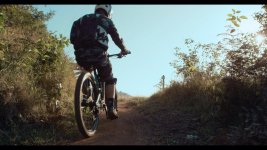
Agree on all counts...the graded image I posted addresses #3 and #6. Given how low the sun is in the frame, I chose to make it look like an early-morning ride. Thus, dialing ISO back to 320 lowered the daylight intensity. And I used the helmet to pick the WB and Tint. I think it looks like an inspiring image with those simple parameter changes. But agree that there are many elements to quality, all of which must be respected.
 
Thanks guys!

I have read so many conflicting views on what the base iso is for the Dragon. After this lesson I think its fair to say it certainly behaves better at 320 than at 800. Im sure I've read a few people quoting that the dragon's base was 800.
Mark thanks for the creative little grade there, I really do appreciate the help :)
Finished a first pass with Resolve with all iso's at 320 and so far so good
 
Thanks guys!

I have read so many conflicting views on what the base iso is for the Dragon. After this lesson I think its fair to say it certainly behaves better at 320 than at 800. Im sure I've read a few people quoting that the dragon's base was 800.
Mark thanks for the creative little grade there, I really do appreciate the help :)
Finished a first pass with Resolve with all iso's at 320 and so far so good

Base ISO, the term at least, is a complicated subject.

There is a measurement that can be ascertained through a few different testing methods. That's one aspect. The additional variables come in the form of acceptable image noise and exposure practices.

For instance, I've shot with the STH OLPF and rated the camera at ISO 800 in the past for that texture and appeal. However, there is of course texture/noise/grain across the exposed image. Rating the camera at 800 with say the Standard OLPF will provide a different look.

Generally a good rule of thumb is:
STH - ISO 320-500
STD and LLO - ISO 640-1280

I've been working this way on Dragon and Helium. And interestingly enough, the biggest change to my shooting style is I'm mostly on the Standard OLPF these days.
 
Just needs a little finesse, that's all. :)

Grade_1.1.2.jpg
 
I like my grade better :coolgleamA:
 

Attachments

  • A089_C007_0101TO.0000082_S000F.small.jpg
    A089_C007_0101TO.0000082_S000F.small.jpg
    79.7 KB · Views: 0
Dragon is 320 ISO, period. If you shoot RAW, and do a greyscale, and you'll see that it's 320. However the OLPF you chose can help you shift that dynamic range around. Skintone at 320 gives you a great picture, with excellent highlights. LLO at 800 ISO protects your shadows more, but you're highlights are compromised.

The key to Dragon is giving it LIGHT. Don't starve.

Look at how Probst shoots - FEEDS the camera light, giving his final image a rich, saturated finish.
 
Just to offer a differing opinion on that theory, I disagree ;-) I rate Dragon at 800 90 percent of the time, and am not shy about going up to 1600.

As a reference, House of Cards rates at 800, and shoots just about screaming wide open. I think the footage from that show looks fantastic. I am not sure what people are seeing at 800 iso that they don't like. Dragon at 800 iso is cleaner than any film stock ever made. I don't know if people some people just have unrealistic expectations, or spend all their time pixel peeping or what. I wish people would stop building new cameras. Stop already, you did it ;-)

Nick
 
Dragon is 320 ISO, period. If you shoot RAW, and do a greyscale, and you'll see that it's 320. However the OLPF you chose can help you shift that dynamic range around. Skintone at 320 gives you a great picture, with excellent highlights. LLO at 800 ISO protects your shadows more, but you're highlights are compromised.

Isn't that reversed? Shooting at 800 ISO instead of 320 ISO is underexposing so therefore you are recording more highlight information at the expense of shadow information.

[EDIT] Sorry, I realize you were talking about OLPF differences...
 
I love my Scarlet-W at 800 ISO, the balance between highlights protection and the image 'texture' is very pleasing to me, it makes what I called the character of "RED Dragon Filmstock"! But, my last client was terrified to see the 'noise' on the blacks, so I will rate at 320 ISO just for them next time :)
 
MIne... :) Anyway I have been shooting with DG2 and RLF at 800 ISO and I had no problem, but as Phil said I will try now to stay around 500
 

Attachments

  • Gradel.jpg
    Gradel.jpg
    99.2 KB · Views: 0
Back
Top