Welcome to our community

Be a part of something great, join today!

  • Hey all, just changed over the backend after 15 years I figured time to give it a bit of an update, its probably gonna be a bit weird for most of you and i am sure there is a few bugs to work out but it should kinda work the same as before... hopefully :)

Noise on the low end but even worse scary megenta lines

Status
Not open for further replies.
Awesome stuff....Looks like Noise Reduction option will come our way sooner than we think...a big plus to have...Charts look awesome and Dragon is hotter than ever now!!!
 
I probably should just pointed to your original "New OLPF Test" from 5 months ago right off the bat... Phil, you make this place such a better place.... you are incredibly generous in your time and your expertise and I can't thank you enough.

Ditto.
 
Yes, much more noise. More detail, more dynamic range but way more noise. That was a 50mm Ultraprime on the Dragon and a 24-70 2.8L @50mm for the Canon cameras.

Zeb, OBVIOUSLY I'm doing it wrong.

800ISO? That's some large amount of noise where there shouldn't be any... Curious to see what your goal post looked like during the shot.
 
Nothing... those guys that think the old OLPF is better for them can keep it if they want. None of the new stuff Graeme is doing applies to the old OLPF. You will still get the RED in the shadows and loose the stop at top and wont have the best skintones and won't have the best IR performance / flares. But you will get a bit less noise on the bottom.

I better take a holiday for a few weeks and send Old OLPF Dragon back in for a swap out, and get all of our other bodies swapped over at the same time.

I need a rest. :)

On a side note:
I haven't had a single issue with my Dragon since day dot. When people say they are "SIDE LINING" there Dragon because of the noise, ? I'm really baffled at that comment.
Either everyone is shooting underexposed inducing noise... or shooting and seeing completely differently stuff to me. Scratching my head every time I come back to this thread.

The images I'm getting out of my Dragon way surpass my MX Dragon's so much so that I haven't shot a frame on my MX bodies for months.

Anyways, i hope you sort out everyones issues, It's only going to be better for everyone when you do.
 
I better take a holiday for a few weeks and send Old OLPF Dragon back in for a swap out, and get all of our other bodies swapped over at the same time.

I need a rest. :)

On a side note:
I haven't had a single issue with my Dragon since day dot. When people say they are "SIDE LINING" there Dragon because of the noise, ? I'm really baffled at that comment.
Either everyone is shooting underexposed inducing noise... or shooting and seeing completely differently stuff to me. Scratching my head every time I come back to this thread.

The images I'm getting out of my Dragon way surpass my MX Dragon's so much so that I haven't shot a frame on my MX bodies for months.

Anyways, i hope you sort out everyones issues, It's only going to be better for everyone when you do.

No one complained about noise with the old olpf... It's the new olpf that has raised the apparent noise level at the same ISO as the old olpf. 800ISO on old olpf was pretty spotless, not nearly as clean with the new olpf and we also have the red noise which is being fixed soon. That is the complaint. The version of Dragon you have now is the cleaner version which you will see yourself soon.
 
No one complained about noise with the old olpf... It's the new olpf that has raised the apparent noise level at the same ISO as the old olpf. 800ISO on old olpf was pretty spotless, not nearly as clean with the new olpf and we also have the red noise which is being fixed soon. That is the complaint. The version of Dragon you have now is the cleaner version which you will see yourself soon.

I used both side by side Matt.. :) Remembering, I was and still am a early beta user.
 
I used both side by side Matt.. :) Remembering, I was and still am a early beta user.

haha I know... But you've said you don't have the new olpf yet right?
 
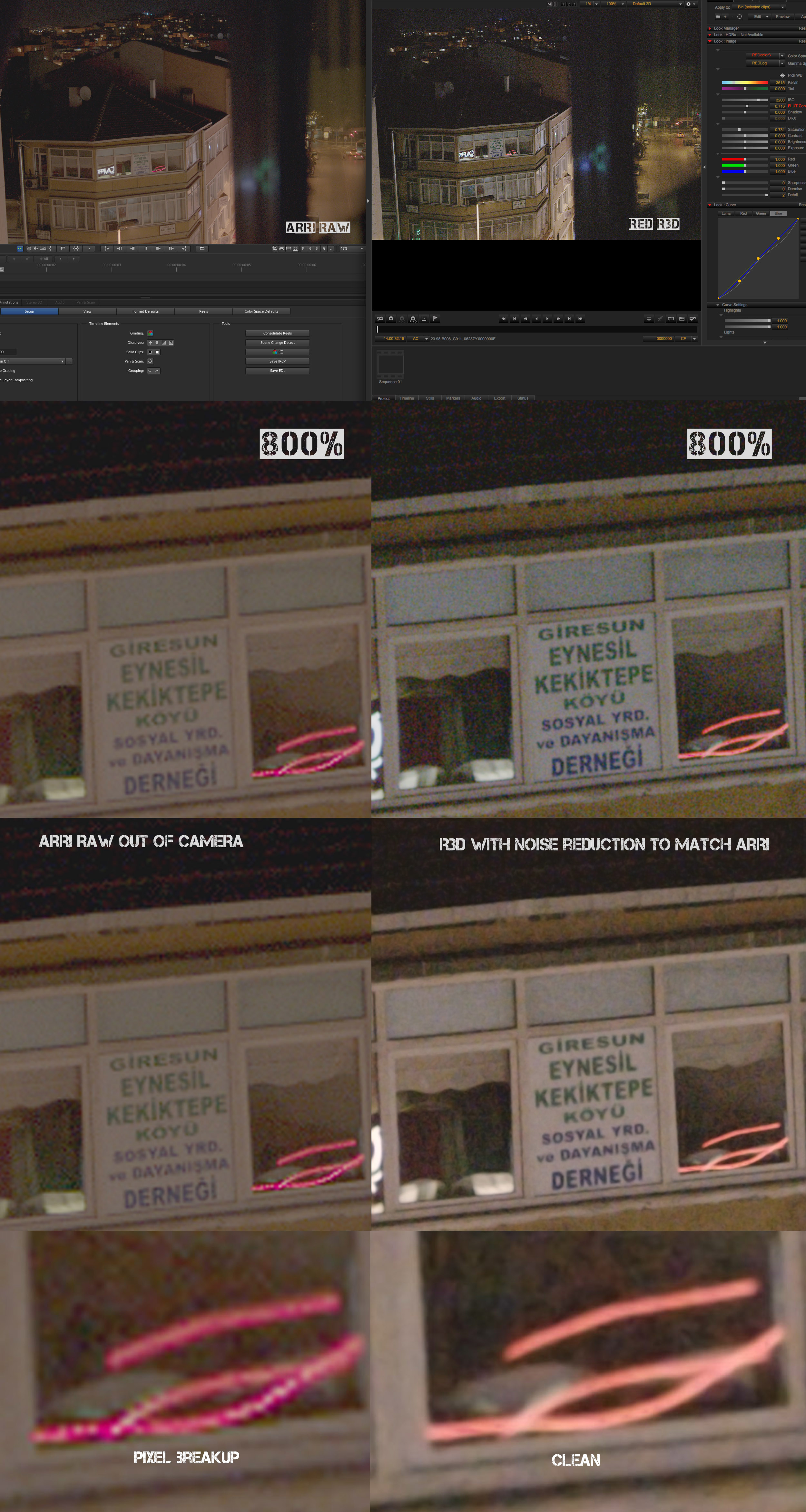
i posted samples on this post

Very interesting Kemalettin, Thanks for posting. :)

You can really see the benefit of in camera noise reduction with the Arri. Yet at the same time, great to get the sharpness from the Dragon, then decide later if you want noise reduced softening the image or not.
3200ISO on the ARRI is a lot better than I thought it would be considering the last Hi ISO tests we did with it. They must have done some upgrades in software.

Looking forward to seeing RED's new colour settings applied to a shot like this.

arri_r3d_hi_ISO.jpg
 
Mark, I don't understand it either. Some users seem to be getting great results. My camera came back with all the shadows full of red noise. Red took it back and replaced the sensor again and the noise is less but still there. Hopefully the next firmware update corrects this but even then it's going to take a while for the fix to filter though to all the post tools via the SDK. I've had to rent an MX all this month and it's been a real hit in the wallet.

It doesn't look like Red have stopped the upgrade process while they figure out the noise issue, effectively taking in working cameras and shipping out cameras that may not work all that well.

Matt, I dropped in a R3D still into that dropbox https://www.dropbox.com/sh/q4j4cnt1gd99b7j/AACQ4iNUw10DO1dAXSq9KEmZa
 
Very interesting Kemalettin, Thanks for posting. :)

You can really see the benefit of in camera noise reduction with the Arri. Yet at the same time, great to get the sharpness from the Dragon, then decide later if you want noise reduced softening the image or not.
3200ISO on the ARRI is a lot better than I thought it would be considering the last Hi ISO tests we did with it. They must have done some upgrades in software.

Arriraw doesn't have any noise reduction going on. It's much like R3D's, no sharpening, no noise reduction. It's up to you in post.

"Many processing steps that are irreversibly ‘baked-into’ the ProRes or HD-SDI image on the set are not applied to the ARRIRAW files (de-bayering, downscaling, white balance, exposure index, gamma). Those processing steps will be performed in post, where there is more time and where they can be reversed at any time by going back to the original ARRIRAW files. Thus ARRIRAW provides more flexibility in post, including the flexibility to apply different vendor’s image reconstruction algorithms."

http://www.arri.com/camera/alexa/learn/alexa_faq/
 
Amazing Comparison and test results Mark...I guess the perfect combo is to have a built in noise reduction option maybe or something similar on the DRAGON to be at the best of both worlds...Noise and Sharpness...

My 2 Cents
 
Amazing Comparison and test results Mark...I guess the perfect combo is to have a built in noise reduction option maybe or something similar on the DRAGON to be at the best of both worlds...Noise and Sharpness...

My 2 Cents

Arriraw does not use on board noise reduction. I don't know where anyone gets that... Arriraw is very similar to an R3D in that there is no noise reduction or sharpening in camera.
 
Judging by your image Paul and according to the goal posts there should be no noise, yet there seems to be quite a bit. It seems like the exposure tools might be incorrectly calibrated for the new olpf...

Screen-Shot-2014-06-24-at-6.24.08-PM.png

Screen-Shot-2014-06-24-at-6.24.16-PM.png
 
Just did three very unscientific tests with Epic Dragon/Canon C300/Canon 1DmkIV, three cameras that were in my living room. Only the Dragon is showing those horizontal magenta lines.

https://www.dropbox.com/sh/q4j4cnt1gd99b7j/AACQ4iNUw10DO1dAXSq9KEmZa

Granted, these are jpegs and not the best when it comes to grossly manipulating the image, but I'm seeing horizontal bands in both the C300 and 1DmkIV pics by either moving the white point slider to the left in the Photoshop Levels adjustment or moving the "Exposure" slider to the right in the Exposure adjustment.

The bands are faint and magenta across the speaker in the 1DmkIV pic. If you invert the image and adjust the black point slider in the Levels adjustment, you can see bands as being more green where the rest of the image has more magenta.

The C300 pic has a green narrow green band across the bottom half of the woofer. However, the Dragon's bands are more prominent for sure. Again, I don't know how much jpeg compression is playing a role.

Besides, don't the C300 and 1DmkIV have built-in image processing? Maybe it helps mitigate the effect in those cameras somehow.
 
Ryan, I agree about the noise. Fingers crossed for the firmware update.

Brian, you're right. Not the best cameras to compare but they were sitting in my living room as I read this thread. The C300 tops out at 50Mb/s and both Canon cameras have all kinds of image processing going on. When pixel peeping you can see some difference but overall when looking at the image you don't see it while the magenta banding on the Dragon is very obvious.
 
Status
Not open for further replies.
Back
Top