Welcome to our community

Be a part of something great, join today!

  • Hey all, just changed over the backend after 15 years I figured time to give it a bit of an update, its probably gonna be a bit weird for most of you and i am sure there is a few bugs to work out but it should kinda work the same as before... hopefully :)

Noise and green screen / VFX

Could you post a short clip mot just a still? I wouldn't throw the vfx guy under the bus without seeing it in motion. I've shot greenscreen before and it looked great as a still but was really chattery in motion.

There are some more frames in the R3D trim I linked to. A short motion with his head to give an idea on the motion. There aren't much motion at all in all of these shots.
 
Yeah, no. It's trivial to get a pristine key on this. Especially because *worst* case scenario you could use a luma key on his dark hair. Or a saturation key. Or... there are so many different and incredibly basic ways to get a clean key that there is no excuse. There isn't even any spill really to cleanup. I did a luma key just to make sure there's nothing weird acting up and I didn't bother applying a despill and it didn't look weird. You're not going to get much better out of Alexa unless you do arri raw. And then you're just looking at marginal improvement thanks to being truly uncompressed but you could punish yourself by shooting 2:1 as well for little to no improvement in the end result.
 
I think your "VFX-master" boosted the ISO a lot trying to put that man into the bright enviroment. Of course he can get noise than. Its hard to put something dark into bright enviroment. You should shoot in white cyclorama with a green piece just on the back. Than propably you can get "the right look".
 
can you name one of those that might be the best general purpose compositing software? If I want to learn one I need to choose one to put all that energy into. I'm moderate in AE so I'm not new to compositing, but I haven't worked with node based workflows except in Resolve.

In my post boutique I use 2 Smokes which run on Mac Boxes. The advantage of Smoke is that's a full NLE with a deep VFX toolbox and hence well suited for finishing AND compositing. Nuke and Fusion are shot based compositors and not usable for timeline based finishing. You need a NLE or Resolve to assemble the VFX shots in your final TL. Nuke Studio is timeline based but a 10k software and somewhat in its infancies. For Windows user that don't want to spent much on a compositing package Fusion seems nowadays a pretty attractive offer since it's basic version is free. Together with Resolve Fusion seems to be a viable option on budget.

Hans
 
You are hanging out in a shitty post house thats all :)

Hahaha :D unfortunately this guy is external, if it had been in-house I would have visited him personally :tongue_smilie:

I think your "VFX-master" boosted the ISO a lot trying to put that man into the bright enviroment. Of course he can get noise than. Its hard to put something dark into bright enviroment. You should shoot in white cyclorama with a green piece just on the back. Than propably you can get "the right look".

He didn't work from the R3D files. I did the conversion to TIFF 16bit sequences through Resolve at a full premium debayer down to 4K UHD. So he even had debayered-ready downscaled material.


In my post boutique I use 2 Smokes which run on Mac Boxes. The advantage of Smoke is that's a full NLE with a deep VFX toolbox and hence well suited for finishing AND compositing. Nuke and Fusion are shot based compositors and not usable for timeline based finishing. You need a NLE or Resolve to assemble the VFX shots in your final TL. Nuke Studio is timeline based but a 10k software and somewhat in its infancies. For Windows user that don't want to spent much on a compositing package Fusion seems nowadays a pretty attractive offer since it's basic version is free. Together with Resolve Fusion seems to be a viable option on budget.

Hans

I do grading with Resolve so it might be overkill to have another timeline based software if I use Resolve for finishing instead. I did however download the Black Magic Fusion (Lite) that they bought. I haven't had the time too look into that but would you say it's worth my while to learn it, or get something else? (I'm windows based by the way)
 
I do grading with Resolve so it might be overkill to have another timeline based software if I use Resolve for finishing instead. I did however download the Black Magic Fusion (Lite) that they bought. I haven't had the time too look into that but would you say it's worth my while to learn it, or get something else? (I'm windows based by the way)

u can finish in Resolve, what Hans is saying is that Smoke has a full NLE (Non Linear Editor) incorporated and/or u can finish if u want to...

On Windows: Premiere > NUKE X (for ur VFX only) > Resolve

Resolve w/ the Fusion integration may (in the future) become a one-stop shop as they already have a baby NLE and now direct VFX flow...
 
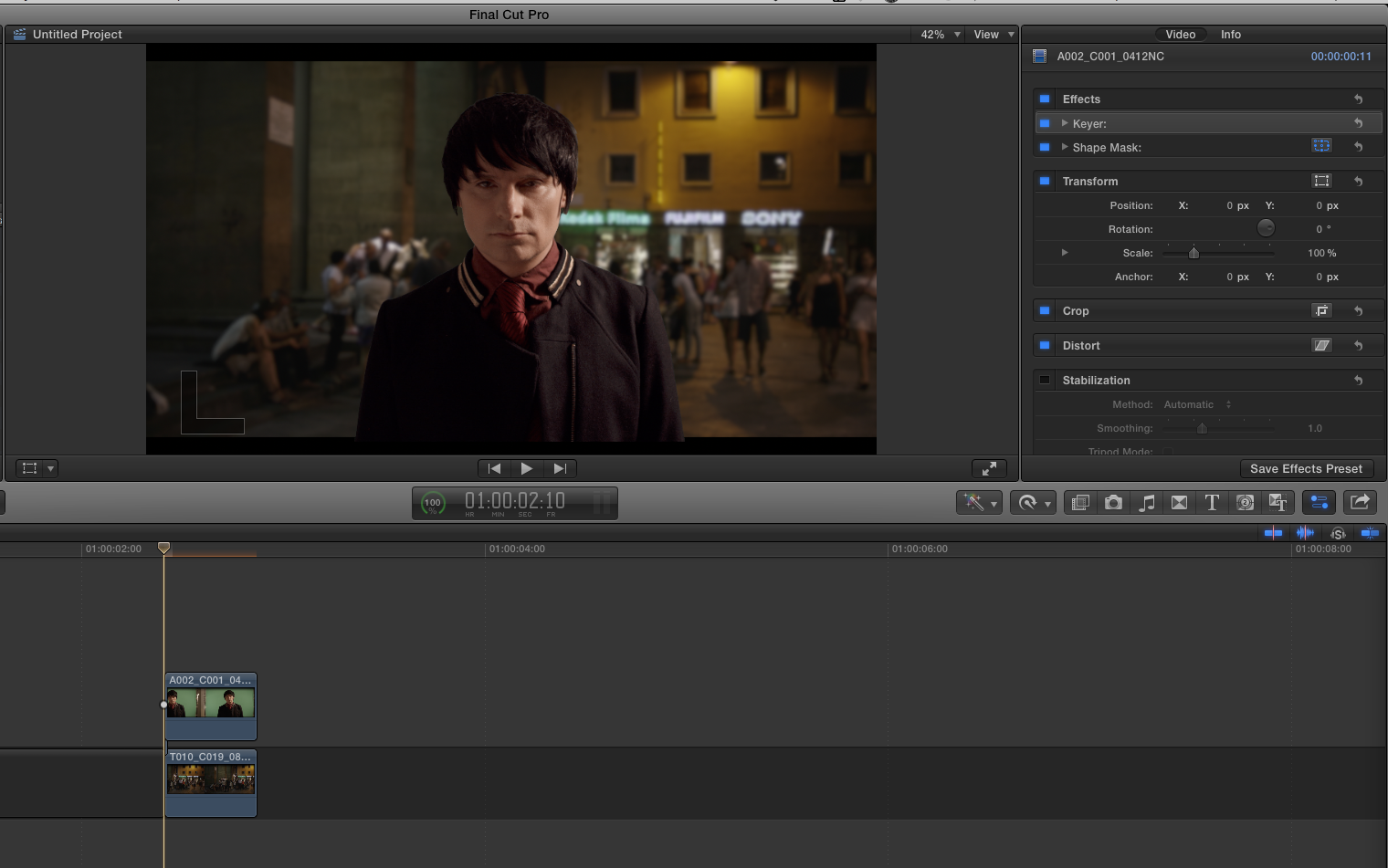
this took me all of ten seconds in FCPX with zero adjustments.

if you can pull this key this quickly then affecting it should be quite simple. You hired an FX house that charges money?

fcpxkey.png
 
I do grading with Resolve so it might be overkill to have another timeline based software if I use Resolve for finishing instead. I did however download the Black Magic Fusion (Lite) that they bought. I haven't had the time too look into that but would you say it's worth my while to learn it, or get something else? (I'm windows based by the way)

I'm pretty sure that BM will push Resolve even more as the upcoming version 12 is indicating. Obviously BM is leaving with Resolve the traditional grading market and entering the finishing market which means that after the fact changing the timing without tedious re-comforms is possible - a huge achievement. Tools for touch-ups, text etc... are important to make Resolve an attractive alternative to Smoke and other NLEs that try to compete in this market with tons of plugins.

Bringing in a couple of Fusion nodes into Resolve's own node-based compositor (this is what Resolve's node tree basically is) makes a lot of sense. In Resolve vers. 13 it is not unlikely that we will se a stripped down Fusion tool box that will be designed to tackle daily tasks in commercial land such as basic rotoscoping and painting, GS based compositing etc. probably in a 2D environment. For 3d compositing etc... quick round-tripping to Fusion and back to Resolve would be meaningful.

Bottom line: with the purchase by BM Fusion got a new life and probably will stay the next years with us. Yes, learning it makes sense.

Hans
 
u can finish in Resolve, what Hans is saying is that Smoke has a full NLE (Non Linear Editor) incorporated and/or u can finish if u want to...

On Windows: Premiere > NUKE X (for ur VFX only) > Resolve

Resolve w/ the Fusion integration may (in the future) become a one-stop shop as they already have a baby NLE and now direct VFX flow...

Yeah, that's what I'm thinking, because I'm already deep into Resolve in my workflow, it might be best to learn fusion and hope for such integration. Just like people with AE hoped for years for a better C4D workflow and they got just that (which isn't even part of Adobe).


this took me all of ten seconds in FCPX with zero adjustments.

if you can pull this key this quickly then affecting it should be quite simple. You hired an FX house that charges money?

Nope, external guy and without pay, no one in this production gets anything, me included, except some fine wine from me as payment. :tongue_smilie:
That's why I can't really complain, but even for free work, he has been giving me a hard time for not shooting a clean key, which I found surprising, hence this thread asking about the noise.


I'm pretty sure that BM will push Resolve even more as the upcoming version 12 is indicating. Obviously BM is leaving with Resolve the traditional grading market and entering the finishing market which means that after the fact changing the timing without tedious re-comforms is possible - a huge achievement. Tools for touch-ups, text etc... are important to make Resolve an attractive alternative to Smoke and other NLEs that try to compete in this market with tons of plugins.

Bringing in a couple of Fusion nodes into Resolve's own node-based compositor (this is what Resolve's node tree basically is) makes a lot of sense. In Resolve vers. 13 it is not unlikely that we will se a stripped down Fusion tool box that will be designed to tackle daily tasks in commercial land such as basic rotoscoping and painting, GS based compositing etc. probably in a 2D environment. For 3d compositing etc... quick round-tripping to Fusion and back to Resolve would be meaningful.

Bottom line: with the purchase by BM Fusion got a new life and probably will stay the next years with us. Yes, learning it makes sense.

Hans

I hope they aren't leaving color grading too much because it's my go to software for just that. I hope that they improve on this and get the integration of basic compositing as much as possible.
But as for now, the NLE part of Resolve is lightyears behind applications like Avid. Just like Premiere I find the actual working experience with the timeline to be lacking in precision. I work 20 times as fast in Avid just based on the actual editing. But for basic conform it's good, I just like it to be a bit more improved.
 
Ok.

this explains a lot. Remember the old saying Cheap, fast, good, Pick two. It's hard to ever get all three. Maybe you go cheap and fast but the good part is missing. :)

Anyhow, the takeaway is that your end was OK.

One little thing I would suggest when green screening is to "walk the screen" with the meter and look to elimate hotspots. it might look even to your eye but to the meter you will see hotspots, etc. If you have a Waveform monitor look to make the green screen a straight line across and a consistent height or thickness.

If you look at yours it, got a slight curve and taper, nothings matts can't clean up, but if you want to hit it perfectly and take it to the next level. A flat field that is evenly lit is the "key" to perfect keys every time.

Nice stuff.

B
 
Yeah, that's what I'm thinking, because I'm already deep into Resolve in my workflow, it might be best to learn fusion and hope for such integration. Just like people with AE hoped for years for a better C4D workflow and they got just that (which isn't even part of Adobe).

sounds like a plan, the only thing to consider is that no matter how great a one-stop-shop sounds by default, more important are the quality and effectiveness of the (individual) programs... NUKE has a lot of stuff built-in, top-shelf.

It may be beneficial to compare VFX solutions before u spend valuable time...
 
I hope they aren't leaving color grading too much because it's my go to software for just that. I hope that they improve on this and get the integration of basic compositing as much as possible.
But as for now, the NLE part of Resolve is lightyears behind applications like Avid. Just like Premiere I find the actual working experience with the timeline to be lacking in precision. I work 20 times as fast in Avid just based on the actual editing. But for basic conform it's good, I just like it to be a bit more improved.

You know that Avid has a Fusion hot-link?

---

Resolve in its current state cannot be compared to Avid as an NLE. But the next version will be much more attractive to editors. Please note that Avid diehards (for good reason) will never be happy with PP, FCPX or Resolve which share a common editing philosophy which is different to Avid's.

BM won't drop Resolve's grading abilities. On the contrary, vers. 12 will be also improved in this regard. Colour is the core of Resolve.

Hans
 
You know that Avid has a Fusion hot-link?

How? Didn't know that. Might not work well because I only do offline in Avid, but anyway :)

Ok.
this explains a lot. Remember the old saying Cheap, fast, good, Pick two. It's hard to ever get all three. Maybe you go cheap and fast but the good part is missing. :)

Yeah, the "fast" part is the one left out here. Although I think the "good" part got left behind as well... the only one remaining is "Cheap", but not for me :glare:


You know that Avid has a Fusion hot-link?
---
Resolve in its current state cannot be compared to Avid as an NLE. But the next version will be much more attractive to editors. Please note that Avid diehards (for good reason) will never be happy with PP, FCPX or Resolve which share a common editing philosophy which is different to Avid's.
BM won't drop Resolve's grading abilities. On the contrary, vers. 12 will be also improved in this regard. Colour is the core of Resolve.

Hans

Yeah, I'm looking forward to version 12, but it only supports Windows 8.1 so I have to wait until all other softwares I use work on that.
It might just be preference for me, but I've never seen an editor being faster in Premiere than an editor in Avid. I'm actually just speaking about basic things, like having a stupid "cut tool" that isn't exactly precise, instead of cutting at marker. Having a trim-mode that makes sense and not this mousedragging snap-to default. Handling complex large timelines is a mess. I do some commercial editing in Premiere, smaller projects, but for feature films, no way. If Resolve tried to be more like Avid instead of premiere, it might attract me but not now, however the version 12 feels like.
 
Back
Top