Welcome to our community

Be a part of something great, join today!

  • Hey all, just changed over the backend after 15 years I figured time to give it a bit of an update, its probably gonna be a bit weird for most of you and i am sure there is a few bugs to work out but it should kinda work the same as before... hopefully :)

Nikon NRAW Red workflow

tomridlle

Member
Joined
May 3, 2008
Messages
5
Reaction score
1
Points
3
Location
China
I am very excited about the new beta R3D SDK that supports decoding Nikon NEV/NRAW files. After some initial tests, it appears that we Nikon Z camera users might be able to adapt to a RED post-production workflow. Using the current version of REDCINE‑X PRO, it seems possible to convert an NEV file to a RedLog medium file, which can then be imported into other editing or grading software (e.g., DaVinci Resolve).

However, I have encountered several issues:

  1. IPP2 Workflow for NRAW
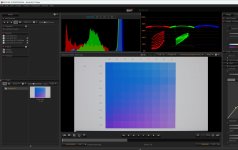
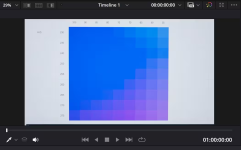
    In Resolve, decoding NRAW files has been problematic due to oversaturated blue color. On Nikon cameras such as the Z9, Z8, and Z63—when shooting with H.265 10-bit—the blue is rendered correctly. However, NRAW NEV files in Resolve always exhibit a blue saturation issue. It appears that when using REDCINE‑X PRO to decode these NRAW NEV files, the blue color problem is resolved. Nevertheless, we Nikon users are curious about the IPP2 workflow process: How does it handle color, and in which color space? For example, if we export an NEV file as Apple ProRes or Avid DNx using the RedColorGamut and RedFilmLog settings, can the exported file be treated as a RED‑shot file, thereby following the RED post-production workflow?
  2. Lens Distortion
    I noticed that in Resolve, Nikon NEV files have lens distortion corrected by default (there is an option in the UI to toggle lens distortion correction). However, when exporting from REDCINE‑X PRO, the resulting NEV file does not have lens distortion correction applied. How can this issue be addressed correctly?
  3. Metadata
    REDCINE‑X PRO reads the metadata from Nikon NEV files; however, for color space and gamma information, it always reports Rec. 709 and BT.1886 gamma. This is not accurate for the N‑Log settings used on the camera. Is there a way to have the correct metadata reflected in REDCINE‑X PRO?
Any insights or solutions from users who have worked through these issues would be greatly appreciated.
 
I have a Z9 that I use for RAW recording. I think I have seen the blue saturation problem and solved that by trying different color management options - maybe it was 'DaVinci YRGB color managed'?. Anyway, I don't think it is a problem anymore as I haven't seen it for some time, maybe Blackmagic fixed it?

I tried but you can't export NEV files as R3D files from RedCineX - that would have been wild! So you are limited to ProRes and then I don't see any advantage except for maybe IPP2. I am fine with the Resolve's color science as it is but maybe someone can do a comparison.

From my testing N-log is just metadata and there is no quality difference for the RAW file. And you can change the gamma in Resolve anyway. The standard preview on the camera is way too aggressive for my taste so I just shoot in standard dynamic range and make sure highlights are not clipped.
 
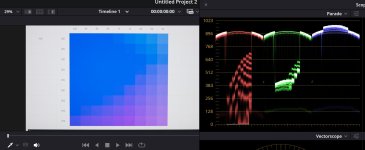
As of February 15, 2025, the blue saturation issue in DaVinci Resolve when processing Nikon NRAW files from the Z9, Z8, and Z63 cameras remains unresolved. This problem is particularly noticeable when shooting scenes with bluish LEDs at night; no grading method effectively corrects it. While certain workflows and LUTs provided by Nikon and RED can mitigate the issue, they don't fully resolve it. For instance, shooting a blue gradient pattern displayed on a computer screen reveals that color information present in H.265 MOV files is lost in NRAW NEV files. This phenomenon is demonstrated in this video and this video.

However, the former video's solution doesn't address the root cause, which stems from DaVinci Resolve's incorrect decoding of NRAW NEV files.

Recently, REDCINE‑X PRO has addressed the blue saturation problem but has introduced a new issue related to lens distortion correction. Further testing is necessary, especially concerning N-Log and Rec. 709 NRAW NEV files within the REDCINE‑X PRO workflow. Currently, REDCINE‑X PRO reads NRAW NEV metadata but doesn't indicate whether the footage is in N-Log, suggesting that some metadata might be missing or not displayed.
 
@sander kamp

No, the nraw blue saturation problem is not fixed in latest resolve. Please try this nraw/nlog clip in resolve and compare it with the h265 clip recorded in camera. Bunch of people tried to render it correctly but failed.

NRaw in Resolve (you can see oversaturated blue area in top-left, blue and red channels are clipped abnormally)
Screenshot 2025-02-16 171041.jpg

NRaw in RedCineX beta is decoded perfectly, no clipping, no oversaturation:
red.jpg
 

Attachments

  • 1739695500312.png
    1739695500312.png
    136.3 KB · Views: 5
Last edited:
Yeah that's not great. Have you passed that onto Blackmagic?

Looks like nraw is getting supported as part of Red's SDK, I wonder if that will improve things in resolve? It would probably still be a wait.
 
Yeah that's not great. Have you passed that onto Blackmagic?

Looks like nraw is getting supported as part of Red's SDK, I wonder if that will improve things in resolve? It would probably still be a wait.
someone has contacted Blackmagic and Nikon customer support but Nikon doesn't think it's an issue so BMD can do nothing about it :)

The good news is Adobe Premiere Pro will support nraw through Red sdk later this year. So hopefully the issue won't exist in PR
 
Last edited:
When REDCINEXP processes NIKON NRAW file with clipping, do you experience the red/green noise at clipping area? I am running MAC Studio. thanks IMG_7180.PNG
 
I found the same issue. Report it to Red. Hopefully it gets resolved.
 
This has now been fixed with the integration of RED's decoding of NRAW .NEV clips into .R3D clips. Here is a video breakdown showcasing that blue clipping issue and how it is resolved with this new workflow.

 
Back
Top