I am very excited about the new beta R3D SDK that supports decoding Nikon NEV/NRAW files. After some initial tests, it appears that we Nikon Z camera users might be able to adapt to a RED post-production workflow. Using the current version of REDCINE‑X PRO, it seems possible to convert an NEV file to a RedLog medium file, which can then be imported into other editing or grading software (e.g., DaVinci Resolve).
However, I have encountered several issues:
However, I have encountered several issues:
- IPP2 Workflow for NRAW
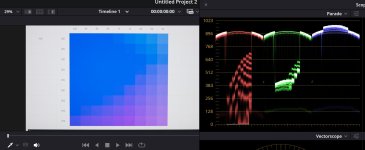
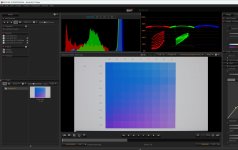
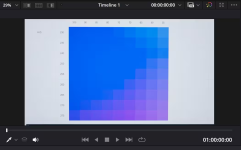
In Resolve, decoding NRAW files has been problematic due to oversaturated blue color. On Nikon cameras such as the Z9, Z8, and Z63—when shooting with H.265 10-bit—the blue is rendered correctly. However, NRAW NEV files in Resolve always exhibit a blue saturation issue. It appears that when using REDCINE‑X PRO to decode these NRAW NEV files, the blue color problem is resolved. Nevertheless, we Nikon users are curious about the IPP2 workflow process: How does it handle color, and in which color space? For example, if we export an NEV file as Apple ProRes or Avid DNx using the RedColorGamut and RedFilmLog settings, can the exported file be treated as a RED‑shot file, thereby following the RED post-production workflow? - Lens Distortion
I noticed that in Resolve, Nikon NEV files have lens distortion corrected by default (there is an option in the UI to toggle lens distortion correction). However, when exporting from REDCINE‑X PRO, the resulting NEV file does not have lens distortion correction applied. How can this issue be addressed correctly? - Metadata
REDCINE‑X PRO reads the metadata from Nikon NEV files; however, for color space and gamma information, it always reports Rec. 709 and BT.1886 gamma. This is not accurate for the N‑Log settings used on the camera. Is there a way to have the correct metadata reflected in REDCINE‑X PRO?