Welcome to our community

Be a part of something great, join today!

  • Hey all, just changed over the backend after 15 years I figured time to give it a bit of an update, its probably gonna be a bit weird for most of you and i am sure there is a few bugs to work out but it should kinda work the same as before... hopefully :)

New Workstation Build - i7 X99, Titan X, Overclocking...

JEff
Thanks for your time and kindness.
Your a real Mecca of knowledge.

I am sure Areca is great, but It is pricey, especially with souring Canadian dollar:)

On the other hand, any experience with overclocking?, My system doesn't like it, it seams.
I am running 6core 3.5 MHZ on Asus Deluxe x99 3.1. With full tower 1000watt and good water cooling.

I've got

You can run the 5930K or the 5820K at 4.2 by setting the 1 core ratio to 42 and the CPU core voltage override to 1.26 or 1.27. To do that you have to set the CPu Core voltage to Manual mode then the voltage to 1.26 or 1.27. Almost all those chips handle that with those voltage settings alone.
 
Yeah 4.0-4.2 is easily obtainable and in the "might as well" category if you are using a custom water cooling loop or an AIO (one of the all in one rigs with a radiator permanently plumbed to what is usually a combo CPU block and pump). Anything beyond 4.2-4.3 and IMHO you'd better know what you're doing - if you accidentally leave it set as Adaptive voltage the motherboard might do nasty things like give you 2.25 VIN or 1.56VCORE heh
 
Jeff, anything interesting in the compact server market coming?

Yeah, when we see the Xeons have their die shrink to 14nm, that's going to really get things moving the right direction. We'll see better base clocks for the higher core counts and better thermals for more compact or slimline ' blade systems. Beyond that, for server use, the Skylake i7's are going to be quite effective in the small single CPU market. A lot depends on what you're looking to do with the system. In terms of being a "server" it still comes down to software more than the hardware. Most of the lowly 6 to 8 core i7 or Xeon CPUs can more than handle all the I/O bandwidth you can realistically throw at a server. If you want to go with higher core counts, that is becoming more specific in terms of database or virtualization purposes.
 
JEff
Thanks for your time and kindness.
Your a real Mecca of knowledge.

I am sure Areca is great, but It is pricey, especially with souring Canadian dollar:)

On the other hand, any experience with overclocking?, My system doesn't like it, it seams.
I am running 6core 3.5 MHZ on Asus Deluxe x99 3.1. With full tower 1000watt and good water cooling.

I've got

David and Eric have pretty well addressed the OC issue. Perhaps there is something else going on unique to your system, but it would be difficult to know what unless we can actually get our hands on it. I don't recall if I've updated my Overclocking status for my i7 build that kicked off this thread, but I'm running at 4.2. I was higher than that to start, but over time that's where I had to settle in order to maintain stable operation under intense processing and even then it does seem to run a bit hotter than I'd like at times. Even with all the fans running full blast. Overclocking can be a bit tricky and sometimes it takes a lot of trial and error to find where a system is happy. You have OC options in the BIOS as well as through the ASUS software utilities. On my system, the OC settings like to reset themselves every time I go into the BIOS for anything and I have to re-do them. The ASUS software utility likes to set up my system to run at 4.4 or 4.5, but the system can't sustain that when I really push it hard.

my RAM is clocked at 3000MHz as purchased and I'm not running it OC'd. Just pushed the CPU up to 4.2 and running my Titan X SC's at their default as well. All things considered, this has become a very nice system and quite reliable. I've only had one crash that left me scratching my head. A few other minor things an application goofiness that happens when I leave it on too long with too many apps running -- which happens on any system.

As for the RAID card, that Areca is pricey. You can find them for under $500 if you shop around. NewEgg occasionally has refurbished ones or open box ones for under $450 too. Still pricey, though. If you have a good backup setup in place and can setup RAID-5 with the on-board SATA host, give that a try. I really can't think of any lower cost RAID cards that I would trust to do it any better than the on-board offering. HighPoint and a few others have some decent offerings and can save you a bit. However, if you're going to spend $350 on a HighPoint, why not spend $100~$150 more for the Areca?

The ATTO cards are also great, also expensive too. Some people experience overheating with them, I personally have not. But they do run hot and would not be ideal in a system where you're trying to OC and keep excess heat under control.
 
Yeah, when we see the Xeons have their die shrink to 14nm, that's going to really get things moving the right direction. We'll see better base clocks for the higher core counts and better thermals for more compact or slimline ' blade systems. Beyond that, for server use, the Skylake i7's are going to be quite effective in the small single CPU market. A lot depends on what you're looking to do with the system. In terms of being a "server" it still comes down to software more than the hardware. Most of the lowly 6 to 8 core i7 or Xeon CPUs can more than handle all the I/O bandwidth you can realistically throw at a server. If you want to go with higher core counts, that is becoming more specific in terms of database or virtualization purposes.

Sorry Jeff, I meant compact workstation instead of server. Shows my advanced age.
 
Thanks for the advice. Are they doing architecture revisions along with shrinks on a yearly basis at the moment, or was that atom?
 
David and Eric have pretty well addressed the OC issue. Perhaps there is something else going on unique to your system, but it would be difficult to know what unless we can actually get our hands on it. I don't recall if I've updated my Overclocking status for my i7 build that kicked off this thread, but I'm running at 4.2. I was higher than that to start, but over time that's where I had to settle in order to maintain stable operation under intense processing and even then it does seem to run a bit hotter than I'd like at times. Even with all the fans running full blast. Overclocking can be a bit tricky and sometimes it takes a lot of trial and error to find where a system is happy. You have OC options in the BIOS as well as through the ASUS software utilities. On my system, the OC settings like to reset themselves every time I go into the BIOS for anything and I have to re-do them. The ASUS software utility likes to set up my system to run at 4.4 or 4.5, but the system can't sustain that when I really push it hard.

my RAM is clocked at 3000MHz as purchased and I'm not running it OC'd. Just pushed the CPU up to 4.2 and running my Titan X SC's at their default as well. All things considered, this has become a very nice system and quite reliable. I've only had one crash that left me scratching my head. A few other minor things an application goofiness that happens when I leave it on too long with too many apps running -- which happens on any system.

As for the RAID card, that Areca is pricey. You can find them for under $500 if you shop around. NewEgg occasionally has refurbished ones or open box ones for under $450 too. Still pricey, though. If you have a good backup setup in place and can setup RAID-5 with the on-board SATA host, give that a try. I really can't think of any lower cost RAID cards that I would trust to do it any better than the on-board offering. HighPoint and a few others have some decent offerings and can save you a bit. However, if you're going to spend $350 on a HighPoint, why not spend $100~$150 more for the Areca?

The ATTO cards are also great, also expensive too. Some people experience overheating with them, I personally have not. But they do run hot and would not be ideal in a system where you're trying to OC and keep excess heat under control.

It turned out my memory is bad. I am taking it back to the shop for a swap. The one I've got is corsair clocked at 2400mhz (i think)
You're right Jeff, I'll get Areca; I had some bad experience with Highpoint.

I guess Areca has real hardware RAID that doesn't put too much strain on the CPU.

Having macs for past 10 years got me lazy :)

Thanks everyone for the info.
 
ok, so pulled the trigger and ordered areca ARC-1883i !
I am going to configure it with 4x4GB WD red NAS as a RAID5.
As my needs for space grow, can I add more drives to the existing RAID5 or I need to re-iinitialize the RAID5?
Thanks again !
 
That is a two-way question. The raid card will allow you to add drives and expand the array - however your OS may or may not allow you to dynamically expand the size of the volume. There's 3 layers to consider here:

Physical Drive
Disk Array
Logical Volume

(nomenclature for these will vary slightly by manufacturer)

Physical drives are just assets used to create a disk array (assigned, or set aside as hot spares, or as JBOD / pass-through disks).

The Array is a collection of physical drives. This is handled by the raid controller 100%

Logical volumes are a combo of the controller and your OS. The controller "presents" the operating system with what looks like one large physical disk (block storage device) but the OS handles file tables or partitions. For example I had a Highpoint RAID card under OS X, which saw it as a large "Parallel SCSI" devices. I had to do some crazy trickery to get it to expand the volume after adding several new disks - in a word, deleting the partition table entries and re-recreating it (the "start" and "end" points for where the blocks of data started). Not for the faint of heart and not something I'd do w/o backing up completely. Windows, I'm not sure, I've never expanded an array under it.
 
They are trying to replace PC's with Arm processor machines, and this is happening in the server space. You can fit heaps of high grade arm cores in the same space as an i7 with broadly similar functionality but more processing power.

Is it worth running a Linux Arm processor based system?

I have been waiting for the first 32 core Arm systems, and if nvidia does it, then you get the great gpu cuda features too.
 
That is a two-way question. The raid card will allow you to add drives and expand the array - however your OS may or may not allow you to dynamically expand the size of the volume. There's 3 layers to consider here:

Physical Drive
Disk Array
Logical Volume

(nomenclature for these will vary slightly by manufacturer)

Physical drives are just assets used to create a disk array (assigned, or set aside as hot spares, or as JBOD / pass-through disks).

The Array is a collection of physical drives. This is handled by the raid controller 100%

Logical volumes are a combo of the controller and your OS. The controller "presents" the operating system with what looks like one large physical disk (block storage device) but the OS handles file tables or partitions. For example I had a Highpoint RAID card under OS X, which saw it as a large "Parallel SCSI" devices. I had to do some crazy trickery to get it to expand the volume after adding several new disks - in a word, deleting the partition table entries and re-recreating it (the "start" and "end" points for where the blocks of data started). Not for the faint of heart and not something I'd do w/o backing up completely. Windows, I'm not sure, I've never expanded an array under it.

Thanks David, but Its all black magic to me:)
Simply put it;
I am using areca ARC-1883i with 4 drives configured in RAID 5.
Areca is capable to have 8 drives.
While I have 4 drives in RADID 5 , can I add additional 2 drives without braking the RAID5 configuration or I need to re-initialize the RAID5 from scratch using 6 drives?
Thanks again for help
Albert
 
To tl;dr my post -

yes, the card will almost certainly allow you to expand the raid. BUT - your OS may not. The manufacturer probably has a FAQ addressing this. Different brands call it different things "online expansion" etc bu most can migrate between raid levels and easily add disks nondestructivly.
 
To tl;dr my post -

yes, the card will almost certainly allow you to expand the raid. BUT - your OS may not. The manufacturer probably has a FAQ addressing this. Different brands call it different things "online expansion" etc bu most can migrate between raid levels and easily add disks nondestructivly.
Thanks David
So the limit may be within windows10. I did check areca info page , but cant really find clear answer.
Perhaps I can expend it as another partition.
I'll send then an email and see.
thanks again.
 
This is what Areca support wrote me back:Dear Sir/Madam,

sure, all our raid controllers support online expansion, you can expande the array without losing the data inside.
the initialization is necessary while expansion, but it affect on the new added capacity only.
 
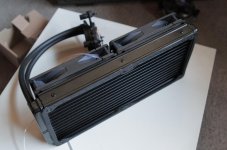
Nice build Jeff, just in case you wondered, there is no issue at all with the C70 if you would like to fit a 2 x 140mm rad on the top of the case, and also being able to fit a 120mm rad on the top-back as the other exhaust for the GPU, all of them with thin shrouds too

Also, if you get slightly thinner 120mm fans you can fit them in the front pannel without them being right up against the filter making excessive noise, even with thin shrouds, then you can remove the pull fans from the HDD cages

Then you can fit a 120mm in the bottom of the case as another intake and 2 x 140mm on the side panel as intakes giving you tons of airflow with super low rpms all around for a super quiet rig

I set up a G2 pulling air from the bottom so that it doesn't steal air pressure by becoming another exhaust, that way everything pushes towards the rads
 
They are trying to replace PC's with Arm processor machines, and this is happening in the server space. You can fit heaps of high grade arm cores in the same space as an i7 with broadly similar functionality but more processing power.

Is it worth running a Linux Arm processor based system?

I have been waiting for the first 32 core Arm systems, and if nvidia does it, then you get the great gpu cuda features too.

I've been researching some issues with this, and it turns out people are doing transliteration software to convert x86 instructions into ARM to run Linux software on Arm Linux systems. My guess it will be between half to a quarter the speed of native optimised code, maybe once the translatiin from x86 is optimised). But will most commercial software allow that or break security checksum, I don't know. However, 200 watt Arm CPU might add up to 80-160 Nvidia cores. I don't know how much of the cuda GPU that will include. But I'm now interested in seeing if an option is available to allow Resolve Linux to run on my Nvidua Sheild TV one day, as a test to see how slow it is (my guess optimise between an i3-i7,with lowend Nvidua GPU card). Something to keep in mind once desktop arm hits.
 
Nice build Jeff, just in case you wondered, there is no issue at all with the C70 if you would like to fit a 2 x 140mm rad on the top of the case, and also being able to fit a 120mm rad on the top-back as the other exhaust for the GPU, all of them with thin shrouds too

Yep, but you have to be careful with the radiator sizes, not the fans. The Corsair 110i GT[x] radiators don't fit on top. Seems to fit on the bottom if we eliminate the lower drive cage. Looks like the latest Noctua 2x140mm radiator fits on top.

Also, if you get slightly thinner 120mm fans you can fit them in the front pannel without them being right up against the filter making excessive noise, even with thin shrouds, then you can remove the pull fans from the HDD cages
Yep, I've got two 120mm up front and they work great and overall my system is pretty quiet. Loudest fans and really only noise comes from the GPUs when their fans are running full blast.

Since posting the build in here, I've added two 140mm intake fans on the side and replaced the two 120mm radiator fans with two higher output fans than the ones Corsair included with the H100i radiator. Made a HUGE difference.

I would still not use the C70 again for this build. It's just a bit too cramped overall for my liking. OTOH, if I dumped the HDDs and went to SSDs for internal RAID, I would re-configure a few things. I probably wouldn't use the bottom air intakes much or relocate the radiator. Those bottom air intakes struggle if the system sits on carpet and in my current office setup, that's the way it is. Don't want to have a special piece of wood or other solution, even a nice one, just to set the system on. Besides, it tends to vacuum up more dirt and pet hair or whatnot. Never been a big fan of bottom air intakes unless there's just no other way.
 
Yup. I got the Corsair H110 (note the is no "i"). I forget why I got this specific version but I am 90% sure it had to do with clearance for the case. It is an older version but still has the same size pipes, so it provides near identical cooling as the new 280mm rads. It fits like a charm, even with a thin foam shroud on top, and a thicker plastic shroud on the bottom which is where it really counts if you are pushing.

Also agree on the bottom intake if you have carpet. For that reason I built a mini desk using left over material from my big office desk. Whe I was done building the desk I looked at the shelves I didn't want to use and inmediately saw a perfect mini stand with the perfect size for the case and 6 inch legs. The little lift lowers the amount of dirt that makes it in.

The C70 has filters in the bottom. I bought quite a few of the foam shrouds for the tight spaces, like the front panel and between the 280mm rad and the case, the side panel intakes (then I ended up shrouding everything). You end up with quite a bit of that left over foam either way, and it works like a charm to cover up the areas that are not used as intakes and/or not covered by the filter. I've only have to clean the filters and take an air can to the system about once every 6 months or so.

The question is where to put the second 120mm radiator for the second GPU... And the only answer I came up with was to use the bottom pannel. I might be going SLI 1080, so I would use my 120mm bottom intake and turn it into a rad exhaust... thing is that would feed pretty warm air to the PSU, so if I do that I might have to flip the PSU and make it pull from inside the case,

That would make the whole thing like this:

INTAKES
2 x 140mm (side panel)
2 x 120mm (front panel)

EXHAUSTS
3 x 140mm (two on top mounted CPU rad, one on PSU)
2 x 120mm (top-back mounted GPU rad, bottom mounted GPU rad)

The only other alternative if you are using all six HDD bays would be to go with two separate 140mm rads for the GPUs and mount them on the top of the case, but that would require a little customization to the GPU cooler's water pipes since they wouldn't reach that far. You would then use a single 120mm for the CPU and mount it on the back, which is totally fine really, just not as overkill as we like it but still plenty of cooling for a healthy just not crazy overclock on the CPU.

If you go single GPU this case is KILLER, piece of cake, love it and it looks cool without looking childish
 

Attachments

  • rad shrouds 2.jpg
    rad shrouds 2.jpg
    87.8 KB · Views: 0
Back
Top