Welcome to our community

Be a part of something great, join today!

  • Hey all, just changed over the backend after 15 years I figured time to give it a bit of an update, its probably gonna be a bit weird for most of you and i am sure there is a few bugs to work out but it should kinda work the same as before... hopefully :)

New Workstation Build - i7 X99, Titan X, Overclocking...

Frick.

You're so right. Even with all these lanes, the allocation has left us in an awkward position.

1: GTX 980
2: ---------
3: GTX 980
4: ---------
5: Decklink HDMI Bracket
6: Decklink Extreme 12G SDI
7: TB2

I'm not even sure the Decklink will work in 5 and 6.
No space for a RAID card unless I use a Cubix or limit myself to a single Titan X. :prrr:
 
  • Thread starter
  • Moderator
  • #42
Still wrestling with some PCIe issues here, but I think it will get sorted in a few more reboots.

Here's my current slot configuration:

1: Areca 1883i SAS RAID
2: Thunderbolt EX II
3: GTX Titan X SC
4: ----
5: GTX Titan X SC
6: ----
7: Decklink 4K Extreme

GPUs are performing well, but I will need to add more fans to the system to keep air moving. Not that the extra GPU adds a huge amount of additional heat, but airflow is much restricted on the top GPU and overall airflow is further restricted with the second GPU in there. This system is full. Bad case decision on my part. Will see how it goes, but I will probably transplant this system into a larger case in the near future.

Minor PCIe conflict issue with the Decklink card, but I think it's actually working now as I type this. So we'll see.

This has been a frustrating build. Partially in terms of cable management (my fault to some extent with the case choice) and the current ASUS UEFI/BIOS. My other X99 build using the same motherboard went very smooth late last year. Initially had some overclocking issues on that system as the BIOS just wasn't ready for prime time yet. I'm running dual 980 cards in that one, no Thunderbolt, ATTO RAID card and that's it. No video I/O, just the two GPUs and the RAID. The Thunderbolt card seems to cause a lot of headaches here, but is working now. On this motherboard it just has to be in slot 2. I did get it to recognize in slot 7 and I don't know if that's an undocumented feature or a fluke and I don't know if it will actually work there. But I thought it interesting that it posted in that slot and the drivers loaded.
 
I install this motherboard for Davinci with 5 old GTX. Can play in real time (3 nodes) 6k clips in half good resolution in 2k preview

1: GTX 970
2: GTX 580
3: GTX 580
4: GTX 580
5: GTX 580
6: DeckLink HD Extreme 3D
7: GTX 580
 
My TB card comes in the mail in a few days; I'm going to try it straight in slot 7 and hope it works.
Do you think I'll run into any problems having slot 6 occupied by the Decklink since 6 shares the same bandwidth with 7?

Worst case scenario, I ditch the TB card and replace it with a RAID card.. Though my current plans are to buy a Akitio Thunder2 Quad Enclosure and load it with SSDs to use as active storage.

Any idea what your Decklink is conflicting with?
 
The Decklink 12G card works fine in slot 7. Also you can remove HDMI header slot from the 12G card. You just need to update to latest software and firmware. It may BSOD on the first reboot but it should sort the resources out if the above 4G decoding is enabled.
 
  • Thread starter
  • Moderator
  • #46
All seems to be working fine. Once I got the TB card to play nice with everything else it all fell into place. :/

Even though the TB card posted in slot 7, I don't think it will properly work there. Seems like the system specifically needs / requires the card in slot 2 to function properly.

Once I had the GPUs sorted, I tried to space them with the first in slot 3 and the second in slot 7 to allow for better airflow. This would be a great way to go, but it's just too crowded in the bottom of my case and the GPU didn't get along with some of the connections along the bottom edge of the motherboard. It's do-able, if I would have more room to work. Also made for a problematic run of the TB card's security cable. I couldn't situate it under the GPU due to where the 9 to 5 pin adapter plug located itself along the cable. If it were an inch longer either way, it would have solved that issue. I still made it fit, it was just tight. All things considered, I went back to having the GPUs in slots 3 and 5 with the Decklink in slot 7 and everything is working as it should. I do need to add a couple more fans though as temps in the system have gone up 10° with adding the second GPU and fans are kicking in higher. I'm still running the same overclock settings at 4.6GHz for the CPU and RAM at 3000MHz. I'm going to go ahead and add the fans later today before I really stress test everything.

Revisiting the topic of the RAID from before, the RAID-6 configuration performed well the last two days doing a real project with this system. All Premiere and AE. Nothing too demanding, just two different edits for a 30-second commercial finished at UHD resolution. The system handled well. I guess I'll put it through its paces in Resolve and see how it fares now with the second GPU. Initial quick and dirty testing in RC-X shows no benefit to the second GPU for playback/ working, as per usual. But the single GPU wasn't a bottleneck before...
 
  • Thread starter
  • Moderator
  • #47
Had to tune down the overclock, even with the extra fans added in. No crashes, but I didn't like what I was seeing for temps. Airflow seems fine, but the second GPU is raising the MB temperature and seems to be hitting the CPU harder. And while I took the CPU down a bit -- 4.4GHz -- I actually have the RAM running at 3100MHz or up 100MHz from before. All seems very stable and thermally happy. I'm settling here for now and starting into the benchmarking.

For starters, I can play back 6K R3D's in the latest REDCINE-X at 1/2 res full quality without skipping a beat. It actually caches ahead faster than playback at 24fps, could probably play back 30fps just fine, will try that... Upping to full resolution playback and scaled to fill the 4K screen is almost do-able. We're plodding along at just under 24fps... Like 21fps... Whether or not the second Titan GPU is enabled or not makes no difference here. CPU is obviously the bottleneck. There is a marked improvement with this box over the 8-core Mac Pro for comparison, which can play back 1/2 res 6K, but relies on the cache and can sometimes fall short. This system performs no better than my other i7-5960X system with GTX 980 GPUs in RC-X.

I'll get some transcode numbers and do some more detailed testing over the next few days as I have time.

Have noticed that write times to the RAID-6 array are quite fast for large files, but very disappointing for a lot of small files. Read times seem consistent either way and are a bit slower than I would like. So probably going back to RAID-0 when I finish up a few things. All things considered, it's still plenty fast as it is for most typical work I'm going to do with the system.
 
Here's what I did with the slots which seems to be working. I haven't laid into the machine yet due to work but this seems to fit in the HAF 935 case:

1: Adaptec ASR-71605 SAS RAID
2: Thunderbolt EX II (For Ultrastudio 4K)
3: GTX Titan X
4: ----
5: OPEN
6: Solarflare 10GbE
7: GTX Titan X
 
How hard would it be to build such a machine for someone that has never build and use a PC before (Mac only)? :) Is there any knowledge needed before starting? Is there a way to learn online on how to build it / configure it for optimal performances?
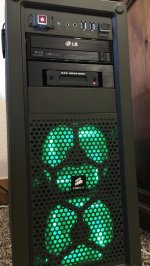
Thank you guys!
 
  • Thread starter
  • Moderator
  • #50
The actual building part is pretty simple. Assuming you're not a klutz and you can operate a screwdriver. Making decisions on which components to use is something that depends somewhat on experience and following market trends, hardware reviews and such. Where those new to building systems run into trouble is when things don't go smoothly. For instance, if you end up with a bad RAM module or other faulty component or things just don't cooperate. This build should have been pretty easy. And looking back on it, it was except for some glitchy BIOS firmware issues. This would be a lot of system for a first-time build, but I would not say that it's anywhere near advanced. And so much of the extra tweaking or overclocking process, if you choose to go down that road, is practically automated these days. I won't say that it's idiot-proof, but pretty close. ...Nothing is idiot-proof; history shows us that as technology advances and becomes more resilient to idiots, people also advance by breeding superior idiots.

I had my son, who celebrates his 10th birthday in about 3 weeks, help with this build. He actually prepped the system case, installed the front fans, seated the motherboard after installing the RAM. He also installed the m.2 SSD and put the drives in their caddies and slid them into the bays. I had him do the Windows install, but it didn't start off smooth since Windows wouldn't allow an install to the M.2 SSD unless we forced the system to to ignore legacy BIOS/ startup devices and do UEFI only. Selecting "Use UEFI drivers first" in the boot options wasn't enough, so we had to make another stop into the BIOS and then make the second attempt, which went perfectly smooth.

Due to the ASUS BIOS glitches, this system seems to need to do a lot of shut-downs and restarts to sort out changes. This caused me some real grief when installing the second GPU, as I probably restarted the system 5 or 6 times, when I knew the BIOS settings were correct, before it actually worked and I was about to throw in the towel on the TB2 card because I initially could get the two GPUs to work if one of them was in slot-1.. Just little things like that.

The system is great though, I'm very pleased with it. I will probably be doing another X99 build again here in the near future as I need another workstation for a different purpose. Going to run with essentially the same exact component list, but will use the larger Corsair 750D case and probably the 14-core Xeon CPU. No DeckLink card and probably no Thunderbolt card, but will have a 10GE.
 
"Nothing is idiot-proof; history shows us that as technology advances and becomes more resilient to idiots, people also advance by breeding superior idiots"

Apple in a nutshell.
 
Sounds great! Thank you Jeff for this detailed answer! So basically I can just order what you listed in your first post right? Or would you do something different? Do you recommend having multiple GPU cards? My needs will be lot of Davinci Resolve grading and editing of 6K footages, Premiere, Nuke X, C4D, and little bit of Octane Render. I have a Pegasus TB2 12TB I'd like to be able to use it too.

Thanks again.
 
Great info in this thread. I have somewhat similar system, with the same processor and the Noctua NH-U12S CPU cooler and Asus X99 Deluxe board. I've built quite a few PCs but have never really overclocked the CPU. Say if I'd like to go to the 4 Ghz direction, what would be the recommended procedure?

My RAM is Gskill Ripjaws 2666 (32 gb), and in the bios it says the clock is something like 2133 mhz. Is it ok to set the clock to 2666 Mhz?

The GPU is GTX 780 6GB. In the old machine I'd use it with a GTX 750 as a GUI gpu. Is the GUI gpu necessary in this kind of a system? I'd like to get another GTX 780 6GB but they are not available here.. I have a GTX 970 in another PC, might try that alongside with the 780.. dunno how it'll work out.
 
You have to enable the XMP profile for the ram to clock to 2666. When you do make sure you set the CPU strap to 100Mhz since most likely it will change to 125Mhz. You want to clock the cpu up using the turbo ratio settings. I would not suggest using the 970GTX with the 780GTX since the vram is different on those cards. GPU acceleration will be limited by the lowest common denominator for vram.
 
Last edited:
  • Thread starter
  • Moderator
  • #57
Just elaborating on some various questions above...

Mixing GPUs from different series or families is usually problematic on some level. Typically, most software will actually cripple your more powerful GPU as they will dumb-down the allocated memory sizes and other abilities to match the lowest common denominator GPU in the system. CUDA actually doesn't do this with the RAM anymore, which helps. For rendering processes where the GPUs are used for computation or procedural calculations, we can see varying results from one GPU type or family to the next. This can lead to undesired artifacting or visual anomalies in your videos.

We don't really need a dedicated GUI GPU with separate GPU used for acceleration these days. Slots are at a premium and the performance impact of using a display GPU also for computation is really not that bad. Better to put in 2 or 3 powerful GPUs and actually use them all for as much as you can, rather than wasting a slot on some card that does little more than drive your display.

@Octave Zangs, you could very easily work off of my build list -- this has turned out to be a real nice configuration. However, there are lots of ways to build a system like this and a variety of good components out there to choose from. As an example, ASUS has the Rampage V Extreme motherboard that is similar in connectivity and ability to the X99-E WS motherboard I'm using, but also adds WiFi and some better controls for tweaking. I would definitely recommend a larger case to build into. The Corsair C70 is pretty good, but is a tight fit for this configuration. Depending on your storage needs, you may find better value in using more HDDs of a smaller capacity or by going with SSDs instead.

I have outfitted the system with a RED Mini-Mag reader, which leaves me with one free drive bay and I could add another HDD into my RAID configuration if I wanted. All things considered, 8 drives would have given me superior performance and I really didn't need drives with 6TB individual capacity for this workspace RAID. The case itself isn't really to the the task of holding that number of drives, yet I do still have two free SAS ports on my Areca card, not to mention all the other SATA ports on the motherboard I have not used... Just using one for the Blu-Ray and one for the Mini-Mag reader.

Two GPUs definitely makes a difference over just one. While I could install a third, at the expense of either the Decklink card or the Thunderbolt card, I don't think I would gain much advantage there. After spending some time in Nuke and Resolve over the weekend, the 64GB feels cramped, just as I knew it would.

In retrospect, I know it would have cost me another $2400, but I probably should have build this workstation using the 14-core 2.6GHz Xeon and 128GB RAM. At least for much of the work I've been doing since putting it together. OTOH, it's still clocked stable at 4.4GHz with its cramped internals and dual GPUs. It screams for quite a few tasks where the clock speed matters more than threads, or where multiple threads just don't get used by the application.
 

Attachments

  • green.jpg
    green.jpg
    97.9 KB · Views: 0
Thank you Jeff again for all those details! I guess I'll go with the Rampage V Extreme motherboard and 750D case like Phil. I let you know how it goes!
 
Back
Top