Welcome to our community

Be a part of something great, join today!

  • Hey all, just changed over the backend after 15 years I figured time to give it a bit of an update, its probably gonna be a bit weird for most of you and i am sure there is a few bugs to work out but it should kinda work the same as before... hopefully :)

new REDCINE-X feedback

It's always enabled. On windows it's under C:\Documents and Settings\***you user name***\Local Settings\Application Data\REDCINE-X

Thank you!

I think I've narrowed it down to the external hard drive I was saving the files on just not having the necessary bandwidth. I'm trying it again on the internal drive, and I'm not seeing any errors.
 
Oh, I am such a frikkin' retard:

http://new.music.yahoo.com/ralphie-may/tracks/tard-happy--36865896
:)

DPX! I would like OpenEXR but won't be greedy :)

A resume-able Quicktime or MXF export function would rock but is not going to happen - totally understand!

Oh, and if you build that iPad thing, chat to Stu Maschwitz - he's doing the same thing for Colorista. He might make it listen to OSC (Open Sound Control) messages, since there are already programs for iPhone etc that send OSC eg:
http://hexler.net/software/touchosc
So you only have to do the reader portion. Maybe he can give you his source code? Since you guys are basically doing very similar things - building an "OSC -> color wheels x-y data" converter. We know he's a fan and would probably do it just for the cred of saying he helped RED :)

OpenEXR: We have to do some other internal changes to see proper exr support.

Quicktime/MXF resume: What are you aborting/resuming for? Would rendering in the background be an alternative?

OSC: We've looked at it for a long time now. Wave got higher priority first. Maybe if someone sends us a few iPads :)
 
I just host a project in 4k 16:9 cropped to 2:40. Is there anyway I can export the material already cropped in Redcine-X ? By what amount should I do this since it doesn't have frameguides as the old Redcine yet ?

Thanks.
 
I just host a project in 4k 16:9 cropped to 2:40. Is there anyway I can export the material already cropped in Redcine-X ? By what amount should I do this since it doesn't have frameguides as the old Redcine yet ?

Thanks.

good question.....
 
Don't you guys mean "Mactablet" or something like that? I think two other companies claim to have ownership of "ipad".
 
I seem to have lost all of my color grades. I was religiously saving my project, but after I closed Redcine-X and reopened later, none of my grades were viewable. Reloading the project rsx file does nothing as well. I hope I'm doing something wrong...either that or this is some type of bug. Any suggestions?

Thanks,
Adam
 
I just tested it again, I did a quick color grade on everything and saved it. Then did another one and saved it. I tried opening them and the first time it worked. Now they don't! :ack2:

Are you guys aware of this bug?

Thanks,
Adam
 
I just tested it again, I did a quick color grade on everything and saved it. Then did another one and saved it. I tried opening them and the first time it worked. Now they don't! :ack2:

Are you guys aware of this bug?

Thanks,
Adam

We haven't seen that in our testing.
Can you email me your log files and the rcx files?
 
Deanan,
I've also had things re-set but not totally.

What I do currently is ( long winded ;) )

Cut in fcp. export edl and xml.

Launch RC-X

Turn BG off and have edl viewable and drag clips in EDL into Bin1

Drop 1 clip at a time into timeline and do first light grade.
Drag clip into Bin2

repeat for all clips.
Save project.

Load XML in text edit in BG.
Set Bin2 to List view
Input in/out frames from XML to clips in/out in Bin2

Export ALL BIN.

Now I saved a _v002 of the project and that was ok but _v001 some clips lost settings.
Not all settings. Random. Most were just reset ColourSpace and GammaSpace though so most settings ok. No grades were pasted from saved presets.


Also.. if the BG for RC-X is off and you can see the desktop the following can occur.

Drag clip off timeline. Clips gets dropped onto desktop.
Warning comes up file exists already. So "Cancel"
File then gets moved (eek!) to desktop out of orig folder. Even if on external raid or network mounted volumes. Can this be changed?

Also.. being pickey ;) when you drag something out of a bin or off timeline to remove can the animation not show the outline snapping back to where the clip was?

Begging for a cuts only edl/xml trim option :)

Loving the app though.

Cheers

Si
 
Resize

Resize

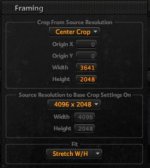
I don't know if anybody has been trying to take there 4k footage(2:1) and resize it to 1920x1080(16:9) in Redcine-X. I finally found out the answer(thanks to Austin Wallender)...sorry if everybody already knows this.

In the framing tool, "crop from source resolution" section, change the width 4096-->3641. And of course change your export settings to 1920 by 1080. This will chop off the edges of your 2:1 frame and your footage won't look stretched.
 

Attachments

  • resizing.jpg
    resizing.jpg
    9.9 KB · Views: 0
I don't know if anybody has been trying to take there 4k footage(2:1) and resize it to 1920x1080(16:9) in Redcine-X. I finally found out the answer(thanks to Austin Wallender)...sorry if everybody already knows this.

In the framing tool, "crop from source resolution" section, change the width 4096-->3641. And of course change your export settings to 1920 by 1080. This will chop off the edges of your 2:1 frame and your footage won't look stretched.

There was a bug in b96 with fit width and height.
it's now fixed with b99. try that with fit height again and
see if it's doing what you wanted. thanks.
 
Nope, doesn't work. I tried it many different ways, "Fit" still doesn't work. What are the exact settings I would need to enter into "crop from source resolution" and "source resolution to base crop settings on"?
 
Nope, doesn't work. I tried it many different ways, "Fit" still doesn't work. What are the exact settings I would need to enter into "crop from source resolution" and "source resolution to base crop settings on"?

My bad. It hasn't gone into the release branch yet.
 
hows the framing tool work

hows the framing tool work

The framing tool does not seem to be doing anything on build 99
 
ROCKETCINEX -

ROCKETCINEX -

Which is the preferred program to use if I have the Redrocket card?
Would it be REDCINE-X OR ROCKETCINE-X ?
I've not tried ROCKETCINE-X yet....but is that on the way OUT and REDCINE-X the only program to be left standing and receiving build support?
 
Framing/Cropping

Framing/Cropping

Hi

Will the framing and cropping tool in Redcine-x ultimately function with the ease and elegance of the old Redcine tool? Performing this task numerically and without an interactive window is cumbersome at best.

Bill
 
Export Settings

Export Settings

Thanks RED! Looking good!

Just mention one small thing, in case you haven't noticed?
BUILD 99

When you set :-

"Output with Clip Filename to Selected folder"

It still wants to save as 'Untitled.mov' not Clip Filename (Or am I missing something?)

See Picture 1.png Picture 2.png
 
Thanks RED! Looking good!

Just mention one small thing, in case you haven't noticed?
BUILD 99

When you set :-

"Output with Clip Filename to Selected folder"

It still wants to save as 'Untitled.mov' not Clip Filename (Or am I missing something?)

See View attachment 4895 View attachment 4896

That only happens when you're exporting from the timeline since it you've got multiple clips rendering out to one movie and can't guess which name to use.

Outputting each clip in a timeline will come separately with a different feature addition.
 
I chose 'Output with Clip Filename to Selected folder' with 'Export Clip in Player' and it still wanted to save it as 'Untitled.mov'
 
Back
Top