Welcome to our community

Be a part of something great, join today!

  • Hey all, just changed over the backend after 15 years I figured time to give it a bit of an update, its probably gonna be a bit weird for most of you and i am sure there is a few bugs to work out but it should kinda work the same as before... hopefully :)

New Mac Pro

We are about to get in 100 or so 2.7GHZ 12 core D700 1T SSD 64GB as well as offer custom 3GHZ 10 core D700 1TB SSD 64GB mac pros if anyone is interested. sales@editbuilder.com

They don't come in until the end of next week but our first batch of 50 sold within a few days.
 
New DevBuild. Same as the others with A/V focusing. They must be doing some serious refinement and bug squishing work given how rapidly these builds are being put out for testing.

That's what I'm hoping for. Seems very focused because the builds are coming fast and the update packages are relatively small. I'm hoping it's also a sign of impending release.
 
Yet another A/V DevBuild today. Looks like they are ramping up the QC to get something out the door by the next WWDC.
 
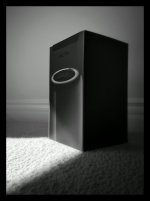
Look what just show up today. Wish I have a fully functioning RRX to go with :-)
 

Attachments

  • ZEB-macproHD.jpg
    ZEB-macproHD.jpg
    44.7 KB · Views: 0
Any of you non-developer riff-raff hooligans can now sign up for access to the OS X betas if you have new hardware that you want to test.
 
Been following this thread and searching a few other places but as of yet haven't seen any answers... any word on how the D700s handle Red debayering in Resolve? Anyone been able to test that out? I'm able to get 1/4 res real time on a MacBook Pro retina from R1 footage so I'm sure the Mac Pro soars far beyond that.


Check out Brarefeats.com We did some tests using my 12 Core 2013 VS his 8 Core 2013. Within the next few days there should be results for the nMP 12core VS 12core Tower with 3.46ghz processors (upgraded). Interesting results.

In short when dealing with Red footage and GPU debayer, CPU is still the bottleneck. More cores = better.

http://www.barefeats.com/tube14.html
 
Finally put yesterday's dev build on. New updates to Thunderbolt resolution support and it's obvious that Apple is paying attention to DPI here and not trying to simply replicate existing desktop monitor metrics. The 3008 pixel-wide equivalent scaling is really nice. Just a fuzz too small on the 24", but would shine on a 26~27".

They took out the native 4K resolution option - WTF? Definitely sending them feedback about that. Always need a native resolution support option, no matter what that resolution may be. Now sees 4096x2160 modes properly too and provides slightly different retina scaling options there as well. I'm going to be shocked if Apple doesn't have a 4K or "retina" Thunderbolt2 display at WWDC. I'm really hoping for an ultra-wide aspect 5120x2160 display. Even better would be a 32" 6140x2600 2.35:1 or 5120x2880 16:9. Come on, Apple, I know you can do it! ;)

Looks like they may have killed off the last of the wake from sleep issues I was having with all previous 10.9.x builds too. PDF printing weirdness is still there, but I think that's more of an Adobe problem.
 
Check out Brarefeats.com We did some tests using my 12 Core 2013 VS his 8 Core 2013. Within the next few days there should be results for the nMP 12core VS 12core Tower with 3.46ghz processors (upgraded). Interesting results.

In short when dealing with Red footage and GPU debayer, CPU is still the bottleneck. More cores = better.

http://www.barefeats.com/tube14.html

Damn. Hits the sweet spot of 25fps in resolve... Seems like 12 core it is then...
 
Check out Brarefeats.com We did some tests using my 12 Core 2013 VS his 8 Core 2013. Within the next few days there should be results for the nMP 12core VS 12core Tower with 3.46ghz processors (upgraded). Interesting results.

In short when dealing with Red footage and GPU debayer, CPU is still the bottleneck. More cores = better.

http://www.barefeats.com/tube14.html

Damn. Hits the sweet spot of 25fps in resolve... Seems like 12 core it is then...

Hmm, even with the 12 core, you're still dropping from realtime playback after a couple of blur nodes. Looks to me like a rocket is still a necessity for that...

Will be interesting to see how the situation develops. I was considering a nMP as a general workstation for offlining but more for both Resolve work and Cinema 4D. Perhaps the 6-core will not serve me as well as I thought (more cores is always better for C4D...)
 
Hmm, even with the 12 core, you're still dropping from realtime playback after a couple of blur nodes. Looks to me like a rocket is still a necessity for that...

Will be interesting to see how the situation develops. I was considering a nMP as a general workstation for offlining but more for both Resolve work and Cinema 4D. Perhaps the 6-core will not serve me as well as I thought (more cores is always better for C4D...)

Okay this is maddening. We have the newer Mac Pro 2013s running all the goodies at a decent pace with or without ROCKET here (only 4K work).

However on a Mac Pro 2010 with a single Quadro 4000 and ROCKET sitting in the 16x lane, why is BMD insist that my crashes are due to the lowly (wasnt so lowly with v9?) single GPU.

I thought the ROCKET was supposed to help in this matter and Im only talking playback here and no actual work done to footies in Resolve.

Sent BMD crash logs so hoping that its something else and not the config that once was running all required apps to work in 4K with supreme smoothness.

To stay on topic, all 2013s are running 4K projects across the board (Avid MC, Premiere and FCPX) without the ROCKET.

We have a Sonnet and Magma enclosures but their at Thunderbolt 1.

Hoping for Thunderbolt 2 options.
 
Okay this is maddening. We have the newer Mac Pro 2013s running all the goodies at a decent pace with or without ROCKET here (only 4K work).

However on a Mac Pro 2010 with a single Quadro 4000 and ROCKET sitting in the 16x lane, why is BMD insist that my crashes are due to the lowly (wasnt so lowly with v9?) single GPU.

I thought the ROCKET was supposed to help in this matter and Im only talking playback here and no actual work done to footies in Resolve.

Sent BMD crash logs so hoping that its something else and not the config that once was running all required apps to work in 4K with supreme smoothness.

To stay on topic, all 2013s are running 4K projects across the board (Avid MC, Premiere and FCPX) without the ROCKET.

We have a Sonnet and Magma enclosures but their at Thunderbolt 1.

Hoping for Thunderbolt 2 options.

Interesting, thanks for the info Eric! Though sorry to hear about your Blackmagic issues. :( Might I enquire what the specs of your 2010 versus 2013 Mac Pro are?
 
Put the new 16GB modules in the first two slots and leave the remaining two 4GB module in there for the 40GB total. You're not going to get maximum performance with any configuration here unless all 4 slots are identical. Most tasks are not going to show you much difference anyway. Upgrade those remaining two 4GB to 16GB modules down the road a bit when you get a chance, if you feel that you need to after running the system for a while.
 
Put the new 16GB modules in the first two slots and leave the remaining two 4GB module in there for the 40GB total. You're not going to get maximum performance with any configuration here unless all 4 slots are identical. Most tasks are not going to show you much difference anyway. Upgrade those remaining two 4GB to 16GB modules down the road a bit when you get a chance, if you feel that you need to after running the system for a while.
hmm...i must have put them in the wrong slots...put 2x16 in, left 2x4 in place and got the bad ram beep at startup, so i figured that they all have to be the same....
but i think i will get 2 more 16 anyway, compared to the rest of the set up it is cheap and resolve seems to draw as much as it can get....
 
Put the new 16GB modules in the first two slots and leave the remaining two 4GB module in there for the 40GB total. You're not going to get maximum performance with any configuration here unless all 4 slots are identical. Most tasks are not going to show you much difference anyway. Upgrade those remaining two 4GB to 16GB modules down the road a bit when you get a chance, if you feel that you need to after running the system for a while.
Thanks Jeff. My plan is to get an additional 2 16GB cards in the next couple months, but didn't want to waste the extra 4's since they are there :)
 
I've been editing 6K RED RAW clips directly in FCP 10.1.1 with a nMP without crashes or other drama. Haven't updated all my filters since some are not Maverick friendly so been making due with native FCP stuff. Takes a bit to render compound clips and heavy filters. For a non-time critical application - the nMP with TB2 raids is dandy.

Working on a real cool project right now. Hope to post within the week . . .
 
Zeb were you on an 8 or the 12 core? Also, what kind of compression for the 6K stuff?
 
Put the new 16GB modules in the first two slots and leave the remaining two 4GB module in there for the 40GB total. You're not going to get maximum performance with any configuration here unless all 4 slots are identical. Most tasks are not going to show you much difference anyway. Upgrade those remaining two 4GB to 16GB modules down the road a bit when you get a chance, if you feel that you need to after running the system for a while.

just checked with apple (after still getting the beep with every 2x16 and 2x4 configuration) and they say i can't mix ram sticks at all....4x4, 4x8 or 4x16 (or 4x32 i guess) is it....not sure if this goes for the 8 core only but that is what apple says...
 
just checked with apple (after still getting the beep with every 2x16 and 2x4 configuration) and they say i can't mix ram sticks at all....4x4, 4x8 or 4x16 (or 4x32 i guess) is it....not sure if this goes for the 8 core only but that is what apple says...

you can't match the 16 gig ram with anything lower than it. i thought it was widely known. I have had issues with the computer not reading my ram sometimes though. I made sure the dims were securely positioned. I got the 8 gig dims from other world computing. anyone else have that issue?
 
Back
Top