Welcome to our community

Be a part of something great, join today!

  • Hey all, just changed over the backend after 15 years I figured time to give it a bit of an update, its probably gonna be a bit weird for most of you and i am sure there is a few bugs to work out but it should kinda work the same as before... hopefully :)

Negative looking images when grading IPP2 in resolve?

Joined
Feb 21, 2017
Messages
11
Reaction score
0
Points
1
Location
Guadalajara, Mexico
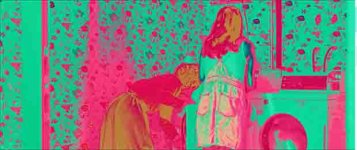
Hey guys, looking for some help, maybe this has happened to someone before. I am trying to grade and export some IPP2 footage in Davinci Resolve and the footage displays these weird negative color looking splices within the clips. I have tried modifying several settings in the raw options but the problem persists. If I play back this clips in RED player or Final Cut the clips appear to be perfectly fine. Any idea why this could be happening and how to fix it?
 

Attachments

  • Screen Shot 2019-07-23 at 9.57.52 AM copy.jpg
    Screen Shot 2019-07-23 at 9.57.52 AM copy.jpg
    34.1 KB · Views: 0
Hey guys, looking for some help, maybe this has happened to someone before. I am trying to grade and export some IPP2 footage in Davinci Resolve and the footage displays these weird negative color looking splices within the clips. I have tried modifying several settings in the raw options but the problem persists. If I play back this clips in RED player or Final Cut the clips appear to be perfectly fine. Any idea why this could be happening and how to fix it?

I've had great experiences calling into BlackMagic and taking to resolve techs. They're very patient and will likely have a reason. If not, would be nice for it to be a ticket so it can help the next person.
 
Can you export a few Red .r3d still frames? Maybe it's a combination of incorrect project settings in Davinci Resolve"s Color Management and or Red Raw IPP2 settings, as Nick alluded to, plus maybe an incorrectly chosen IPP2 Output Transform Lut.
 
This looks to me like maybe a legacy color and IPP2 color were combined or 2 IPP2 Output Transform Luts of different or similar color spaces were combined.
 
What specific Color Management settings are you using? We're not seeing any problem with the normal IPP2 Red pipeline.
 
Saw another image like this on Facebook recently. I suspect something is up with GPU driver. I would revert to the last stable driver or if there's a newer one maybe give that a whirl. I think they guy on FB had a dual Radeon setup if I recall correctly, but I have no idea without digging deeper.
 
The mystery could be easily solved, if OP just posted a single R3D...

+1, if it was important enough to start a thread about, surely providing a R3d file or frame to help resolve the problem shouldn't be a lot to ask for.
 
Forgot to mention, this happened to me because my computer is too old to process a lot of things in newer Resolve programs. I had to downgrade to an older one to add things like stabilizer filters etc. Just an idea.
 
Back
Top