Welcome to our community

Be a part of something great, join today!

  • Hey all, just changed over the backend after 15 years I figured time to give it a bit of an update, its probably gonna be a bit weird for most of you and i am sure there is a few bugs to work out but it should kinda work the same as before... hopefully :)

Need some basic LUT help

steve green

Well-known member
Joined
Jan 27, 2012
Messages
1,049
Reaction score
1
Points
36
Location
Thousand Oaks, Ca
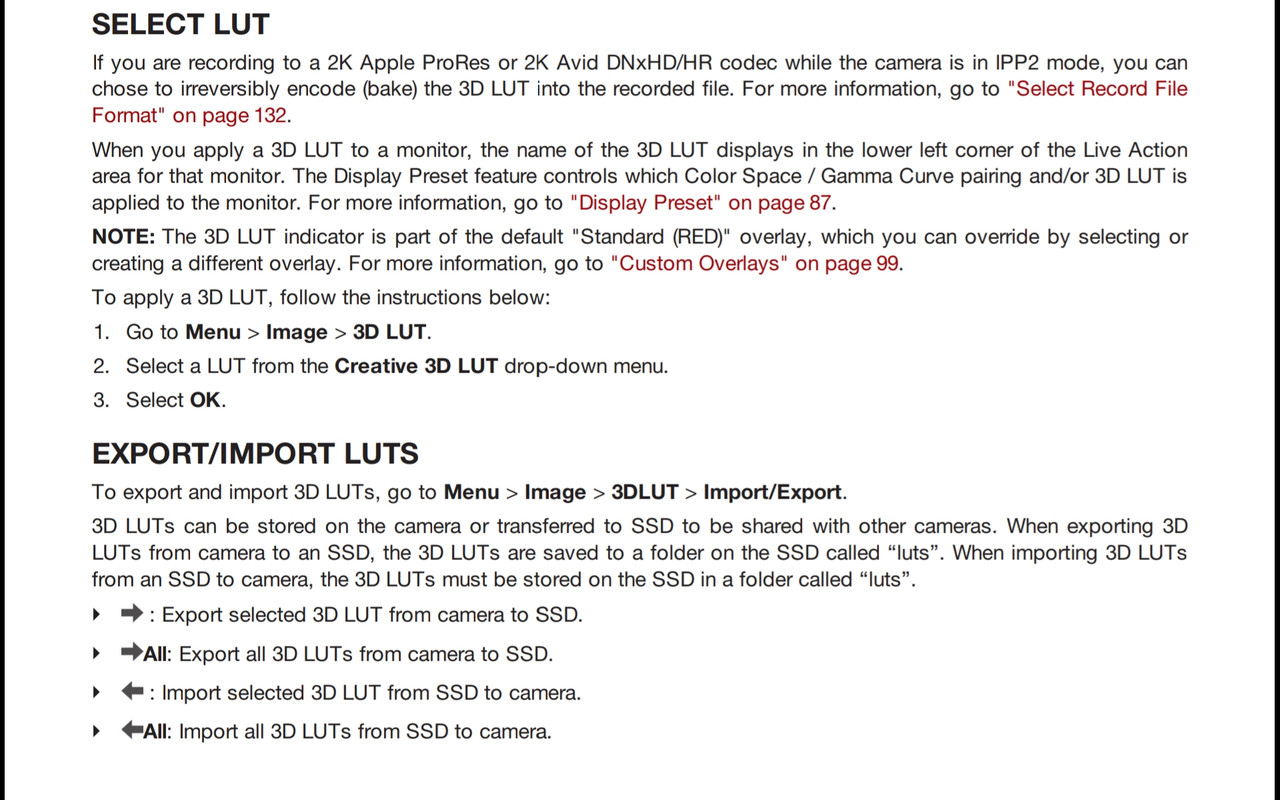
I'm not grasping the LUT concept and I'm really struggling to use them for my R3D's and pro res files. Can someone, post what the output menu should read when using a LUT with IPP2 and Monstro?

When I load them and view on a SDI monitor they're either oversaturated or "flat" depending on the setting I selected.

I'd love the LUT to be viewable on the R3D's as a reference for post, and "baked into" the prores files.
 
Steve,

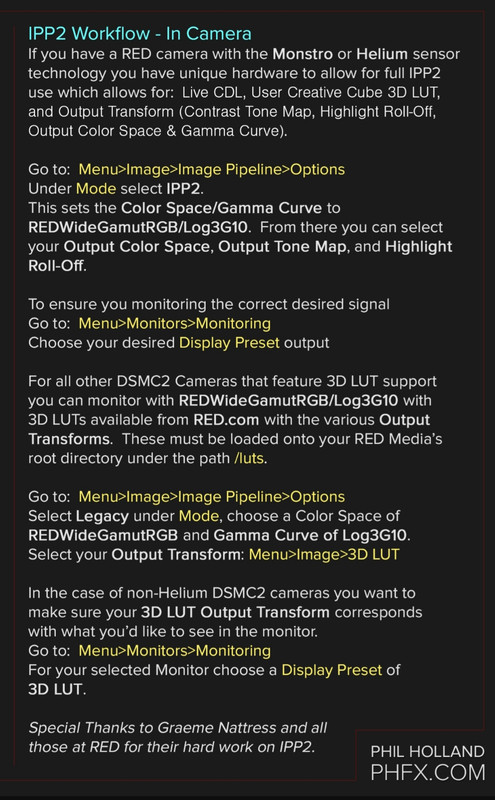
I have never owned a Red Digital Cinema Camera so maybe someone who does will chime in with the screen grabs you requested. However, here are two workflow explanations from Phil Holland at Phfx.com and from page 85 of the "Red DSMC2 Monstro Operations Guide" if that helps


20190521-180839.jpg


Screenshot-20190521-181106-Drive.jpg
 
Steve,

I have never owned a Red Digital Cinema Camera so maybe someone who does will chime in with the screen grabs you requested. However, here are two workflow explanations from Phil Holland at Phfx.com and from page 85 of the "Red DSMC2 Monstro Operations Guide" if that helps


20190521-180839.jpg


Screenshot-20190521-181106-Drive.jpg

Thanks, Rand, I've tried to follow the ops manual to no avail. I'll try again, hoping to get the screen grabs to verify I'm not completely off target.
 
There was a good thread on LUTs recently that might help: IPP2 and LUTs


Just read that thread and come to the conclusion that in the Red eco-system IPP2 in camera Luts are not really usable. Such a bummer as I'm getting hammered with a client that needs pro res proxies looking good with a baked in LUT. AGH!
 
I'm not grasping the LUT concept and I'm really struggling to use them for my R3D's and pro res files. Can someone, post what the output menu should read when using a LUT with IPP2 and Monstro?

When I load them and view on a SDI monitor they're either oversaturated or "flat" depending on the setting I selected.

I'd love the LUT to be viewable on the R3D's as a reference for post, and "baked into" the prores files.

Just read that thread and come to the conclusion that in the Red eco-system IPP2 in camera Luts are not really usable. Such a bummer as I'm getting hammered with a client that needs pro res proxies looking good with a baked in LUT. AGH!

Don't know what you mean by in camera LUTs not being usable. That's literally why the feature is there. In the IPP2 ecosystem you are placing the LUT, defined as a Creative Cube, before the Output Transform to whatever your Color Space and Gamma are. If you want the LUT after the fact, dive back into Legacy and likely use REDlogFilm. You need to know what the LUTs you are using are designed to work with really.

In terms of baking into proxies, 2K doable, 4K not doable.

You can also create a custom LUT with various output transforms, but this depends really on what you are doing. Sort of just need to know what your goals are. If you are talking about slapping a LUT on at the tail end of the IPP2 pipeline, you can't currently do that in camera. But you can create an Output Transform LUT via RCX and combine it with whatever LUT you are utilizing.
 
Steve,


Maybe this will help also. This is the method I use to make "Creative Luts" For both Redcine-X and to use back Inside Resolve.


At the Bench: Loading LUTs on a RED with IPP2 Workflow


RED's new IPP2 workflow, which is supported in-camera with the latest RED DSMC2 bodies brings a lot to R3D workflows. One of the most important features is the ability to load a custom 33-sided 3D LUT in .cube format into the camera for viewing. In this blog, Ian shows you two scenarios for on set and off set LUT creation.

To read the full post, visit our blog: https://www.abelcine.com/articles/blo...
 
Last edited:
Proxy LUT burn-in in LEGACY mode.
 
Back
Top