Welcome to our community

Be a part of something great, join today!

  • Hey all, just changed over the backend after 15 years I figured time to give it a bit of an update, its probably gonna be a bit weird for most of you and i am sure there is a few bugs to work out but it should kinda work the same as before... hopefully :)

Neat trick animating R3D Flut in Nuke

PatrickFaith

Well-known member
Joined
Nov 4, 2011
Messages
2,560
Reaction score
0
Points
36
Location
California
Website
www.pudls.com
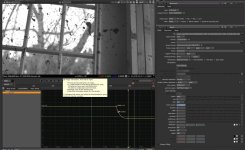
I had a shot where i was going from super dark to outside but needed to keep things from blowing out. The raw r3d could handle the dynamic range in the raw footage but it was hard to get a DI to work. Anyway nuke now can import monochrome footage r3d directly and has hooked into the RED library in such a way that it can animate (i.e. have key frames the r3d values) per frame. Is real easy to do. here's a screen shot and the nuke nodes i used. (another trick is using notch to reduce noise on the real darks as i moved to a 2k scope format)


set cut_paste_input [stack 0]
version 8.0 v1b48
Read {
inputs 0
file /Volumes/LaCie/pudl_raw/A037_0101JB.RDM/A037_C007_0101EE.RDC/A037_C007_0101EE_001.R3D
format "5120 2700 0 0 5120 2700 1 "
first 0
last 3621
origfirst 0
origlast 3621
origset true
r3d_sdk 8
r3d_init 2
r3d_rockect_custom_scale {5120 2700}
r3d_colorspace REDcolor3
r3d_gamma_curve "Half Float Linear"
color_version v2
r3d_iso 800
r3d_flut {{curve x2080 1.4 s0 t-0.005200000014 x3008 -0.2336246967}}
r3d_gain {1 1 1}
r3d_lggLift {0 0 0}
r3d_lggGamma {1 1 1}
r3d_lggGain {1 1 1}
r3d_pdlog_gamma 0.6000000238
name Read1
selected true
xpos -301
ypos -142
}
Reformat {
format "2048 858 0 0 2048 858 1 2kws"
filter Notch
name Reformat1
selected true
xpos -188
ypos 13
}
 

Attachments

  • nuke_screenshot.jpg
    nuke_screenshot.jpg
    94.8 KB · Views: 0
Well, this has been a feature in most color-correction programs, too, as far as I know. Realistically, I think you can handle an exposure change in a color correction just as well as you can in FLUT, assuming you start with a reasonable balance and level, and the footage isn't too noisy. It takes seconds to do and just a few mouse clicks.

I don't like the idea of color-correcting in an effects program, but I don't dispute that all software begins to blur the lines: editing programs that can color-correct and do limited effects, color-correction software that can do limited effects and editing, compositing software that can do limited color-correction. But I honestly think it makes more sense to use software optimized mainly to do one thing in post.

Having said that: I don't mind using Resolve to conform a final TV show or feature, assuming you're working from an EDL. I would have a big problem with anybody trying to edit in Resolve, and I'm not fond of doing composites in Resolve, either.
 
Well, this has been a feature in most color-correction programs, too, as far as I know.

I'm not aware of any color correction software, that can dynamically change metadata during the given shot. Basically you can set your metadata per each shot and that is basically it. Said that, I change metadata during grading not that frequently, especially because Resolve has funny way of handling it. Basically, you can't undo the metadata change and it doesn't gets transferred using ColorTrace. So, the idea behind my philosophy, the less I screw with it, the better I will be. Besides, with the advance of ACES, the metadata adjustment completely goes away…
 
Marc : agree ... though I use nuke for fx compositing (both practical and computer effects). I am doing a lot of projection of the r3d footage out of nuke(i.e. like used in Oblivion on the sky platform so i need to convert the r3d footage to something that can be projected for practical effects), and find a lot of the projection systems are really 6 bit and 8 bit if I am lucky. I also use virtual projections for photorealistic lighting, where the r3d is "lighting" my vfx scene, and that needs the light linear between 0.0 and 1.0.

Jake: I need to understand the openexr to aces workflow one of these days, seems like it would improve my workflow. I normally do my final output from nuke to editing (which then goes to grading) in dpx 10 bit rec709.
 
Thats cool but the difference from animating the input nodes meta data or fade between two input nodes linked to the same source with different meta data settings is quite slim, no?
Thats what I do if the shot goes from almost burnt out to black or such. One node with a good setup for the beginning and one setup that fits the end of the clip and a node that control transparancy in between the two.. viola. Same thing when doing "post HDRx" two input nodes and adjust at raw level straight into a comp.

Saying the VFX and compositing tools have limited grading capabilities does not really make sense, if you work in Flut and have the nodes that exist in NUKE then that setup actually makes pretty much all "dedicated grading tools" look limited. So to me those kind of arguments belongs back in telecine times which for most past a long time ago.

But yes, why these meta data parameters does not have keyframes beats me.

The latest nuke with it's vector scope and other things kicks ass. But, yes there are programs that are dedicated for grading that is better but then again those applications are does just that. Nuke on the other hand has so much more to offer and it treats colours far better than most grading applications. I actually think that if they even did a simple grading console for it it would be top of class.

I run two flame 2012 but the 3d guys that I work with use nuke so we have a bit of mixed environment. The Flames are used in the client suite and nuke is boiling in the background. Flame is better for the "online / client supervised work" with it's playback capabilities and intruiging timeline and great interactivity. But frankly nuke is a far more technical tool where you are completely free to sit and program you own nodes and plugins from a blank txt doc if wanted.
 
So which is better Smoke or Nuke? I read somewhere that Smoke is not for windows and am not sure about Nuke on windows.
 
So which is better Smoke or Nuke? I read somewhere that Smoke is not for windows and am not sure about Nuke on windows.

Nuke and smoke are very different from each other. One of the biggest differences is that smoke is a complete rewrite from flame and fire and as it is autodesk has long way ahead before they actually have a product that works in a real working environment. They do the same for Flame, So flame 2013 old version not the new one is what works. Pretty much no body moved on to flame 2014 since they do not feel it's up and running just yet and they made change that "old school flame user" did not find as improvement... a bit of a FCP7 and FCPX scenario.

Nuke on the other hand is on a solid build and works well on both PC and MAC (flame runs on a autodesk version of redhat). But yes you can run nuke very well on Windows.

They also differ in a way that smoke got a pretty good version of the flame/fire timeline, if you ask me the flame timeline is probably the most advanced and capable timeline ever made and the way flame link clips and handles edls xml's etc are actually out standing compared to everything else. Nuke on there other hand do not have a built in timeline but nuke goes along with Hiro which is more of a conforming and playback tool. basically hiro makes a container for each clip and that container is linked to nuke setup libraries and the containers are able to show iterations of nuke renders which is quite nice, it's still a bit in development but quite easy to use and very powerful. Multiple nuke users can sit and bust work into the same timeline that can be played out locally if you got fast enough network and so on. And you can do sub trees with grading comps etc within each clip.

I have no doubt that Autodesk will manage to get around and "Finnish" smoke but as it is they try to please a rather big crowd, to me it's like the aim for everyone, beginner / imovie cutters and experienced flame operators in one big swoop... and when the imovie guys get their will simply because the are so many and scream louder the flame guys looks for a substitute... at the moment a lot of people then jump towards Nuke.

But what autodesk really needs to do is to listen a bit more to the flame guys and skip the whole smoke thing and port flame to osx. I think that will happen very soon or at least I think flame 2015 will not be on redhat it will probably be on OSX, a bit depending on the performance of the trash cans i guess :)
 
Jake: I need to understand the openexr to aces workflow one of these days, seems like it would improve my workflow. I normally do my final output from nuke to editing (which then goes to grading) in dpx 10 bit rec709.
As far as I understand, ACES is built on linear EXR. If you use ACES, you're using EXR. Said that, there is no problem exporting EXR for grading, as pretty much all top end grading software works great with it, because they now can work in ACES. Going back to NLE from NUKE using EXR, well, that's not really happening now.
 
Nuke on the other hand has so much more to offer and it treats colours far better than most grading applications. I actually think that if they even did a simple grading console for it it would be top of class.
As usual, Bjorn making weird statements about color grading. How about some real life examples? Your arguments show time after time, that after all these years you still have very garbled idea about the purpose of color grading. Why do you despise color grading so much?
 
…nuke now … has hooked into the RED library in such a way that it can animate (i.e. have key frames the r3d values) per frame
Hey, I love all the new additions to Nuke 8, but R3D keyframing is not one of them as far as I am aware. I just tested in Nuke 6.3, and I can keyframe FLUT.

Incidentally, because Nuke works internally in linear float, there should be no difference between using a FLUT adjustment in the R3D parameters and using an external exposure node, if the R3D is set to decode as half-float linear. I just did a test of two read nodes, one with FLUT set to zero, and one with it set to +1, followed by an exposure node set to -1 stop. The results were numerically identical.

I use my own custom gizmo as an input process in Nuke so I can have REDgamma3 as the VLUT curve.
 
I'm not aware of any color correction software, that can dynamically change metadata during the given shot. Basically you can set your metadata per each shot and that is basically it.
What I said is that you can dynamically change the exposure in color-correction, which is true. I don't think tweaking the FLUT either way results in any visual difference than knocking the level up or down 20 units. It's trivial.

I do agree that doing this kind of work in a compositing program like Nuke is ill-advised, because it's not what the program was designed for. It's a compositing program. And by the same token, I'm not a fan of doing compositing in Resolve, even though you can technically do it. And I'm also not a fan of doing audio mixing in a video editing program like Avid or Final Cut Pro. It's just a question of using the right tool for the right job. You can use a wrench as a hammer, too, but it's a lot better 99% of the time just to grab an actual hammer.
 
Hey, I love all the new additions to Nuke 8, but R3D keyframing is not one of them as far as I am aware. I just tested in Nuke 6.3, and I can keyframe FLUT.

Incidentally, because Nuke works internally in linear float, there should be no difference between using a FLUT adjustment in the R3D parameters and using an external exposure node, if the R3D is set to decode as half-float linear. I just did a test of two read nodes, one with FLUT set to zero, and one with it set to +1, followed by an exposure node set to -1 stop. The results were numerically identical.

I use my own custom gizmo as an input process in Nuke so I can have REDgamma3 as the VLUT curve.
Your right, is just cool that you can keyframe the r3d. I btw really like nuke 8, they have added all the color correction software including radar displays - so makes matching the colors so much easier durring compositing (they now even have a match grade thing). I think i need to get a nuke node like what you have, i especially need a nuke node that "chromes" black and white, gives a black and white shot with that metallic feel(feature I'm working on is black and white). Basically it composites the high lights with the medium tone (there was a bunch of techniques to do this anciently, but programs like Silver Efex ProII are used in photoshop black and white silver effects, but i need that for nuke).
 
As usual, Bjorn making weird statements about color grading. How about some real life examples? Your arguments show time after time, that after all these years you still have very garbled idea about the purpose of color grading. Why do you despise color grading so much?

Jupp we had this discussion before. There is normally a pretty fucking good colourist tool setup in any top shelf composting program, a lot of times more capable and exact than most colourist toolsets are. So saying the right tool for he right job and all this is just lame.

A guy that only does, graphics can probably excell in that quite far than somebody that does graphics, editing, grading, 3D, sound recording, filming etc etc. That I agree on. But all those comments that Colors should be done in a dedicated colourist program that I do think is something that is a leftover from the telecine time. When you needed to set the colors in a dedicated machine when going from film to 8 bit video. That scenario is not with us any more and things are changing.

That does not mean that I don't think dedicated colourists is not in need any more, I very much think they are, but if a guy need to grade a clip and he is used to nuke, then jumping to resolve is not doing much good, he has all the possible buttons and nodes that exist in resolve within nuke and he probably have a greater chance to understand what he does in nuke than in resolve. As I think you can only learn a very few of these programs on a profesional level within a lifetime so jumping from program to program does not do much good.

So no I do not dispise colorgrading. But I think people that think it's only possible to create a good grade with a "color grading dedicated program" are basically wrong. Thos programs are great if thats all that you do. If you do more than that then it's not optimal to do what we call "round tripping" and all that. To me it's not convenient it's a relic from the past, when we moved from film to beta sp for offline then final grade to D1 from D1 to flame, from flame to digibeta master... I just do not see that kind of work flow as valid any more. But yes I see dedicated colourist as a great asset.

For real life examples I got our web page. it's not much there as it's made recently, but then on the other hand pretty much all projects there have never seen a dedicated colourist program.. :) www.syndicate.se
 
Jupp we had this discussion before. There is normally a pretty fucking good colourist tool setup in any top shelf composting program, a lot of times more capable and exact than most colourist toolsets are. So saying the right tool for he right job and all this is just lame.

A guy that only does, graphics can probably excell in that quite far than somebody that does graphics, editing, grading, 3D, sound recording, filming etc etc. That I agree on. But all those comments that Colors should be done in a dedicated colourist program that I do think is something that is a leftover from the telecine time. When you needed to set the colors in a dedicated machine when going from film to 8 bit video. That scenario is not with us any more and things are changing.

That does not mean that I don't think dedicated colourists is not in need any more, I very much think they are, but if a guy need to grade a clip and he is used to nuke, then jumping to resolve is not doing much good, he has all the possible buttons and nodes that exist in resolve within nuke and he probably have a greater chance to understand what he does in nuke than in resolve. As I think you can only learn a very few of these programs on a profesional level within a lifetime so jumping from program to program does not do much good.

So no I do not dispise colorgrading. But I think people that think it's only possible to create a good grade with a "color grading dedicated program" are basically wrong. Thos programs are great if thats all that you do. If you do more than that then it's not optimal to do what we call "round tripping" and all that. To me it's not convenient it's a relic from the past, when we moved from film to beta sp for offline then final grade to D1 from D1 to flame, from flame to digibeta master... I just do not see that kind of work flow as valid any more. But yes I see dedicated colourist as a great asset.

For real life examples I got our web page. it's not much there as it's made recently, but then on the other hand pretty much all projects there have never seen a dedicated colourist program.. :) www.syndicate.se

Please don't do the dance Bjorn. You made this statement "Nuke on the other hand has so much more to offer and it treats colors far better than most grading applications." Now you said "There is normally a pretty fucking good colorist tool setup in any top shelf composting program, a lot of times more capable and exact than most colorist toolsets are". I'm asking you AGAIN to back those statement up with an example or two about color grading superiority of color tools found in Nuke. You chose to ignore my original question and instead, as usual, you went into another tangent bashing color grading profession as a whole. So, I'm asking you, please start behaving appropriately and refrain from displaying your open disdain for the profession of color grading and finally answer the question.
 
Bjorn is right. I've seen what the guy can do - It looks GREAT. The "colorist" profession is not as special as it used to be. The software you use is not going to make you or your footage better. Light better - grade less.
 
Bjorn is right. I've seen what the guy can do - It looks GREAT. The "colorist" profession is not as special as it used to be. The software you use is not going to make you or your footage better. Light better - grade less.

Another idiotic statement from someone who also doesn't understand the meaning of the word "grading" as in "color grading".
We can all sleep better knowing, that Robino can actually create the final "look" by better lighting and he's such a lighting perfectionist, that there is no need to match outdoor scenes with changing lighting conditions. You are delusional, if you believe your own statements on less need for grading Robino. If anything, with the proliferation of new inexpensive cameras, it's just the opposite.
 
Jake - you`re more than a little sensitive on this subject. No?
 
Jake - you`re more than a little sensitive on this subject. No?

I'm sensitive, when people say that my chosen profession doesn't add any value to the process of filmmaking. My clients think otherwise:-)
I don't see much posting from you Mr. D helping people out, when they are lost trying to navigate through the post process. But I see your snide remark.
But hey, I'm game. Are you willing to show your work and let me criticize it and you personally? And BTW, my "useless" work is right there in my signature. Go look for yourself, I have nothing to hide Mr. D
 
I'm sensitive, when people say that my chosen profession doesn't add any value to the process of filmmaking. My clients think otherwise:-)
I don't see much posting from you Mr. D helping people out, when they are lost trying to navigate through the post process. But I see your snide remark.
But hey, I'm game. Are you willing to show your work and let me criticize it and you personally? And BTW, my "useless" work is right there in my signature. Go look for yourself, I have nothing to hide Mr. D

Jake, your blood pressure must be through the roof! Un-grit those teeth! lol!
 
Bjorn is right. I've seen what the guy can do - It looks GREAT. The "colorist" profession is not as special as it used to be. The software you use is not going to make you or your footage better. Light better - grade less.

Jake - you`re more than a little sensitive on this subject. No?

Gotta say I'm with Jake on this one. Putting the word colorist in quotations to imply what, it's not a profession? No different then when people say the DP's role isn't important anymore, "you can reframe re-light everything in post." That's bullshit. I think the communication and collaboration between the two needs to be as strong as ever if anything. Read the American Cinematographer article on Inside LLewyn Davis, a perfect example of DP and Colorist working extensively together to create the look of the film. The look of that film would not have been possible without the work done by colorist Peter Doyle, and I don't think anyone here is going to question Delbonnel's lighting. They work in unison, and thats just one example.
 
Back
Top