Welcome to our community

Be a part of something great, join today!

  • Hey all, just changed over the backend after 15 years I figured time to give it a bit of an update, its probably gonna be a bit weird for most of you and i am sure there is a few bugs to work out but it should kinda work the same as before... hopefully :)

Nearly a year ago....... (Vegas Panorama)

Phil Holland

Administrator
Staff member
Joined
Apr 19, 2007
Messages
13,392
Reaction score
796
Points
113
Location
Los Angeles
Website
www.phfx.com
It's been nearly a year since Jim Jannard, Peter Lik, and Mick shared this gorgeous panorama shot from the balacony of The Cosmopolitan in Las Vegas. That print was eventually put up and shown during the November 3rd Scarlet Announcement Event.

Last week Paul Ellington invited me up to the Palms in Las Vegas to hang out while he was busy winning the Screenplay Grand Price for "Dating Alfie" at the Las Vegas Cine Awards.

Red's been an important part of both of our lives and careers. Lots of talk about previous gigs, rigs, and both of our future paths. While staying at The Palms I had a tremendous view of nearly every hotel from my balcony. After a bit of coercing I was able to get somebody to open up that balcony for a few minutes to allow me to shoot a panorama of the city during dusk.


phfx_palmsPano2012.jpg

- Here's a high resolution 4K version of the panorama.


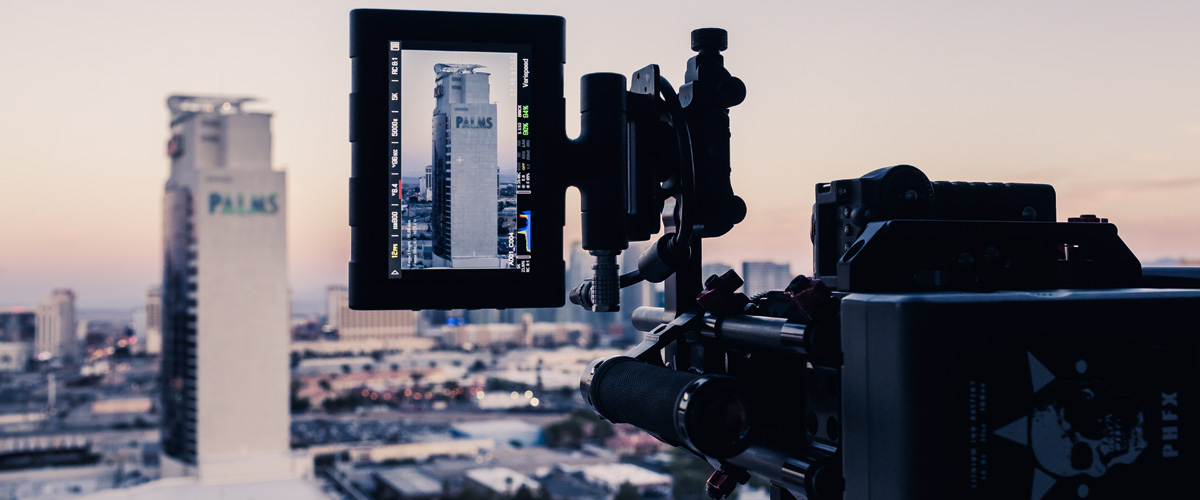
I shot this particular panorama on my Red Scarlet X with the 85mm f/1.2L in vertical orientation.
_MG_5660.jpg


5K 12fps 8:1, ISO 800, f/6.4, at 1/96th. On the Scarlet I pretty much only use 5K for panorama and timelapse work. The finished stitch used 87 individual 5K images to create an 196 megapixel panorama. Here are some 100% crops:

phfx_palmsPano2012_crops.jpg


On the last day of our trip we ate dinner at Roku at Ceasar's Palace and peeked in at Peter Lik's gallery to see some of his gorgeous work printed large, which reminded me of that panorama from a year ago.

Here's Paul and our "assistant" during the panorama shoot:

_MG_5661.jpg


Just thought the panorama and technique were worth sharing as it was kicking up a bit of nostalgia for me.
 
Spectacular stuff, Phil! Did you just pan the camera ever so slowly and kept a fast shutter? You must have done this quickly not to loose light. Would love to hear details about how you shot this.
 
  • Thread starter
  • Moderator
  • #3
Spectacular stuff, Phil! Did you just pan the camera ever so slowly and kept a fast shutter? You must have done this quickly not to loose light. Would love to hear details about how you shot this.

Thanks Tony. Since I picked up the Scarlet back in December I've been practicing my panorama technique with it. In this situation I'm using the bolt on dovetail plate to get as close to the nodal point as possible with my tiny travel tripod. Then I am panning and stopping at each area of overlap. I like to leave around 33% of overlap between frames. On areas where there is more movement I may decide to "hold" the pan there a bit longer to get more useful data. Depending on the shot I may go vertical or horizontal if there's a lot of moving subject matter that can be dealt with via a portrait or landscape style of framing. Usually I prefer portrait orientation to have less panning rows, but it just depends really.

On more elaborate actual jobs I use a motorized head. But for a simple panorama like this you can get great results doing the moves by hand.
 
Thanks for sharing. Beautiful and impressive.

Will you make a print of this? 196 Megapixel! That is huge.

Do you do all the post work in Photoshop? That must take a lot of time. Do you use any other programs or plug-ins?

Cheers,
Damien
 
  • Thread starter
  • Moderator
  • #8
Thank you everybody!


Will you make a print of this? 196 Megapixel! That is huge.

Do you do all the post work in Photoshop? That must take a lot of time. Do you use any other programs or plug-ins?

I will make a print of this at some point. This image can be printed up to around 7 feet at 300dpi. I've made panorama prints up to 15 feet before. For gallery and display work I try to keep things at 300dpi overall.

I typically use ptGui for my stitching work. I sometimes use Photoshop's Photomerge feature as well. ptGui provides a lot more control over the stitching process though. It's also a bit more friendly when it comes to 100+ megapixel panoramas. This image didn't need any additional leveling or anything like that and was pretty straight forward. Shockingly there were only 6 paint fixes that needed to be taken care of. Just a couple cars that moved during the panorama. I thought there'd be more, but I got lucky by shooting during a red light.

Processing and painting the fixes of this panorama was rather quick. A 64bit CPU and a healthy amount of RAM helps. However, I performed everything you see here on my laptop in the actual hotel room with 16GB of RAM. It was done in less than an hour. I spent more time fiddling with the color more than anything.
 
Hi Phil,
I'm assuming you did two passes? By my calculations, to get 196MP, you'd have to have over 7000px of vertical resolution with this aspect ratio to pull that off. Unless your end result was wider, in which case, one pass would work.
 
  • Thread starter
  • Moderator
  • #10
@Shaun - I shot a little bleed on the ends. It was 3 "rows" at 85mm. Final cropped frame was 25673x7651. If you check out the shot of the 5.0" Touch above you can get a feel for the scale of the main building filling the frame at 85mm. To get a similar FOV with one pass yielding a lower resolution I would have likely used a 35mm prime.
 
Thanks, Phil. I should have guessed that and with vertical overlap, too. I didn't know if you had just punched in 1:1 on the monitor, but that would have obviously been in further. Very nice shot all around!
 
Phil,

Thanks for sharing! Amazing work as usual! I also use my Scarlet in 5K mode for doing panoramas as well as 360 spherical panoramas.

Can you share some post processing tips to getting sharp images for stills? What's your sharpening workflow? Do use use any of the sharpening settings like "detail" or "unsharp mask" in REDCineX? Or do you do it all in Photoshop?
 
Back
Top