Welcome to our community

Be a part of something great, join today!

  • Hey all, just changed over the backend after 15 years I figured time to give it a bit of an update, its probably gonna be a bit weird for most of you and i am sure there is a few bugs to work out but it should kinda work the same as before... hopefully :)

My first RED.

I think I've tried that configuration but I'll give it another go. What firmware version are you on?
 
Wow, I'd say that was a steal. Basically the price of a mid-level mirrorless camera. Amazing.

My camera came with a PL mount and I had to buy and attach the Birger. It really wasn't a problem. Making a backfocus adjustment was easy enough. However, I have not been able to change aperture on my Canon lenses. I've tried powering the Birger from one of the aux ports, but it seems that the camera won't even power up when I have something plugged into any of those ports.

I have a set of cine-modded Nikkor AIS primes as well as a Tokina 28-70 in Nikon mount. But I also have some Sigma Art primes that I'd love to use with the camera.

Hey Nick,
I believe you may also have to press the top and bottom buttons on the Birger mount at the same time to sort of initialize it to start controlling the aperture on the lenses.
You do this when the mount and camera is powered up.

Also verify your R1 has these settings in the menu:

RED ONE Menu Settings for Birger Mount:

System/ Preferences/ Display: check Lens Data

System/ Set Up/ Remote: check S4i Lens

System/ Preferences/ GPIO:
Input: Recording
Output: Recording
Polarity:
GPIO In: Active Low
GPIO Out: Active Low

There are some ancient threads buried in the RU archives that detail some of the Birger functionality.

https://www.reduser.net/forum/shooti...lenslibrary19x

https://www.reduser.net/forum/shooti...t-reservations

Am still quite a fan of that device.


Brian Timmons
BRITIM/MEDIA
 
I think I've tried that configuration but I'll give it another go. What firmware version are you on?

Firmware on mine is 32.0.3.

Have you tried powering your Birger from another source (external to the camera, I mean)? That might help you isolate the problem.
 
Brian Timmons

Thanks for all of this info. I checked my menu settings and GPIO Out was set to Active High. I made the correction, rebooted, held both buttons down (is this a quick press or a long hold?), but I still don't have aperture control. When I installed the mount about a year ago, I noticed some cabling from the camera that I had to tuck away. Are these supposed to be connected to the Birger in some way that I am missing? Or is lens data sent through the power cable? I'm going to sit down and read through the threads at some point. I think I attempted to do it once before, but they are just so long.

James Sullivan

I think my build is in the 32s as well. Still no luck though. I've tried both Aux ports and both ports on the side of the Birger. I'd try powering it independently but I don't have another battery or power station with that kind of port. Question for you: when you toggle your aperture, can you see the values on your monitor?
 
Last edited:
Brian Timmons

Thanks for all of this info. I checked my menu settings and GPIO Out was set to Active High. I made the correction, rebooted, held both buttons down (is this a quick press or a long hold?), but I still don't have aperture control. When I installed the mount about a year ago, I noticed some cabling from the camera that I had to tuck away. Are these supposed to be connected to the Birger in some way that I am missing? Or is lens data sent through the power cable? I'm going to sit down and read through the threads at some point. I think I attempted to do it once before, but they are just so long.

James Sullivan

I think my build is in the 32s as well. Still no luck though. I've tried both Aux ports and both ports on the side of the Birger. I'd try powering it independently but I don't have another battery or power station with that kind of port. Question for you: when you toggle your aperture, can you see the values on your monitor?

No, I don’t see any aperture value increasing/decreasing on my monitor when I toggle.

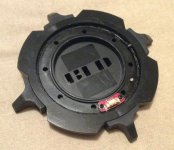
Re: cabling inside the Birger, I think you surely would have to attach the Birger electronically to the camera cable from where you removed the original mount, no? For example, see the pic of my PL mount below. There’s clearly an electronic board (red colored) that would need to be reconnected if I wanted to put the PL mount back on and have full functionality. I presume it’s similar with the Birger.
 

Attachments

  • 2A0AB01C-C71A-48AB-82BE-F619C6172D1D.jpeg
    2A0AB01C-C71A-48AB-82BE-F619C6172D1D.jpeg
    62 KB · Views: 0
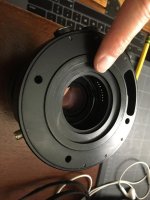
I was thinking that I had a photo of the back side of the Birger adapter somewhere and it turns out that I do. The back of the mount had a little cavity in which the cable was meant to be coiled up and stuck into. There were no electronic connection points.
 

Attachments

  • 108837418_10106065538244687_2689305193098829760_n.jpg
    108837418_10106065538244687_2689305193098829760_n.jpg
    54.8 KB · Views: 0
I was thinking that I had a photo of the back side of the Birger adapter somewhere and it turns out that I do. The back of the mount had a little cavity in which the cable was meant to be coiled up and stuck into. There were no electronic connection points.

The cable with the pins is for the S4/i lens data connector. The connector allows the Birger mount to pass the focus, zoom, and iris information to the RED 1.
I'm pretty sure the cable is not required for the Birger mount to work as it is only for the passing lens data and not any other camera functionality.

If I remember correctly, you do want to be careful not to short the cable as it can potentially blow the same board the sensor is located.

Nick - If the cable is connected and you have the camera in the right settings I'm not sure if you may have a faulty unit.

Perhaps try different lenses to see if they might work.

I do know that the mount works best with Canon lenses.
I did once have a Tamron 150-600 on the mount and could not get the mount to control the aperture.
Have used other 3rd party lenses by Sigma and Tokina and they worked fine. Some of this might depend on the firmware on the lens.

Also here is a link to the manual that originally came with the mount.
https://birger.com/products/lens_con...ions_Large.pdf

Brian Timmons
BRITIM/MEDIA
 
The cable with the pins is for the Si-4 lens data connector. The connector allows the Birger mount to pass the focus, zoom, and iris information to the RED 1.
I'm pretty sure the cable is not required for the Birger mount to work as it is only for the passing lens data and not any other camera functionality.

If I remember correctly, you do want to be careful not to short the cable as it can potentially blow the same board the sensor is located.

Nick - If the cable is connected and you have the camera in the right settings I'm not sure if you may have a faulty unit.

Perhaps try different lenses to see if they might work.

I do know that the mount works best with Canon lenses.
I did once have a Tamron 150-600 on the mount and could not get the mount to control the aperture.
Have used other 3rd party lenses by Sigma and Tokina and they worked fine. Some of this might depend on the firmware on the lens.

Also here is a link to the manual that originally came with the mount.
https://birger.com/products/lens_controller/manuals/red/Assembly_Instructions_Large.pdf

Brian Timmons
BRITIM/MEDIA

Super helpful info and pdf there. Thanks Brian.
 
Thanks again, Brian. I followed the instructions carefully when I installed the adapter, and then your excellent menu settings write up as well. I think I've got a dud here! It's okay though. There is still plenty of manual EF-mount glass that I can use with the R1.
 
Glad to help in providing info for you both and other users.

In full disclosure the write up was a copied and pasted post from an old REDuser who
went by the name Octamas.

Sorry the mount doesn't seem to work Nick.
You might be able to get Erik Widding at Birger Engineering to look at it though there may be a fee involved.

I did have to get my mount serviced in 2016 (don't install anything sensitive with minimal sleep) and I remember him saying that he was low on parts then.
There is a possibility the fix can be corrected with soldering, not sure.

Hope a solution can be found. That mount is one of my all time favorite RED accessories or otherwise.

It was THE 1st mount that allowed EF lenses to be used on Digital Cinema cameras.

Birger Engineering was a true pioneer along with RED 1 at that time.

I'm still using my Birger mount with my R1MX to this day.

Brian Timmons
BRITIM/MEDIA
 
Back
Top