Nick_Brown
Well-known member
I think I've tried that configuration but I'll give it another go. What firmware version are you on?

Follow along with the video below to see how to install our site as a web app on your home screen.

Note: this_feature_currently_requires_accessing_site_using_safari
Wow, I'd say that was a steal. Basically the price of a mid-level mirrorless camera. Amazing.
My camera came with a PL mount and I had to buy and attach the Birger. It really wasn't a problem. Making a backfocus adjustment was easy enough. However, I have not been able to change aperture on my Canon lenses. I've tried powering the Birger from one of the aux ports, but it seems that the camera won't even power up when I have something plugged into any of those ports.
I have a set of cine-modded Nikkor AIS primes as well as a Tokina 28-70 in Nikon mount. But I also have some Sigma Art primes that I'd love to use with the camera.

I think I've tried that configuration but I'll give it another go. What firmware version are you on?
Brian Timmons
Thanks for all of this info. I checked my menu settings and GPIO Out was set to Active High. I made the correction, rebooted, held both buttons down (is this a quick press or a long hold?), but I still don't have aperture control. When I installed the mount about a year ago, I noticed some cabling from the camera that I had to tuck away. Are these supposed to be connected to the Birger in some way that I am missing? Or is lens data sent through the power cable? I'm going to sit down and read through the threads at some point. I think I attempted to do it once before, but they are just so long.
James Sullivan
I think my build is in the 32s as well. Still no luck though. I've tried both Aux ports and both ports on the side of the Birger. I'd try powering it independently but I don't have another battery or power station with that kind of port. Question for you: when you toggle your aperture, can you see the values on your monitor?
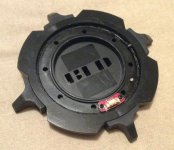
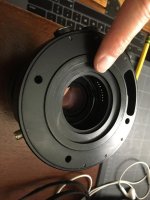
I was thinking that I had a photo of the back side of the Birger adapter somewhere and it turns out that I do. The back of the mount had a little cavity in which the cable was meant to be coiled up and stuck into. There were no electronic connection points.
The cable with the pins is for the Si-4 lens data connector. The connector allows the Birger mount to pass the focus, zoom, and iris information to the RED 1.
I'm pretty sure the cable is not required for the Birger mount to work as it is only for the passing lens data and not any other camera functionality.
If I remember correctly, you do want to be careful not to short the cable as it can potentially blow the same board the sensor is located.
Nick - If the cable is connected and you have the camera in the right settings I'm not sure if you may have a faulty unit.
Perhaps try different lenses to see if they might work.
I do know that the mount works best with Canon lenses.
I did once have a Tamron 150-600 on the mount and could not get the mount to control the aperture.
Have used other 3rd party lenses by Sigma and Tokina and they worked fine. Some of this might depend on the firmware on the lens.
Also here is a link to the manual that originally came with the mount.
https://birger.com/products/lens_controller/manuals/red/Assembly_Instructions_Large.pdf
Brian Timmons
BRITIM/MEDIA

If you don't mind sharing, what is that top plate and handle you are using? Your whole setup is sick!