Welcome to our community

Be a part of something great, join today!

  • Hey all, just changed over the backend after 15 years I figured time to give it a bit of an update, its probably gonna be a bit weird for most of you and i am sure there is a few bugs to work out but it should kinda work the same as before... hopefully :)

Mushy image on Epic Dragon DSMC1

Joshua Hoareau

Well-known member
Joined
Dec 26, 2012
Messages
224
Reaction score
0
Points
16
Location
Melbourne, AU
Website
www.cinestudios.com.au
Hey everybody,
So I feel like I'm missing something extremely simple, but for some reason on my latest shoot, my footage came out really 'mushy'.
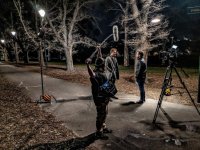
I've attached a screengrab .R3D file and 2 on set photos so you can see lighting.

I shot at 5k at a 6:1 compression ratio on my Epic Dragon DSMC1 using Sony PL Cinealta V2 PL lenses at 2.0.
I was shooting on the low light OLPF at 1600ISO.
I also black shaded to my target temp.

Any help on this would be great! The last few shoots I've done at night have also had this issue but the latest shoot was the most visible.


R3D

https://drive.google.com/file/d/1qR4EqKLN7qyCTe91jXVqqzAC70kK071A/view?usp=sharing


CHEERS!
 

Attachments

  • 68651622_505101553628071_8555249892111417344_n.jpg
    68651622_505101553628071_8555249892111417344_n.jpg
    98 KB · Views: 3
  • 68557607_714032745715360_3405829011832569856_n.jpg
    68557607_714032745715360_3405829011832569856_n.jpg
    99.1 KB · Views: 3
The metadata is stating Canon 50mm f/1.8 II, don't know about a PL mount Cinealta in this case.

Either way, based on the lower part of the main subject's jacket, I'd say your front focused a smidgeand missing critical focus on his head by a few inches. Foreground guy is just out of focus in this case.

I'd apply some light sharpening and I'd say it's passable in this case, I've seen worse buzzes on the big screen for sure.
 
Hey Joshua,

To add to Phil's advice about the focus potentially being off by just a hair, did you black shade after the camera already had a chance to heat up or did you black shade on startup?
For night shooting on Dragon that can easily affect the noise level and once you combine that with focus that's slightly off, can get things to look a little mushy.
No matter what though, I've always found that low light shots on dragon almost always need a little bit of help to look decent.

The best practice tends to be making sure your shot has enough contrast so you can clip the black levels and still see what's going on clearly, which this shot does a good job of doing and is a good place to start.
But to me, the biggest issue this shot has is the sensor noise, specifically with the blue channel.
So, I'd recommend running it (and probably the whole scene) through the NeatVideo plugin to get rid of that.
Then clip the black level slightly with a curves adjustment.
And for good measure add a bit of sharpness in on top at the end.
That should give you something that looks like this:
Joshua1.jpg


And as a quick note with NeatVideo, I feel like it works a little too good most of the time, so I'll generally have it on an adjustment layer and set the opacity to 75% so that a bit of the texture comes back in.

Hope that helps.
 
Hey Phil :)
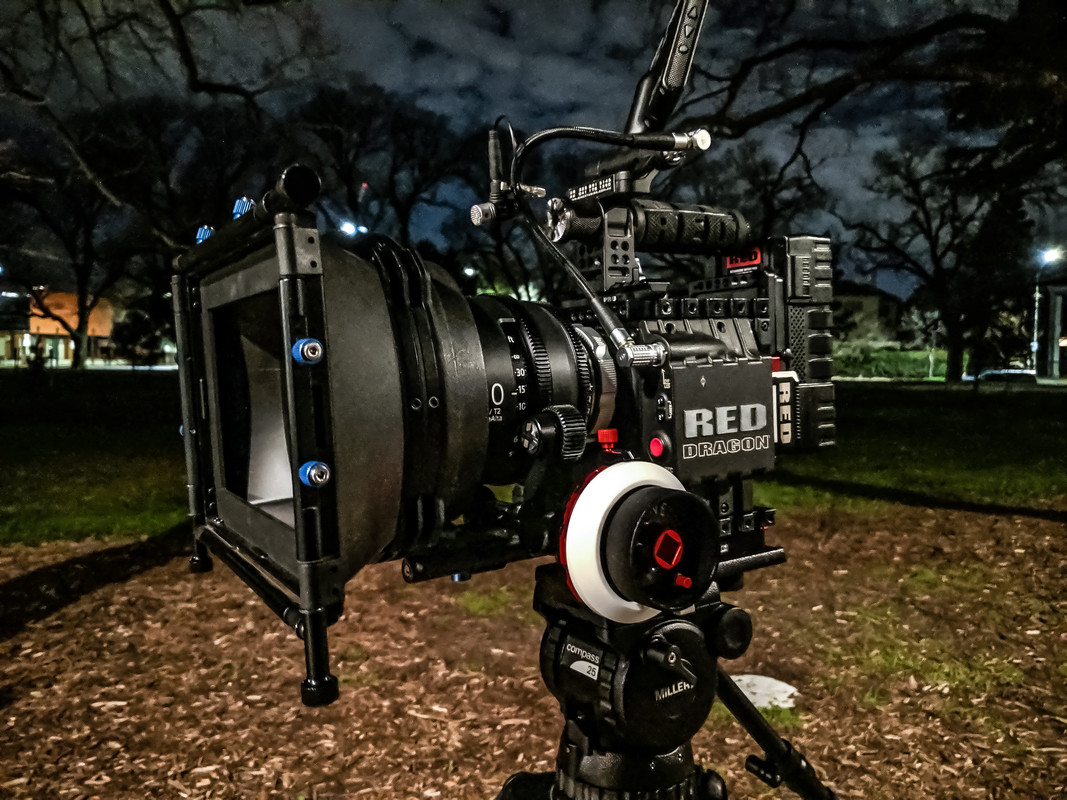
That's so weird about the metadata :S Here is a shot of my set-up from that night.

67564675-872660583102957-7006984159805571072-n.jpg


Ah okay cool I thought I might have been off a bit (recently suffered an eye injury and was so scared on focus!) I was able to clean it all up in post using neatvideo and then reapplying some film grain and was pretty happy with the outcome just wasn't sure if there was anything on production that I was doing wrong.
 
There's a lot detracting from an ideal signal, IMO.

1600 ISO is stretching the shadows too far. Shoot/light more in the ballpark of 500-640, especially on a DSMC1 Dragon. At least, that's been my experience.

2800K is a bit aways from the daylight native sensor temp. Light your scenes for 5600K for more balanced noise across all 3 color channels.

5K instead of 6K is throwing away 5 megapixels of potential information away. Not a huge deal, but more resolution will always help minimize the compression artifacts. I imagine you shot 5K because of the Sony lenses, though, that's understandable.

Lastly, the these settings aren't giving the compression a fighting chance at 6:1. If you ever find yourself in this less-than-ideal situation, you can at least help reduce the potential of muddiness by throwing it to minimum compression. I believe that's 3:1 on DSMC1 Epic Dragon if I am correct.

And of course, as the others mentioned, critical focus is important. Also, I don't have any experience with the Sony lenses but I imagine they snap a little better stopped down a bit from wide open. Also verify your back-focus is set properly.

So really, the image is a sum of all its parts. This is why testing every factor and what it does to the image is very important.
 
Basically re-iterating, but...

My general rule of thumb for compression for mission critical is to use the K:1... so if shooting 6k, 6:1 is aces. 4k 4:1... 8k 8:1, etc.

Second, I would also go with the 6k, 6k HD, 5.5k HD... basically whatever the lenses cover (even if you end up throwing it away later). Downscaling is always rad. Do the Sony's only cover 5k?

Lastly, and this is where I think any perceptible muddiness is happening with this particular scene, 2800K is pushing it. Even 3200K looks better, and those street lamps don't look to be 2800 or 3200k. Maybe try rating the .r3d at 5000K and using colour correction (non-raw) settings to balance it back to neutral. Not sure if that'll work, but it's worth a shot.

OH, and I'd also suggest *not* adding tons of contrast in an attempt to make it pop more. I find that causes things to start looking videoy.
 
I shoot on Epic Dragon w/ LLO.

I think:
1) The scene has very little light, so the sensor isn't seeing much to begin with.
2) In very low light, the colors and detail will be off.
3) Any ISO higher than 500 is going to start compromising the image quality.
4) The scene's colors might already be considered "mushy" - mostly shades of gray, brown. Only the guy's skin tone would stand out as the color that pops.
5) You were shooting 5K and the guy's face is only a tiny portion of the frame, so very few pixels were dedicated to picking up that facial detail, even if there was sufficient light. Low light just made that worse.
6) The white balance looks off. Using "Pick WB" in RCX on the man's gray jacket, above his chest, will give 2851K/-11.1 Tint and that looks better to me.
 
Hey Phil :)
That's so weird about the metadata :S Here is a shot of my set-up from that night.

Guessing that PL adapter registers as a Canon 50mm f/1.8 II.
 
Guessing that PL adapter registers as a Canon 50mm f/1.8 II.

Yeah, my Helium defaults to that same lens when using adapted Contax Zeiss as well. Even though I've never put that lens on it in the past. I guess when the camera doesn't detect a lens at all, it just defaults to that lens in the metadata. Though that info could be changed, if one so cared.
 
Good to hear it's from user error than anything else :) So the PL mount on my RED is a Wooden Camera dumb mount so no data would be passing through.
The Sony's are S35 but only the 20, 25 vignette on 6k, the rest seem to be covered.
I'm still shooting on original size REDmag so I think my compression limit is 4:1 (I'll have to double check that). Yeah so the lights at that location were a really weird in between temp.
 
Most people pay good money for that kind of softness....

But it looks like the focus was just off, plus wide open the lens may not be at its peak sharpness.
 
Back
Top