Welcome to our community

Be a part of something great, join today!

  • Hey all, just changed over the backend after 15 years I figured time to give it a bit of an update, its probably gonna be a bit weird for most of you and i am sure there is a few bugs to work out but it should kinda work the same as before... hopefully :)

Most you can punch in before losing quality

Scotty Fox

Active member
Joined
Dec 3, 2013
Messages
26
Reaction score
0
Points
0
Hey all,

So how far can you scale in on a 4K image before losing quality (softness sets in)? I realize it probably happens with 1%, but how far can you push it before it's noticeable to the eye? And if so, is there anything you can do to hide the softness? (i.e., unsharp mask, etc.)

I have a couple shots that I didn't have time to get CU's on. So it's all wide. There's some other issues that I could hide as well by pushing in.

But I'd have to push in past 100% by about 50 to do that. And I'm thinking at most I could probably push in 15-20% before it becomes really noticeable? But I'm just estimating, as I don't know the technical aspects of this for sure.

Assume this would be played in a theater at 2K. But I have a feeling if it's in a theater then you're looking at 0% push in! And that would suck. I guess I could always master at 1K but it's only 2 shots out of the whole thing, so really would like to stay at 2K.

Thanks everyone.
 
Doing broadcast material like music videos, mastered for 1080P, I avoid magnifying more than 150%. And even so, it is an extreme. Just a bit of sharpening after dealing with noise helps. But noise can be an issue. Neat Video helps in both noise and softness (use advanced mode for sharpening)... I guess you can get away with it. If not, consider splitting the layers in Resolve and treat foreground and background sharpness separately.
 
Firstly, this is not punch in, this is cropping.
Punch in is using longer focal length, which changes the perspective, DOF and motion characteristics. This is faking punch in.

Every cropping looses quality compared to the original. How much is acceptable depends on delivery resolution and personal criteria. Sharpening cropped picture leads to further inconsistencies between edited original material. More natural detailed image vs lower detailed image with enhanced micro contrast.

WS to CU is overdoing it.
If you have to crop to salvage the cut I suggest observing and comparing shots in edited sequence.
 
It depends on the resolution of the display / master and the nature of the shot and the quality of the original photography (how sharp it was, how clean, how contrasty, etc.) It also depends on how long you will be staring at the shot. I've seen 100% blow-ups (4K cropped to 2K) that were acceptable in an emergency, not ideal but it works as long as the original wasn't too noisy. Also keep in mind that a viewer expects a landscape shot to look more detailed than a close-up of a face, so you have a little more flexibility if the subject doesn't have to be super-sharp.

You could also consider shooting some new close-ups and somehow faking the background, maybe keeping the background in soft focus.
 
Doing broadcast material like music videos, mastered for 1080P, I avoid magnifying more than 150%. And even so, it is an extreme. Just a bit of sharpening after dealing with noise helps. But noise can be an issue. Neat Video helps in both noise and softness (use advanced mode for sharpening)... I guess you can get away with it. If not, consider splitting the layers in Resolve and treat foreground and background sharpness separately.

I'll play with that and see how it looks. Thanks for the tips on that.

It depends on the resolution of the display / master and the nature of the shot and the quality of the original photography (how sharp it was, how clean, how contrasty, etc.) It also depends on how long you will be staring at the shot

The quality of the original isn't too great. It was low light so there was already noise. Already a problem shot. It's like the perfect storm happened on this particular sequence so it's frustrating. That being said it's a quick shot. Middle of an action sequence where a guy gets pushed into the wall. I'd classify it as an emergency just because I really have no other options. Pretty much just making it the least obvious when it's viewed. Blending it as best I can.

I've played around with it and it really needs to be a 75% blowup (4K cropped to 2K as you pointed out in your example). But the noise even on the r3d is bad. I'll have to talk to the colorist so we'll see. I think the softness wouldn't be really an issue as its arms/hands grabbing the guys back, not a whole lot of detail in the shot anyway, but the noise is the real problem.
 
Firstly, this is not punch in, this is cropping.
Punch in is using longer focal length, which changes the perspective, DOF and motion characteristics. This is faking punch in.

Every cropping looses quality compared to the original. How much is acceptable depends on delivery resolution and personal criteria. Sharpening cropped picture leads to further inconsistencies between edited original material. More natural detailed image vs lower detailed image with enhanced micro contrast.

WS to CU is overdoing it.
If you have to crop to salvage the cut I suggest observing and comparing shots in edited sequence.


No going on a longer lens does not change prespective. Thats wrong.
Try with a zoom and zoom in and out and you will see thats not the case, the prespective stays the same. Also ypu will see it does do very little to the dof aswell zooming in / going to a longer lens is very much similar to crop an image.

however yes you loose pixel resolution from cropping. you also scale up the lens artifacts when cropping so depending how high your len resolution is together with noise levels and final resolution kind of sets how far you can "push in" in post.
For example if you got 6k and shot no noise and master at 2k you can go further than if you shot 4k with noise. So its all dependent on image quality.

On common trick is to grain match and degrade the shoots before and after the pushed shoot gradually so it does not hit you as hard.
And there is also alot of different algoritms for upscaling images. I believe quantel sinc is still the best one out there.
 
Its one of those annoying missconceptions that 'cause you are shooting 5K you can just punch in and grab a close shot from the original. While you will have a lot more success with a Red 5K image over a 1920 camera the resolition is only one of the limiting factors. Apart from the camera resolution the next biggest limitation is the optical path through the glass. Lenses are designed to be sharp and have acceptable artifacts when they are used at the image size they were made for. Only using a small proportion of the lenses area very quickly magnifies softness and other artifacts. I find I run out of lens performance way before I run out of pixels when zooming in.
How far you can zoom in will depend on the quality of your glass and if you totally nailed the focus. After this hurdle you have to answer to the sensor noise and this is dependant on exposure and redcode settings.

Sorry for the long answer but there is no definitive correct allowable zoom factor as it is dependant on the above parameters but don't worry too much about the technical and zoom the shot in if that propels the narrative forward
 
I think this is a personal thing, ie: does it work for the shot? As a director, I crop in a lot (as I'm not delivering 4K material) if I think it delivers a better creative message. As Tom says, don't worry about the technicals if it works for the narrative.

Here's a promo for a short film I've been cutting, a couple of the shots are majorly cropped in (ie: 100% views of the 4K in a 1080p timeline) but I think the shots work so much better for the story, so I'm cool with it. Oh and there's some 2K (this was shot on Scarlet).

If it works for your piece, I wouldn't get too bogged down in "what's allowed"...


https://vimeo.com/88615866

EDIT: I by no means endorse the idea that you don't need to shoot mediums and close ups because you can crop in post...
 
Last edited:
A sensitive question.
In my book, if you are shooting a sharp 4K or UHD sized image, then it's quad HD which means, in lay-person terms : it's like four HD screen at the same time. ( 2 X 2 screens worth )
Which means if you mask off 3 of the screens , the remaining one better fricking look like a nice quality HD feed.
If your 5K/4K footage can't hold up to this, guess what, you are shooting below UHD true achievable sharpness.
 
Sorry for the long answer but there is no definitive correct allowable zoom factor as it is dependant on the above parameters but don't worry too much about the technical and zoom the shot in if that propels the narrative forward

I totally get it. Thanks for taking the time to write that. And thanks to everyone for their opinions.

I completely agree that shooting what you intend (on a particular lens) should suffice in that you're not "punching in", and yes I know it's not real punching in ;-) in post. Unfortunately I'm not doing this out of laziness (not that anyone said that) or just because I can, but because as Tom mentioned, it helps the narrative and I was unable to get these things on set. Namely this one scene that we just ran out of time. Low budget!

It's a scene where a guy gets thrown into the set wall. But because we were rushing, no one noticed one of the shots, the set wall moved like crazy when he hit, looks ridiculous. So I have to cut away, and I don't have any other shots of that. So stuck with punching in close to change what the viewer is seeing and the wall moving, or watch that thing flail like a rubber band. And the noise level is awful.

So basically I have two options. Cut to something in the room (a dresser) and just have SFX play it out with shadows moving like they're fighting (vfx). Or make the entire film have some noise and make it a look. There's noise in other shots too so it wouldn't be that hard. Ugh... sucks.

Thanks again everyone for the assistance and expertise. Much appreciated.
 
No going on a longer lens does not change prespective. Thats wrong.
Try with a zoom and zoom in and out and you will see thats not the case, the prespective stays the same.

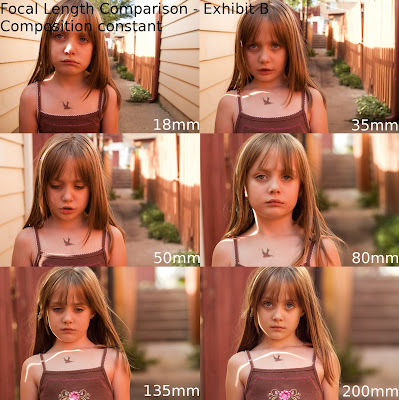
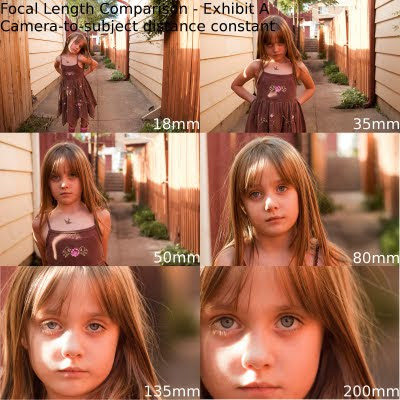
Perspective changes compared to the same type of shot i.e. same subject composition achieved with a different focal length. Which requires different distance to subject. I was under the impression that part did not require going into detail so perhaps the wording was not put into specific context the best way. Obviously cropping the image shot from the same position has the same perspective but that is a salvage job type of compensation. At the cost of loss of quality and differing depth and separation characteristics.


Also ypu will see it does do very little to the dof aswell zooming in / going to a longer lens is very much similar to crop an image.


http://www.dofmaster.com/dofjs.html


10erlu9.jpg


2jadstk.jpg


Web examples:


Composition constant, different focal length & distance to subject.


focal-length-exp-comp-exhibitb.jpg


Distance to subject constant, different focal length:


focal-length-exp-comp-exhibita.jpg


Distance to subject constant, different focal length + crop to same composition:


_MG_0006crop-X3.jpg


_MG_0008crop-X3.jpg


_MG_0012crop-X3.jpg


_MG_0020crop-X3.jpg
 
So basically I have two options. Cut to something in the room (a dresser) and just have SFX play it out with shadows moving like they're fighting (vfx). Or make the entire film have some noise and make it a look. There's noise in other shots too so it wouldn't be that hard. Ugh... sucks.
Or... reshoot it.

I've seen cases where fight scenes were partially reshoot in extreme closeup (even on a very big recent project I worked on), and nobody, but nobody, would ever know that the shots were pickups done days later.

If the original shot isn't handheld, I'm wondering if it might be possible to use VFX to replace the wall that's shaking. I've seen more extreme stuff done before -- but it boils down to time and money.
 
Back
Top