Welcome to our community

Be a part of something great, join today!

  • Hey all, just changed over the backend after 15 years I figured time to give it a bit of an update, its probably gonna be a bit weird for most of you and i am sure there is a few bugs to work out but it should kinda work the same as before... hopefully :)

Most Up to Date HQ Workflow for Scarlet-W Legacy Camera

Joined
Oct 17, 2012
Messages
23
Reaction score
0
Points
1
Location
Portland, OR
Hi all, I've been out of the RED ecosystem for a while and am wrapping up a project shot a long time ago on the RED One and RED Scarlet-W. So much has changed with RED since then I can't even keep up and I'm just wondering what people are recommending these days for how to get the highest quality out of these older cameras. Initially I'm wondering if I should use the new IPP2 and latest RED Color and RED Gamma or if I should stick to the image capture format?

I'm going to work through a few tests but I just thought I would check here as well.

Thanks for any info!

Cheers,

Matt
 
Matthew,


IPP2 is indeed the latest and greatest image processing workflow for Red Cameras past and present. However, since you just finished this project and you seem to just be testing the waters of IPP2, I would stick to the Legacy workflow for this one last time. Later after you finish the project, you can take the time to better familiarize yourself with the IPP2 Workflow for future projects.
 
Contrary to Rand, I'd go IPP2 and use the same settings/LUTs/adjustments across both cameras (it's what IPP2 was intended for). You'll likely have to adjust the SW down to match the R1mx, but I bet you could drop saturation by 5% and they'd be close (outside of the SW holding more in the highlights).
 
Awesome, thanks Rand and Mike. I should have specified that I'm wrapping picture lock and now diving into the grade. What I've done so far is take all of the footage from the two cameras in Premiere Master Effects and change all of them to IPP2 and the Output Transform from Rec.709 to REDWideGamutRGB and saved that to the RMD. I figure that way when I bring everything into Davinci Resolve all of the footage is starting out at the same place. Hopefully that works.
 
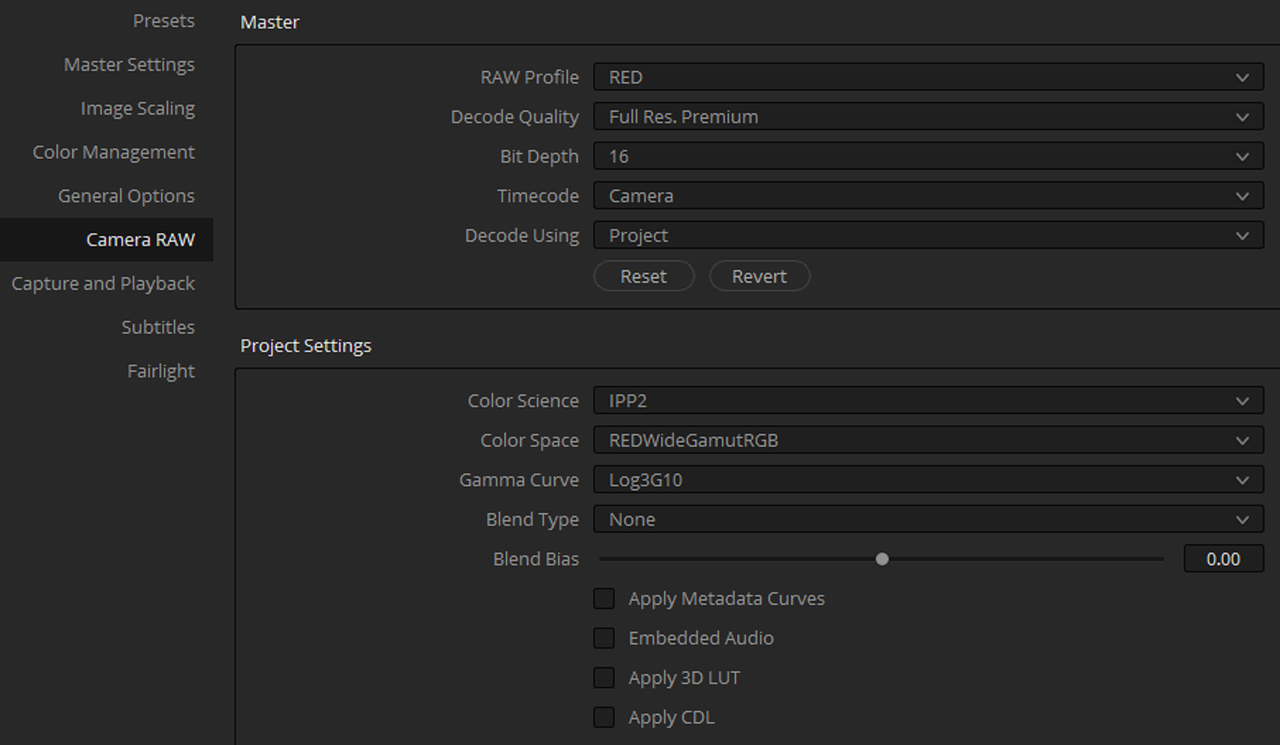
My go-to .REC709 SDR workflow on Scarlet MX. I record RC4 RG4 in-camera, and in Davinci upon creating the project set those settings (in the lower right corner the sign of settings):

Snymok.jpg


This makes Davinci read ALL RED camera clips with those settings. I've used it to match Helium and Scarlet MX into one project.

While Contrast and highlight-rolloff are a subject of taste (with some high-key projects I also use low contrast and very soft roll-off), the Medium-Medium settings are pretty-close to what you see in-camera using Legacy workflow. Also you can change the contrast and highlight roll-off in the RAW tab of the CC panel, or default to legacy workflow any time on a separate clip. Beware that the smallest instance for individual RAW settings is a CLIP. If you add cuts to it - it will still be rendered as a whole CLIP in the RAW settings.


And also mark all check-boxes below to apply in-camera exposure and WB settings:

Snymok2.jpg
 
Last edited:
Full res premium in the Camera raw menu is not really needed, there you can pick and choose to get it to a level where you have good playback for your system. Then when exporting you just make sure it set to Full debayer in the advanced output menu.
 
Matthew,

The workflow Alex decribes above is a workflow for grading entirely in the REC709 colorspace. You won't be grading in the REDWIDEGAMUTRGB/LOG3G10 color space which the IPP2 workflow was designed for.


There are two ways to work in the IPP2 RWG/log3G10 workflow.


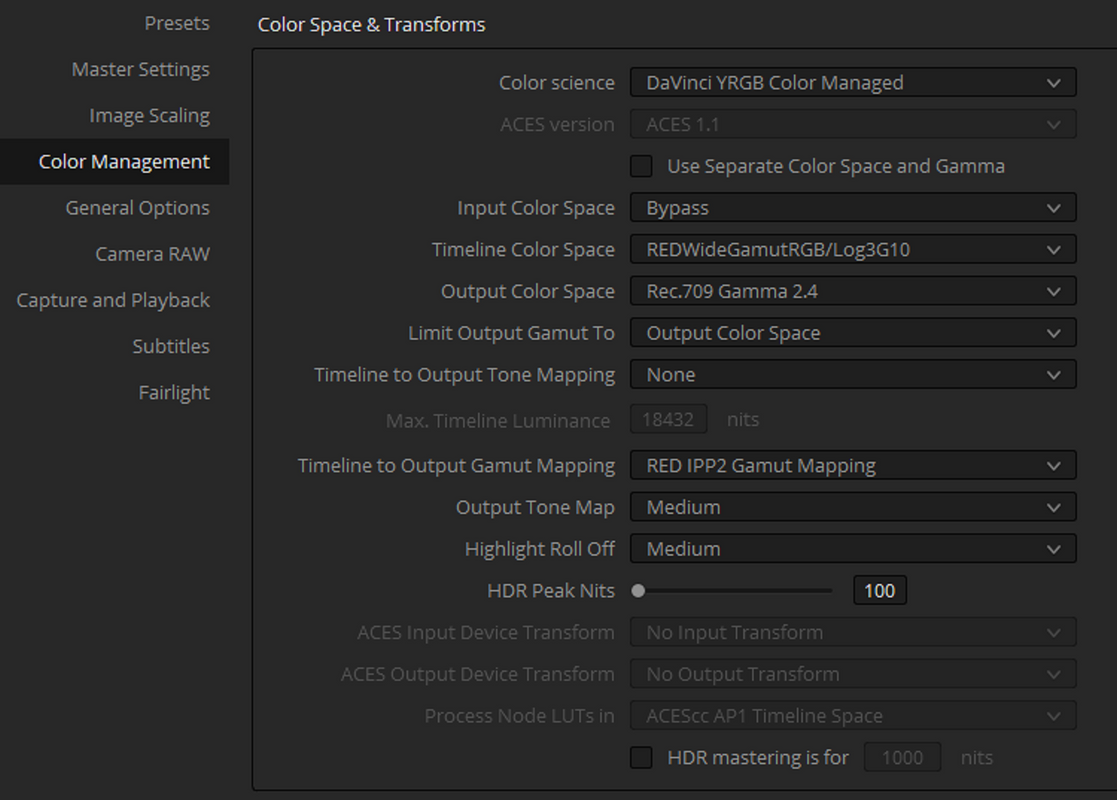
Example 1- Davinci Resolve Color Managed


This allows Resolve to "Color Manage" the project with the benefits of a mathematical "RED IPP2 Gamut Mapping" for both Output "Tone" and Output "Highlight Roll-Off". You won't have to use IPP2 Transform Luts. However, you will be locked into one TONE and HIGHLIGHT ROLL-OFF for the entirity of the project.

Screenshot-88.png


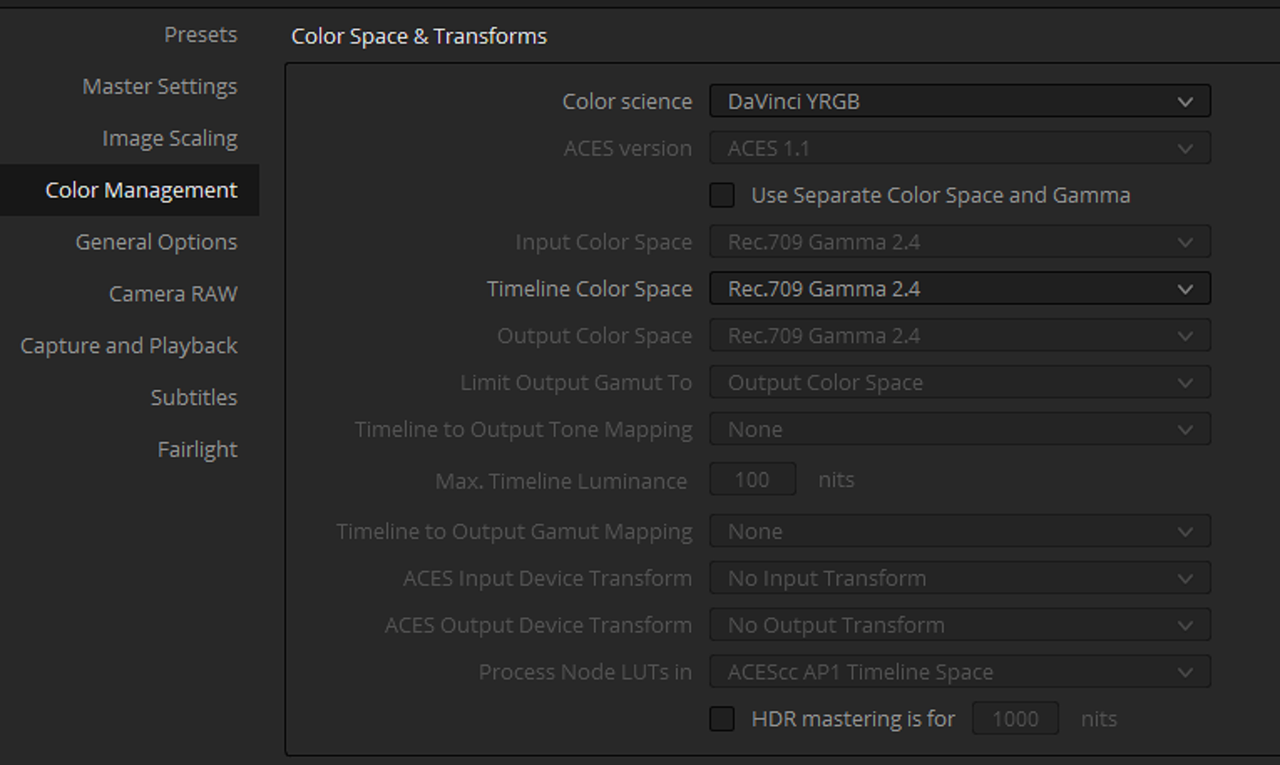
Example 2- Davinci YRGB


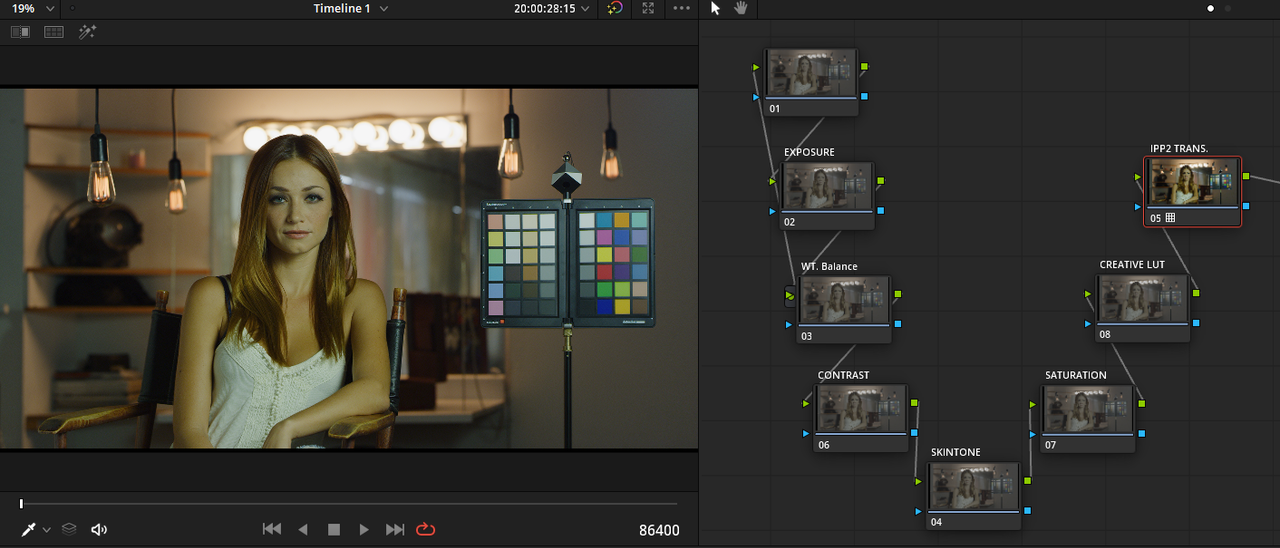
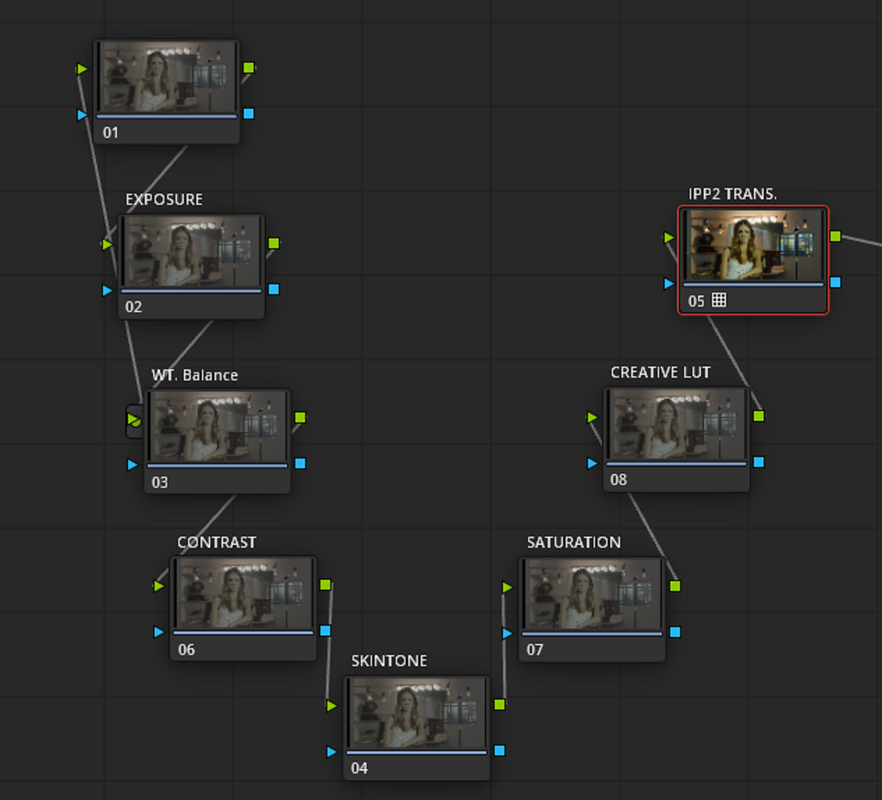
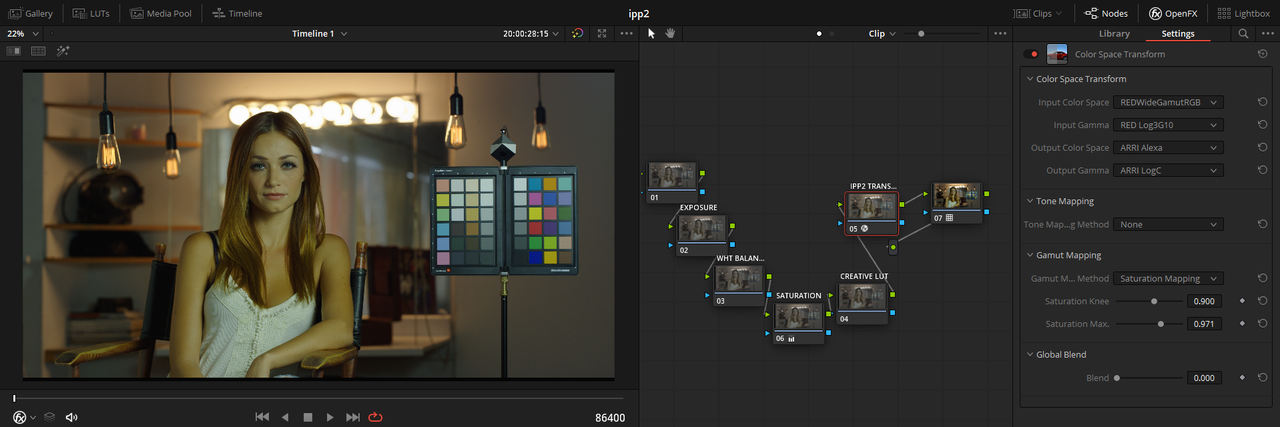
With "DAVINCI YRGB", you transform all of your RED .R3D files into a REDWIDEGAMUTRGB/LOG3G10 image at import. You will still need to add an "IPP2 OUTPUT TRANSFORM LUT" at the end of the Node tree to properly transform the image, It won't be done for you as in the "Davinci Resolve Color Managed" workflow above. However, you will be able to choose what "IPP2 OUTPUT TRANSFORM LUT" you want to use with each individual RED .R3D file instead of being locked into one for the entirity of the project like in the "Davinci Resolve Color Managed" workflow. You don't have to use the exact Nodes I labeled below in your workflow. Just a few, but use the last two nodes "CREATIVE Lut" and "IPP2 Transform"in that order.


er-5.png


er-6.png


Screenshot-137.png


Screenshot-137-2.png
 
Last edited:
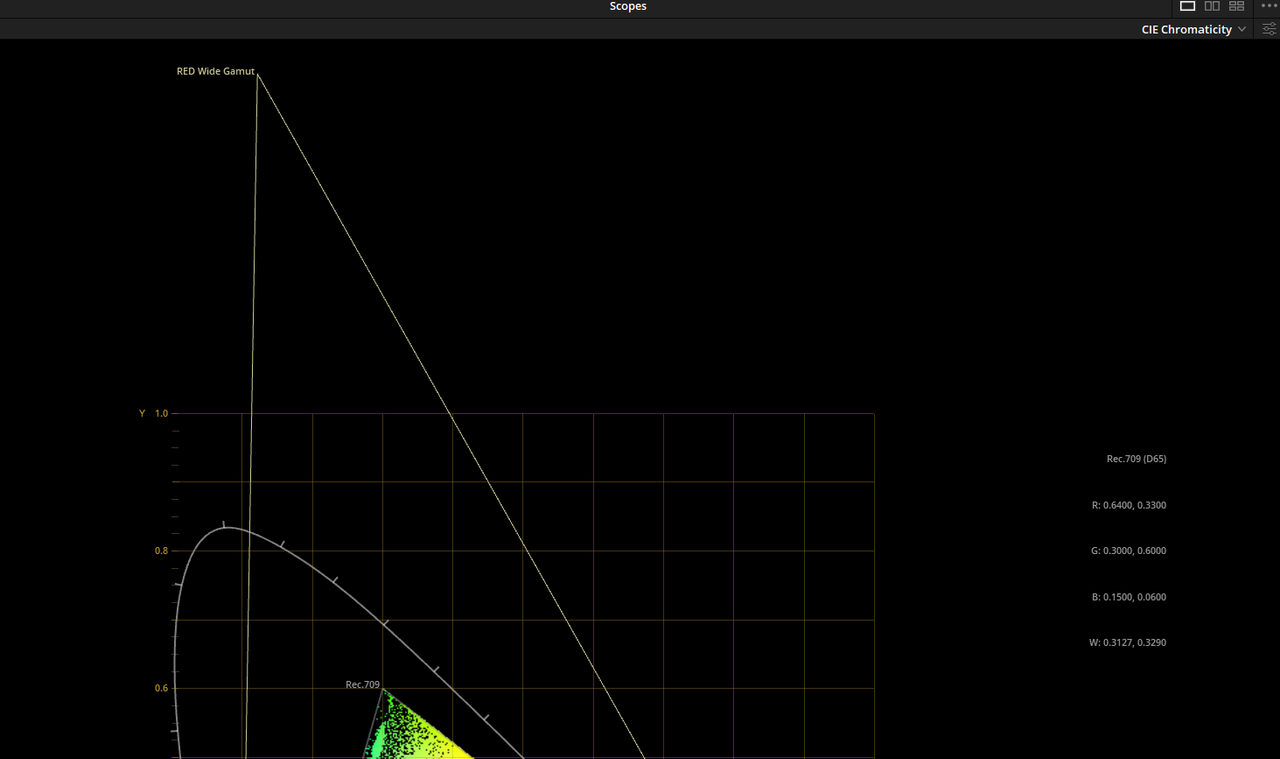
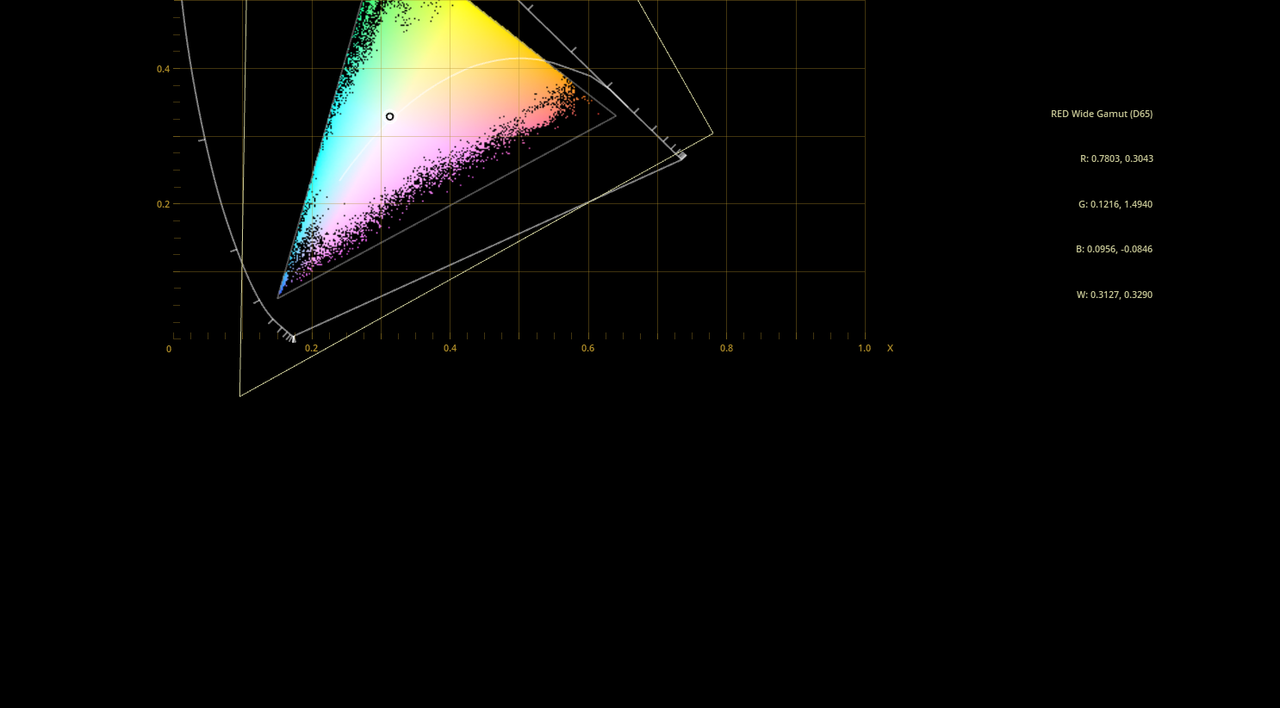
REDWIDEGAMUTRGB/LOG3G10 VS REC709


Screenshot-138.png

Screenshot-140.png
 
Last edited:
Rand, yes and no. Assuming I was talking exactly about .rec709 (sdr) final grade, not .rec2020 (hdr) - the workflow I've posted is in-fact exactly the same, as an in-camera IPP2 recorded clip with rec709 lut with settings imported from clip in Resolve. There are 4 different ways someone can apply a LUT over a clip in resolve - you can apply it on a node, over a clip (right-click on a clip thumbnail > 3D Lut), in a raw tab, in project settings raw tab (handles the same way as a clip raw tab), and in the color management menu. Which is right for you - is the one right for you. And no, you're not loosing any information this way, it's all there. And yes, the wheels in the color tab will handle as .rec709 wheels, not like LOG wheels this regard. It's a matter of taste, at least to me, and I like to start from a .rec709 image instead of LOG image. Some colorists like to start from scratch. Some like to work with LOG wheels, some like to work with .rec709 wheels. Nothing is wrong here, and you still get the same result, just a different workflow.

Here's a nice example to my words:
 
Last edited:
As long as you understand that the workflow you posted will be entirely in a Rec709 colospace and color corrections will be confined within that colorspace, that's fine. However, the whole purpose of the IPP2 workflow was to do all color grading in the RWG/ Log3G10 colorspace and then have that transformed to any other smaller colorspace with better results than working in that smaller colorspace to begin with.


The RWG/ Log3G10 image captures all of the colors that the Red Camera Sensor can capture. Grading in that colorspace allows for grading in a much larger color range than the typical Rec709 color range. The Ipp2 Output Transform Luts, at the end of the Node tree, brings the RWG/LOG3G10 color range back down into a smaller color range with a better Highlight-roll off and with better Gamut Mapping Capabilities.

Your settings only effect how the image was " Initially " brought into the project as an IPP2 image and not how it will be maintained throughout the project.The net effect of those settings within your project is not much different than the prior Legacy workflow.

The In- camera workflow for IPP2 starts from a RWG/LOG3G10 image with a selected Output Transform.
 
Last edited:
Rand, yes and no. Assuming I was talking exactly about .rec709 (sdr) final grade, not .rec2020 (hdr) - the workflow I've posted is in-fact exactly the same, as an in-camera IPP2 recorded clip with rec709 lut with settings imported from clip in Resolve. There are 4 different ways someone can apply a LUT over a clip in resolve - you can apply it on a node, over a clip (right-click on a clip thumbnail > 3D Lut), in a raw tab, in project settings raw tab (handles the same way as a clip raw tab), and in the color management menu. Which is right for you - is the one right for you. And no, you're not loosing any information this way, it's all there. And yes, the wheels in the color tab will handle as .rec709 wheels, not like LOG wheels this regard. It's a matter of taste, at least to me, and I like to start from a .rec709 image instead of LOG image. Some colorists like to start from scratch. Some like to work with LOG wheels, some like to work with .rec709 wheels. Nothing is wrong here, and you still get the same result, just a different workflow.

Here's a nice example to my words:


And that video is completely and totally wrong unless he wants to confine it to Rec709.

Here is a perfect example of my words.

 
Alex and Rand, I see where you’re both coming from. To be honest I don’t know enough to say whether or not you’re loosing information by decoding the project color space immediately into Rec.709. That is essentially a Color Space Transform off the bat right? So in theory there’s no loss of information you’re just only displaying a certain amount of that information at a time.

Just to be on the safe side though, I’m sticking with the wide gamut color space until my final Color Space Transform to Arri LogC and Rec.709 and then to my Film Print Emulation LUT.

I think the only downsides to working this way are that you have to use the LOG color wheels because a lot of the controls don’t behave properly, and pulling qualifications can be tricky.
 
Matthew,

If you are only going to be grading in REC709 and want to use standard REC709 Luts that can be found anywhere, Alex's workflow would be best for you. If you want to be able to "Qualify" skintones as you are use to, Alex's workflow would be best for you.

Also you don't have to use Log controls if you use the RWG/LOG3G10 "Color Managed" workflow. You can use the same controls as you are used to. And in the IPP2 Lut transform workflow the only real thing is not being able to Qualify things the way you normally would do.


If you use either the "RWG/LOG3G10 "Color Managed" workflow" or the "IPP2 Lut transform workflow" you will have to have Luts that are compatible with RWG/LOG3G10 or else the results will look terrible. Philmcolor Luts are designed for a RWG/LOG3G10 workflow.

Philmcolor
http://www.phfx.com/tools/philmColor/index.shtml


Also,

The OFX Color Space Transform can be GPU intensive so be aware that a slower Computer may be tasked with alot of clips with that OFX applied to it

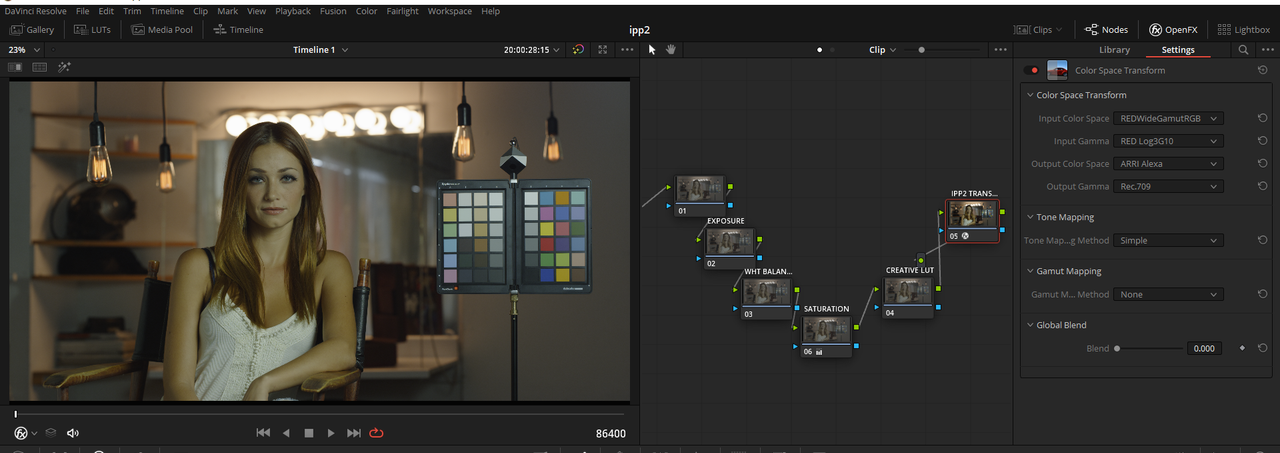
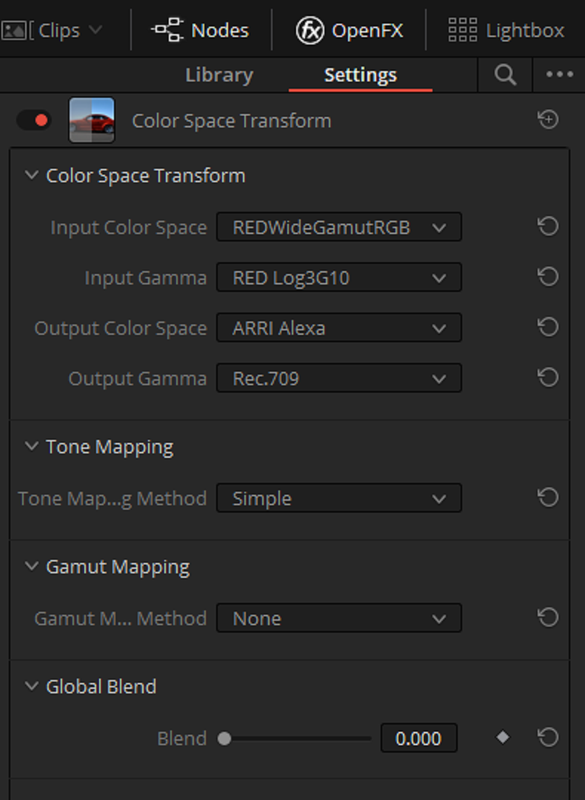
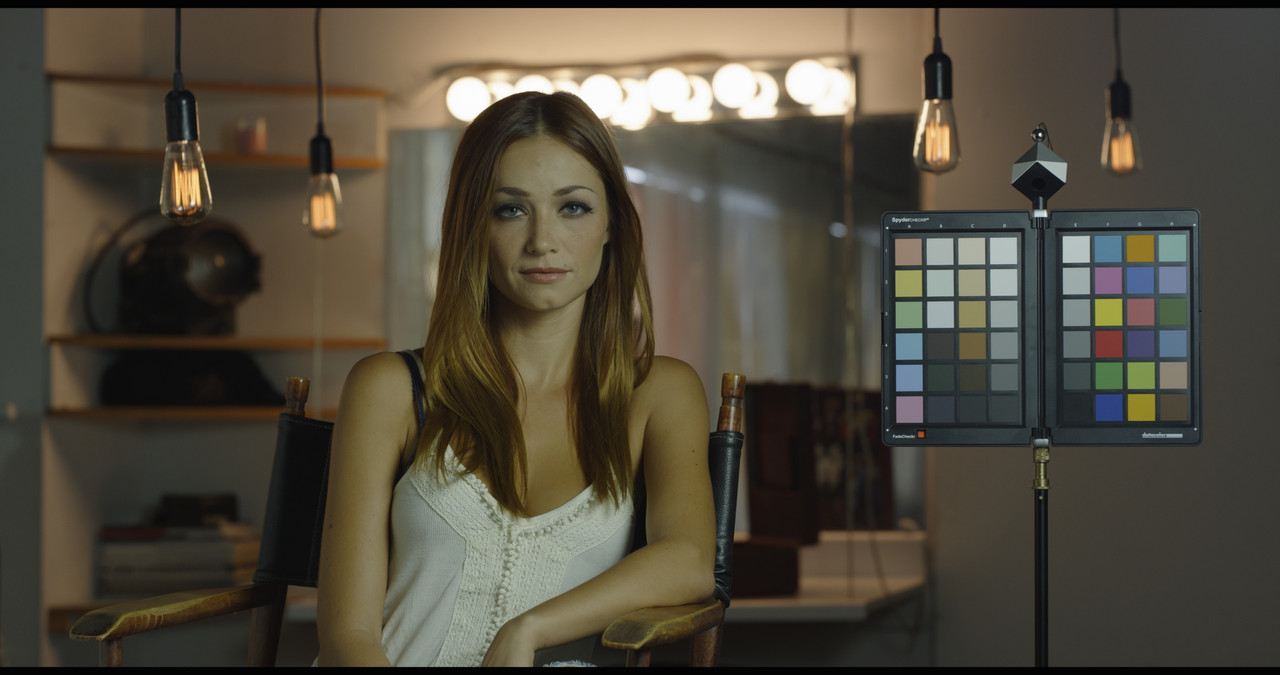
Here's what the RWG to ARRI color space transform looks like with an added 55 Saturation.

Screenshot-176.png


Screenshot-174.png


rwg-alexa-1-1-2.jpg


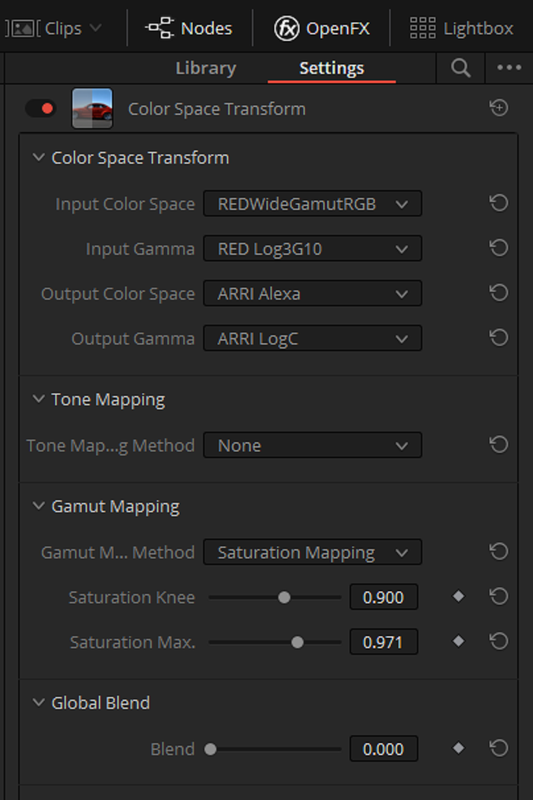
You can Also Transform RWG/LOG3G10 to ARRI/ARRI LOG-C and then use an ARRI LOG-C to REC709 TRANFORM LUT, But you may have to do you own Tone and Gamut Mapping. But just because you can do this doesn't mean that you should do it.


Screenshot-179.png


Screenshot-178.png


rwg-arr-log-c-1-1-3.jpg
 
Last edited:
Matthew,


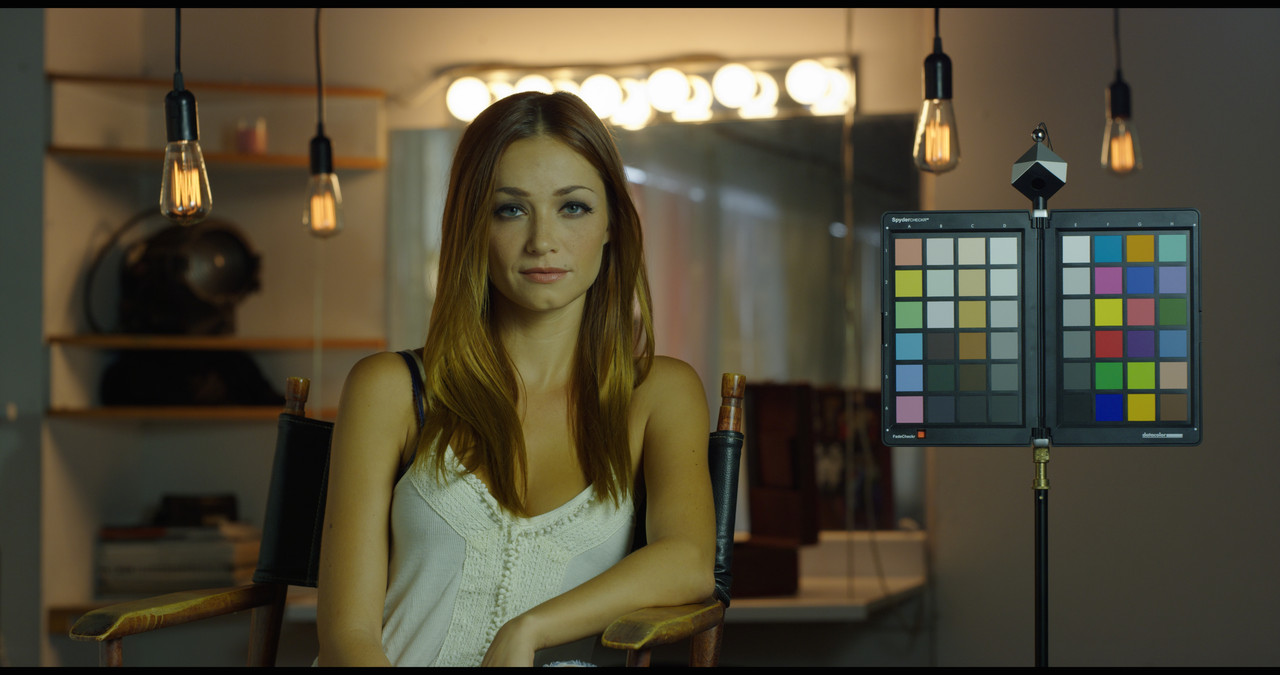
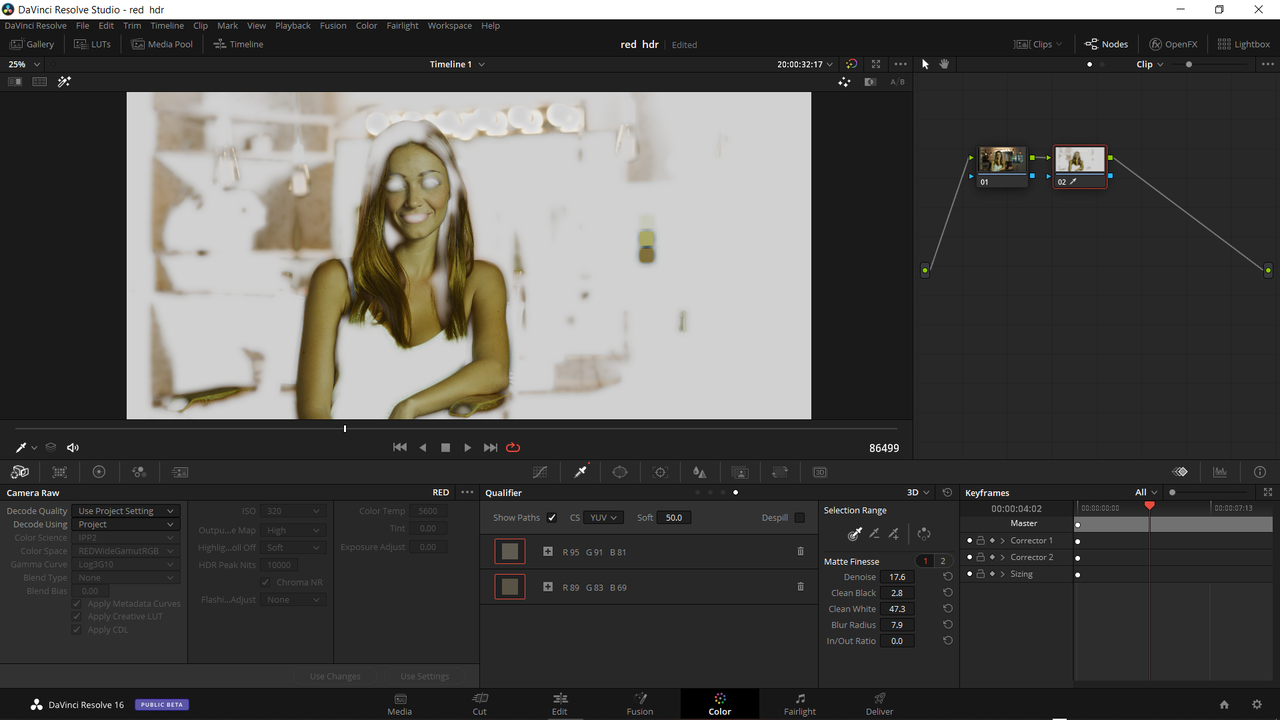
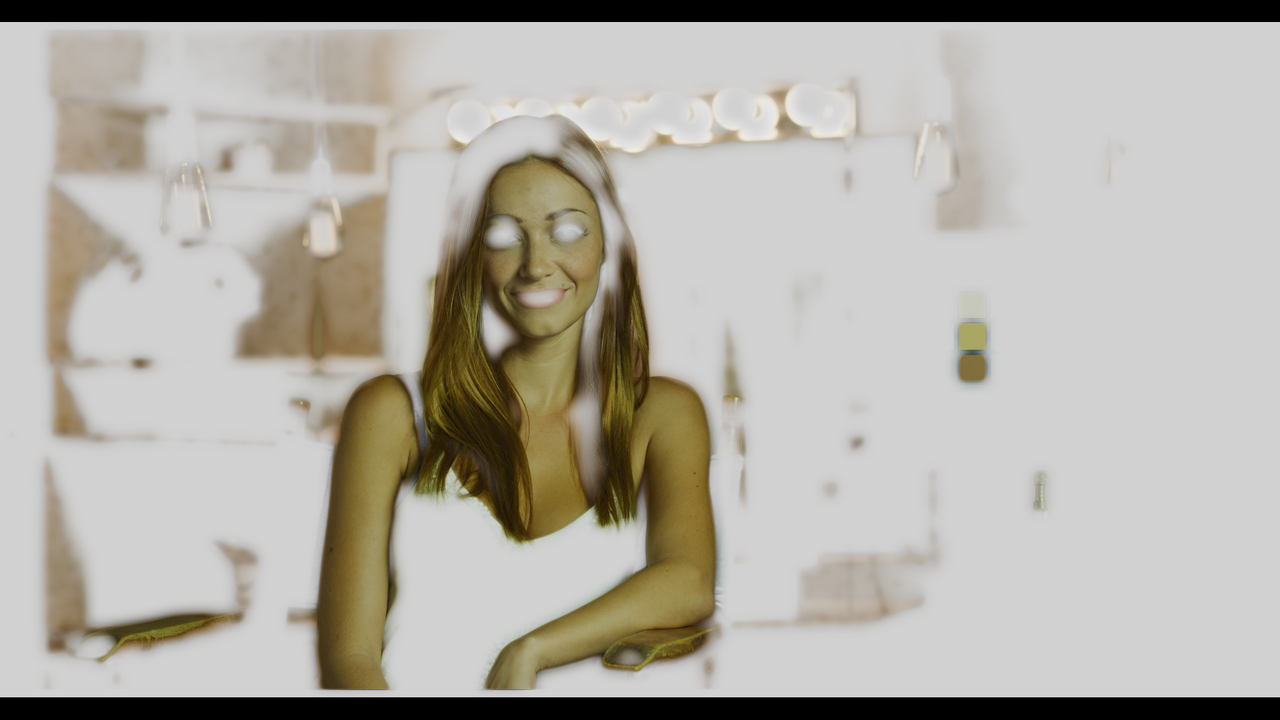
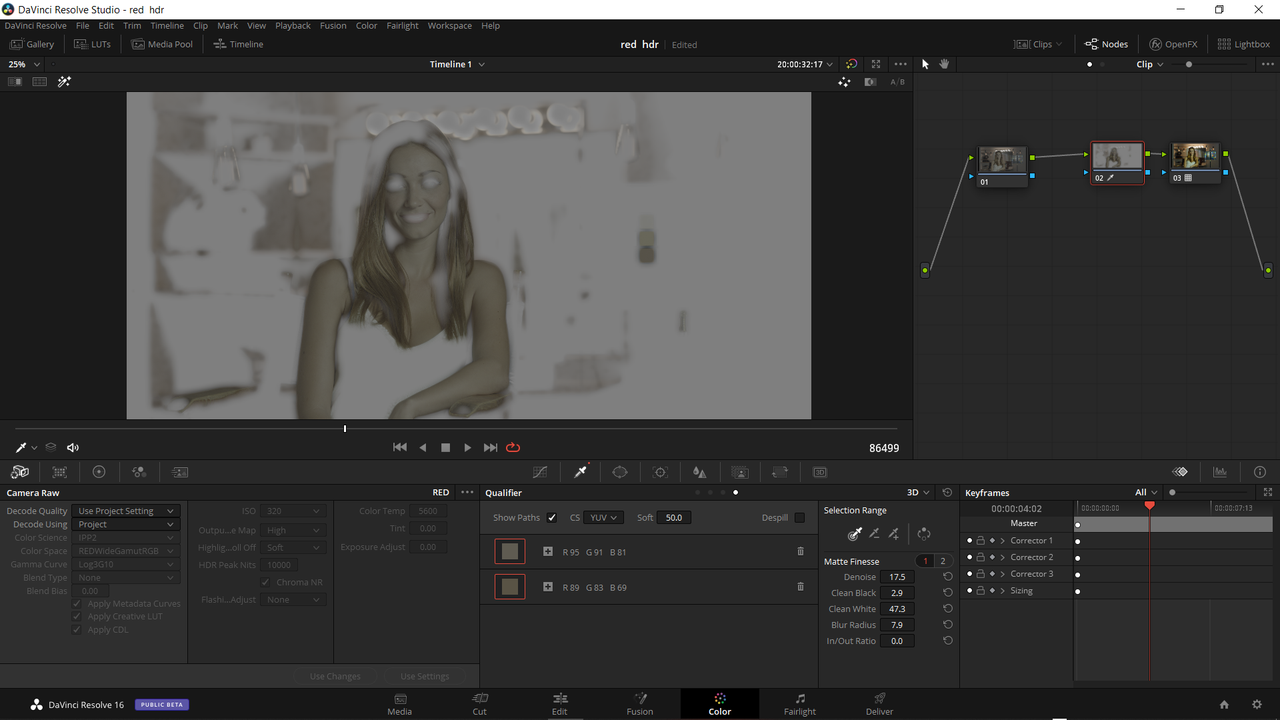
Here are two examples of how qualifying Skin tones will look in both a RWG/LOG3G10 Color Managed Workflow and in an IPP2 Output Transform workflow. Note that you will have to use the "3D" qualifier in either one. Notice you will actually be able to see the Skintones in the RWG/LOG3G10 Color Managed Workflow.


RWG/LOG3G10 Color Managed Workflow

Screenshot-182.png


Screenshot-185.png


IPP2 Output Transform LUT workflow


Screenshot-183.png


Screenshot-184.png
 
Last edited:
Back
Top