Welcome to our community

Be a part of something great, join today!

  • Hey all, just changed over the backend after 15 years I figured time to give it a bit of an update, its probably gonna be a bit weird for most of you and i am sure there is a few bugs to work out but it should kinda work the same as before... hopefully :)

Monstro ISO

Anthony DeRose

Well-known member
Joined
Oct 12, 2009
Messages
54
Reaction score
0
Points
0
Location
New York
Hello all,

1. I don't shoot a lot of Red and was curious about what is the "native" ISO of the Monstro with Standard OLPF?

2. Does Monstro have the Menu>Image>ISO>New ISO Calibration setting like the Helium does? This boned me last time I shot with the Helium as I wasn't aware of this setting and ended up with some unwanted grain.

3. For standard shooting practices are most people using Log3G10 and ReWideGamut

Thanks
 
1. You don't want "native ISO". The recommended Base ISO is around ISO 800. I would say for most with the Standard OLPF ISO 800-1600 is a nice place to start.
2. Yes, Monstro features ISO Calibration 2.
3. I've been on IPP2 since day one. It provides the best image quality and color from RED cameras.
 
Thank you Phil.

To clarify on ISO Calibration 2 - that option needs to be checked in the Menu>Image>ISO setting, correct? Is my understanding correct that ISO calibration 2 brought the sensor base down to 640-800? Finally I assume the Gemini being dual ISO does not have this same calibration option.

Thanks
 
Thank you Phil.

To clarify on ISO Calibration 2 - that option needs to be checked in the Menu>Image>ISO setting, correct? Is my understanding correct that ISO calibration 2 brought the sensor base down to 640-800? Finally I assume the Gemini being dual ISO does not have this same calibration option.

Thanks

Gemini and Monstro are both Calibration 2. This just means that 800 ISO meters as 800 ISO. Calbration 1 was a stop off (800 ISO metered at 400 ISO).

Gemini, as a separate feature, also has TWO iso settings - Standard (from approx 200 to 1600), and Lowlight (from 1600 on up).
 
So I have always shot at ISO 800 with the Standard OLPF. When I mix Monstro with DXL2 I change to the low light OLPF and change the ISO calibration check box and use ISO 1600.

Interestingly on a recent Netflix feature the DOP on 1st unit with DXL2 was shooting a great deal of material at ISO 3200 but I never saw that footage on a big screen.
 
So I have always shot at ISO 800 with the Standard OLPF. When I mix Monstro with DXL2 I change to the low light OLPF and change the ISO calibration check box and use ISO 1600.

For clarity's sake, when you switch to ISO Calibration 2 at ISO1600 to match DXL2, that results in *2* stops brighter than ISO Calibration 1 at ISO800, right? (Switching from ISO Cal 1 to 2 = +1 stop, and going from ISO800 to 1600 = +1 stop.)

Just wondering how much brighter DXL2 is at default/recommended/"native" settings.
 
I'll have to check my notes when I'm back at the hut, but if I recall correctly the DXL2 is also on ISO Cal 2.

I'm hesitant to post without my notes, but if that's the case:
- Monstro w/ Use New ISO Cal Selected
- DXL2

At ISO 800 should net the same image w/ the same OLPF installed.

Which would make sense when Peter has it unselected on Monstro at ISO 1600 to match DXL2 at 800.

All ISO Cal 2 is doing is a one stop boost, mainly to play better w/ meters. It's been the standard way of working for a long while now.
 
For clarity's sake, when you switch to ISO Calibration 2 at ISO1600 to match DXL2, that results in *2* stops brighter than ISO Calibration 1 at ISO800, right? (Switching from ISO Cal 1 to 2 = +1 stop, and going from ISO800 to 1600 = +1 stop.)

Just wondering how much brighter DXL2 is at default/recommended/"native" settings.

For clarity's sake, a production should use ONE calibration at a time.
 
I'll have to check my notes when I'm back at the hut, but if I recall correctly the DXL2 is also on ISO Cal 2.

I'm hesitant to post without my notes, but if that's the case:
- Monstro w/ Use New ISO Cal Selected
- DXL2

At ISO 800 should net the same image w/ the same OLPF installed.

Which would make sense when Peter has it unselected on Monstro at ISO 1600 to match DXL2 at 800.

All ISO Cal 2 is doing is a one stop boost, mainly to play better w/ meters. It's been the standard way of working for a long while now.

I had this same question/dilemma a few months ago while using a Panavised Helium. It appears that the DXL LUT is adding the 1 stop push, and the “ISO CAL 2” setting is disabled in-camera. Same result, different path!
 
It would be great Phil if you made something like this, or if Red did. I was talking to a Arri "fanboy". and he showed me this and I thought it looked super helpful.
 

Attachments

  • IMG_0173.jpg
    IMG_0173.jpg
    12.2 KB · Views: 5
It would be great Phil if you made something like this, or if Red did. I was talking to a Arri "fanboy". and he showed me this and I thought it looked super helpful.

Heh. I've produced actual patches w/ data sampled, but I can whip up one of those in Photoshop.

Or actually.

I have a better idea.
 
For clarity's sake, a production should use ONE calibration at a time.

I know, but Peter was matching a Monstro to a DXL2, so I was curious what the DXL2 does by default (and/or how much brighter that'd be over ISO Cal 1/ISO800)... To complicate it further, I'm still rocking Dragon, which is ISOCal1/800 (aka meters at ISO400), so I'm curious to see if it'd play at something closer to DXL2. But if DXL2 is ISO Cal 2 and ISO1600 recommended, that'd be ISO3200 on ISOCal1 (aka not gonna happen on Dragon).

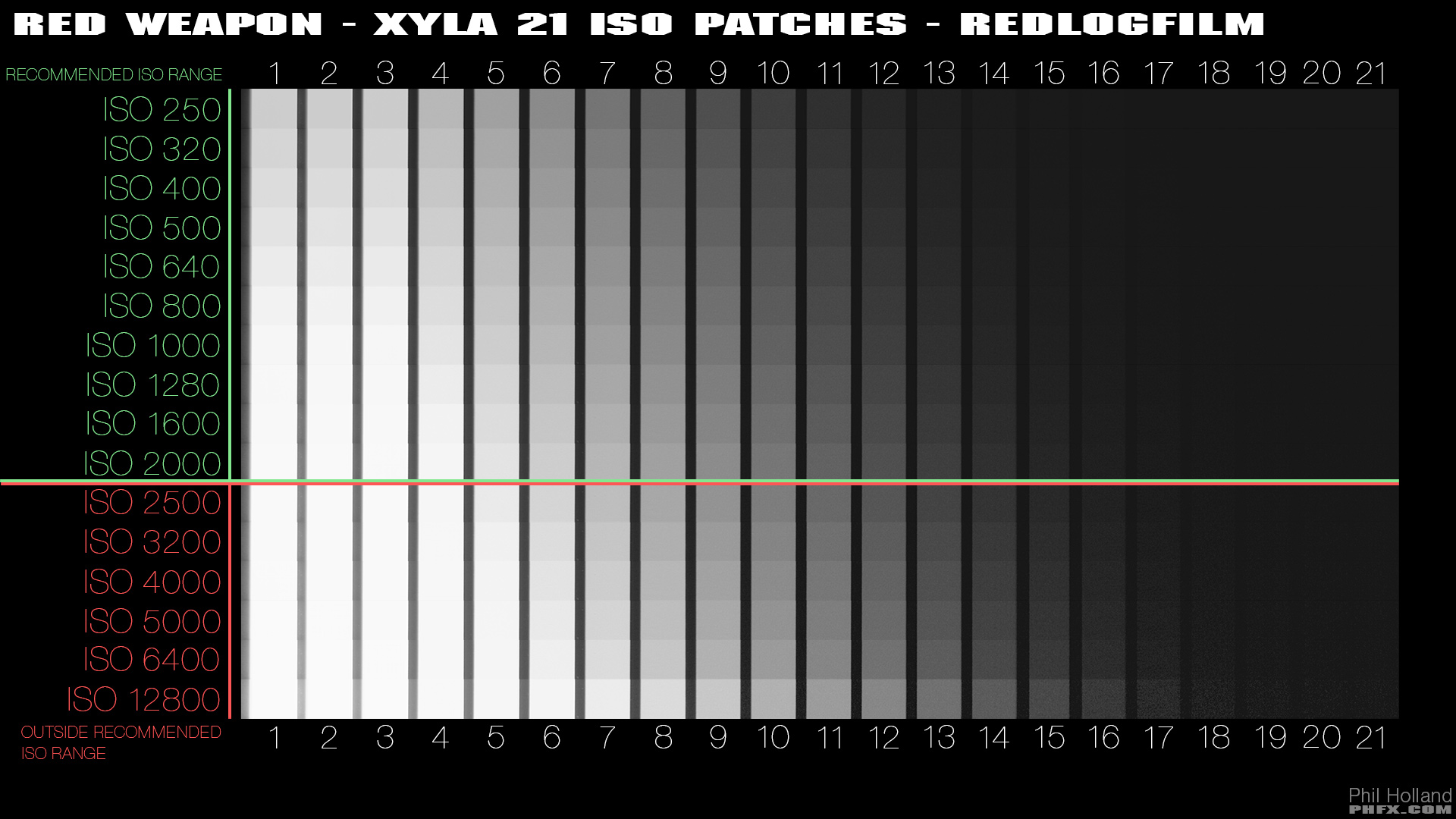
Also, Phil made this for Weapon 6k:

phfx_REDWeaponTest2015_xyla21_ISOPatches_RLF.jpg


But I agree, those Arri over/under vs ISO graphs are way easier to follow/read, and they've been available since ALEV3 launched. Even BMD has them for Pocket 4k (even over/under at ISO800 and 4000) and Pocket 6k (even over/under at ISO640 and 3200).
 
Last edited:
Forgive my ignorance and thank you for all the response.

To be clear is the Monstro already at ISO Calibration 2 by default with no option for Calibration 1? Will I need to have my AC at checkout even worry to check if its in that calibration? In other words was the whole ISO 1 vs 2 calibration just something specific to the Helium and the Monstro's been ISO 2 calibration since the get go.

Thank you
 
Forgive my ignorance and thank you for all the response.

To be clear is the Monstro already at ISO Calibration 2 by default with no option for Calibration 1?

Documentation makes clear that calibration is a parameter you can set. The firmware defaults to Calibration 2, but you can change it if you are sentimental (or semi-mental).

Will I need to have my AC at checkout even worry to check if its in that calibration?

Of course. Your AC should check all the parameters that can result in error if not set correctly.

In other words was the whole ISO 1 vs 2 calibration just something specific to the Helium and the Monstro's been ISO 2 calibration since the get go.

To their, ahem, credit, RED acknowledges that they were off by a full stop when they advertised the ISO ratings of their first few sensors. They cleaned up the mistake via a software fix, and as a parameter that can be set. It is possible today in 2019 to make the latest RED camera as untruthful about ISO calibration as the original RED ONE, by using Calibration 1. It is also possible to set it to Calibration 2, and have something that largely agrees with what light meters have been telling us for the past 50 years. You are free to choose your own adventure every time you prepare for a shoot.
 
Probably the only reason they’ve kept ISO Cal 1 in DSMC2 is to be able to match pre-Unified DSMC2/DSMC1/R1 cameras that didn’t ship with ISO Cal 2. And yes, it’s annoying; I seem to recall even R1 camera tests mentioning that REDs were metering almost exactly one stop darker than every other camera, so they should’ve fixed it then.

At the introduction of ISO Cal 2, I would’ve gone a step further -- updated all cameras to use ISO Cal 2 (and include RWG/LOG3G10, which is only available in DSMC1 Dragon onward [not MX]). And make getting to ISO Cal 1 somewhat difficult/buried in the menus.

That said, there are probably a few logistical reasons why they didn’t. Specifically, not everyone updates their firmware, and pre-DSMC2 cameras get super noisy at ISO1600 (aka ISO Cal 2 at 800, which is what most people still rate REDs at)... plus even though it’s the “same” sensitivity, no one wants to see that their camera is actually an ISO400 camera, after years of having “ISO800” recommended.
 
Last edited:
The ISO Calibration across different manufacturers is not very regulated. Mainly what transpired was frustration between brands if people were familiar and/or working with other systems. This mainly manifested in the unique differences between each camera's "standard look" where each tone curve and as it relates to 18% gray was slightly different. Which is still moderately true to this day btw.

The way we counter acted this variance on set was to either create a LUT or look and use it in camera, in the world of RED and specificly compared to the standard Rec.709 Arri look it was common to ISO up 1 stop or open the lens a stop, actually it was somewhere between a stop or 2/3rds. This was not an issue on productions that made custom looks between cameras.

Either way, RED's solution was to eventually create this ISO Cal for newer DSMC2 sensor tech. One of the other interesting things to note since IPP2's initial release. By default it started out with an Output Tone Map of Medium with a Highlight Roll-Off of Medium as well, which was similar in tonality to RED's previous default curve. Now IPP2 defaults to an OTM of Low and HRO of Soft to moderately go with the trend of imagery from the last few years. Generally all the default OTMs meter around 18% accurately. Always good to test. Meters are also a minefield of variance.
 
Thank you all again.

If I am set for ISO Calibration 2 on the Monstro at 640-800 ISO that should be a pretty clean image, correct?

I believe my error in the past was I was going by the old recommendation of 1280 ISO on the helium not realizing the camera was set for ISO Cal 2 which essentially put me at a 2500 adding noise I did not want.
 
Thank you all again.

If I am set for ISO Calibration 2 on the Monstro at 640-800 ISO that should be a pretty clean image, correct?

Yes, 800 should be fine.

Going up without differing analog gain is a data-centric pink unicorn land and you just underexpose and stretch fewer bits more.

It's not just the noise, it's the tonal depth also. And more importantly.
 
Back
Top