Welcome to our community

Be a part of something great, join today!

  • Hey all, just changed over the backend after 15 years I figured time to give it a bit of an update, its probably gonna be a bit weird for most of you and i am sure there is a few bugs to work out but it should kinda work the same as before... hopefully :)

Monstro: High ISO grid pattern

Tim Sessler

Well-known member
Joined
Feb 4, 2015
Messages
131
Reaction score
0
Points
0
Location
NYC
Hi guys -

I've been test the Monstro at high ISOs (3,200 and 6,400) to see how far I can push the sensor.
3,200 feels really interesting for bright exteriors - creates a super nice highlight rolloff and pleasing grain.
6,400 can get a little much at times and seems to introduce some weird ISO patterns. Instead of a constant random noise its nearly like there is a small grid laid over the entire video.
When looking at single frames it appears to be random but once you play the video it shows the pattern.

Here is a test clip - pushed to 12,800 to make it more obvious:


Here is a downloadable link: https://www.dropbox.com/s/07vc6n70a4pdaf6/12800 ISO Pattern - Monstro.mov?dl=0


I was curious if anybody could explain where this grid pattern is coming from. I really like having some grain in the image when pushing it - especially since Monstro grain has become more and more pleasing.
But having this pattern makes it rather unusable.


Thanks for the input!

Cheers,
Tim
 
This looks really good, nice to see what pushing Monstro will do. I've been really interested in what happens at higher ISOs with that sensor.

Tim I know you more than know your way around these cameras, but did you do the FLUT test after blackshading? I found a few abnormalities at higher ISOs with my Helium after some manual blackshades and I ended up running them until I pushed the FLUT and the pattern was almost imperceptible. Took me a couple tries but ended up nailing one and the pattern went away. I will say I wasn't pushing past 3200ISO but maybe that could help? I've found newer firmwares to get the calibration on the first try (I also had to send my cam in for a board replacement and it's been solid since). Wonder if that could help with the pattern.
 
Two things:
1.) was this rendered at anything less than full debayer? (I believe in camera prores/dnx is 1/2 premium)
2.) does it appear the same way when you render out an 8k version?

Better off posting a .r3d frame (or like 3second clip) so people can push it around in RCXp and see where/how it breaks.
 
This looks really good, nice to see what pushing Monstro will do. I've been really interested in what happens at higher ISOs with that sensor.

Tim I know you more than know your way around these cameras, but did you do the FLUT test after blackshading? I found a few abnormalities at higher ISOs with my Helium after some manual blackshades and I ended up running them until I pushed the FLUT and the pattern was almost imperceptible. Took me a couple tries but ended up nailing one and the pattern went away. I will say I wasn't pushing past 3200ISO but maybe that could help? I've found newer firmwares to get the calibration on the first try (I also had to send my cam in for a board replacement and it's been solid since). Wonder if that could help with the pattern.


Good point! I'll double check that. Have to upgrade to the latest FW as well. Will report if that makes any difference.
 
Tim,

Looking at the R3D it looks typical to me of a Red/Monstro image at that ISO setting. I assume the grid pattern is Fixed pattern noise and it seems to rear its head around 6400ASA especially if it's underexposed. My personal preference is to max out at 3200asa and even then there will be some minor organic noise but little Fixed pattern noise. Strangely the Dragon Enhanced Blacks (DEB) checkbox setting still cleans up a lot of the red chroma noise in underexposed Monstro footage. Are you going with a manual black shade of the camera as per Reds recommendation? This is important if you are going to push the camera to its limit. Not sure I would use the Low Contrast Output Tone Map and Soft setting on the highlight roll off with such low light imagery?
 
Tim,

Looking at the R3D it looks typical to me of a Red/Monstro image at that ISO setting. I assume the grid pattern is Fixed pattern noise and it seems to rear its head around 6400ASA especially if it's underexposed. My personal preference is to max out at 3200asa and even then there will be some minor organic noise but little Fixed pattern noise. Strangely the Dragon Enhanced Blacks (DEB) checkbox setting still cleans up a lot of the red chroma noise in underexposed Monstro footage. Are you going with a manual black shade of the camera as per Reds recommendation? This is important if you are going to push the camera to its limit. Not sure I would use the Low Contrast Output Tone Map and Soft setting on the highlight roll off with such low light imagery?

+1 .
 
Tim,

Looking at the R3D it looks typical to me of a Red/Monstro image at that ISO setting. I assume the grid pattern is Fixed pattern noise and it seems to rear its head around 6400ASA especially if it's underexposed. My personal preference is to max out at 3200asa and even then there will be some minor organic noise but little Fixed pattern noise. Strangely the Dragon Enhanced Blacks (DEB) checkbox setting still cleans up a lot of the red chroma noise in underexposed Monstro footage. Are you going with a manual black shade of the camera as per Reds recommendation? This is important if you are going to push the camera to its limit. Not sure I would use the Low Contrast Output Tone Map and Soft setting on the highlight roll off with such low light imagery?


Interesting. I was on manual black shade but will run a few more tests. The odd thing is that the pattern definitely doesn't seem consistent. Some shots feel a lot more organic and like random noise, while others have this very stark and ugly grid.

I'll test more and do some more black shades to see if that changes anything!

Thanks for the help thus far.
 
If there's a repetitive grid chances are it's a downsampling issue. What tool did you use to downsample the Monster 8k down??

Graeme
 
Yes what is your monitor resolution. If you look at the file on a small screen quicktime will do a real time down sample that is not the best.
 
If there's a repetitive grid chances are it's a downsampling issue. What tool did you use to downsample the Monster 8k down??

Graeme

Downsampling in Resolve - is there any way to improve the quality? What tool provides the best downsampling results?

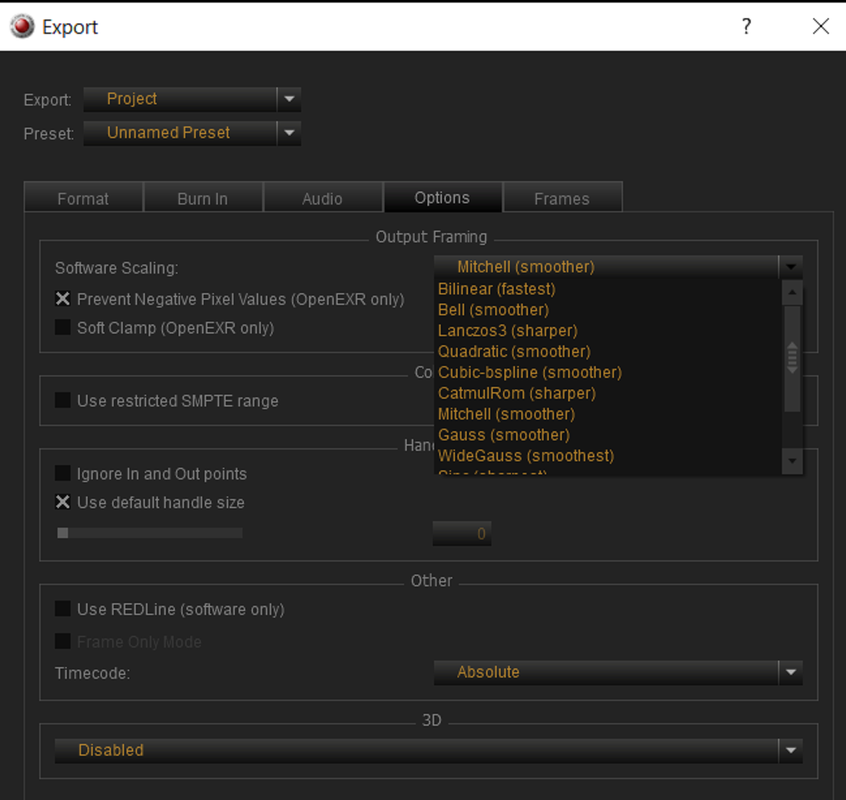
Here are the scaling settings - they shouldn't have changed from the factory settings:
ne84fq.jpg


Thanks!
 
Yes what is your monitor resolution. If you look at the file on a small screen quicktime will do a real time down sample that is not the best.

Traveling right now - so just on a 2.8K MBP. But have seen the same a home on the 5K iMac screen.

Cheers!
 
Traveling right now - so just on a 2.8K MBP. But have seen the same a home on the 5K iMac screen.

Cheers!

That sounds like a bad mix. If you scale down UHD to 2.8k realtime shit will simply not look correct. then it line skipping involved playback. And of course also important to have a good downscale algorithm going in resolve or what ever is used. to go from 8k and down. But yes deep in the dark there is a static patter in all sensors.

What you can look into to help it is Blackshading, downscaling algorithms and of-course noise reduction. Normally I remove the heavy noise if there is such and then apply a fine noise that match the less noisy scenes.

But yes your clip here looks really blocky. Dont know why that is. an r3d would tell more.
 
Nice! I rock 44 on my Helium and it's worked out great for me. Finding your temp can be super helpful.
 
So yes, I found this the other day with some material I'd shot and the Resolve downsample was sub-optimal. When I looked at my R3Ds there was no regular grid pattern. But... downsampling is Resolve made that pattern appear, no doubt aliasing created as the noise floor goes through a downsample filter. If it were FPN, you'd see it as vertical lines only and no evenly spaced. It would not look like a grid. What I saw was a perfectly even grid. This is what poor downsampling looks like. As for what can you do in Resolve - I'll leave that to the Resolve experts and I want to hear the answer too.

Graeme
 
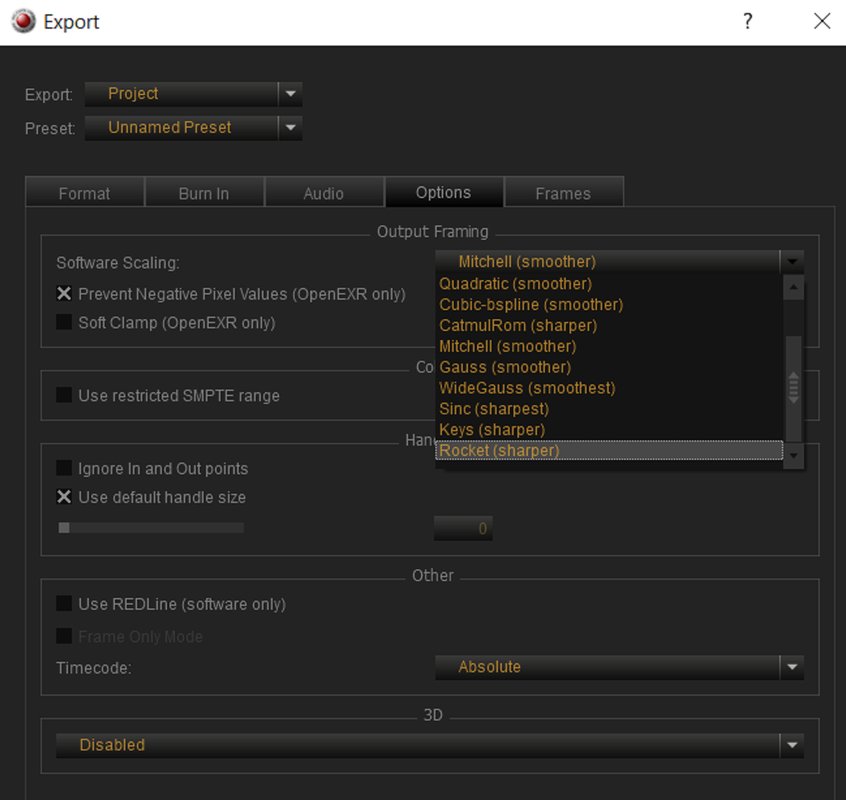
Or you can just down-sample it with a superior Scaling-Algorithm inside of Redcine-X to go from a .R3D raw file to create an Avid DNxHR or Pro-Res 4444 compressed file for a better looking image imported inside of Resolve.


Screenshot-209.png


Screenshot-210.png
 
So yes, I found this the other day with some material I'd shot and the Resolve downsample was sub-optimal. When I looked at my R3Ds there was no regular grid pattern. But... downsampling is Resolve made that pattern appear, no doubt aliasing created as the noise floor goes through a downsample filter. If it were FPN, you'd see it as vertical lines only and no evenly spaced. It would not look like a grid. What I saw was a perfectly even grid. This is what poor downsampling looks like. As for what can you do in Resolve - I'll leave that to the Resolve experts and I want to hear the answer too.

Graeme

Put image scaling to "smoother" instead of default "sharper" would probably be a good start, and ofcourse red debarring to full res premium 16 bit. Also I guess using a pipeline not using the ipp2 luts but IPP2 in timeline would help aswell.
 
I just did a whole Blackshade test at different temperatures from 38 going up to 42. Somehow 39 and 41 looked A LOT batter than 38, 40 and 42.

2a7zb51.jpg


Also here are R3D and Tiff pulls from each calibration: https://www.dropbox.com/sh/5aovry30aljpdfv/AACdvJStpIwd3UmBM5l3WLNra?dl=0

Any chance you did this test with Dragon (and even MX) as well? This is a can of worms that seems like a bit of a nightmare to have to test... Especially since the sensor temp isn't what is controlled by the temp control under fan settings.

Wow! Great test!

Great test, but also a giant pain in the ass... Like it could be different per camera, and those results vary quite substantially for such a small shift in temp.

EDIT: Bjorn clears this up on the next page. Spoiler alert: the differences are actually less drastic/dramatic when each BStemp chip is adjusted to the same brightness. Seems within typical blackshade variances.
 
Last edited:
Back
Top