Welcome to our community

Be a part of something great, join today!

  • Hey all, just changed over the backend after 15 years I figured time to give it a bit of an update, its probably gonna be a bit weird for most of you and i am sure there is a few bugs to work out but it should kinda work the same as before... hopefully :)

Middle range PC build for Resolve and Premiere

Olivier Madar

Well-known member
Joined
Apr 23, 2007
Messages
575
Reaction score
0
Points
0
Location
Asnieres (very near Paris)
Hi,


After switching from Mac to PC, and very happy with my top end notebbok Clevo, i built a midle range PC tower and wanted to share my experiences.

It has been a little bit difficult to make it work correctly but now, i can start working and testing.

Here is the hardware :
Gigabyte X79 UD5
Intel sandy bridge 3930
32 G of Ram
2 x GTX680 2 Gigs
1 x Red Rocket
4 x 3 TB hard drive in Raid 0 mode

My first bad move was to go Raid 5 route with the mother board : it is a very bad idea, the performance is poor and the security is null because if you have to re initialize your motherbord, you loose everything !!

So, i bought a Sonnet fusion 400 (esata connection) for doing the Raid 5 : it was not a good idea either because the speed of the fusion in raid 5 is very very low (2 hours for downloading a 83G Red Mag). So, i did a raid 0 in the sonnet and a raid 0 in the tower on the motherboard for backup. Now, the hard disk perfs are good enough (I did not spend a lot of money in the hard drive, they are Seagate 3T 7200, not Entreprise edition).
I spend a lot of time installing all the drivers and figting with the raid of the motherboard but, at the end, the PC worked well with only 1 GTX680. I got 16 fps with resolve and 4KHD. Then, I put a second GTX680 and now, i am full time (i did not try to stress the GPU at the max yet).
The price for all is 4 000 euros (without the Red Rocket). Ok, it is not as nice and easy as a Mac, but it is also interesting to be able to go "inside" the computer. And it is a horse power in comparaison of Macs.

If you want more details, or tests, just ask.


Olivier
 

Attachments

  • 09.jpg
    09.jpg
    89.7 KB · Views: 0
  • 10.jpg
    10.jpg
    89.7 KB · Views: 0
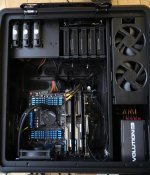
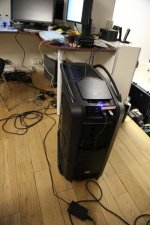
It is very very big but nice. The noise is very limited by the double wall on each side and the watercooling is great too. In fact, i get much more noise from the fusion raid O outside the PC. Of course, when you stress the GPU, you ear a little bit of wind.
Another nice feature is the double place for esata 3,5 hard drive on the front of the tower : you just push your disk and you see it. I put Macdrive on win, so i can share all hard drive from Mac or PC.
 
Nice config!
I'm getting my computer parts this month too and wanted to build a raid5 setup but i guess I'll go for a Raid0+1 if what you say is true. I'd love to know how the two GTX680 are performing so if you could keep us informed would be great!
 
Don't do raid5 on your motherboard !!
I was doing test and trying (i am not an expert) overclocking, then the PC was seek, and i decide to push the little reset button on the motherboard. Then i tryed some hours rebuilding the raid without any luck. So, i think it is much more dangerous than anything. The risk of failure of the motherboard is probably more important than the risk of failure of 1 disk, and you have to do firmware update quite often. So, go Raid with a card or a box but not the motherboard. I did raid 0 on the motherboard for my backup because it is only backup purpose.
And the test I did with raid 5 inside the PC on the motherboard or outside with the fusion 400 clearly show that it is not useful for Red workflow. Don't trust the tools for testing speed. Just do a copy with a good soft (not windows copy, but freefilesync copy for example) and look how the data are sustained : with the fusion raid 5 it was more than 100 M/s at the beginning but it was continuously going down until 35M/s wich is unusuable.
Even in Raid0 on the fusion i am not good enough to read a 1080p 10bit with no compression continuously. But I think it is the hard disk fault. I did not put in it the recommended Sonnet hard dive.
You need 100M/s SUSTAINED copy with Red. I think the max is near 150 from Red Mag to SSD. I did not notice a big difference betwenn Sata reader and USB3 reader.

I will keep you informed with the 2 x GTX680. I could have put a less powerfull graphic card but as the time goes, the soft uses better and better the GPU. With the last Premiere 6.0.2, you don't have to modify the cuda supported card, the 680 is the top recommanded card by Adobe. I think it will be the same with Resolve and the 680 is not very expensive (I remember the price of my quadro 4000 on my Mac...)


Olivier
 
I forgot to say that the installation of the GTX680 was very very easy. Just put the card in the slot, then windows says "you should strip your GPU in SLI" and i did not install any driver. Finish !
In Resolve, i see the 2 GPU and the rocket.

Olivier
 
I forgot to say that the installation of the GTX680 was very very easy. Just put the card in the slot, then windows says "you should strip your GPU in SLI" and i did not install any driver. Finish !
In Resolve, i see the 2 GPU and the rocket.

Olivier

From your description and from the photo your are using the first PCIe x 16 slots for the two GTX680 cards the next x 16 for the RR. What else for your are using the other slots? What about the BM for the Resolve and what about an ATTO r680 controller?
 
The 2 first PCI are x16 and have the 2xGTX680. The third is x8 and have the Red Rocket. Then, i have no more room in the PC. So, the Black Magic is an intensity USB3 (and work perfectly), and I have no room for an Atto controller. So, i don't have "good enough" Raid 5 performances. With the Fusion, it is about 50MB/sec and with the Raid5 on the motherboard, it is about the same. That is why i went Raid0 + Raid0. Now, i download the SSD at 150 MB/sec.

This is not my last PC. I am waiting for high end motherboard with thunderbolt on them. This PC is not very expensive and work great. Yesterday, i spend 8 hours editing in Premiere CS6 with 3 hours timeline of R3D without a glitch. For rendering a preview, at h264 in 512x288 with 2 pass, it needs 2 at 3 less time than the project time ! I have the feeling of working with DV 10 years before. But it is not, it is 4K...

I wanted to speak about this surgery's project on reduser but my previous thread has been deleted by a moderator, probably shocked by the view of the pills in 4K. Sorry, because every body might be concerned by pills... The censure procedure on Reduser is not very clear for me.


Olivier
 
It is not yet defined. Today, there are very fewq motherboard with thunderbolt and they are too small. When high end mothgerboard with thunderbolt will be available, i will look at the processeur and so.

Olivier
 
Hi Oliver

What is the debayering setting that you use for realtime playback ? Half res Premium ? I would be surprised if you said full res, sound almost impossible. I have one cineform 4K and cineform RAW 5K files for you to test to see if it can run realtime if you are interested

Rivai
 
The 2 first PCI are x16 and have the 2xGTX680. The third is x8 and have the Red Rocket. Then, i have no more room in the PC. So, the Black Magic is an intensity USB3 (and work perfectly), and I have no room for an Atto controller. ...

Oliver, are you using the Intensity Shuttle USB 3.0? I ask b/c I've heard mixed reviews of this device. Thanks!
 
Hi Rivaic,

I am playing 4K HD file in Resolve 9 at full res premium 10 bits 24 fps. But i don't know well Resolve, so if you send me a Resolve project without the R3D, maybe i can put an R3D with the same name and characteristics as yours to do the test.

In Premiere CS6, i am always in 1080p timeline with 1/2 resolution and 4KHD files. It works with full resolution, but i am totally comfortable at 1/2. Doing a green key is always amazingly fast and good.


Olivier
 
Hi Peter,


Yes, that is the cheapest USB3 black magic card. Works perfectly for me and i don't want to spend a PCI in the PC. I think it draws a little bit of power from the PC, and the screen on the BM card is sometime a bit late compared to the computer screen. As it is USB3 powered, i can work with it in the train with my notebook and a Pana BTLH910 with Vlock batterie.

Olivier


Olivier
 
Hi Olivier

Pls check your pm. I sent you some files to test.

Regards
Rivai
 
Hi Rivaic

I downloaded and installed the codec. The 4K is read between14 and 16 fps, and the 5k is read between 15 and 16 fps


Olivier
 
Hi Rivaic,

I think you are only testing disk speed with your test. I tried to read your file on my notebook, and i read the 2 files at 24 fps. My notebook contains only 1x GTX680M but 2x SSD and the speed of ssd are much more than my Raid 0 fusion. The GPU seems not necessary to decode cineform but speed disk yes !

Olivier
 
Hi Olivier

Now that's very interesting and pretty much confusing. Cineform supposed to be a codec which doesnt depends on disk speed, but your test result is certainly intriguing. I have a RAID that boost up to 800MB/sec but i dont get that realtime speed with Cineform on Resolve. I need to do the test again.

Back to your configuration, i thought you have 3TBx4 ? You should be able to get easily 200MB/sec or more. What is your read speed on RAID SSD ?

Rivai
 
Hi Rivaic,


I did a copy of your files on the SSD containing the System, and the results are the same. It is strange to see a notebook faster with a single GTX680M than a 2x GTX680.
Could you do a project in Resolve with a R3D 5K 10:1 16/9 of 1 minute that we could name "test.R3D" including nodes, noise reduction, etc. that you could send to me ? I will replace the test.R3D file by another one with the same characteristics.

Olivier
 
Back
Top