Welcome to our community

Be a part of something great, join today!

  • Hey all, just changed over the backend after 15 years I figured time to give it a bit of an update, its probably gonna be a bit weird for most of you and i am sure there is a few bugs to work out but it should kinda work the same as before... hopefully :)

MetaFuze v2.1 now available

MichaelP

Well-known member
Joined
Aug 18, 2007
Messages
2,567
Reaction score
0
Points
0
Location
Boston
Hey all -

MetaFuze v2.1 is now available on www.avid.com/metafuze.

It has the following features/fixes:

1. Support for new color science
2. Support for RED ROCKET card
3. TAPE name is now filename
4. RSX file support
5. Ehanced color mapping and color space conversion
6. Arri RAW support (just in case... ;) )
7. Litte extra stuff


Michael
 
Working on getting those numbers - MetaFuze is a transdcode engine, and does not have all the controls and UI for the settings that you will have in ROCKECTCINE-X - nor does it sync external BWF files. But for now, the PC version of ROCKETCINE-X does not do all the MXF/DNxHD stuff, so here is a way to do that.

Michael
 
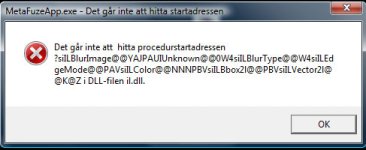
This version doesn't run well for me, get this error:

Untitled-1.jpg

Says: "Can't find procedure start adress"
Then SICORE stops working...
 
What version OS are you running on?

Michael
 
Hey all -

MetaFuze v2.1 is now available on www.avid.com/metafuze.

It has the following features/fixes:

1. Support for new color science
2. Support for RED Rocket™ card
3. TAPE name is now filename
4. RSX file support
5. Ehanced color mapping and color space conversion
6. Arri RAW support (just in case... ;) )
7. Litte extra stuff


Michael

Very nice progress!

Now .... how about the ability to slip clips (sync start points) and FLOP shots for stereo media in 2.2? Please ....
 
Windows Vista Business 64bit
Previous version works flawlessly
 
When is that error happening? On Launch, on scan, on transcode, and what parameters such as burn-in?

Thanks
 
Unfortunatelly Metafuze can't find our RedRocket.
It says something like our RedRocket has driver ver 0.0.0 and firmware ver 0.0.0

When I check from Devices->Properties->Drivers it lists driver 1.1.4 and I know we have latest firmware also.

Windows XP SP3 32bit here.

Priit
 
Checking into it. But a uninstall should be done before installing in all cases.

Michael
 
What is weird is that on one of my systems, I simply ran the 2.1 installer and all was fine. On another system, I installed 2.1 and it did not work. Error on launch. Uninstalled the MS redistributable (of which there were two) and MetaFuze (of which there were two), then reinstalled 2.1 and it all worked fine.

Weird thing is, these are very similar systems. XW8600 and XW8400, both on Vista Biz 64bit.

Improved color space conversion ROCKS!
 
Also make sure you are using the correct version of the driver. The driver provided with MF is 1.0.10.0 firmware is 1.14.28
It seams you are using a newer driver : 1.1.4.

Can you try the approved driver... you will find them under the MetaFuze application folder : /Drivers


Michael
 
So, 2.1 now supports RSX files. What do I do with the RSX in Metafuze?
 
If it's in the RDC folder it gets used as part of the transcode.

Michael
 
If it's in the RDC folder it gets used as part of the transcode.

Michael

Does that mean the DIT has to put an RSX in each clip's folder, or will Metafuze use the first one it finds to apply to all other transcodes in the same batch?
 
It won't apply an RSX from one file to all others in a batch. Is that a common workflow? You can save out an RLX and use that on a entire batch.
 
Yeah, for the offline, we just need a 1-light look applied on the transcode so they look normal once in Avid. Presently, they look "milky."

The entire series is shot on green screen with the same lights for every scene - so, I'm guessing one RLX should work for the whole day's shoot.

How do I make Metafuze use one RLX to affect an entire batch of transcodes?
 
Presently, they look "milky."
Not anymore in MF 2.1. It now performs a different RedSpace-to-709 conversion. Huge difference. Give it a try.

How do I make Metafuze use one RLX to affect an entire batch of transcodes?
I've done that in the past. Just select all transcodes in the transcode pane, then, in the settings window apply the RLX.
The downside is that it will then overrule any and all settings in the metadata from set ('cause the RLS is replacing those). I had created an S-curved RLX once (for better contrast), but then all other "look" settings from the shoot (like color temp) were ignored during transcode.
 
Back
Top