Welcome to our community

Be a part of something great, join today!

  • Hey all, just changed over the backend after 15 years I figured time to give it a bit of an update, its probably gonna be a bit weird for most of you and i am sure there is a few bugs to work out but it should kinda work the same as before... hopefully :)

Meaning of 16.5 stops of Dynamic Range

That is just what Toia did when he got his hands on Dragon the first time. The funny thing is that he got crap from some people for allowing the highlights to blow out. Those early images he shared were very informative. (Old OLPF of course)

In a single-shot DR testing route it would be helpful:

- Pointing cameras at a high contrast real life scene, containing greater range than camera(s) can capture
- Using spot meter for measuring values of distinguishable scene elements, from overexposed to underexposed ones
- Providing scene measurements
- Providing captured results

Additionally, providing results in RAW enables checking the usability of captured DR.
 
Last edited:
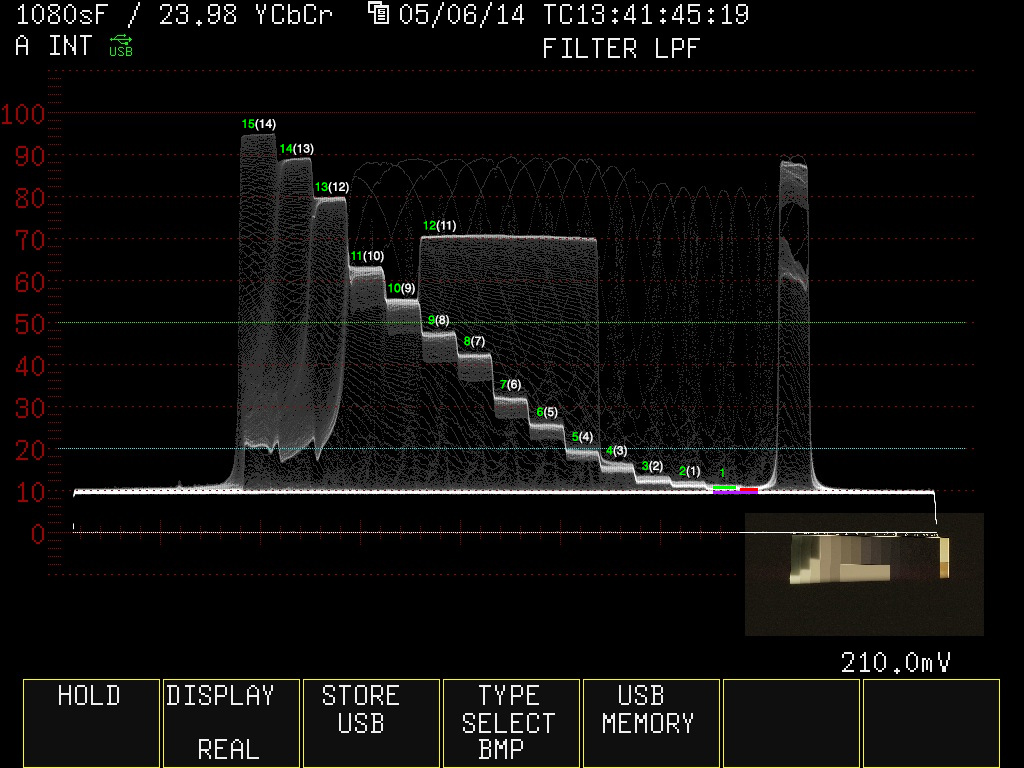
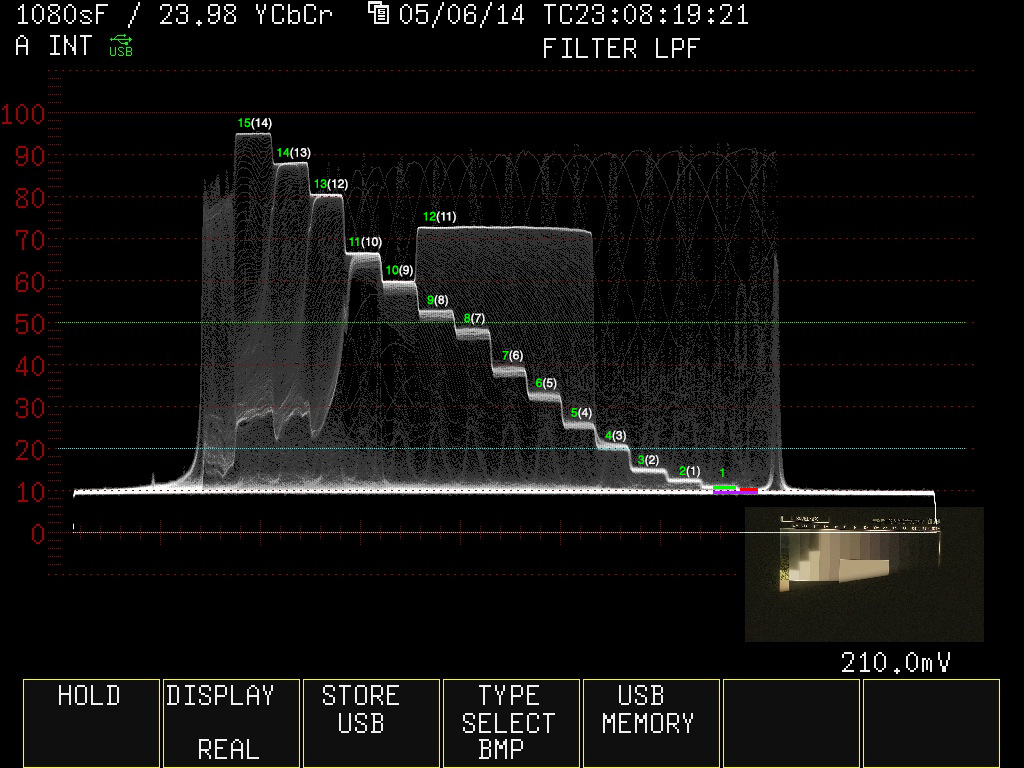
The above charts seem to be intdication 14 stops for the Alexa, 13 for the Dragon.

It's difficult to tell what's going on down in the darks but I count at least 14 on both. In fact, unless I'm reading the WFM wrong, I get 15 for both. As I've illustrated below...

The purple line represents a signal level of 0 or absolute black.

The green line [1] represents what I believe to be the first discernible stop (the difference between the 0 line and the darkest chip on the chart).

The red line may or may not be a stop, but it's too hard for me to tell, so I didn't count it.

If you start at the green line [1], you get 15 stops to the top. If you think that's being too generous, starting at what I've labeled "2(1)," I still count 14 for both.

I'm not sure how you're not seeing at least 14 for both, let alone how you're only getting 13 for Dragon. Am I reading these incorrectly?


DRAGON - 800 ISO

dragon-wfm-count.jpg


ALEXA - 800 ISO

alexa-wfm-count.jpg
 
Last edited:
In a single-shot DR testing route it would be helpful: - Pointing cameras at a high contrast real life scene, containing greater range than camera(s) can capture- Using spot meter for measuring values of distinguishable scene elements, from overexposed to underexposed ones- Providing scene measurements- Providing captured results Additionally, providing results in RAW enables checking the usability of captured DR.
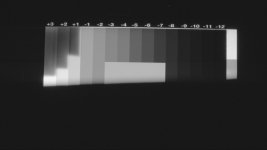
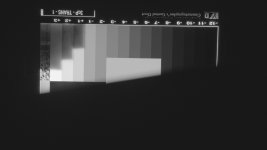
Hrvoje, I think these scope pictures show you everything you've asked for. Its a high contrast scene in one shot, each chip is measured in one stop values (spotmeter), and here are the results. I've numbered the chips starting at the clip point as I think that is an absolute value and leaves no room for interpretation. Both cameras clip at the same point. Again, these scope shots show what other test seem to show and that is that both cameras are very close in total dynamic range. Alexa maps the tonalities a little different by putting in one stop more latitude in the highlights (I'm assuming a mid gray point of about 40-42 ire). Other than that they're almost the same. How much total is up to interpretation.
 

Attachments

  • DRAGON_800ISO_CAP05062014082821.jpg
    DRAGON_800ISO_CAP05062014082821.jpg
    92.9 KB · Views: 0
  • ALEXA_800ISO_CAP05062014081511jpg.jpg
    ALEXA_800ISO_CAP05062014081511jpg.jpg
    93.5 KB · Views: 0
Whether both are 14 or 15, don't forget what Geoff Boyle said when comparing the two - that Dragon was MUCH CLEANER. Having comparable DR to Alexa but with a much cleaner signal (and at 6K), presumably gives Dragon footage additional wiggle room in post.
 
Evaluating Dragon DR by recording to a third party prores recorder? :emote_head_explode:
 
Evaluating Dragon DR by recording to a third party prores recorder? :emote_head_explode:

Sure why not? There is no Red Prores recorder so yes it's third party. Spatial resolution does not change the overall DR available when viewing live using Redlogfilm gamma which is (as I noted) why I did the test. ProresHQ compression is not affecting the results in any relevant fashion. Yes, there would be more detail to grade with using R3D and ARRIRAW as I also noted. How much more I'm not here to debate as I don't care - I found out what I needed to know to make informed exposure decisions on set with Dragon.
 
It's difficult to tell what's going on down in the darks but I count at least 14 on both. In fact, unless I'm reading the WFM wrong, I get 15 for both. As I've illustrated below...

The purple line represents a signal level of 0 or absolute black.

The green line [1] represents what I believe to be the first discernible stop (the difference between the 0 line and the darkest chip on the chart).

The red line may or may not be a stop, but it's too hard for me to tell, so I didn't count it.

If you start at the green line [1], you get 15 stops to the top. If you think that's being too generous, starting at what I've labeled "2(1)," I still count 14 for both.

I'm not sure how you're not seeing at least 14 for both, let alone how you're only getting 13 for Dragon. Am I reading these incorrectly?


DRAGON - 800 ISO

dragon-wfm-count.jpg


ALEXA - 800 ISO

alexa-wfm-count.jpg


I mistakenly looked at the 1600 ISO charts, which show 14 for the Alexa, and 13 fopr Dragon.
So it's not native ISO definitely. However, what is interesting is that this also seems to indicate that the Alexa performs better in low light.
 
Below - Dragon - 1600ISO
DRAGON_1600ISO_CAP05062014083025.jpg


Below - Alexa - 1600ISO
ALEXA_1600ISO_CAP05062014081545.jpg


I mistakenly looked at the 1600 ISO charts, which show 14 for the Alexa, and 13 fopr Dragon.
So it's not native ISO definitely. However, what is interesting is that this also seems to indicate that the Alexa performs better in low light.
The distribution of greys also seems to be more even without as much variation in the curve as the range progresses up the steps at the higher ISO.
 
Hrvoje, I think these scope pictures show you everything you've asked for. Its a high contrast scene in one shot, each chip is measured in one stop values (spotmeter), and here are the results. I've numbered the chips starting at the clip point as I think that is an absolute value and leaves no room for interpretation. Both cameras clip at the same point. Again, these scope shots show what other test seem to show and that is that both cameras are very close in total dynamic range. Alexa maps the tonalities a little different by putting in one stop more latitude in the highlights (I'm assuming a mid gray point of about 40-42 ire). Other than that they're almost the same. How much total is up to interpretation.

I wasn't referring to this test, and I agree that it is helpful, transmission chart route is much more objective than reflective charts.
With this exact approach I am considering if it might have been more beneficial for both cameras to be exposed until the last chip is slammed to the clipping point, then counting down the stops from there.

What tests like these are not showing is practical usability of the DR which is why the suggestion for more real life scenes, not to replace tests like these but complement them.
 
Clipped...
What tests like these are not showing is practical usability of the DR which is why the suggestion for real life scene.

I agree 100% that real life shooting / testing is more important than any chart. However most of the time I shoot with Redlogfilm in the monitoring path then use a LUT processor / LUT based workflow - thus my interest in how closely Dragon resembled my Alexa LUT based workflow for lighting / exposure / live grading decisions. This chart helps me establish a common baseline starting point for each camera, that's it. It doesn't help me after moving on to the next scene and offloading mags to then go into RCX and dig around for extra detail that is likely there beyond what I saw live. At least in network series land, Directors and Producers get justifiably nervous when you tell them that what they're looking at live will look better and/or different in post.
 
, captured from brain HD-SDI to Atomos Samurai Blade using ProresHQ.

Alexa - Shot this last year so it was running SUP6. Shouldn't affect DR much if at all. Lens - Cooke 50mm S5. 5600K, Log-C recorded to SxS using ProresHQ.@

Hi.

As I have stated a few times:
Tests give you a result for what you test for, the way you test it.

This shows what happens when recording RedLogFilm through the SDI, which is good to know.

Thanks!
 
Third Party recorder

Third Party recorder

It's a flawed approach because people are looking at the charts and commenting on the camera when they should be commenting on your color settings. It took 60 seconds to match those charts with color correction - something that could have been done in camera to the raw files.

And to be clear, I'm not flaming you for posting these - I appreciate it.

And out of curiosity, did you check the exposure with a spotmeter? Specifically, the black and white chips...

[Time passes...]

Ok, having thought about it more, I guess it's a fair test.

I guess I'm going to try to game the test when I get my Dragon and see what can be squeezed out of the raw data.
 

Attachments

  • DRAGON_800_5600_1.mov.Still001 (0.00.00.00)_1.jpg
    DRAGON_800_5600_1.mov.Still001 (0.00.00.00)_1.jpg
    65.1 KB · Views: 0
  • ALEXA_800_5600_1.mov.Still001 (0.00.00.00).jpg
    ALEXA_800_5600_1.mov.Still001 (0.00.00.00).jpg
    73.2 KB · Views: 0
Last edited:
I mistakenly looked at the 1600 ISO charts, which show 14 for the Alexa, and 13 fopr Dragon.
So it's not native ISO definitely. However, what is interesting is that this also seems to indicate that the Alexa performs better in low light.
The distribution of greys also seems to be more even without as much variation in the curve as the range progresses up the steps at the higher ISO.

if you understood grading at a higher level you would understand that it's not that simple.
 
It's a flawed approach because people are looking at the charts and commenting on the camera when they should be commenting on your color settings. It took 60 seconds to match those charts with color correction - something that could have been done in camera to the raw files.

And to be clear, I'm not flaming you for posting these - I appreciate it.

And out of curiosity, did you check the exposure with a spotmeter? Specifically, the black and white chips...

[Time passes...]

Ok, having thought about it more, I guess it's a fair test.

I guess I'm going to try to game the test when I get my Dragon and see what can be squeezed out of the raw data.

Below is a short R3D trim from the original chart file:
https://dl.dropboxusercontent.com/u...C016_0506SF_S000.RDC/A006_C016_0506SF_001.R3D
https://dl.dropboxusercontent.com/u/55061736/Public/A006_C016_0506SF_S000.RDC/A006_C016_0506SF.RMD

Mark, I have not used a spot meter with this chart as I trust that it was manufactured properly. Both the Alexa and Dragon had the same Litepad behind the same chart at the same intensity in a dark room at the time they were both shot. Thanks for pointing out that it is easy to match the Dragon and Alexa both in post and in camera if you wish. What color settings should I have used in your opinion? You mention people should be commenting on my color settings.

I hope the 56MB R3D trim is long enough to find a sweet spot on this chart for those interested in this level of scrutiny. (I am not but anyway...) When you find the frame you're happy with I can post the exact frame from the Prores file if you want to compare just how much they vary. Again, I've never advertised that this chart or my methodology is the definitive DR test for these cameras. I shot some tests for myself and shared them here, that's all. I'm absolutely open to suggestions as to how I could have done it better given the tools I had available.
 
Thanks for the R3Ds - always good to dig through that stuff.

I asked about the spotmetering mostly just as a check on the chart (not the Alexa) - did they really show 1 stop steps? How black was the black - is it elevated because of the black shade?... etc.

I rolled through the color science options in Redcine and agree that Redlogfilm is the best - though PDlog985 is really interesting on the high end rolloff.

Thanks again for sharing this.
 
So basically, according to these tests, red epic mx has 12 stops of dynamic range and both the dragon and the alexa has 2 stops more than it...
hmm this finally makes sense. So Alexa and dragon have equal amounts of dynamic range not more not less than each other. Period.
 
i see 15 for both, too, maybe 14 really usable ... but, it´s what it is, if i need "bit" more i use my HDRx button at Dragon, and 1-2 stops more even in motion are fine when you have this extreme situation to need 17 (!!) stops ;-)
the difference between MX and Dragon is the whole image impression, everyone will see it when you compare ... MX seems to be bit underrated, as the RAW has very much information, it IS a very good camera.

in comparison to Alexa: 2 years, "Alexa" was THE dynamic range king camera, the best of the best, you always heard this, now, Dragon is "equal", but in a little box with 6K sensor, including hdr tool, dragoncolor, highlight roll off, end lower prize, ... and some are disappointed ... ?
you should not. in the whole package, Dragon is unbeatable. and that industry goes on, is normal - so, maybe there is a camera next year with 8K and 17 stops, will come, for sure, but we are in the present ...
 
Back
Top