Welcome to our community

Be a part of something great, join today!

  • Hey all, just changed over the backend after 15 years I figured time to give it a bit of an update, its probably gonna be a bit weird for most of you and i am sure there is a few bugs to work out but it should kinda work the same as before... hopefully :)

Major Sync issues

QUOTE=Greg M;992434]Its important that you have a single master clock, and that no other device is doing the same. Intermittent OOS issues are not un-common when something is not connected correctly or you have the wrong settings/dip switches on lockit box, camera, SD, etc etc.. Ive even seen guys hook up the lockit backwards and swear the camera was faulty. I hate to say it, but from my experience 90% of the tc sync issues are operator error. So dont get hung up on the fact that its not consistent, double check each device in the chain, something is not set up correctly.[/QUOTE]

I am seriously hoping that it is operator error.

I have gone back to basics this morning. I have reset the Pix to factory settings and entered all the menu settings as I understand them, using the PIX to generate the timecode. My path is this

PIX-BNC output - timecode, freerun, 1080p25, sync out, 0 frame offset. Video input SDI video resolution - same as input

Epic, Camera input - Sync in Camera output - sync out sync mode - genlock. My project settings for timecode are timecode display - time of day timecode source - external. timebase 25fps
IMG_6091small.jpg

IMG_6096small.jpg

IMG_6080small.jpg

IMG_6081small.jpg

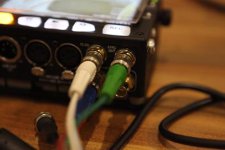
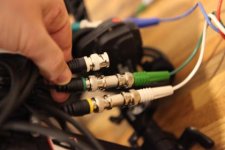
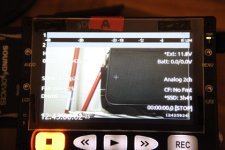
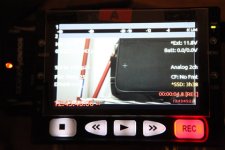
So you can see my cable route from the PIX into the camera. You can also see the camera in standby mode, with the generated timecode on the right hand side of frame and the timecode generated at the camera on the lower right had side of frame.

In record mode, you can see the generated timecode in red that is going to the pix, and the timecode on the camera sdi on the right. You can see the difference,
 
We are missing major info to help. What are all your settings on each device. Don't say "I entered all the settings as I know them" As you know them seems to be the issue here:

Did you read the PIX-240 Manual I posted??
READ THIS:
Setting the Sync Out
The setting of this is parameter is found in Setup Menu option Timecode/Sync Sync Out. If not using the Sync Out of the PIX 240, set the Sync Out to Off. When using the Lockit to generate the Sync (genlock) for a camera, the frame rate and resolution must be set for the camera’s sync input. Consult the camera’s documentation for information of which rates are accepted.
Additionally, there are two advanced modes under Timecode/SyncSync Out: Genlock, Fol- lows Video In and Wordclock, Follows Video In. Genlock, Follows Video In can be used to slave another camera’s or audio recorder’s genlock input to the camera feeding the PIX. Likewise, Word- clock, Follows Video In can be used to slave an external audio recorder to the camera driving the PIX to achieve perfect audio sync with zero drift. Drift is less likely to be an issue when recordings are kept short.


If neither of these setting are correct we are spinning our wheels here.
Please post larger images. Also we need to see Epic LCD image
what is the Pix 240 FW version?
Epic FW version?

Is the Cameras PROJECT TIME BASE = 25fps
Have you selected jam sync on Epic?

STEP BY STEP OF EVERYTHING YOU DID
 
Greg, your help is appreciated.. I will come back to you shortly with all settings & processes that we have followed, along with larger pics - I wasn't able to post larger images, can I PM you them or email?

I did look at the Pix manual & at the Epic manual again.

Pix FW V2.0
Timebase 25fps
Epic FW V3..0.0
Pix generated timecode is time of day and set to freerun and sending to camera hardwired via timecode out

Sync out is ON on PIX 240 and Sync out is set to 1080p25 in the pix menu hardwired to the camera
The camera is set to receive external timecode, I assume this is what you reference as Jam Sync as there is no particular setting anywhere in the menus that say "JAM SYNC"
Timecode display on camera is set to TOD

We are getting 3 green lights on the Epic monitor TC/GEN/SYNC When we disconnect either sync out or timecode from the pix the appropriate light turns red so the camera is realising something is missing.

Sync mode is set to Genlock in the camera
When we set sync mode to slave in camera still no luck

We have changed the genlock follows video but lose picture on the pix

Will come back shortly with a full workflow

We have tested with 2 different epics & 2 different pix's so it is hopefully pointing to user error somewhere - or a
 
will do.... we have just got an 80% success rate jamming the camera to an external source (pix) then switching the pix into taking sdi timecode. This gave us a consistent 1 frame error on 8 out of 10 takes - we are just testing with an offset it the pix of 1 frame. There were 2 takes that were 2 frames adrift
 
will do.... we have just got an 80% success rate jamming the camera to an external source (pix) then switching the pix into taking sdi timecode. This gave us a consistent 1 frame error on 8 out of 10 takes - we are just testing with an offset it the pix of 1 frame. There were 2 takes that were 2 frames adrift

I don't think that you want the pix to take sdi timecode after your original jam from the sound department. The pix should always be feeding timecode to the camera. Otherwise you are sending timecode from the pix to your camera via the red sync cable and then asking the pix to read it again via the sdi in. You can see where this might confuse the recorder.
Camera settings are settings/setup/gpio/sync
Camera input: sync in
Camera output: general purpose out
Sync mode: Genlock.

150Ms offset in the audio when sending audio directly into the pix. (your settings may vary)
These are the PIX settings that i am getting consistent timecode with:
 

Attachments

  • pix.JPG
    pix.JPG
    33.3 KB · Views: 0
just for grins try all these settings at 23.98 and see if they work.

Bizzare occurence. We are obviously working at 25fps, however, we did a sync from a 2nd pix using that as a reference to jam Pix1, 788 & then hardwired 2nd pix to camera to act solely as an external sync/timecode. We did 10 takes and checked back an all were in sync (without checking sound rushes) i.e the pictures matched timecode. When we looked at the Pix 2, the one we had used to create the master timecode, it's timebase was 23.976 ??? Could it be something in that that is kicking the camera into the correct sync?
 
You should be using the 788 as master clock. Feed the camera sync from there. The Pix is just an external recorder that should not be connected to the master clock, it will get its timecode from sdi. Make sure you set up the pix as just a slave to sdi input so it will auto start/stop with Epic. I dont have my gear with me, but look at SD's site, there is a video on how to set up the PIX to auto record via sdi.
 
Hi Greg... I have had varied suggestions, even from Sound devices. I have been told to let the Pix generate t/c then let the camera generate and send to Pix (which is your suggestion in a roundabout way)

Fundamentally, we have the equipment all working and the errors we are getting are the same across 2 cameras and 2 different Pix recporders, so it would suggest a setting error or user error !

The pix is start/stopping flawlessly from the Red. Timecode jamming seems to be working. We set a different timecode with each test and be it the camera or pix generating the timecode the other picks it up.

Our working workflow at the moment (88% accurate) is:

Camera timecode from external source (in this instance pix number 2). Camera sync from same source (pix number 2)
Pix 1(recorder) taking SDI in and timecode taken from SDI feed
No frame offset in Pix recorder

The issue we still have though is that we have done a lot of tests and if we take the last one which was 25 clapperboards (seperate takes) takes 1 2 & 3 were 1 frame out when we came to match picture. This was done by syncing the r3d & the pix mov via timecode and match framing. I know this is an easy fix in post, but it would be better to get it right at our end. We then had 22 takes rock solid. Nothing changed and the 25 takes were done within a 5 minute period.

My query is whether there is some sort of phase issue which we have reduced in our workflow but not yet eliminated. There is an issue with black bars out of the sdi is this somehow linked to the inconsistencies? Or is it my error ??? :-)
 
The black bars are normal. This is a red issue and is supposed to be addressed in about two weeks with a firmware update. Read my last post and try those settings and let me know what the result is.
Regards
Shane.
 
The issue we still have though is that we have done a lot of tests and if we take the last one which was 25 clapperboards (seperate takes) takes 1 2 & 3 were 1 frame out when we came to match picture. This was done by syncing the r3d & the pix mov via timecode and match framing. I know this is an easy fix in post, but it would be better to get it right at our end. We then had 22 takes rock solid. Nothing changed and the 25 takes were done within a 5 minute period.
I have a question:

If you feed sound to the Epic, then take the R3D file, debayer it through RedcineXPro it to the same format as the Pix, then load up both files into your editing programs, are the files identical?

In other words, can you determine where the error is happening? Is the Pix wrong and the Epic is right, or is the Pix right and the Epic is wrong?

Me personally, if it were 1 frame, I wouldn't care in post and I'd just tell the assistant editor to fix it. The key for me would be, the Pix file has to be 100% identical to the Epic file. Without that, all bets are off.

If the Epic file is 1 frame out of sync with the Pix file, then you could potentially have a massive problem with the conform. What I think is happening is, you have a non-referenced timecode phase issue where at certain times, the timecode number slips over to the next frame. I have seen this happened with two non-genlocked cameras, particularly in 3D situations.

Also, are you basing sync on numbers on a timecode slate? Shutter speed (angle) can affect how the pickup "sees" the timecode number, so certain numbers may be interpreted differently on two cameras, side by side. This was -- and is -- frequently a problem in film post, and is one reason why we use the clap as "real" sync, and only use slate numbers to get us close. The clap is real-world sync, held as an absolute.

I'd also be curious to see what would happen in an all-23.98 situation. I've only done shoots and post sessions with 23.98 material, so there's always the possibility that something is a little off in a 25.00 world.
 
In some earlier tests the method we used was to transcode the r3d's via redcine to dnxhd36. Due to the time it took to transcode, we did not do exhaustive tests but it appeared that the transcoded files from red cine & the r3d's matched.

I am thinking it is some sort of phase issue as there are takes in the test that are fine and others are not. I have made a short video demonstrating my exact workflow and the resulting clips sync together and compared. If anyone wants to look and tell me where I am going wrong
http://www.youtube.com/watch?v=fygyxoy1DHY&feature=youtu.be

I'm not an engineer, however I am wondering if it is something within the camera relative to 23.976 because at the most stable setting we can achieve, camera sending timecode via the sdi then our fail rate is between 1 & 3 in 25 slates. to my non engineer mind, if there is something strange referencing 23.976 (or 24fps for that matter) then the fail rate seems proportional to that.

There is another user in the Redcine X forum having similar issues at 25fps, though not identical they have flagged up the fact their timebase is 25fps

Any thoughts GREATLY appreciated as we start shooting at 8pm this evening !
 
I have just tested at 23.976: I still get mismatched frames with identical timecodes throught the tests except when I generate timecode to the pix through the SDI, i.e I have sent timecode from the Pix to the camera, different margins of error per clip. I have sent timecode via LTC to the pix from the camera, again some clips in sync others out, but when I test generating timecode at the camera by jam syncing the camera to an external timecode then sending timecode to the PIX down the SDI, I do not get any inconsistencies in the results.

My only concern about looking into the 23.976 too deeply is that I did 15 tests via sdi timecode, and whilst all were accurate, the previous test at 25fps yielded 1 error out of 25 so my sample of 15 may not have been big enough to make a definitive judgement.

We start night shoots in a coupld of hours so am running out of time to test further.
 
well, I would try what I suggested earlier. Use the 788 as the master clock only and just use the pair of PIX recorders as recorders only with only an SDI input.
This is the way we work and have not had issues.
 
Simon, I just did a test with the epic and pix at 25fps timebase. shot 19 clips, all were in sync.
here's my settings:
pix:
video input: SDI
file resolution/Rate: 1080p25
codec: prores422HQ
input Psf detect: AUto

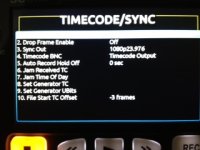
TIMECODE/SYNC
Timecode mode: Freerun
Drop Frame enable: off
sync out: 1080p25
Timecode BNC: Timecode output
autorecord hold off: 0sec

File start TC offset -2 frames

On the epic.
gpio menu
Camera input: sync in
camera output: general purpose out
sync mode: genlock

under project/settings/timecode I have "timecode source" : external

I'm using the red sync cable to jam the camera from the pix. SdI cable runs back from the camera to the pix.
The differences that I can see compared to your video are in order of appearance in your video:
you have camera output set to sync out, I have it set to general purpose out
on the pix, you have file resolution/rate set to same as video input, I have set this up as 1080p25.
I'm recording prores instead of avid although this shouldn't matter.


My suggestion would be to first turn off the sync out on the camera, then set your resolution on the pix to 1080p25.
Good Luck!
 
well, I would try what I suggested earlier. Use the 788 as the master clock only and just use the pair of PIX recorders as recorders only with only an SDI input.
This is the way we work and have not had issues.

That's what we will try later onl.. the only piece of kit I don't have access to to test is the 788. Did you see my video and if so did anything strike you as odd?
 
Thanks Shane.

I have just done 10 clips and had 1 error. This is the first time I have achieved this sort of consistency using the pix to drive the timecode directly. I am going to try and do 30 tests but I start shooting in an hour. I'll report back
 
this time 30 clips.... 2 errors in the 30. Vast improvement. Thanks for help so far. Will be testing again whilst waiting for it to go dark - vampires & all that type of stuff. Any further thoughts appreciated. Will report back re 788 success rate.
 
Possibly a bad cable?
I assume you have one on each camera?

Just so we are clear, is the problem a visual match with the slate or have you tried actually syncing in post?

Have you selected jam sync in the menu?
Do you have the green sync indicator in camera?


The SYNC icon has nothing at all to do with timecode, it indicates that the sensor timing is synced to a Genlock signal. Whether or not the camera has been jam synced on this boot is shown by the TC icon being green.

The symptoms the OP is complaining about, are from the external audio recorder. As a test, if you like, run audio out from your mixer and into the camera as scratch track. You will see that it is always lined up and the external audio track wavers around.
 
If your project needs to have matching synch on all recording devices, there is a common way to do this, but it will involve 2 additonal pieces of hardware (and a 3rd one would be better)
Get 2 Ambient Lockit boxes, or 2 Dencke SB3 (Or SB-t) boxes , jam them to the 788 TC twice a day (or get a Denecke gr-2 for a production master clock, and jam the 788 and the lockit boxes to it).. Then put them full time feeding the camera's TC input..
this works well, and is very stable.

If you need very high accuracy,this is better than jamming the cameras and removing the box.... in theory a studio set up could use multiple TC feeds to the cameras and audio recorder from a *SINGLE* TC master source...
let the Pix recorders read the SDI embedded tc..
 
Back
Top