- Thread starter
- #21
Simon N
Well-known member
QUOTE=Greg M;992434]Its important that you have a single master clock, and that no other device is doing the same. Intermittent OOS issues are not un-common when something is not connected correctly or you have the wrong settings/dip switches on lockit box, camera, SD, etc etc.. Ive even seen guys hook up the lockit backwards and swear the camera was faulty. I hate to say it, but from my experience 90% of the tc sync issues are operator error. So dont get hung up on the fact that its not consistent, double check each device in the chain, something is not set up correctly.[/QUOTE]
I am seriously hoping that it is operator error.
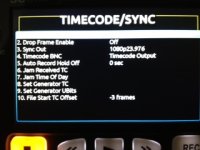
I have gone back to basics this morning. I have reset the Pix to factory settings and entered all the menu settings as I understand them, using the PIX to generate the timecode. My path is this
PIX-BNC output - timecode, freerun, 1080p25, sync out, 0 frame offset. Video input SDI video resolution - same as input
Epic, Camera input - Sync in Camera output - sync out sync mode - genlock. My project settings for timecode are timecode display - time of day timecode source - external. timebase 25fps
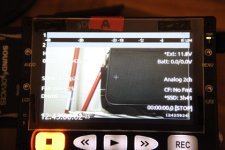
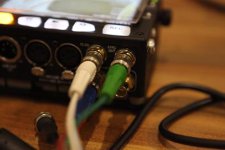
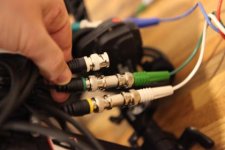
So you can see my cable route from the PIX into the camera. You can also see the camera in standby mode, with the generated timecode on the right hand side of frame and the timecode generated at the camera on the lower right had side of frame.
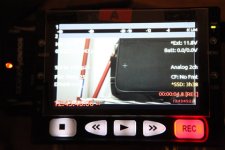
In record mode, you can see the generated timecode in red that is going to the pix, and the timecode on the camera sdi on the right. You can see the difference,
I am seriously hoping that it is operator error.
I have gone back to basics this morning. I have reset the Pix to factory settings and entered all the menu settings as I understand them, using the PIX to generate the timecode. My path is this
PIX-BNC output - timecode, freerun, 1080p25, sync out, 0 frame offset. Video input SDI video resolution - same as input
Epic, Camera input - Sync in Camera output - sync out sync mode - genlock. My project settings for timecode are timecode display - time of day timecode source - external. timebase 25fps
So you can see my cable route from the PIX into the camera. You can also see the camera in standby mode, with the generated timecode on the right hand side of frame and the timecode generated at the camera on the lower right had side of frame.
In record mode, you can see the generated timecode in red that is going to the pix, and the timecode on the camera sdi on the right. You can see the difference,