Welcome to our community

Be a part of something great, join today!

  • Hey all, just changed over the backend after 15 years I figured time to give it a bit of an update, its probably gonna be a bit weird for most of you and i am sure there is a few bugs to work out but it should kinda work the same as before... hopefully :)

Magenta Fringing

Joined
Aug 23, 2018
Messages
8
Reaction score
0
Points
0
Hi All,

We purchased a Gemini late last year and have noticed some magenta fringing on our shots. We have noticed this on all lenses. It feels as though the issue is more than what you would expect from being wide open and it presents on parts of the image that you would not expect. Sometimes it is manageable, sometimes it is quite ugly and unacceptable. All shots were lit using HMIs and LEDs, we have the Revolva ND Turret and the standard OLPF fitted.

Here are some examples:

open

R3D Grab: https://we.tl/t-yDJslvbsqD
Lens : Zeiss CP.3 35mm @ T2.1
Revolva Nd .3

open

R3D Grab: https://we.tl/t-p8sGZiQ4Jp
Lens : Zeiss 25mm ZF.2 F2
Revolva ND Clear

The second one is way worse. Would love to hear peoples input on what we are doing wrong or what causes this. I have never seen this on other cameras in the same situation. Thanks in advance for your help!
 
Last edited:
Hey, the zeiss lenses war knows for their CAs. I would do some test with T4 and T5.6 and see if it's gone and then also test some other lenses.
Maybe Try to change the mount back to normal to be sure that It's not because of the mount. Maybe you got reflections in there or the distance of the lens is not perfectly to the sensor because of the mount.

Just some things i would do.
Never had issues with my Gemini. I use the SLR Magic APO Hyperprimes.
 
Hey, the zeiss lenses war knows for their CAs. I would do some test with T4 and T5.6 and see if it's gone and then also test some other lenses.
Maybe Try to change the mount back to normal to be sure that It's not because of the mount. Maybe you got reflections in there or the distance of the lens is not perfectly to the sensor because of the mount.

Just some things i would do.
Never had issues with my Gemini. I use the SLR Magic APO Hyperprimes.

Yes, I could never understand how people could stand the Zeiss CP lenses with all that CA. My gut says it's the lenses.
 
Thanks for the replies folks!

We have encountered the issue on lenses from Sigma, Tamron and Canon too. I accept that this could be attributed to CA but I have not seen CA as bad as the second example I posted where the image is unuseable. As I mentioned, we use these lenses on Sony FS7, FS5 with no issues.

We have not tested at T4 or 5.6 - There may be an improvement here but it would be pretty annoying to have to use the lenses at those stops. Surely it's not acceptable to have a camera that can only shoot at T4 and above? We have $4K Sonys that allow us to shoot wide open with no issues on these lenses!

Would you folks say the second sample here is with in the normal acceptable range of CA?
 
Yes, we also had issues with magenta fringing on Scarlet-W as well, with a Sigma 18-35 Cine housing, even closed at T8. It's such a pain. We finally went with a Canon 16-35 L III, I know it's not a proper cine lens but at leas we have no purple CA even wide open, we sleep better at night ;-)

Or maybe the Otus line would be fine too.

Kristin
 
That is 100% Lens CA, that's exactly the torture case for them. The only way to avoid this is either stopping down as has been mentioned. Or look for lenses that are APO correctly which help minimise this type of effect. Lens design is a trade off between lots of areas, and Zeiss tend to go for sharpness over this sort of correction.

I have a thread on here about the SLR Magic APOs, take a look through that because it discusses some of these issues.

cheers
Paul
 
OK great points here folks, a lot for us to take on board.

We are about to arrange a test day to recreate the issue and then see what lessens it as you all have suggested, either by stopping down or avoiding certain lenses. Our 25mm zf2 is particularly bad so maybe we just look at an alternative.

Will post back here with findings!

Thanks,
Richie
 
Thanks Paul for your SLR magic Apos thread... I was interested in them till I saw some nasty violet fringing on the last frame grab of this post...

http://www.reduser.net/forum/showth...-mini-review&p=1820918&viewfull=1#post1820918

Cheers,

Kristin

I don't think *any* lens will stop this totally. That looks wide open on a wide lens against the sky - again the contrast between the back and foreground will create this as its optical. The Signature primes from Arri seem to do an amazing job here (from what i've seen, not used) but you're looking at an insane amount of money.

I'd also say that doesn't look like CA in the same way as the OP but some edge softening as it's only really on the edge. Personally for a shot like that stopped down would have fixed that.

I've just finished off a project where there's a lot of people against sky and i'm still blown away by the look compared to all the various other combinations of lenses i've used.

But as you can see they're not infallible!

cheers
Paul
 
Richie,

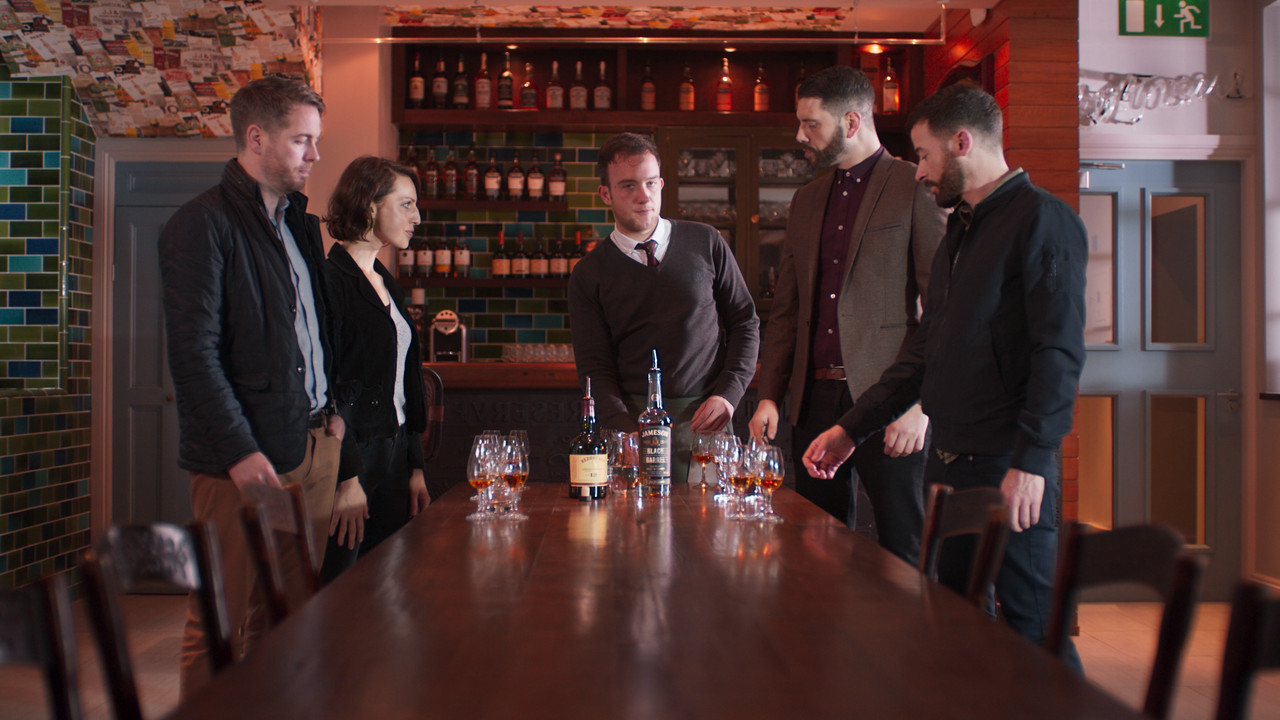
You can correct it out to some extent.

Chromatic-Aberationless-1-1-1.jpg

Rand,

This is a great result, do you mind me asking how you achieved it? Did you isolate and remove in resolve? We have had some success removing it but I think we need to get better at working through these issues. Everyone's input here has been extremely helpful, glad there is consensus too. We've learned a lot! Might look at adding a Hyperprime to our tests if I can get my hands on one!
 
Richie,

I'd also ask looking at that last shot whether there's actually something wrong with the lens because that's an appalling result all over. I assume that was wide open at 25mm? I really don't think it should be that bad. Are you able to try something else? I guess using those wide open are not ideal!

cheers
Paul
 
Richie,

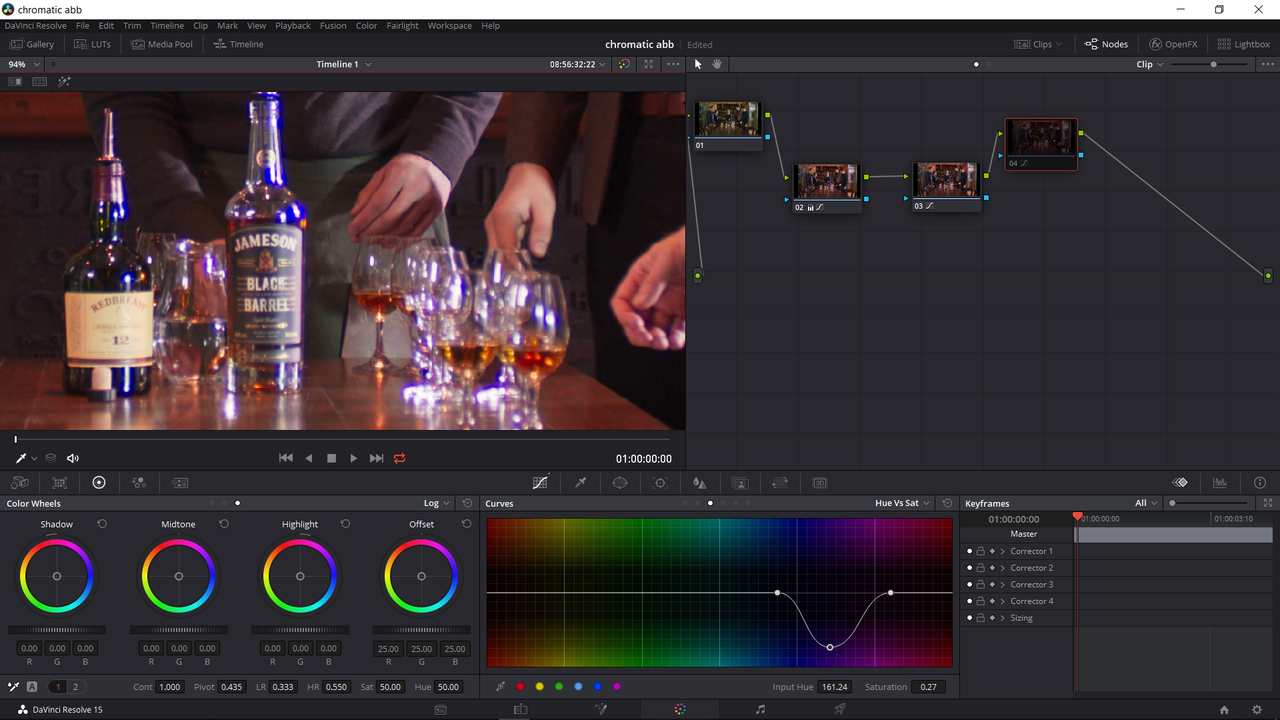
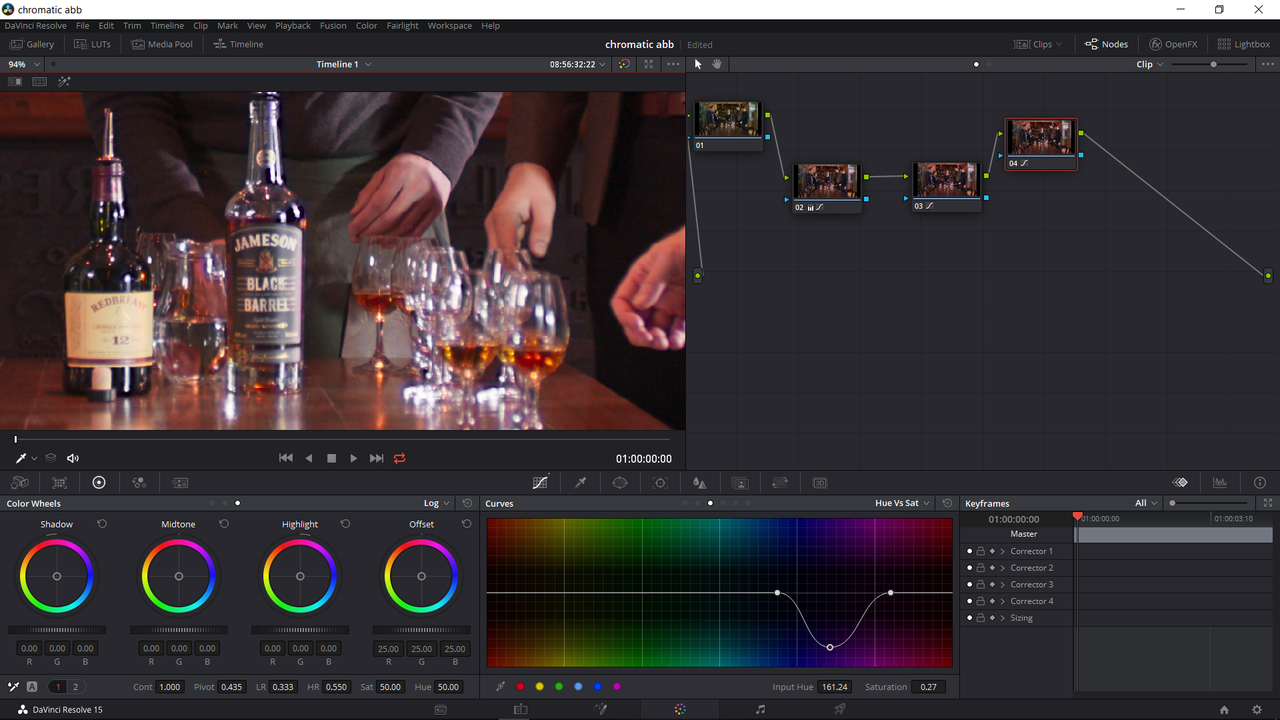
with a simple "Hue Vs Sat". However, be careful that you only isolate the colors in the Chromatic Aberration and not the guy in the Sportscoat's Magenta Shirt, The waiter's Magenta Tie or the wrapping on the "Redbreast" bottle.

In the examples below I enabled and disabled the Node with the Correction on it. I was in an ACEScct workspace so no IPP2 in this one.

Screenshot-939.png


Screenshot-940.png
 
The CP definitely have noticeable CA. You shouldn't see CA on this level with the SIGMAS. I'm surprised to hear you mention they were problematic. The Canons will also show CA as well. In addition to Hyperprime APO's check out the Tokina Vistas -- no CA and negligible breathing. Nice lenses.
 
Richie,

I'd also ask looking at that last shot whether there's actually something wrong with the lens because that's an appalling result all over. I assume that was wide open at 25mm? I really don't think it should be that bad. Are you able to try something else? I guess using those wide open are not ideal!

cheers
Paul

This is true, usually we see no issues on this lens on Sony cams but it's pretty beat up at this stage. It's the 25mm Ziess ZF2 and we were asking too much of it in this shot. This is the lens we really need to look at replacing first.
 
The CP definitely have noticeable CA. You shouldn't see CA on this level with the SIGMAS. I'm surprised to hear you mention they were problematic. The Canons will also show CA as well. In addition to Hyperprime APO's check out the Tokina Vistas -- no CA and negligible breathing. Nice lenses.
All lenses we used on that shoot were showing CA but most of it was acceptable. Any shots where it's really bad we were wide open. The Sigma 18-35 is working well but we will be pushing it in our tests. Would love to try the Vistas but unlikely that we can find them here in Dublin!
 
Richie,

with a simple "Hue Vs Sat". However, be careful that you only isolate the colors in the Chromatic Aberration and not the guy in the Sportscoat's Magenta Shirt, The waiter's Magenta Tie or the wrapping on the "Redbreast" bottle.

In the examples below I enabled and disabled the Node with the Correction on it. I was in an ACEScct workspace so no IPP2 in this one.

Screenshot-939.png


Screenshot-940.png

Really helpful Rand, Huge thanks for going to the trouble here!
 
Back
Top