
Navigation
Install the app
How to install the app on iOS
Follow along with the video below to see how to install our site as a web app on your home screen.

Note: this_feature_currently_requires_accessing_site_using_safari
More options
Welcome to our community
Be a part of something great, join today!
You are using an out of date browser. It may not display this or other websites correctly.
You should upgrade or use an alternative browser.
You should upgrade or use an alternative browser.
MacBook Pro 2016 Thoughts
- Thread starter jonathan murphy
- Start date

Brody_B
Well-known member
- Joined
- Mar 8, 2016
- Messages
- 1,145
- Reaction score
- 16
- Points
- 0
- Location
- Los Angeles
- Website
- www.boldpoppy.com
They need to put a Flippin' NVIDIA card in there...
Sounds like exciting news RE: Akitio!
Agreed. Unfortunately the Node doesn't support OSX, or even Bootcamp for that matter.
Bizon Box 3 will tho.
Sulekh Suman
Well-known member
- Joined
- Sep 16, 2011
- Messages
- 535
- Reaction score
- 0
- Points
- 0
- Location
- Los Angeles
- Website
- www.sulekhsuman.com
2016 MBP and RRX
2016 MBP and RRX
I was able to get 2X real time using RRX on my maxed out 2016 MBP using All SSD RAID. This will improve significantly since I had daisy chained RRX and the RAID off the same USBC port.
So far, the following
i. RRX works on 2016 Mac Book Pro
ii. RRX works on Sierra
iii. The performance with RRX is at least 6 times faster than without RRX on 2016 MBP.
I have a case open with apple and we are going back and forth currently. Will love to benchmark with some 8K footage using a thunderbolt 3 RAID and RRX on independent buses this week. Also hoping to upgrade Sonnet Echo Express III thunderbolt 2 connector with thunderbolt 3.
2016 MBP and RRX
I've tested with my 2016 MBP/TB3toTB2 adapter/Sonnet TB2, and it seem that there's no difference between with and without the Rocket X.. Same rendering time
I was able to get 2X real time using RRX on my maxed out 2016 MBP using All SSD RAID. This will improve significantly since I had daisy chained RRX and the RAID off the same USBC port.
So far, the following
i. RRX works on 2016 Mac Book Pro
ii. RRX works on Sierra
iii. The performance with RRX is at least 6 times faster than without RRX on 2016 MBP.
I have a case open with apple and we are going back and forth currently. Will love to benchmark with some 8K footage using a thunderbolt 3 RAID and RRX on independent buses this week. Also hoping to upgrade Sonnet Echo Express III thunderbolt 2 connector with thunderbolt 3.
Agreed. Unfortunately the Node doesn't support OSX, or even Bootcamp for that matter.
Bizon Box 3 will tho.
It's working (at least in beta)
See post from Chad Lancaster a few posts above.
I have other akitio gear and love it, so will continue on the akitio train once all this shakes out.
Good news on the eGPU front, my films sponsor AKiTiO has figured out how to run their eGPU Thunderbolt 3 box on the new MacBook pro as well as on Windows systems. I'm figuring out a possible Reduser group buy on their NODE TB3 box and a future pro eGPU box. Nvidia GTX cards and Red Rocket-x are working..More info coming soon..
Chad please put me down for one

Chris Niswonger
Well-known member
Hey guys,
I'm getting screen glitching and locking up while using Premiere. Tons of reports on this issue. BUYER BEWARE!!!
Visiting to the Genius Bar tomorrow and will report my results.
https://www.youtube.com/watch?v=FnnFOme_YyQ
C.
I'm getting screen glitching and locking up while using Premiere. Tons of reports on this issue. BUYER BEWARE!!!
Visiting to the Genius Bar tomorrow and will report my results.
https://www.youtube.com/watch?v=FnnFOme_YyQ
C.

Blair Thornton
Well-known member
- Joined
- Oct 27, 2013
- Messages
- 375
- Reaction score
- 0
- Points
- 16
- Location
- Toronto
- Website
- www.beachroadfilms.com
I have to say I'm a bit disappointed with mine. Performance wise is not that much of an improvement to my 2012 Retina. Have to use filmsy adaptors for usb3 to usb c, and no hdmi is a step backwards. The screen is nice, the touch bar interesting but I keep hiting the siri button while typing. The trackpad when using final cut seems a bit arbitrary on press, sometimes I can select and drag and sometimes I have to fight it to select.
Space gray is nice.
Probably will sell it as soon as this 32 gb replacement comes. A bit of a disaster, this launch.
Cant however shake the feeling of disappointment and really lack of "connection" with it. Hard to put this in words.
I don’t mind the dongles, knowing most are short term. The AKiTiO Thunder3 Quad Mini TB3 case has display port out https://www.akitio.com/portable-storage/akitio-thunder3-quad-mini and with an active HDMI adapter you can get 4:4:4 colour to 4K via HDMI https://www.amazon.ca/Club3D-Displa...2&keywords=Club3D+Displayport+1.2+to+HDMI+2.0 .
I simply love being to plug anything in anywhere. This is a huge PLUS. No more strained power cord on the left side for one! Sure, 32Gb of RAM would be great, but it’ll do fine until next year. Keep in mind though, your virtual memory is 3.1Gb/sec !!
They need to put a Flippin' NVIDIA card in there...
Yup, while there are presently no nVidia drivers for the pascal 12Gb TitanX for the Mac, there are drivers for the NVIDIA GTX 980 Ti (6GB) and the maxwell version of NVIDIA GTX TITAN X (12GB) now via Bison Box 3 https://bizon-tech.com
Agreed. Unfortunately the Node doesn't support OSX, or even Bootcamp for that matter.
Bizon Box 3 will tho.

Reuben Evans
Well-known member
2016 Macbook Pro with FCPX is awesome. Works well with RRX in a Sonnet enclosure. Except if I have the LG 5K display hooked up. Then I get audio dropouts even if they are on separate TB controllers. I am hoping that getting a proper TB3 enclosure will address that. It is much faster than my 2012 Retina MBP. Especially when loading FCPX libraries from our network share.
- Moderator
- #69

Jeff Kilgroe
Well-known member
I'm very pleased with my 2016 MBP. Still no issues with it, the latest OS X beta is seriously stable and seems to address all my battery issues. I still wish I could have had 32GB in this thing -- without the necessary compromises of sticking with DDR3 memory. Proper DDR4 to do 2400MHz 32GB on Kaby Lake should be available in the next month or two. So there's a good chance I'll be upgrading again later this year. :/ ...Kinda like when many of us bought the late 2011 MBP with Thunderbolt only to upgrade to the Retinam MBP when it launched 9 months later.
As much as I want to complain about the GPU acceleration for 3D and computational work, I don't feel Apple made a bad choice here considering the overall system. It still has crazy pixel throughput to drive those 5K displays. And And considering the updated Dell XPS15 is stuck with a sub-par CPU and the GTX1050 GPU as the best offering, I'm glad I have the previous XPS15 for my Windows laptop.
I think Apple has done really well here. But the launch was a mess, OS X wasn't ready to properly drive the hardware, and the industry at large had built up too many false hopes of what the new MBP could or should be.
That said, I would have gladly lived with the previous form factor if we could have had a bigger battery and better GPU.
As much as I want to complain about the GPU acceleration for 3D and computational work, I don't feel Apple made a bad choice here considering the overall system. It still has crazy pixel throughput to drive those 5K displays. And And considering the updated Dell XPS15 is stuck with a sub-par CPU and the GTX1050 GPU as the best offering, I'm glad I have the previous XPS15 for my Windows laptop.
I think Apple has done really well here. But the launch was a mess, OS X wasn't ready to properly drive the hardware, and the industry at large had built up too many false hopes of what the new MBP could or should be.
That said, I would have gladly lived with the previous form factor if we could have had a bigger battery and better GPU.
Daniel Kelly Brown
Well-known member
Hey guys,
I'm getting screen glitching and locking up while using Premiere. Tons of reports on this issue. BUYER BEWARE!!!
C.
Getting this on mine as well. Just like on my imac when things like this started to happen, I downloaded mac fan control and fire it up and turn fans on HIGH anytime I am editing/rendering in premiere. Seems to fix the freezing so far.
Either way I set my autosave to every 5min and save more often as well because premiere does not seem to comprehend this glitch...and does not autosave on crash.
- Moderator
- #71
Jeff Kilgroe
Well-known member
Not seeing this glitching with Premiere on my end. Well, Premiere has some issues I see on all systems, so that's a bit different. What are your MBP specs? Do you have the graphics switching enabled? I'm also not doing a lot of editing in Premiere, or at least nothing real intense, so maybe I'm not working it hard enough to see this.
Chris Niswonger
Well-known member
Not seeing this glitching with Premiere on my end. Well, Premiere has some issues I see on all systems, so that's a bit different. What are your MBP specs? Do you have the graphics switching enabled? I'm also not doing a lot of editing in Premiere, or at least nothing real intense, so maybe I'm not working it hard enough to see this.
I have a 2.7Ghz, 512GB, AMD 455 with default graphics switching.
Visited the genius bar last night. They couldn't access diagnosis on my machine and haven't see this issue before. They where quick to give me a brand new machine. I'll let you guys know how the new machine (same specs) reacts.
C.
Kazu Okuda
Well-known member
mine has been fine. i do have glitches or crashes with sleep wake with external monitors tho
- Moderator
- #74
Jeff Kilgroe
Well-known member
I have a 2.7Ghz, 512GB, AMD 455 with default graphics switching.
Visited the genius bar last night. They couldn't access diagnosis on my machine and haven't see this issue before. They where quick to give me a brand new machine. I'll let you guys know how the new machine (same specs) reacts.
C.
I didn't notice your post above showing the glitching. That glitching should be gone with your replacement unit. A few of the earlier units had some unidentified GPU issue, mostly the 455 GPUs, but also a few 460's, that would scramble up the screen like that. Saw one other RedUser member with the same thing swap out theirs early on. You also want to be on the latest builds of OSX 10.12.2 to smooth out some other GPU and battery issues.
Chris Niswonger
Well-known member
I didn't notice your post above showing the glitching. That glitching should be gone with your replacement unit. A few of the earlier units had some unidentified GPU issue, mostly the 455 GPUs, but also a few 460's, that would scramble up the screen like that. Saw one other RedUser member with the same thing swap out theirs early on. You also want to be on the latest builds of OSX 10.12.2 to smooth out some other GPU and battery issues.
I got a replacement with 0 issues. Glad its not wide spread. Thanks Jeff!
C.
Brody_B
Well-known member
- Joined
- Mar 8, 2016
- Messages
- 1,145
- Reaction score
- 16
- Points
- 0
- Location
- Los Angeles
- Website
- www.boldpoppy.com
Now having some time to put it thru its paces, I have been having great success lately on my Macbook Pro touch. Working a lot with an 8K timeline in FCPX, of course a proxy timeline, but the 8K 422 Proxies look surprisingly great. Basic color, edits, key framing, color/shape masks with multiple tracks, etc. and don't have any stuttering, staying away from the heavy processing effects, it starts to get a bit slow with any sharp, denoise, etc. The perfect portable editing system for me at the moment.
- Moderator
- #78
Jeff Kilgroe
Well-known member
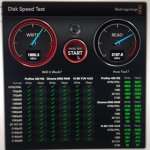
Yeah it’s more of a beast than people give it credit for. Internal SSD speed and I/O abilities are phenomenal.
Saumene Mehrdady
Well-known member
- Joined
- Nov 26, 2012
- Messages
- 434
- Reaction score
- 0
- Points
- 0
Just FYI, the 2017 15" models have 10bit color screens now.