Welcome to our community

Be a part of something great, join today!

  • Hey all, just changed over the backend after 15 years I figured time to give it a bit of an update, its probably gonna be a bit weird for most of you and i am sure there is a few bugs to work out but it should kinda work the same as before... hopefully :)

Lighting help--Moving car against green screen

Chad Cooper

Well-known member
Joined
Jan 2, 2012
Messages
71
Reaction score
0
Points
0
Location
NY,NY
Website
www.chad-cooper.com
I need to shoot a car against a cyc on Monday to be used as composite layer against a plate of a street (we'd shoot the car just on the street but have a layer that needs to be inserted in the middle that will be shot against green screen). It will be a wide shot and the car will roll through it, we'll need to see the whole car in the shot at once, and since we're shooting 5k figure we'll get as wide as we can and crop in post.
My question is what is the best way to shoot this so the car looks like it's driving down a suburban street?
If we paint the cyc green to key out, I'm afraid reflections will be very difficult (any lighting recommendations/how easily can this be removed in the grade).
If we leave it white and luma key the cyc out, I'm afraid we'll end up keying highlights on the car out.

Does anyone here have experience keying out backgrounds behind cars like this? Also, any personal recommendations or places you can refer me to that discuss lighting the exterior of cars? First time lighting a big glossy car and don't have a day to test... any tips greatly appreciated.
 
there are several ways to accomplish this. some may apply, and some might not be an option due to the angle. why don't you sketch out your 2-3 shots of how the scene needs to cut and i'll recommend a few options. post them or send me an email to jason@CinemaOxide.com
 
Roto. Mocha is your friend.

Yes, To me it sounds like somthing that could be roto / splined / painted behind the car. do not introduce a greenscreen in car scenes if it's not needed, cars are like big reflection balls and you will have that greenscreen all over the reflection of the car normally which do cause more pain than good. As stated above. Post your story board / simple drawings of the shots and you will get a good brief how it should be done most efficiently.
 
Depending on your post and lighting budget - I'd suggest shooting against black and rotoscoping. Any way you do it "somebody" is gonna need to do some work. Greenscreen - they will need to remove the green and "relight" the car - which will likely involve some rotoscoping - and vfx guys will be lighting your car. If you light the car nicely against black - and try to define some edges - at least the only post task will be to roto some edges. I did this for a car commercial a few years back. The post people had the same amount of work to do had we shot against green - but I was able to light the car exactly how "I" wanted it "and" I didn't have to light a massive green screen.
 
I would use a combination of green-screen behind the windows of the actors only, (use pop-up style chroma keys) and roto the rest of the car out. That way your roto work is simpler (no moving actors/complex shapes) and your greenscreen is kept to a minimum so there's no need to worry about spill and reflections on the car.
 
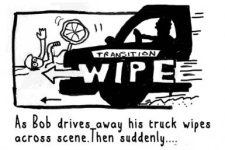
Storyboard below. I'm starting to think any green screen won't work--black really is the way to go in terms of control, but as our budget isn't big enough to give us full control anyway, maybe putting it against white might enable us to luma key the background and then roto the car across. It's a puppet video, so it gives us some creative room to animate the car too.

Thanks for chiming in by the way.....
 

Attachments

  • Screen Shot 2013-04-03 at 2.47.27 AM.jpg
    Screen Shot 2013-04-03 at 2.47.27 AM.jpg
    20.7 KB · Views: 0
Last edited:
Hey mate! You have a simple task here! By your drawing the truck moved fast. You can simply shot one scene with static camera (cyc falling down). Than just the truck moving with the same weather and camera conditions. Than just mask it! Its only few frames to complete. :)
 
Depending on your post and lighting budget - I'd suggest shooting against black and rotoscoping. Any way you do it "somebody" is gonna need to do some work. Greenscreen - they will need to remove the green and "relight" the car - which will likely involve some rotoscoping - and vfx guys will be lighting your car. If you light the car nicely against black - and try to define some edges - at least the only post task will be to roto some edges. I did this for a car commercial a few years back. The post people had the same amount of work to do had we shot against green - but I was able to light the car exactly how "I" wanted it "and" I didn't have to light a massive green screen.

There are easier ways to do this shoot, but shooting against black as Dylan suggests is also my preference.

Lighting a car is really all about the reflections and edges.

Shooting against black lets you concentrate on doing just that.

With modern roto tools, its relatively easy for them to take the car off the background. Especially if you've really given your edges nice separation. (doubly so if the car isn't black!)

As far as instruments, I'd look for large powerful soft sources with a single hard source for "the sun."

If I recall Deakins shot a test up on Panavisions site a car digital versus film, and that is a lot of great reference for how a car should look. (Forget the digital versus film part, just look at the car.)

That said ... I cant find it up anymore on Panavisions site. Grumble.
 
This is a relatively simple shot. Considering the different experience levels, and considering that this isn't that difficult, try shooting a little test shot in front of your home and running it through After Effects. 30 minutes tops and you'll suddenly have another notch in your belt.
 
Back
Top