Welcome to our community

Be a part of something great, join today!

  • Hey all, just changed over the backend after 15 years I figured time to give it a bit of an update, its probably gonna be a bit weird for most of you and i am sure there is a few bugs to work out but it should kinda work the same as before... hopefully :)

Light metering with Weapon

Jason George

Well-known member
Joined
Nov 29, 2007
Messages
58
Reaction score
0
Points
0
Website
www.jasongeorge.com
Hi there- I'm looking for some input on using a light meter with Red Weapon / Dragon sensor. I like using a meter for many reasons, but find that the exposure varies from my meter, and as such, isn't really 'reliable'. Usually I set my ISO (in-camera) to what I consider the RAW 'equivalent' to be so the two are relatively aligned, and I get a nice thick 'neg'; as such, the ISO on my meter has a base ISO to work from (this is with only the default red 'look' applied and no special LUT). Are there any shooters out there who routinely use a meter and have a reliable workflow in place?
Thanks very much.
JG
 
Hi there- I'm looking for some input on using a light meter with Red Weapon / Dragon sensor. I like using a meter for many reasons, but find that the exposure varies from my meter, and as such, isn't really 'reliable'. Usually I set my ISO (in-camera) to what I consider the RAW 'equivalent' to be so the two are relatively aligned, and I get a nice thick 'neg'; as such, the ISO on my meter has a base ISO to work from (this is with only the default red 'look' applied and no special LUT). Are there any shooters out there who routinely use a meter and have a reliable workflow in place?
Thanks very much.
JG

I use a meter during prelights or when lighting sets where the camera is not present. When the camera is present it has superior tools to set exposure than a light meter (histogram, false color, exposure tool, etc) , but I use a light meter to maintain ratios when shooting coverage.
 
I've found that it's tough to get an incident reading to match the exact proper exposure, for countless different reasons (mainly the way RED handles ISO and because of the differences in OLPF's). It'll usually get me very close to my final exposure, but then I'll use the histogram and stop lights to judge my final exposure.

However, I still always use my light meter to determine my contrast ratios. While, you may never get a reading that exactly matches your exposure, the stop difference between your shadow and key side will always be correct, assuming you are using a functional light meter of course, and you point it in the right direction ;)
 
I've found that it's tough to get an incident reading to match the exact proper exposure, for countless different reasons (mainly the way RED handles ISO and because of the differences in OLPF's). It'll usually get me very close to my final exposure, but then I'll use the histogram and stop lights to judge my final exposure.

However, I still always use my light meter to determine my contrast ratios. While, you may never get a reading that exactly matches your exposure, the stop difference between your shadow and key side will always be correct, assuming you are using a functional light meter of course, and you point it in the right direction ;)

What is the typical stop difference you try to go for between your key to shadows ratio?
 
What is the typical stop difference you try to go for between your key to shadows ratio?

It's tough to say because it's all dependent on the story, and the particular shot. Like most questions I have to answer in prep or on set, I always start by asking myself, "What's the story we are trying to tell?" Then, go from there.

But, of course I do have certain lighting setups or looks that I've been drawn to.

I've found that I really like the look of 2:1 on a women's face, especially with a nice hair light. I find that, softly lit, it's flattering, while still appearing like the lighting is dramatically molded.

Ive also found that I really like the look of 4:1 on a man's face. I feel like it gives them a sense of intrigue or danger, which can be enhanced or lessened based on how much of the shadow-side eye you show.

But, what is also important to note is, I've been shooting on RED long enough now, that I'm used to filling in my shadow side a little bit more than normal. Then, locking down my exact contrast ratio in post.

So if I want to end with a 4:1 ratio, I may shoot at a 3:1 to feed the sensor the light it wants. Then, I'll take my juicy, fat, DC2/RG4 neg, switch it to RLF, stare and marvel at the dynamic range for a few seconds :drool:, and then build an S-curve that gives me the contrast I was looking for.
 
Good advice here. I use a meter to get the light dialed in while pre-lighting too. I'm looking to get to a stop. I need to improve along with suggestions here to properly dial in contrast ratios. A lot of time, I eyeball them with a stand in or talent.
 
One thing to consider when using a light meter is that light is additive. For example if your main is f5.6 and your fill is f4 that races your main about a stop so your F5.6 is really close to f8. A 1.5 f-stop difference between main and fill is equivalent to 3:1 ratio. Weird, but those are the qualities of light.
 
Hi there- I'm looking for some input on using a light meter with Red Weapon / Dragon sensor. I like using a meter for many reasons, but find that the exposure varies from my meter, and as such, isn't really 'reliable'. Usually I set my ISO (in-camera) to what I consider the RAW 'equivalent' to be so the two are relatively aligned, and I get a nice thick 'neg'; as such, the ISO on my meter has a base ISO to work from (this is with only the default red 'look' applied and no special LUT). Are there any shooters out there who routinely use a meter and have a reliable workflow in place?
Thanks very much.
JG

Jason,

Light meters are not all perfectly calibrated to each other, so whats most importatnt in my view is "alighning" your meter with your camera and knowing what to expect at a given exposure.

Short of doing a full over/under exposure test at every ISO you want to shoot and examining the results, here is what I would suggest:

With your chosen OLPF installed, use the GioScope tool in your camera to light a gray card. Meter that with a spot meter.

As a point of reference, with a meter that I use sometimes, I find that placing a gray card at GioScope Zone 11 on Epic Dragon with the Standard OLPF indicates that the meter should be set to 640iso. The "iso" in your camera can be set above or below that depending on your desired look.

The advantage to using GioScopes is that it is showing you the RAW exposure, so it isn't effected by the gamma and look settings. I think its a good place to start.

Best,
Adam
 
I've found that it's tough to get an incident reading to match the exact proper exposure, for countless different reasons (mainly the way RED handles ISO and because of the differences in OLPF's). It'll usually get me very close to my final exposure, but then I'll use the histogram and stop lights to judge my final exposure.

However, I still always use my light meter to determine my contrast ratios. While, you may never get a reading that exactly matches your exposure, the stop difference between your shadow and key side will always be correct, assuming you are using a functional light meter of course, and you point it in the right direction ;)

Red is automatically compensating for the OLPF, so skintone and LLO at the same settings (shutter/aperture/iso) should give the same exposure, but the skintone signal is internally "boosted" about 1.5 stops, so it's gonna be more noisy.
So with all OLPF's, if you light by the meter it should be pretty close. (of course you need to compensate for ND's)
 
I posted a fair bit of information back when I did the Weapon Dynamic Range tests here:
http://www.reduser.net/forum/showthread.php?137883-RED-Weapon-Dynamic-Range-and-Latitude-Examined&highlight=

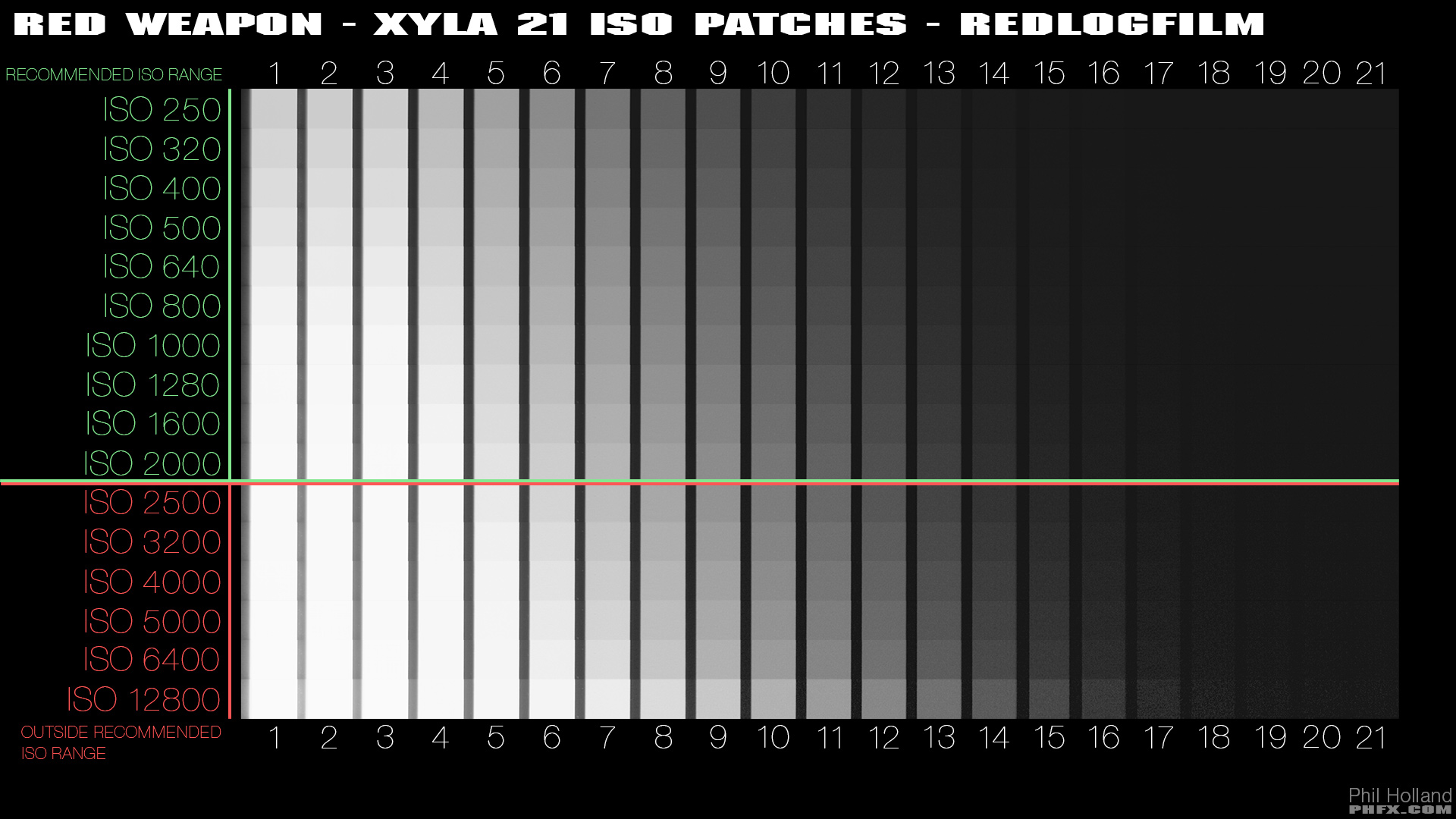
Specifically this graphic:
phfx_REDWeaponTest2015_xyla21_ISOPatches_RLF.jpg


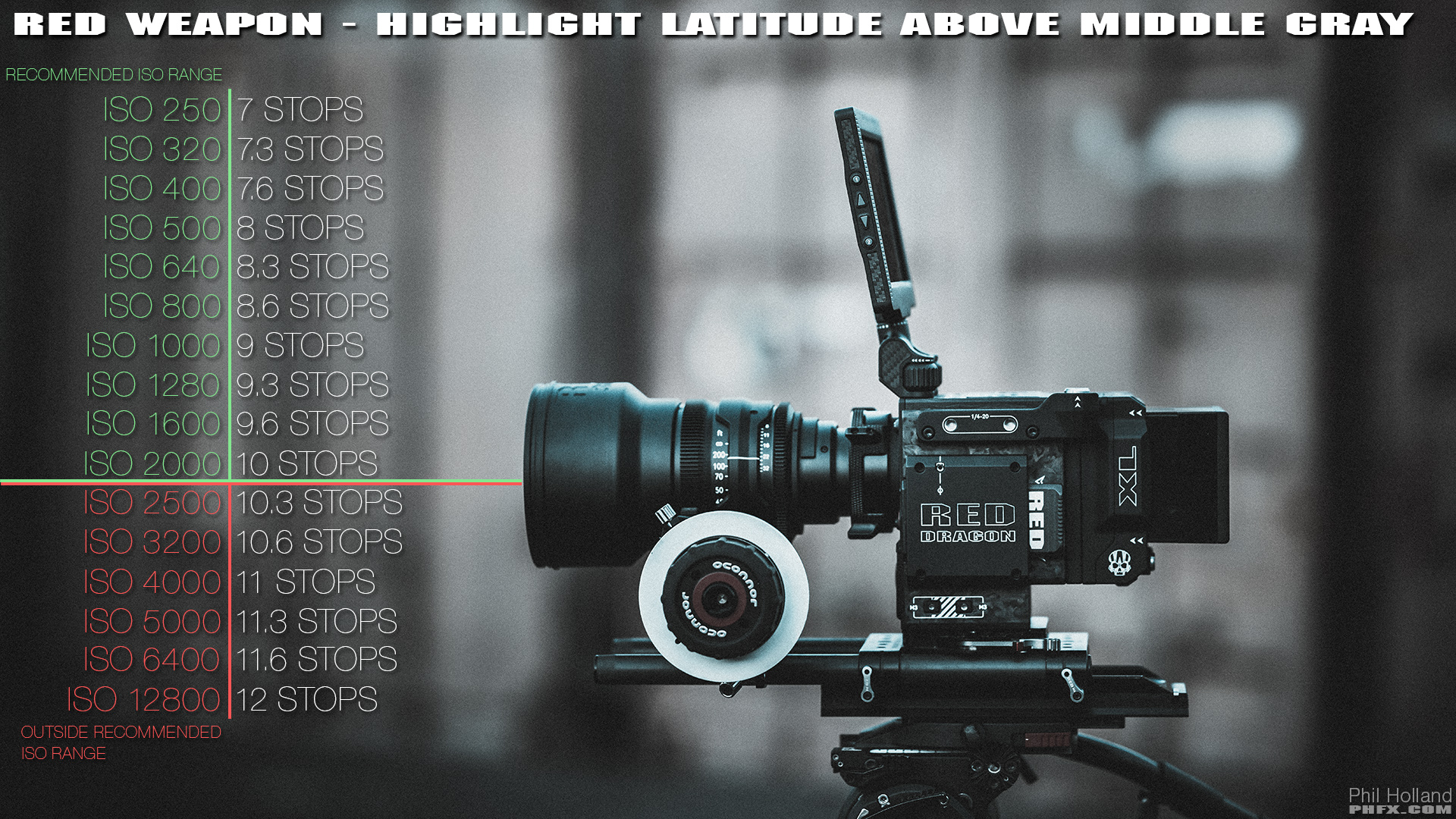
And this graphic:

phfx_REDWeaponTest2015_highlightLatitude.jpg


holds relevance towards highlight and shadow detail based around the standard practice of exposing for Middle Gray. These two images are based on the Skin Tone Highlight OLPF. Using the Standard OLPF and Low Light OLPF I would be a bit more conservative in the Highlight Latitude and a bit less conservative towards where the Noise Floor lands. The Low Light Optimized OLPF is about 1-1.3 stops cleaner in shadows for instance than the Skin Tone - Highlight, but is in contrast less effective and holding highlight detail under tungsten and daylight sources. The Standard OLPF is 1/2 to 1 stop cleaner than the Skin Tone - Highlight OLPF and a bit better in the highlight department than the Low Light - Optimized OLPF.

The balancing act occurs nicely around the ISO 500-1280 range for me. I have my preferences for each OLPF at this point. Rolling 800-1280 on Weapon with the Standard OLPF is rather nice.
 
With digital cameras, I find it's best to just work in footcandles when metering on a pre-light day. The aperture is going to be whatever that particular camera + OLPF + LUT/look/curve + lens (if not calibrated in T stops) is gonna require on the day. But at least you'll know where you stand in terms of ratios and overall levels with footcandles. Otherwise, you're likely to be chasing your tail with stops unless you've calibrated your meter's ISO exactly to your particular setup. And once you change one variable, you'll be completely off again.
 
What is the typical stop difference you try to go for between your key to shadows ratio?

Do what looks good to you and then use your meter to maintain that ratio throughout the scene, film, etc. There are no hard and fast rules. Once you discover what YOU like then you can start noting the common ratios that appeal to you for different feels. The benefit you have is that you can immediately see on the monitor what the results are and react to them...
 
Back
Top