Welcome to our community

Be a part of something great, join today!

  • Hey all, just changed over the backend after 15 years I figured time to give it a bit of an update, its probably gonna be a bit weird for most of you and i am sure there is a few bugs to work out but it should kinda work the same as before... hopefully :)

Light color in Blade Runner

Wito Rohler

Member
Joined
Dec 9, 2013
Messages
16
Reaction score
0
Points
0
Hello,
I am really interested in how the cyan light color (this for example) was achieved, I couldnt find any information on the web. From what I can make out it is not daylight balanced light with a tungsten stock... at least thats what I think. So the question is, what kind of color gel did they use? Thanks in advance :)
 
The movie was shot on 100 ISO tungsten balanced stock, 5247. I believe that big set was lit with carbon arcs, which are daylight balanced and would render blue-ish on 5247. A little of that blue may have been timed out of the prints but I think the shift from blue to cyan is more the result of the recent digital color correction. I don't recall a cyan cast in the original release prints.
 
I have only seen the new directors cut, I think my Blu-Ray got the original theatrical release as well, I'm gonna take a look at that... Do you think there is a way to recreate this kind of light in camera, rather than doing it in post?
 
Filtration/Gel will get you there. Atmosphere is important with the fog/haze.

This also achievable via color grading.
 
Cyan is blue + green. You can achieve this color by adding green gel to a blueish daylight source and shooting near tungsten balance, you could add blue and green gels or cyan gel to a tungsten light, you could just add some cyan in color timing, you could use a cyan camera filter, you could shoot in blue-ish light and shift the hue of the camera towards the green, you could use a blue-green light source like a Cool White fluorescent tube or a mercury vapor street lamp, etc.

Comparing the director's cut to the release version on the blu-ray isn't going to help because both were color-corrected digitally at the same time by the same colorist. You'd have to see an original non-faded print in a theater -- or maybe an earlier video transfer would be less cyan.
 
Thank you very much, this really helped! I'm still a beginner in terms of color grading and I always prefer in camera effects.

I hope I ever get the chance to watch Blade Runner in any form in the theater, maybe I get lucky here in Vienna :D
 
If the light you want to be cyan is the ONLY light in the scene, then it is easy to add an overall cyan cast or add a green tint to a blue-ish image, etc. You can add an overall tint with a camera filter or just by shifting the image in post or by playing with the tint & color temp in the camera, etc. (though I would try to start with an image shot in blue lighting as a starting point rather than try and push the image towards blue and green and thus pick up some blue noise).

But as soon as you plan on mixing that cyan light with other lights in the frame that aren't supposed to be cyan or having any green in them, then it becomes more important to get that color out of the light itself, though it is still possible with post color-correction software to isolate a blue-lit area and shift it towards the green without affecting other parts of the frame, but now you are adding some complexity to the color-correction process.

So in that case of mixed lighting, you'd want to get your particular light to be cyan, which as I said, is BLUE + GREEN. So you could add blue and green gel to a tungsten lamp, you could add green gel to a daylight lamp, you could use cyan gel on the lamp, etc. How much green and blue is a matter of taste. At a 3200K base, you might find that 1/2 CTB (blue) + 1/4 Plus Green gel is enough to get that sort of Cool White color out of a tungsten lamp, though an even more exact Cool White color comes from putting 1/4 CTO (orange) and 1/4 Plus Green on a daylight lamp like an HMI. There is a cyan gel, comes in CC strengths -- CYAN 30, CYAN 60, etc.

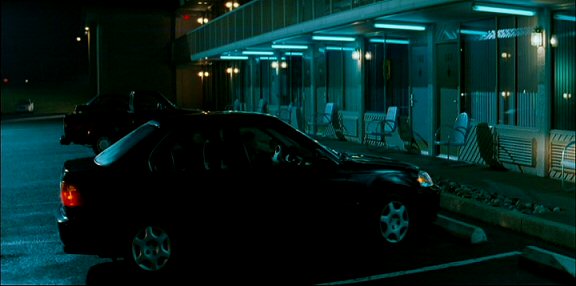
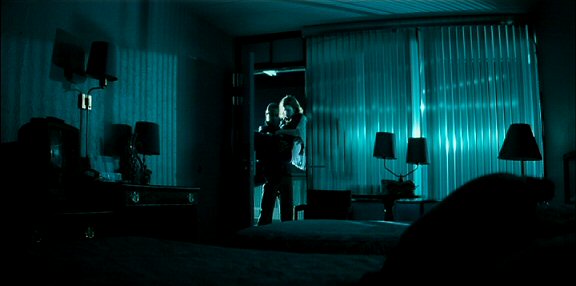
I did a movie where I wanted a location to have a heavy cyan bias -- I ended up wrapping Cool White tubes with Cyan 60 gels:

shadowboxerDVD4.jpg


shadowboxerDVD5.jpg
 
Modern color grading was applied on for the new release of Blade Runner, the standard teal/warm balance was applied to make it look like everything else.... :glare:
 
I prefer the look of Blade Runner Final Cut, there is something more interesting about the colours, they seem to more accurately set the mood of the story. I've got the blu-ray laying around somewhere but I haven't been able to find it in a long time now.
 
Thanks for all the answers, I definitely learned something! :)
 
Back
Top