Welcome to our community

Be a part of something great, join today!

  • Hey all, just changed over the backend after 15 years I figured time to give it a bit of an update, its probably gonna be a bit weird for most of you and i am sure there is a few bugs to work out but it should kinda work the same as before... hopefully :)

Let's talk about Computer for Scarlet

I'm not very conserned with getting Realtime play back at 4k (1/4 res is fine with me), its the time it takes to export 4k R3D's to ProRes thats scaring me away from getting a Scarlet.

When working with 4k footage, is having powerful CPUs more effective then having a RedRocket?

I guess I should include that I would be editing on the 2.4GHz 8 core "Westmere" MacPro if that helps.

There is a lot of other factors in the 'weakest link in the chain' aspect of this. But in general, if you are not worried about playing back at more than 1/4 you should be fine. Best thing to do is to download some R3Ds and test it out for yourself. Search around, they are out there. While not bleeding-edge, your MacPro (given a ton of RAM and fast drives) should have little problem handling the work.

As for the RedRocket, it comes in very handy and takes the debayer load off the CPU cores, but it is not necessary to work with R3Ds. It merely cuts down the time it takes. It also depends on your chosen workflow. However, if your jobs are going to entail tight deadlines, it might be worth it to you. In either event, don't let it detract you from getting a Scarlet.
 
Hey folks! Just wanted to give you the specs on my recent purchse:

CASE: Thermaltake Level 10GT Full Tower Wide Body Gaming Case w/ Side-Panel Window WHITE
CD: Pioneer BDR-206BK 12X Blu-Ray Writer
CD2: Sony 24X Double Layer Dual Format DVD+-R/+-RW + CD-R/RW Drive
COOLANT: High-Performance Non Conductive Coolant powered by Koolance
CPU: Intel® Core™ i7-3930K 3.20 GHz 12MB Intel Smart Cache LGA2011 (All Venom OC Certified)
FAN: CyberPower Xtreme Hydro Liquid Cooling Kit 240MM w/ Dual Fan (CPU & GPU Liquid Cool Capable, Extreme Overclocking Performance + Extreme Slient at 18dBA)
FLASHMEDIA: INTERNAL 12in1 Flash Media Reader/Writer
HDD: 120 GB OCZ Agility 3 SATA-III 6.0Gb/s SSD - 525MB/s Read & 500MB/s Write (Single Drive)
HDD2: 2TB (2TBx1) SATA-III 6.0Gb/s 64MB Cache 7200RPM HDD (Single Drive)
MEMORY: 16GB (4GBx4) DDR3/1600MHz Quad Channel Memory (Corsair Vengeance)
MOTHERBOARD: (SLI Support) Asus Sabertooth X79 Intel X79 Chipset Quad Channel DDR3 ATX w/ TUF Armor, UEFI Bios, SSD Caching, 7.1 HD Audio, GbLAN, USB3.0, SATA-III RAID, 3 Gen3 PCIe X16, 2 PCIe X1 & 1 PC
NOISEREDUCE1: Power Supply Gasket
OS: Microsoft® Windows 7 Professional (64-bit Edition)
OVERCLOCK: Extreme OC (Extreme Overclock 20% or more)
POWERSUPPLY: 1,200 Watts - CoolerMaster Silent Pro 80 Plus Gold Power Supply (80 Plus Gold)
TEMP: Aerocool Touch 2000 Dual Bay Touch Screen Fan Control
VIDEO: EVGA Liquid Cooling NVIDIA GTX Series PCIe Video (EVGA Liquid Cooling NVIDIA GTX 590 Classified Hydro Copper 3GB 16X GDDR5 VRAM)

I just payed $3,272.00 with UPS 3-day and all other Black Friday discounts.

1) I plan on purchasing 3 more 2TB HDDs to fill up all the 5 HDD bays (roughly $240 each). However, I also have an 8TB G-RAID, so I'm not that concerned at this time.
2) I also plan on upgrading my RAM, but first I want to see what 16GB Corsair Vengeance can do given the 590 has 3GB.
3) Yes, the case might be a bit too much, but I considered the quietness of it, and the hot-swappable HDD drives.

Other than that, my hope with this system is that I can handle 4K files in real time. We'll see.

Cheers!
Marcos
 
GTX 590 is a bad choice : CUDA acceleration/Premiere only uses one single gpu of your card and drivers never work well with these special double gpu cards.

Each F110 GPU is only at 607 MHz on a GTX 590 (772 MHz on regular GTX 580 cards).

You will get more horsepower with a single F110 GPU on a GTX 580. It's the fastest single gpu solution currently. I have a Gigabyte GTX580 Super OC at 855 Mhz.

But without a Redrocket card, you CAN'T handle 4K files at full resolution in realtime.
 
Last edited:
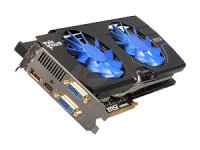
i'm considering this card

as am I. Originally I was looking at the EVGA version. After reading numerous reviews and benchmarks, the MSI seems to be a better card. The only downfall is if you are looking to water cool, EVGA has a hydro copper version.
 
Why would you want to water cool a GPU, I don't really know anyone who does that other than CPU. Overclocking?

A) more efficient cooling. useful if you plan on overclocking
B) Water-cooling is less noisy
C) in terms of thermal dissipation, watercooling allows you to create a closed thermal loop and get the heat out of your case, which is handy if you have lots of hard drives other pci-e cards that you don't want to pollute with heat from your screaming hot GPU
 
Hey, buying on black friday.... That was probably a great idea. As long as you did it from the comfort of your own home, lol.


Hey folks! Just wanted to give you the specs on my recent purchse:

CASE: Thermaltake Level 10GT Full Tower Wide Body Gaming Case w/ Side-Panel Window WHITE
CD: Pioneer BDR-206BK 12X Blu-Ray Writer
CD2: Sony 24X Double Layer Dual Format DVD+-R/+-RW + CD-R/RW Drive
COOLANT: High-Performance Non Conductive Coolant powered by Koolance
CPU: Intel® Core™ i7-3930K 3.20 GHz 12MB Intel Smart Cache LGA2011 (All Venom OC Certified)
FAN: CyberPower Xtreme Hydro Liquid Cooling Kit 240MM w/ Dual Fan (CPU & GPU Liquid Cool Capable, Extreme Overclocking Performance + Extreme Slient at 18dBA)
FLASHMEDIA: INTERNAL 12in1 Flash Media Reader/Writer
HDD: 120 GB OCZ Agility 3 SATA-III 6.0Gb/s SSD - 525MB/s Read & 500MB/s Write (Single Drive)
HDD2: 2TB (2TBx1) SATA-III 6.0Gb/s 64MB Cache 7200RPM HDD (Single Drive)
MEMORY: 16GB (4GBx4) DDR3/1600MHz Quad Channel Memory (Corsair Vengeance)
MOTHERBOARD: (SLI Support) Asus Sabertooth X79 Intel X79 Chipset Quad Channel DDR3 ATX w/ TUF Armor, UEFI Bios, SSD Caching, 7.1 HD Audio, GbLAN, USB3.0, SATA-III RAID, 3 Gen3 PCIe X16, 2 PCIe X1 & 1 PC
NOISEREDUCE1: Power Supply Gasket
OS: Microsoft® Windows 7 Professional (64-bit Edition)
OVERCLOCK: Extreme OC (Extreme Overclock 20% or more)
POWERSUPPLY: 1,200 Watts - CoolerMaster Silent Pro 80 Plus Gold Power Supply (80 Plus Gold)
TEMP: Aerocool Touch 2000 Dual Bay Touch Screen Fan Control
VIDEO: EVGA Liquid Cooling NVIDIA GTX Series PCIe Video (EVGA Liquid Cooling NVIDIA GTX 590 Classified Hydro Copper 3GB 16X GDDR5 VRAM)

I just payed $3,272.00 with UPS 3-day and all other Black Friday discounts.

1) I plan on purchasing 3 more 2TB HDDs to fill up all the 5 HDD bays (roughly $240 each). However, I also have an 8TB G-RAID, so I'm not that concerned at this time.
2) I also plan on upgrading my RAM, but first I want to see what 16GB Corsair Vengeance can do given the 590 has 3GB.
3) Yes, the case might be a bit too much, but I considered the quietness of it, and the hot-swappable HDD drives.

Other than that, my hope with this system is that I can handle 4K files in real time. We'll see.

Cheers!
Marcos
 
A) more efficient cooling. useful if you plan on overclocking
B) Water-cooling is less noisy
C) in terms of thermal dissipation, watercooling allows you to create a closed thermal loop and get the heat out of your case, which is handy if you have lots of hard drives other pci-e cards that you don't want to pollute with heat from your screaming hot GPU

all really good reasons C) always had me worried glad to hear there's a solution, may have to re-consider since I'm going the water cooling route.

thx noah!
 
What do you think of this system:

Intel Core i7 Processor Extreme Edition i7-990X 3.47GHz Six Core 12MB LGA1366 CPU

Corsair HYDRO H60 ENCLOSED LIQUID COOLING SYSTEM

ZEROtherm Advanced ZT100 Thermal Grease

LET'S USE PROFESSIONAL WIRING W/ROUND CABLES ON MY PC

Asus P6X58-E PRO Socket 1366/ Intel X58/ 3-Way SLI & Quad CrossFireX/ SATA3&USB3.0/ A&GbE/ ATX Motherboard

24GB (6 x 4GB) 240-Pin DDR3 1600MHz (PC3 12800) Triple Channel

(6X) COOLMAX MEMORY HEAT SPREADERS

Hitachi / SEAGATE 2TB 7200 RPM 64MB CACHE SATA 6.0Gb/s

VIO HIGH PERFORMANCE HARD DRIVE COOLING FAN

Hitachi / SEAGATE 2TB 7200 RPM 64MB CACHE SATA 6.0Gb/s

VIO HIGH PERFORMANCE HARD DRIVE COOLING FAN

12X BLU-RAY DISK BURNER DVD-RW COMBO DRIVE w/3D Feature

MSI N580GTX Lightning Xtreme Edition GeForce GTX 580 (Fermi) 3072MB 384-bit GDDR5 PCI Express 2.0 x16 HDCP Ready SLI Support Video Card

REALTEK 8-CHANNEL DIGITAL SOUND ONBOARD

REALTEK 10/100/1000 Gigabit Network Card (onboard)

COOLER MASTER HAF 912 RC-912-KKN1 Black SECC/ ABS Plastic ATX Mid Tower Computer Case

VANTEC DELUXE CASE COOLER

THERMALTAKE DELUXE CASE COOLING SYSTEM

CORSAIR 1200 WATT HIGH PERFORMANCE SLI/CROSSFIRE POWER SUPPLY

ALLPCZONE INTERNAL ALL IN ONE DIGITAL CARD READER/WRITER

Microsoft Windows 7 Ultimate 64-bit (W/LIFETIME OF FREE SUPPORT PACKAGE FROM ALLPCZONE)
 
My next red system I'm hoping will be the next mac pro as long as they don't discontinue it.
 
I guess with the MAC PRO, they either have to go very-high-end Pro Studio Workstation with it or bag it.
I wish they would decide soon.
 
I guess with the MAC PRO, they either have to go very-high-end Pro Studio Workstation with it or bag it.
I wish they would decide soon.

You mean you wish they'd let everyone know soon, cos I have a feeling they've already decided.
 
Premier CS5 for one -- Under VIDEO RENDERING AND PLAYBACK>RENDERER: Choose Mercury Playback Engine GPU acceleration. Bingo, your 2nd card used only for render processing.

Not sure I follow, that option only enables MPE to use CUDA on one GPU from my understanding, no? Where does the 2nd GPU come in?
 
my computer is i7 2600k ,16 gb ram, 2 tb, noctua cooler , GTX 560 Ti , blackmagic hdlink hd, board msi

what color grading software i need ?
i need redrocket ?

You do NOT need a Red Rocket, you will get real time playback and editing from the R3D files, if you want.

I like Magic Bullet Look Suite for color correction.

Assuming your hard drive is fast enough, your system is perfect. Download some R3D files and start playing around!
 
Back
Top